Genfeed
Create, review and schedule social content from your AI agent. Approval-first.
Genfeed.ai
The open-source content agent.
Create on-brand videos, images and posts, then review and publish to your connected channels. Work in Genfeed or connect the AI agent you already use.



[!WARNING] Genfeed is
0.xand under active development. Breaking changes ship with an Upgrade note in the release body; semver becomes strict atv1.0.0.
Self-host it (Community), run it on your Mac (Desktop), or use the hosted product at genfeed.ai (SaaS). Same code, three deployment modes.
Requirements (Community)
- Docker Engine with the Docker Compose v2 plugin (
docker compose version), or Docker Desktop. Both the 3-command block below andnpx @genfeedai/createneed it. - Node.js 24 (
>=24 <25), only fornpx @genfeedai/create. - Free host ports 3000 (web), 3010 (API) and 3014 (MCP).
- About 10 GB of free disk (15 GB recommended); a fresh install measured about 9.5 GB.
- RAM: no minimum is published. Tested on 8 CPU / 15 GiB.
- Debian 13 provides Compose v2 in its
docker-composepackage. With Docker CE, installdocker-compose-pluginfrom Docker's apt repository.
See troubleshooting if the app logs
P1001: Can't reach database server at postgres:5432.
Quick start (Community)
curl -fLO https://github.com/genfeedai/genfeed.ai/releases/latest/download/genfeed-selfhosted.tar.gz
tar -xzf genfeed-selfhosted.tar.gz && cd genfeed-selfhosted-v*
cp .env.example .env && docker compose --env-file .env -f compose.yml up -d
| Surface | Local URL |
|---|---|
| Web UI | http://localhost:3000 |
| REST API | http://localhost:3010 |
| MCP server | http://localhost:3014 |
The bundle pins the image for its release, applies Prisma migrations, and seeds one local workspace. No Genfeed Cloud account is required.
For a first generation, do these in order:
- Set
OPENROUTER_API_KEYin.envto a real key from openrouter.ai/keys. Text generation and the agent need it. Without it the install-readiness check reports text generation as not ready. Then restart with the samedocker compose up -dcommand so the container reads the new value. - Open
http://localhost:3000and create your account. Sign-up is on by default (BETTER_AUTH_ENABLED=truein.env), so the first visitor can register. No email provider is needed for email/password. - Complete onboarding, then start a task or generation.
Keys are checked for real. Settings → API Keys validates each provider key
against the provider before saving, so placeholder text is rejected there.
Keys in .env are never accepted as placeholders either: an empty or
template value counts as not configured.
npx @genfeedai/create my-genfeed downloads, checksums, and starts the same
bundle. Checksums, auth, providers, and upgrades:
self-hosting guide.
Let your coding agent install it
Genfeed is driven by agents, so installing it is a task you can hand to one. Paste this into Claude Code, Codex, Cursor, or any agent with shell access:
Install Genfeed — the open-source content agent — on this machine, then connect
it to yourself over MCP.

1. Check Docker Engine with Compose v2 is available.
2. Start the Community bundle:
   curl -fLO https://github.com/genfeedai/genfeed.ai/releases/latest/download/genfeed-selfhosted.tar.gz
   tar -xzf genfeed-selfhosted.tar.gz && cd genfeed-selfhosted-v*
   cp .env.example .env && docker compose --env-file .env -f compose.yml up -d
3. Wait for http://localhost:3000 to answer. Sign-up is open by default; the
   seed also creates one organization (slug `default`) and brand. Put a real
   OpenRouter key in `.env` as `OPENROUTER_API_KEY` and restart before
   generating.
4. For Claude Code, register its dedicated content connector:
   claude mcp add --transport http genfeed --scope user http://localhost:3014/mcp/claude
5. Open /mcp, select genfeed and complete browser OAuth. For other clients,
   configure the standard http://localhost:3014/mcp endpoint and authorize in
   the browser; a scoped API-key fallback is available for those clients.
6. List the Genfeed tools to confirm the connection, then stop.

Reference: https://github.com/genfeedai/genfeed.ai/blob/master/docs/self-hosting.md
Docs index for agents: https://docs.genfeed.ai/llms.txt
Already on the hosted product? Skip installation and authorize with browser OAuth.
Claude uses https://mcp.genfeed.ai/mcp/claude for brands, drafts, existing assets, scheduling and analytics; create media in Genfeed Playground. Other clients use https://mcp.genfeed.ai/mcp for the full toolset.
The standard MCP preset is approval-first: an agent can generate, draft, and schedule, but publishing waits for a human. What each surface exposes and why is in Agent Surface.
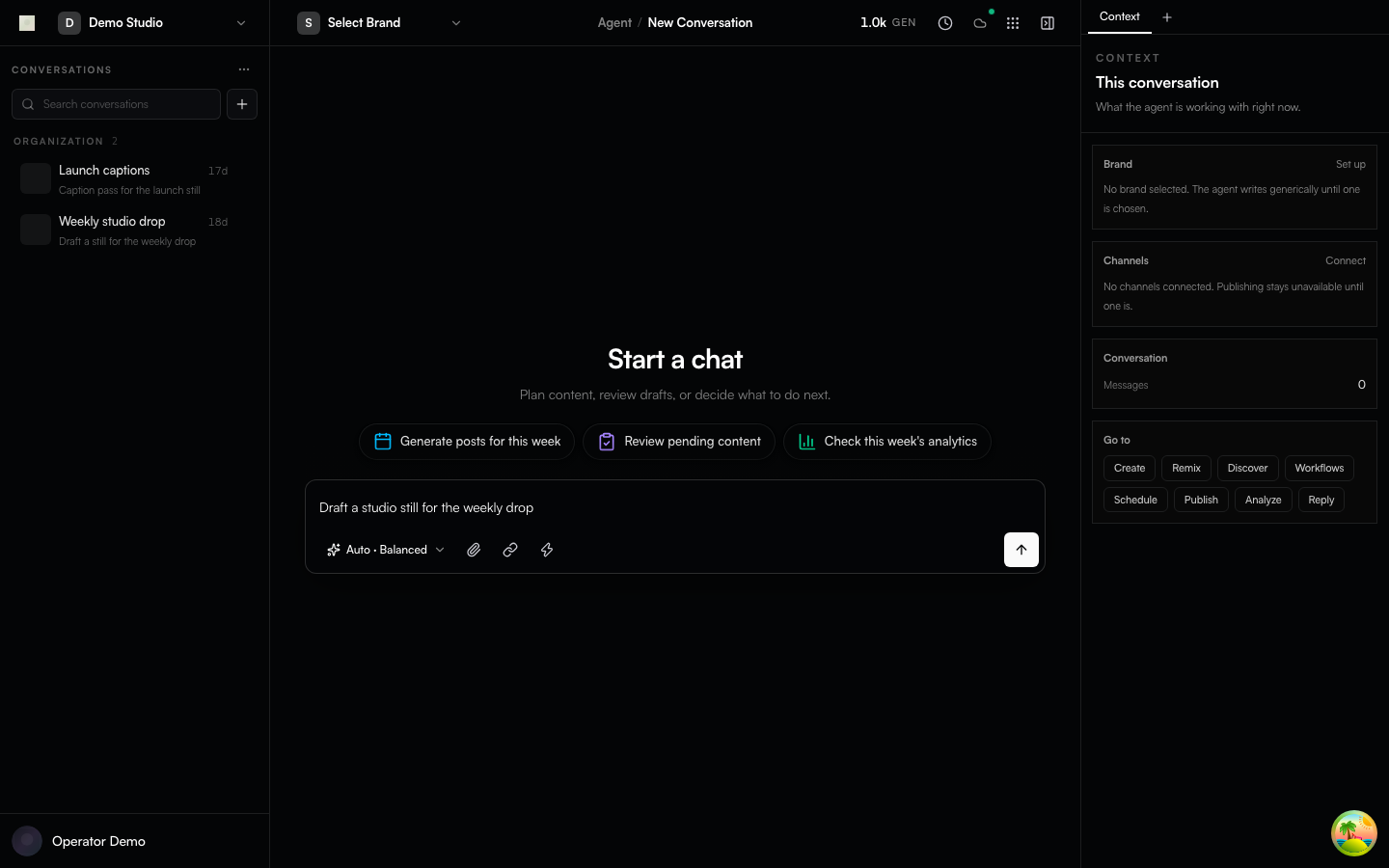
Mocked Playwright capture of the agent conversation shell. Fixture data, not a live generation.
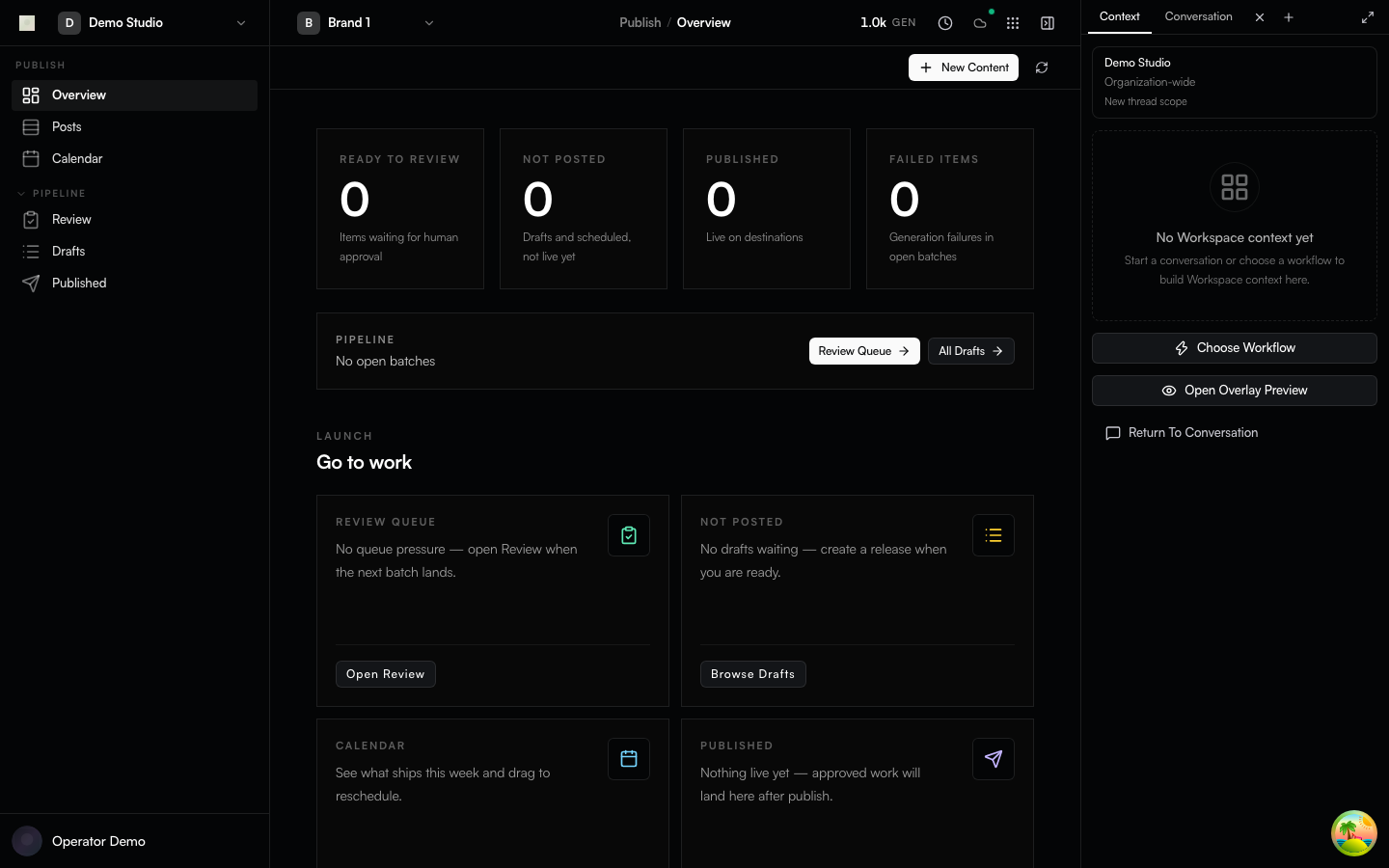
Mocked Playwright capture of the Publish desk.
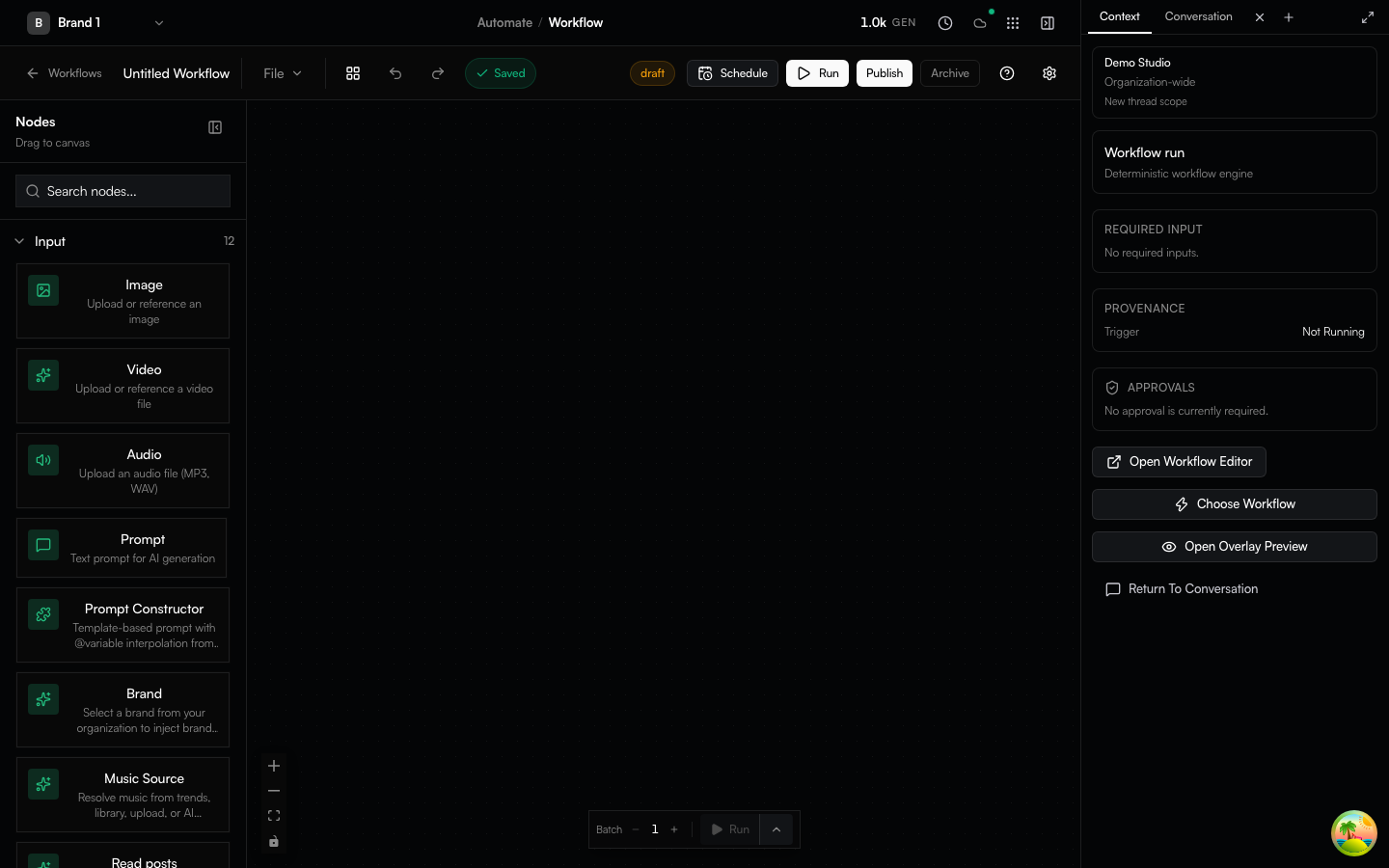
Mocked Playwright capture of Automate workflow authoring.
Capabilities
- Generate images, video, text, voice, and audio with local or bring-your-own-key execution
- Visual workflow authoring; content library, brand, scheduling, and publishing
- Drive the same loop from the web app, the
genfeedCLI, the REST API, or any AI agent over MCP - PostgreSQL via Prisma; Redis/BullMQ background work
- A Community Docker distribution built from the same AGPL source as the hosted image
Availability differs by deployment mode and configured provider. Read Deployment Modes and Execution Boundaries before relying on a feature for a specific distribution.
Deployment modes
| Mode | Who it is for | How you get it |
|---|---|---|
| SaaS | Hosted multi-tenant product | app.genfeed.ai |
| Community | Self-hosters, one organization | Checksummed GitHub release bundle (quick start above) |
| Desktop | Solo creators on their own Mac | Signed macOS artifacts from desktop-v* tags |
Organization billing ships in every image and is gated at runtime
(GENFEED_CLOUD / self-host licence) — see the
billing section.
Managed inference infrastructure and Fleet/LoRA operations live outside this
public repository.
Desktop is macOS-first. Mobile and browser/IDE extension sources live in the tree; this repository does not claim a public store listing for them.
How agents work in this repo
This repository is agent-native: most of its code is written by AI agents under human direction, and the tree is laid out so an agent can be productive from a cold clone.
- AGENTS.md and CLAUDE.md — operating rules every agent (and human) follows: type safety, UI primitives, serializers, tenancy filters, commit conventions.
- CONTEXT.md — the glossary. One spelling per concept, used in code, issues, docs, and PRs.
.agents/— durable project memory (rules, ADRs underarchitecture/ADR-*.md, specs) plus build/dev skills for working on the app.MEMORY.mdis the index.skills/at the repo root is different: those are product/content skills the app ships.- Issues carry EARS acceptance criteria (
WHEN … THE SYSTEM SHALL …) so an agent can pick one up and know what "done" means. Triage rewrites weak criteria; it never bounces. shipcode:*labels are internal automation. They are visible on issues and PRs; contributors never apply them.- Agent-authored PRs are welcome when disclosed in the PR body and a named human is accountable for the description and verification. Undisclosed agent-authored PRs are closed. See CONTRIBUTING.md.
PRs are reviewed by an automated pipeline first, then by the maintainer, who alone merges.
Architecture
Genfeed is a Bun/Turborepo monorepo with Next.js clients, NestJS server workspaces, PostgreSQL/Prisma persistence, and Redis/BullMQ queues. The Community image bundles the web app, API, workers, files, notifications, and MCP runtimes into one container and embeds Redis.
apps/
  app/                    Next.js product UI
  server/                 NestJS services and shared server library
  desktop/app/            Electron client (macOS-first release path)
  mobile/app/             Expo/React Native client source
  extensions/browser/app/ Chrome extension source
  extensions/ide/app/     VS Code extension source
packages/                 Shared @genfeedai/* packages
docker/                   Community and hosted image definitions
The public API is REST/OpenAPI. GraphQL appears only in outbound integrations such as Shopify.
The stack is declared, not debated per-PR. Replacing an item requires an accepted ADR before code lands (see GOVERNANCE.md).
| Layer | Choice | Why |
|---|---|---|
| Runtime + PM | Bun + Turborepo | One toolchain for install, scripts, tests, and bundling |
| Web | Next.js 16 + React 19 | App Router, RSC, and the same client for SaaS, Community, and Desktop |
| API | NestJS 11 | DI, guards, and tenancy/auth enforcement across services |
| Data | Prisma 7 + PostgreSQL | One schema, typed queries, migrations shipped with every release |
| Queues | Redis + BullMQ | Generation, publishing, and scheduling are background work |
| Auth | Better Auth | Self-hostable, org-aware, no vendor account required for Community |
| Quality | Biome, Vitest, Playwright | Format+lint in one pass; colocated unit tests; E2E tiers per distribution |
| Distribution | Docker Compose + GHCR | Checksummed bundle pinned to an image |
More: Architecture · Deployment Modes · Execution Boundaries · Agent Surface.
Contributing
Contributions are voluntary and unpaid. Genfeed has no paid contribution program; see the contribution policy.
Audience order for this repository is self-hosters, then agent contributors,
then human contributors. Development is supported on macOS and Linux (Windows
via WSL2). Prerequisites: Node 24, Bun, Docker with Compose v2, a C/C++
toolchain plus python3 (sudo apt-get install -y build-essential python3 on
Debian/Ubuntu, xcode-select --install on macOS), and systemd on Linux for
dev:setup. Details are in
CONTRIBUTING.md.
bun install && cp .env.example .env.local
bun run env:sync local
docker compose -f docker/local/docker-compose.yml up -d postgres redis
bun run dev:setup                  # once per machine
bun run dev:backend:min            # then, in a second terminal:
bun run dev:app                    # → https://app.genfeed.localhost/
Portless HTTPS is the default contributor dev path. Fixed-port dev:debug*
commands remain an optional debugging path when Portless cannot be used.
Everything else — issue forms and EARS criteria, the PR contract (squash +
conventional title + linked issue), the CLA (once per GitHub account per
CLA version), agent-authored PR disclosure, and focused verification — is in
CONTRIBUTING.md.
Governance is one maintainer plus an AI review pipeline: GOVERNANCE.md. Help and questions: SUPPORT.md. Security reports follow SECURITY.md, never a public issue.
Licence and trademark
- Code: GNU Affero General Public License v3.0 or later — the whole repository
- Contributions: Contributor License Agreement (FSFE FLA 2.1: ICLA.md / CCLA.md), signed once per GitHub account per CLA version via CLA Assistant. A newer CLA version applies to future contributions; prior contributions keep prior rights.
- Name and logo: TRADEMARK.md — the licence covers the code, not the brand
Independently published packages and skills may declare their own license in their package metadata.
Links
Repository docs (docs/ in this tree) are for contributors and
self-hosters: self-hosting,
deployment modes,
architecture, agent surface,
and native referral credits.
docs.genfeed.ai is the product and API
documentation for people using Genfeed. Each side links the other; neither
duplicates the other.
Setup from the maintainer
This listing does not have a supported local package template. Use the maintainer’s documentation for its hosted endpoint, authentication, and client-specific setup. No install command has been inferred.