ai.smithery/adamamer20-paper-search-mcp-openai
Search and download academic papers from arXiv, PubMed, bioRxiv, medRxiv, Google Scholar, Semantic…
Paper Search MCP
A Model Context Protocol (MCP) server for searching and downloading academic papers from multiple sources, including arXiv, PubMed, bioRxiv, and Sci-Hub (optional). Designed for seamless integration with large language models like Claude Desktop.


Table of Contents
Overview
paper-search-mcp is a Python-based MCP server that enables users to search and download academic papers from various platforms. It provides tools for searching papers (e.g., search_arxiv) and downloading PDFs (e.g., download_arxiv), making it ideal for researchers and AI-driven workflows. Built with the MCP Python SDK, it integrates seamlessly with LLM clients like Claude Desktop.
Features
- Multi-Source Support: Search and download papers from arXiv, PubMed, bioRxiv, medRxiv, Google Scholar, IACR ePrint Archive, Semantic Scholar.
- Deep Research Ready: Provides the standardized
searchandfetchtools required by OpenAI Deep Research and ChatGPT connectors. - Standardized Output: Papers are returned in a consistent dictionary format via the
Paperclass. - Asynchronous Tools: Efficiently handles network requests using
httpx. - MCP Integration: Compatible with MCP clients for LLM context enhancement.
- Extensible Design: Easily add new academic platforms by extending the
academic_platformsmodule.
Installation
paper-search-mcp can be installed using uv or pip. Below are two approaches: a quick start for immediate use and a detailed setup for development.
Installing via Smithery
To install paper-search-mcp for Claude Desktop automatically via Smithery:
npx -y @smithery/cli install @openags/paper-search-mcp --client claude
Quick Start
For users who want to quickly run the server:
-
Install Package:
uv add paper-search-mcp -
Configure Claude Desktop: Add this configuration to
~/Library/Application Support/Claude/claude_desktop_config.json(Mac) or%APPDATA%\Claude\claude_desktop_config.json(Windows):{ "mcpServers": { "paper_search_server": { "command": "uv", "args": [ "run", "--directory", "/path/to/your/paper-search-mcp", "-m", "paper_search_mcp.server" ], "env": { "SEMANTIC_SCHOLAR_API_KEY": "" // Optional: For enhanced Semantic Scholar features } } } }Note: Replace
/path/to/your/paper-search-mcpwith your actual installation path.
For Development
For developers who want to modify the code or contribute:
-
Setup Environment:
# Install uv if not installed curl -LsSf https://astral.sh/uv/install.sh | sh # Clone repository git clone https://github.com/openags/paper-search-mcp.git cd paper-search-mcp # Create and activate virtual environment uv venv source .venv/bin/activate # On Windows: .venv\Scripts\activate -
Install Dependencies:
# Install project in editable mode
uv add -e .

# Add development dependencies (optional)
uv add pytest flake8
Contributing
We welcome contributions! Here's how to get started:
-
Fork the Repository: Click "Fork" on GitHub.
-
Clone and Set Up:
git clone https://github.com/yourusername/paper-search-mcp.git cd paper-search-mcp pip install -e ".[dev]" # Install dev dependencies (if added to pyproject.toml) -
Make Changes:
- Add new platforms in
academic_platforms/. - Update tests in
tests/.
- Add new platforms in
-
Submit a Pull Request: Push changes and create a PR on GitHub.
Demo
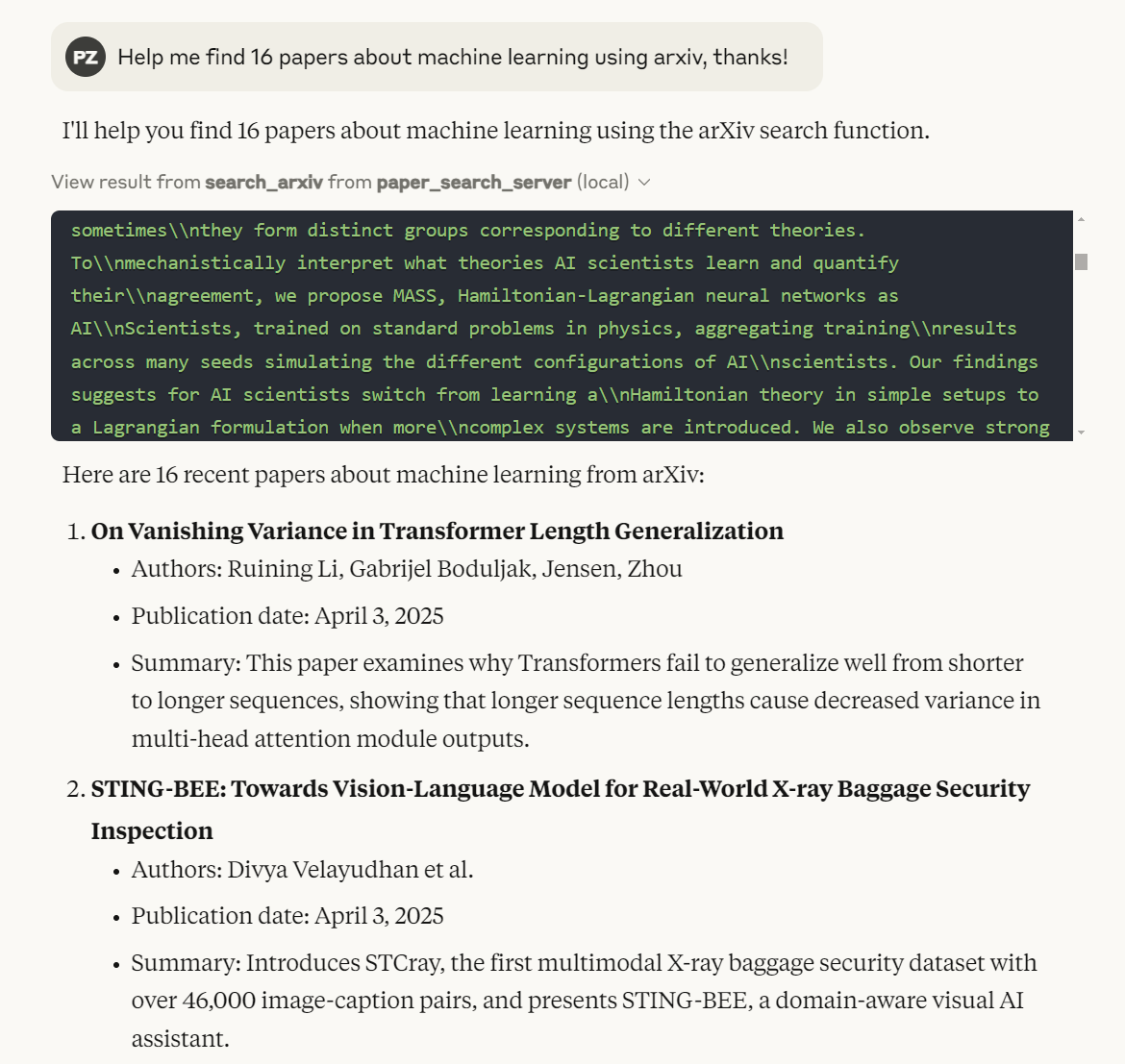
TODO
Planned Academic Platforms
- [√] arXiv
- [√] PubMed
- [√] bioRxiv
- [√] medRxiv
- [√] Google Scholar
- [√] IACR ePrint Archive
- [√] Semantic Scholar
- PubMed Central (PMC)
- Science Direct
- Springer Link
- IEEE Xplore
- ACM Digital Library
- Web of Science
- Scopus
- JSTOR
- ResearchGate
- CORE
- Microsoft Academic
License
This project is licensed under the MIT License. See the LICENSE file for details.
Happy researching with paper-search-mcp! If you encounter issues, open a GitHub issue.
Setup from the maintainer
This listing does not have a supported local package template. Use the maintainer’s documentation for its hosted endpoint, authentication, and client-specific setup. No install command has been inferred.