ai.takara/miru
Hybrid semantic and keyword code search for coding agents.
Miru (見る)




Hybrid code search for AI coding agents. Find code by meaning, not grep.
Your AI agent finds the code it needs with up to 50% fewer tokens.
Miru returns the best chunks (path, lines, snippet) for questions like "where is auth middleware configured?" — plugged directly into Claude Code, Cursor, Copilot, Codex, and 9+ other agents via MCP.
How it fits into your agent's workflow
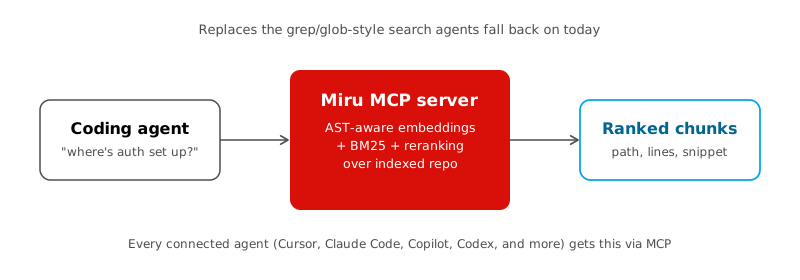
Miru replaces the grep/glob-style search agents fall back on today. Install once, and every connected agent gets search and find_related MCP tools automatically.
Install via a plugin marketplace
Prefer this when your IDE has a plugin marketplace — no bun add -g step, and updates go through the IDE's own plugin flow. Run miru setup first if you have not authenticated yet (see Set up credentials).
Claude Code:
/plugin marketplace add takara-ai/miru-code
/plugin install miru
Restart Claude Code (or reload plugins) when prompted. Update: /plugin marketplace update miru then reinstall. Remove: /plugin uninstall miru.
Cursor:
- Dashboard → Plugins → Team Marketplaces → Add Marketplace → Import from Repo →
takara-ai/miru-code - Customize (sidebar) → find
miru→ Install → choose project or user scope
Any other IDE, or if marketplace install isn't available: use the CLI install below.
What you get from a plugin install vs the CLI
Plugin installs don't carry full CLI parity — what each one gives you depends on the IDE's own plugin capabilities, not just Miru's packaging:
| Claude Code | Codex | Cursor | |
|---|---|---|---|
MCP tools (search, locate, expand, find_related) | ✅ | ✅ | ❌ (plugin ships skills + rules only — no MCP entry yet) |
miru / Caveman / STE skills | ✅ | ✅ | ✅ |
Dedicated sub-agent (miru:miru-code) | ✅ | — | — |
Benchmark mode toggle (/plugin configure) | ✅ | — | — |
| Credentials | own plugin-scoped dir | own plugin-scoped dir | n/a |
— means the IDE's plugin schema has no equivalent mechanism to port these to (not a packaging gap we can close): Codex's and Cursor's plugin manifests have no agents or userConfig fields, so the dedicated sub-agent and the benchmark toggle are Claude-Code-only.
Credentials are plugin-scoped, not shared with your CLI install. Claude Code and Codex plugins each store auth in their own IDE-managed data directory (survives plugin updates, removed on uninstall). This means miru setup done via the CLI does not carry over to a plugin install, or vice versa — each authenticates independently on first use (interactive device-code login bootstraps automatically). If you use both the CLI and a plugin, you'll sign in twice.
Install (CLI)
bun add -g @takara-ai/miru-code
Set up credentials
miru setup
Interactive miru setup defaults to device-code login and saves the resulting credentials locally. Manual bearer-token entry is still available with --key. If credentials are missing, the interactive MCP/plugin path can bootstrap the same device flow automatically on first use.
miru setup --device           # explicit device-code login
miru setup --key YOUR_TOKEN   # store a bearer token directly
miru setup --clear            # remove stored credentials
Miru stores versioned credentials in credentials.json and automatically loads or refreshes them for MCP and CLI use. TAKARA_API_KEY still overrides stored credentials when set explicitly.
Add to your IDE
miru install
Interactive TUI — ↑↓ move, space toggle, a all, enter confirm. Pick agents and integrations:
| Integration | What it does |
|---|---|
| MCP server | search, locate, expand, and find_related tools in the agent |
| Instructions | Search policy in CLAUDE.md / AGENTS.md / GEMINI.md |
| Sub-agent | Dedicated miru-code agent file |
| Cursor rules | Always-on .cursor/rules/miru-code.mdc (Cursor only) |
| Old Miru hooks | Removes stale search hooks from older releases |
| Caveman (experimental) | On-demand chat compression skill (/caveman) |
| STE writing (experimental) | On-demand clear technical English for docs (/ste) |
Restart the IDE when done.
miru uninstall # remove miru config
Supported: Cursor · Claude Code · Gemini CLI · Kiro · OpenCode · GitHub Copilot · Codex · VS Code · Visual Studio (Windows) · Windsurf / Devin Desktop
| IDE | MCP | Instructions / rules | Caveman (experimental) | STE (experimental) |
|---|---|---|---|---|
| Cursor | ~/.cursor/mcp.json | ~/.cursor/rules/miru-code.mdc | ~/.agents/skills/caveman/SKILL.md | ~/.agents/skills/ste/SKILL.md |
| Claude Code | ~/.claude.json | ~/.claude/CLAUDE.md | ~/.claude/skills/caveman/SKILL.md | ~/.claude/skills/ste/SKILL.md |
| Gemini CLI | ~/.gemini/settings.json | ~/.gemini/GEMINI.md | ~/.agents/skills/caveman/SKILL.md | ~/.agents/skills/ste/SKILL.md |
| Kiro | ~/.kiro/settings/mcp.json | ~/.kiro/steering/miru.md | ~/.kiro/skills/caveman/SKILL.md | ~/.kiro/skills/ste/SKILL.md |
| OpenCode | $XDG_CONFIG_HOME/opencode/opencode.json(c) (else ~/.config/opencode/…) | …/AGENTS.md | ~/.agents/skills/caveman/SKILL.md | ~/.agents/skills/ste/SKILL.md |
| GitHub Copilot | ~/.copilot/mcp-config.json | — | ~/.agents/skills/caveman/SKILL.md | ~/.agents/skills/ste/SKILL.md |
| Codex | ~/.codex/config.toml | ~/.codex/AGENTS.md | ~/.agents/skills/caveman/SKILL.md | ~/.agents/skills/ste/SKILL.md |
| VS Code | …/Code/User/mcp.json | — | ~/.agents/skills/caveman/SKILL.md | ~/.agents/skills/ste/SKILL.md |
| Visual Studio | %USERPROFILE%\.mcp.json | — | ~/.agents/skills/caveman/SKILL.md | ~/.agents/skills/ste/SKILL.md |
| Windsurf | — | — | ~/.agents/skills/caveman/SKILL.md | ~/.agents/skills/ste/SKILL.md |
Plugin packaging
- Codex:
.codex-plugin/plugin.json,.agents/plugins/marketplace.json, shares the rootmcp.json - Claude Code:
.claude-plugin/plugin.json,.claude-plugin/marketplace.json, its own.claude-plugin/mcp.json(needed for theuserConfigbenchmark toggle — see What you get from a plugin install vs the CLI) - Cursor:
plugin.jsonand.cursor/rules/miru-code-search.mdc
Current limitation:
- these plugin manifests launch the published Miru runtime through
bunx @takara-ai/miru-code@latest mcp - that means local source edits do not affect plugin behavior until a package version is published
- and a fully self-contained “no Bun required” plugin install is still future work
On-demand skills
Sub-agent files are also written where supported (see miru install plan). Windsurf hooks only (experimental) — no MCP entry yet. Caveman is an on-demand Agent Skill (default off): invoke with /caveman or “talk like caveman”; stop with “normal mode”. Invocation UI varies by IDE (/caveman, $caveman, @caveman, etc.). Most IDEs share ~/.agents/skills/caveman/SKILL.md (including Copilot / VS Code / Visual Studio); Claude Code and Kiro keep vendor-native skill dirs. Ownership is tracked on the shared path so uninstalling one IDE keeps the skill while another still owns it; selecting all owners removes it once. STE is an on-demand Agent Skill (default off): invoke with /ste or “de-slop this”; keep articles and complete sentences. Most IDEs share ~/.agents/skills/ste/ the same way (ownership via miru-owners.json); Claude Code and Kiro keep vendor-native STE dirs.
STE writing (experimental)
STE helps write clear technical English for docs, runbooks, errors, and release notes (pragmatic ASD-STE100-inspired rules). Invoke with /ste or “de-slop this”. Keep articles and complete sentences — not telegraph-style omission.
Not ASD-certified. Full dictionary compliance needs the official standard at asd-ste100.org. Miru does not ship the copyrighted ASD dictionary.
Not for marketing or brand copy. Off by default; enable STE in the installer for any supported IDE. Restart the IDE (or reload skills) after install. For Codex, install also sets [features] skills = true in ~/.codex/config.toml (same as Caveman).
Caveman mode (experimental)
Caveman compresses live chat replies (less filler, max meaning). Intensities: /caveman lite|full|ultra (default full). Persisted artifacts (commits, PRs, customer docs) stay normal prose unless you ask otherwise.
Security / destructive warnings use clear normal prose (auto-clarity) — brevity never hides risk. Session token savings vary; the skill itself costs input tokens. No guaranteed %.
Off by default at install time. Enable Caveman in the installer for any supported IDE. Restart the IDE (or reload skills) after install. For Codex, the installer also sets [features] skills = true in ~/.codex/config.toml (required for Codex to load skills).
Team sub-agent in a repo (optional):
miru init --agent claude --force
Try it
Meaning-based questions → search. Exact strings (env vars, symbols, error codes) → locate.
miru search "auth middleware" ./src
miru locate REDIS_HOST ./src
miru expand src/auth.ts 42 ./src
miru find-related src/auth.ts 42 ./src
Terminal output is human-readable; use --json for scripts. One-off without installing:
bunx @takara-ai/miru-code@latest search "auth middleware" ./src
MCP tools
When wired via miru install, the MCP server exposes search, locate, expand, and find_related. read_benchmark appears only in benchmark mode. repo is optional: it defaults to the server's startup directory. Set it for another repo, or if your MCP client starts elsewhere. The index is built on the first call and cached for the session.
| Tool | When to use |
|---|---|
search | Default for code exploration — hybrid semantic + keyword search. One call per question. |
locate | Exact substrings (env vars, symbols, error codes) — prefer over Grep. |
expand | More context in the same file when a hit has truncated: true. |
find_related | Similar code in other files from a file_path + anchor_line. |
read_benchmark | Cumulative token-savings rollup (benchmark mode only). |
Workflow
searchwithquery— returns compact snippets (~±15 lines) and relevance scores.- If a hit has
truncated: true, callexpandwithfile_pathandanchor_line— not another search or a full-file read. - To trace similar patterns elsewhere, call
find_relatedwith the samefile_pathandanchor_line. - Use your editor's Read on
absolute_pathonly when editing or whenexpandstill lacks context.
Keep repo on follow-up calls when set.
Prefer these tools over Grep, Glob, or SemanticSearch when Miru MCP is connected — hooks and instructions enforce that when enabled.
Local repo hits include absolute_path for one-click navigation. Parameter reference is below under MCP parameters.
How it works
Hybrid search: Takara embeddings + BM25 + fusion + reranking. Index code, docs, config, or all with --content.
MCP watches local files and updates the index incrementally. Package upgrades invalidate stale caches via the version epoch.
| OS | Index cache |
|---|---|
| macOS | ~/Library/Caches/miru |
| Linux | ~/.cache/miru |
| Windows | %LOCALAPPDATA%\miru\Cache |
Chunking & languages
Miru chunks source in tiers: AST (tree-sitter, default) → structural heuristics → line splits.
AST chunking — 26 languages (syntax-aware boundaries via vendored web-tree-sitter grammars):
| Language | Typical extensions |
|---|---|
| astro | .astro |
| bash | .sh, .bash, .zsh |
| c | .c |
| cpp | .cpp, .h, .hpp, etc. |
| csharp | .cs |
| css | .css |
| dart | .dart |
| elixir | .ex, .exs |
| embeddedtemplate | .erb, .ejs |
| go | .go |
| haskell | .hs |
| html | .html, .htm |
| java | .java |
| javascript | .js, .jsx, .mjs, .cjs |
| json | .json |
| ocaml | .ml, etc. |
| php | .php |
| python | .py, .pyi |
| ruby | .rb |
| rust | .rs |
| scala | .scala |
| solidity | .sol |
| sql | .sql |
| svelte | .svelte |
| typescript | .ts, .tsx, .mts, .cts |
| vue | .vue |
Structural fallback (brace/indent heuristics when AST is unavailable): python, go, typescript, javascript, cpp, c.
Line fallback: everything else that gets indexed (kotlin, swift, etc.) — still searchable, coarser chunks.
Set MIRU_AST_CHUNKING=0 to disable AST and use structural → lines only.
CLI reference
Run miru in a terminal or miru -h for the command list, or miru <command> -h for details.
| Command | Purpose |
|---|---|
miru setup | Authenticate and store credentials |
miru install | Configure IDE (global) |
miru uninstall | Remove IDE config |
miru search <query> [path] | Search (-k N, --content, --json) |
miru locate <literal> [path] | Exact substring in the index |
miru expand <file> <line> [path] | Adjacent chunks in the same file |
miru find-related <file> <line> [path] | Related chunks |
miru benchmark on/off/status/clear | Toggle MCP benchmark mode / clear report |
miru init --agent <id> | Project-local sub-agent |
miru clear [path] | Drop index cache (use after big CLI-only refactors) |
miru mcp | Start MCP server (--benchmark for comparisons) |
CLI uses hyphens (find-related); MCP tool names use underscores (find_related).
Library
bun add @takara-ai/miru-code
import { MiruIndex } from "@takara-ai/miru-code";

const index = await MiruIndex.fromPath("./src");
const results = await index.search({ query: "BM25 tokenize" });
Environment
| Variable | Notes |
|---|---|
TAKARA_API_KEY | Required |
MIRU_OPENAI_BASE_URL | Default https://infer.takara.ai/v1 |
MIRU_OPENAI_EMBEDDING_MODEL | Default ds1-miru-int8 |
MIRU_WORKSPACE_ROOT | Optional: restrict MCP local repo paths to this directory |
MIRU_MAX_INDEX_FILES | Cap files indexed per operation |
MIRU_ALLOW_HTTP_GIT | Set 1 to allow plain http:// git clones |
MIRU_MCP_WATCH | Set 0 to disable MCP file watch |
MIRU_AST_CHUNKING | Set 0 to disable tree-sitter AST chunking |
MIRU_BENCHMARK_HISTORY_PATH | Override; see Benchmark mode |
MIRU_CACHE_HOME | Override the platform cache root (see How it works) |
MIRU_QUIET | Set 1 to skip the framed CLI banner (subtitle only on color terminals) |
NO_COLOR | Disable CLI colors |
See .env.example for more.
Privacy and API usage
Miru sends file contents to the Takara inference API when building an index and when embedding search queries. Chunks from your repo are transmitted over HTTPS to generate embeddings. API usage may incur cost depending on your Takara plan.
If you index proprietary code, make sure that sending snippets to Takara's endpoint fits your security and compliance requirements. MIRU_WORKSPACE_ROOT is an opt-in boundary for MCP local repo paths only, and restricts indexing to a single workspace directory when set.
Enterprise self-hosted embeddings (no Takara egress): see docs/self-hosted-sagemaker.md.
Benchmark mode
Optional measurement of how many tokens Miru saves versus a simple Grep workflow (ripgrep + reading the top matched file). Useful when evaluating Miru; leave it off day-to-day. Only local repo paths are compared — git URL repos skip the comparison and return benchmark_skipped: "local_repo_only".
miru benchmark on       # add --benchmark to installed MCP configs
miru benchmark status
miru benchmark off      # prefer off when finished measuring
miru benchmark clear    # delete the global report
Restart agents after changing mode. miru install keeps --benchmark if it was already enabled.
While on, each search / locate response includes a compact benchmark block (save_pct, miru_tok, grep_tok, saved_tok, rank1). Call read_benchmark for a cumulative rollup (or ask the agent when you want totals).
History is global (not per-repo) under Miru's state directory:
| OS | Default path |
|---|---|
| macOS | ~/Library/Application Support/miru/benchmark-history.json |
| Linux | ~/.config/miru/benchmark-history.json ($XDG_CONFIG_HOME/miru/… when set) |
| Windows | %APPDATA%\miru\benchmark-history.json |
Override with MIRU_BENCHMARK_HISTORY_PATH. Append-only JSONL of compact token deltas (no query text); read_benchmark returns cumulative totals. Stored in plaintext — miru benchmark clear or uninstall on shared machines.
MCP parameters
**search**
| Param | Required | Notes |
|---|---|---|
query | yes | Natural language or code query |
repo | no | Startup directory by default; set for another repo |
include | no | Gitignore-style glob patterns; only matching files are searched (same as locate.include) |
exclude | no | Gitignore-style glob patterns; matching files are skipped (same as locate.exclude) |
dedupe_by_file | no | Keep best hit per file (default true) |
**locate**
| Param | Required | Notes |
|---|---|---|
literal | yes | Exact substring to find |
repo | no | Startup directory by default; set for another repo |
include | no | Gitignore-style glob patterns; only matching files are searched |
exclude | no | Gitignore-style glob patterns; matching files are skipped |
mode | no | count · locations · lines (default). Prefer count/locations when possible |
limit | no | Cap returned hits. Omit to return all matches |
ignore_case | no | Case-insensitive match (default false) |
**expand**
| Param | Required | Notes |
|---|---|---|
file_path | yes | From hit file_path or absolute_path (local repos) |
anchor_line | yes | From the search hit (anchor_line when truncated, else start_line) |
repo | no | Same repo as the search, if set |
before / after | no | Extra chunks before/after anchor (default 1 each) |
**find_related**
| Param | Required | Notes |
|---|---|---|
file_path | yes | From a search hit |
anchor_line | yes | From the search hit |
repo | no | Same repo as the search, if set |
**read_benchmark** (benchmark mode only)
| Param | Required | Notes |
|---|---|---|
repo | no | Filter rollup to one local path or git URL. Omit for all saved queries |
Manual MCP (skip miru install)
{
  "miru": {
    "command": "miru",
    "args": ["mcp"]
  }
}
For benchmark mode, set "args": ["mcp", "--benchmark"] (or append the flag). Prefer miru benchmark on after a normal install — it updates every agent config.
Run miru setup once so the server can load credentials from credentials.json. If the MCP server starts in an interactive terminal without stored credentials, it will start device login automatically.
Use bunx + @takara-ai/miru-code@latest if miru is not global. The installer uses this command so each new MCP server launch can pick up a published version without a global update. A running server keeps its current version until restarted. Wrapper key varies by IDE (mcpServers, servers, or mcp).
Older headless MCP configs that launch miru without a subcommand, with or without MCP flags, continue to work. Run miru install again to update managed entries to the explicit mcp subcommand, then restart your coding agent. For manual MCP configs, add mcp after the executable or package name.
Developing
git clone https://github.com/takara-ai/miru-code.git && cd miru-code
bun install && cp .env.example .env.local
bun test && bun run typecheck
See CONTRIBUTING.md for pre-commit hooks, commit message conventions, and the PR process.
Local MCP: "command": "bun", "args": ["/path/to/miru-code/src/cli.ts"]
miru -h / setup print a framed wordmark on color terminals (MIRU_QUIET=1 for subtitle only). Crane art lives in src/brand-banner.ts; regenerate with bun run scripts/render-crane-art.ts (ImageMagick). The crane is a registered mark of Takara.ai Ltd.
Credits
Miru uses work by MinishLab. Thank you to its authors.
- semble (MIT). Miru ports parts of semble. These parts include the file walker, the index layout, the BM25 tokenizer, the hybrid search pipeline, and the ranking signals.
- potion-code and Model2Vec (MIT). The WordPiece tokenizer in
tokenizer/tokenizer.jsoncomes from potion-code.
See NOTICE for the licence text and the Model2Vec citation.
License
MIT
Installation
Source-derived launch command. Check the maintainer’s required arguments and credentials before running:
npx -y @takara-ai/miru-codeSet up in your AI client
Merge this template into ~/Library/Application Support/Claude/claude_desktop_config.json. Keep existing servers. Add any arguments, credentials, and permissions required by the maintainer; this template has not been install-tested.
{
  "mcpServers": {
    "ai-takara-miru": {
      "command": "npx",
      "args": [
        "-y",
        "@takara-ai/miru-code"
      ]
    }
  }
}
Restart Claude Desktop completely for changes to take effect. Confirm the server appears connected in the client’s tool list, then try a read-only example from its documentation.
Claude Desktop setup referencePackage
@takara-ai/miru-codenpmCompatible MCP Clients
ai.takara/miru works with any MCP-compatible client. Copy the config snippet from the Configuration section above and add it to the file shown for your client, then restart the application.
- Claude Desktop
~/Library/Application Support/Claude/claude_desktop_config.jsonRestart Claude Desktop completely for changes to take effect. - Cursor
~/.cursor/mcp.jsonRestart Cursor for changes to take effect. - VS Code
.vscode/mcp.jsonReload VS Code window for changes to take effect. - Windsurf
~/.codeium/windsurf/mcp_config.jsonRestart Windsurf for changes to take effect. - Claude Code
.mcp.jsonSave at the project root, then start Claude Code in that project and review the MCP server approval prompt. Keep real credentials out of shared files.