com.metricprovenance/odgs-mcp-server
ODGS governance enforcement — validation, regulation compilation, drift detection, signed S-Certs.
Open Data Governance Standard (ODGS) — MCP Server
Deterministic governance enforcement at the AI agent boundary.
-0055AA)




For engineers: See Quick Start below, or the guided walkthrough at metricprovenance.com/start.
For compliance and risk officers: The ODGS engine generates cryptographic audit trails (S-Certs).
For architectural clearance and certified packs: metricprovenance.com/pricing
See it in action
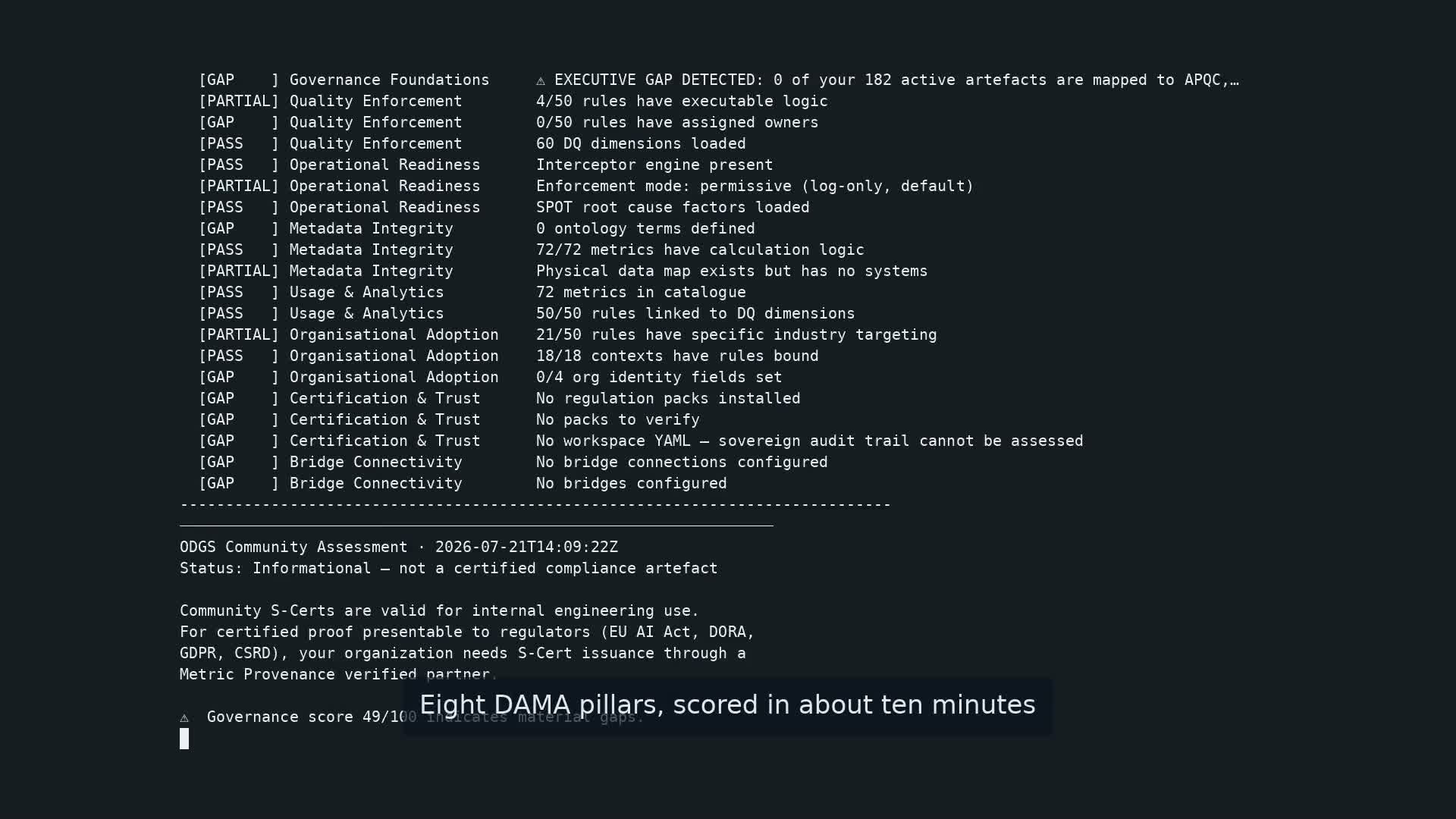
Eight DAMA DMBOK pillars scored in about ten minutes — real MCP server, real maturity engine, click to watch on GitHub.
[!IMPORTANT] ODGS MCP Server v0.3.4 — Maturity Diagnostics + Certified Pack Access
governance_scorenow delegates to theodgs-maturity8-pillar DAMA DMBOK engine. Regulatory compilation, drift detection, and catalog synchronisation require a Certified Pack licence. The community tier — validation, scoring, conformance checking — remains open with no registration.
Core Capabilities
| Change | Detail |
|---|---|
governance_score | Delegates to odgs-maturity (8-pillar DAMA DMBOK) when installed; falls back to built-in heuristic. Returns 0–100 score with per-pillar gap analysis. |
| AuthGate | Community / Professional / Enterprise access via API key validation. 24h disk cache; workspace.yaml fallback for air-gapped deployments. |
| Licensed tools | compile_regulation, check_drift, detect_conflicts, narrate_audit, discover_bindings (Professional); harvest_sovereign_rules (Enterprise). |
The European Data Governance Maturity Benchmark 2026 recorded an average maturity of 37.6% across 99 enterprises — a 62.4% gap against current regulatory expectation.
governance_scoreapplies the same assessment methodology to your project.
What This Is
The ODGS MCP Server connects any MCP-compatible AI agent to the ODGS Sovereign Validation Engine. The engine evaluates data operations against governance rules at runtime and produces S-Certs (Sovereign Certificates) — cryptographically signed, machine-verifiable records that a governance rule was applied.
This is the bridge between probabilistic AI inference and deterministic governance enforcement.
EU AI Act & High-Risk AI Systems
Organisations operating High-Risk AI Systems under EU AI Act Articles 10 and 12 require demonstrable, auditable data governance at the pipeline level. S-Certs provide that audit trail in a format suitable for regulatory submission.
Certified Sovereign Packs and the S-Cert Registry are available through Metric Provenance certified implementation partners. For architectural assessment: metricprovenance.com/pricing.
Capabilities
- Runtime validation: Data payloads are evaluated against sovereign governance rules at call time; each evaluation produces a signed S-Cert.
- Governance maturity scoring: 8-pillar DAMA DMBOK assessment (0–100) with per-pillar gap analysis, aligned to the European Governance Maturity Benchmark methodology.
- Regulatory compilation (licensed): Converts legislative text — EU AI Act, DORA, GDPR — into validated ODGS rule JSON.
- Semantic drift detection (licensed): Identifies definitional drift between governance artefacts across versions.
- Enterprise catalog integration (licensed): Harvests and mints sovereign rules from Databricks, Snowflake, and Collibra via the Flint Bridge.
Quick Start
# Core validation capabilities (free, no account needed)
pip install odgs-mcp-server

# With maturity scoring
pip install odgs-mcp-server odgs-maturity

# Complete installation with LLM bridge capabilities
pip install "odgs-mcp-server[llm]"
Client Configuration
The server operates over standard stdio transport, making it instantly compatible with any MCP client.
Claude Desktop
Add to claude_desktop_config.json:
{
  "mcpServers": {
    "odgs-governance": {
      "command": "odgs-mcp-server",
      "args": ["--transport", "stdio"],
      "env": {
        "ODGS_PROJECT_ROOT": "/path/to/your/odgs/project"
      }
    }
  }
}
Cursor
Add to .cursor/mcp.json:
{
  "mcpServers": {
    "odgs-governance": {
      "command": "odgs-mcp-server",
      "args": ["--transport", "stdio"],
      "env": {
        "ODGS_PROJECT_ROOT": "/path/to/your/odgs/project"
      }
    }
  }
}
Licensed Tool Access
Regulatory compilation, certified packs, and catalog synchronisation require a Certified Pack licence. Provide the issued API key in your client configuration:
"env": {
  "ODGS_API_KEY": "sk-odgs-...",
  "ODGS_PROJECT_ROOT": "/path/to/your/odgs/project"
}
Licences are self-serve — buy at metricprovenance.com/pricing and your key is emailed on purchase:
| Tier | Price | Includes |
|---|---|---|
| Community | Free | validate_payload, governance_score, list_packs, conformance_check — no registration |
| Team | €990/yr | One certified regulation pack, signed + updated, plus all Professional tools |
| Professional | €2,490/yr | All certified packs, priority re-signing on regulatory change |
| Consultant | €4,990/yr | Professional + white-label / client-deliverable rights |
Enterprise deployments (Sovereign CA nodes, harvest_sovereign_rules) via certified partners.
Tools Reference
Community (Free — no API key required)
| Tool | Description |
|---|---|
validate_payload | Validate data against ODGS governance rules, produce S-Cert |
validate_batch | Validate multiple payloads in one call |
list_packs | List available Certified Regulation Packs |
governance_score | Score governance maturity (0–100) across 8 DAMA pillars with gap analysis |
conformance_check | Run ODGS conformance self-check (L1/L2) |
Professional (API Key Required)
| Tool | Description |
|---|---|
download_pack | Download and cache certified regulatory rule packs locally |
compile_regulation | Convert regulation text → validated ODGS rule JSON |
check_drift | Detect semantic drift in governance definitions |
detect_conflicts | Find contradictions between regulatory rules |
narrate_audit | Convert S-Cert → human-readable narrative |
discover_bindings | Auto-generate physical data mappings from catalogs |
Enterprise (API Key Required)
| Tool | Description |
|---|---|
harvest_sovereign_rules | (Flint Bridge) Automatically extract and mint rules from data stores — preview, pending verification against the harvester interface |
Architecture
The ODGS MCP Server is designed for zero-trust, local-first execution. All data validation happens strictly on your machine. No sensitive data leaves your perimeter.
flowchart TB
    Agent[AI Agent\nClaude/Cursor/Custom]

    subgraph "ODGS MCP Server"
        Auth[AuthGate]
        Val[OdgsInterceptor v6]
        Maturity[odgs-maturity\n8-pillar DAMA]
        LLM[OdgsLlmBridge]
        Flint[Flint Bridge]
    end

    Reg[(S-Cert Registry\nregistry.metricprovenance.com)]
    Project[(Local ODGS Project)]

    Agent -- "JSON-RPC (stdio)" --> Auth
    Auth -- "Validate Key (HTTPS, cached 24h)" --> Reg
    Auth --> Val
    Auth --> Maturity
    Auth --> LLM
    Auth --> Flint

    Val -- "Reads Rules" --> Project
    Val -- "Generates" --> SCert[S-Cert]
    Maturity -- "Scores pillars" --> Project
    LLM -- "Compiles Regulations" --> Project
    Flint -- "Harvests Sovereign Rules" --> Project
Certified Regulation Packs
Cryptographically signed rule bundles, each mapped to a specific regulatory instrument. Packs are compiled from authoritative legislative text and certified by Metric Provenance.
| Pack | Regulation | Status |
|---|---|---|
| EU AI Act | Regulation (EU) 2024/1689 | ✅ Certified |
| DORA | Digital Operational Resilience Act | ✅ Certified |
| GDPR | General Data Protection Regulation | ✅ Certified |
| CSRD | Corporate Sustainability Reporting Directive | ✅ Certified |
| NIS2 | Network and Information Security Directive | ✅ Certified |
| Basel III | Basel Committee on Banking Supervision | ✅ Certified |
Full catalogue of 15+ packs. Licensing and deployment via metricprovenance.com/pricing.
Environment Variables
| Variable | Description | Default |
|---|---|---|
ODGS_PROJECT_ROOT | Path to ODGS governance definitions | Current directory |
ODGS_API_KEY | API key for Professional/Enterprise access | None (community) |
ODGS_REGISTRY_URL | Registry endpoint for key validation | https://registry.metricprovenance.com |
ODGS_CACHE_DIR | Local cache for downloaded packs | ~/.odgs/cache |
About ODGS
The Open Data Governance Standard (ODGS) is an open protocol for deterministic data governance enforcement. ODGS is on a path toward formal standardization.
- Protocol specification —
pip install odgs - PyPI package
- Research paper (SSRN 6205478)
- Metric Provenance
Licence
Apache 2.0 — see LICENSE.
The protocol engine and MCP server are open source. Certified Regulation Packs are issued under a commercial licence.
Installation
Source-derived launch command. Check the maintainer’s required arguments and credentials before running:
uvx odgs-mcp-serverSet up in your AI client
Merge this template into ~/Library/Application Support/Claude/claude_desktop_config.json. Keep existing servers. Add any arguments, credentials, and permissions required by the maintainer; this template has not been install-tested.
{
  "mcpServers": {
    "com-metricprovenance-odgs-mcp-server": {
      "command": "uvx",
      "args": [
        "odgs-mcp-server"
      ]
    }
  }
}
Restart Claude Desktop completely for changes to take effect. Confirm the server appears connected in the client’s tool list, then try a read-only example from its documentation.
Claude Desktop setup referencePackage
odgs-mcp-serverpypiCompatible MCP Clients
com.metricprovenance/odgs-mcp-server works with any MCP-compatible client. Copy the config snippet from the Configuration section above and add it to the file shown for your client, then restart the application.
- Claude Desktop
~/Library/Application Support/Claude/claude_desktop_config.jsonRestart Claude Desktop completely for changes to take effect. - Cursor
~/.cursor/mcp.jsonRestart Cursor for changes to take effect. - VS Code
.vscode/mcp.jsonReload VS Code window for changes to take effect. - Windsurf
~/.codeium/windsurf/mcp_config.jsonRestart Windsurf for changes to take effect. - Claude Code
.mcp.jsonSave at the project root, then start Claude Code in that project and review the MCP server approval prompt. Keep real credentials out of shared files.