emailmd
Render markdown into email-safe HTML, lint drafts for deliverability problems, and preview emails.
emailmd
Write markdown. Ship emails. No HTMHELL.
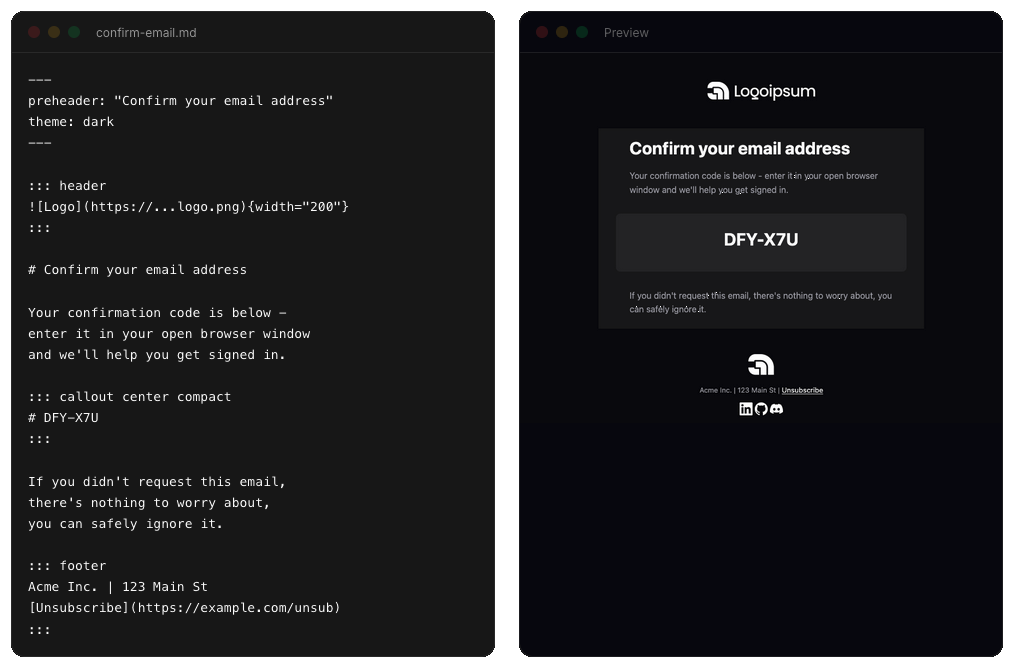
emailmd converts markdown into responsive, email-safe HTML that works across Gmail, Outlook, Apple Mail, Yahoo, and every other client.
Install
npm install emailmd
Quick Start
import { render } from "emailmd";

const { html, text } = await render(`
# Welcome!

Thanks for signing up.

[Get Started](https://example.com){button}
`);

// html → complete email-safe HTML
// text → plain text version for text/plain MIME part
v0.3.0 migration:
render()is now async. Update calls fromrender(md)toawait render(md). Requires Node 20+ (MJML 5).
Charts & Data
Bar charts, progress meters, sparklines, KPI tiles, step trackers, and star ratings, each written as a plain markdown list:
::: chart
- Spotify: 16,900
- Apple Podcasts: 12,400
- Web player: 6,200
- RSS: 2,900
:::

They are drawn from table cells and text glyphs rather than images or SVG, so they still render when the client blocks remote images, and they redraw themselves in the plain-text part instead of collapsing to a list of numbers. See the directives reference.
CLI
emailmd also ships with a command-line interface.
# Render to HTML
emailmd input.md

# Write to file
emailmd input.md -o output.html

# Plain text output
emailmd input.md --text

# Pipe from another command
echo "# Hello" | emailmd
Run emailmd --help for all options.
React
@emailmd/react provides a live-preview hook (useEmailmd), an <EmailPreview /> iframe component, and <EmailmdBuilder /> — the full builder as a drop-in component for your own app.
npm install @emailmd/react emailmd
Learn More
- Docs — full syntax reference, theming, frontmatter, directives, and API
- Templates — ready-made email templates you can copy and customize
- Builder — live editor to write and preview emails in your browser
MCP
emailmd ships a Model Context Protocol server, so an AI assistant can render, lint, and preview emails for you. It exposes three tools — render (markdown to email-safe HTML), lint (flag deliverability problems without rendering), and read_docs (look up emailmd syntax) — over either transport:
# Hosted (Streamable HTTP)
https://www.emailmd.dev/api/mcp

# Or run it locally over stdio
npx emailmd mcp
Published to the official MCP registry as dev.emailmd/emailmd. See the MCP docs for per-client setup.
AI
Prefer plain context over tools? emailmd is just markdown, so AI is great at writing templates. Feed the full docs to your AI tool:
https://www.emailmd.dev/llms-full.txt
Contributing
Contributions are welcome! Feel free to open an issue or submit a pull request.
emailmd is under active development. The API may change between minor versions until we hit 1.0 — breaking changes are always called out in the changelog. See Stability & Versioning for what the semver contract covers.
Acknowledgements
License
MIT
Installation
Source-derived launch command. Check the maintainer’s required arguments and credentials before running:
npx -y emailmdSet up in your AI client
Merge this template into ~/Library/Application Support/Claude/claude_desktop_config.json. Keep existing servers. Add any arguments, credentials, and permissions required by the maintainer; this template has not been install-tested.
{
  "mcpServers": {
    "dev-emailmd-emailmd": {
      "command": "npx",
      "args": [
        "-y",
        "emailmd"
      ]
    }
  }
}
Restart Claude Desktop completely for changes to take effect. Confirm the server appears connected in the client’s tool list, then try a read-only example from its documentation.
Claude Desktop setup referencePackage
emailmdnpmCompatible MCP Clients
emailmd works with any MCP-compatible client. Copy the config snippet from the Configuration section above and add it to the file shown for your client, then restart the application.
- Claude Desktop
~/Library/Application Support/Claude/claude_desktop_config.jsonRestart Claude Desktop completely for changes to take effect. - Cursor
~/.cursor/mcp.jsonRestart Cursor for changes to take effect. - VS Code
.vscode/mcp.jsonReload VS Code window for changes to take effect. - Windsurf
~/.codeium/windsurf/mcp_config.jsonRestart Windsurf for changes to take effect. - Claude Code
.mcp.jsonSave at the project root, then start Claude Code in that project and review the MCP server approval prompt. Keep real credentials out of shared files.