Kurlo
Run, write and test the API requests saved in a Kurlo workspace, the open source API client.
Kurlo
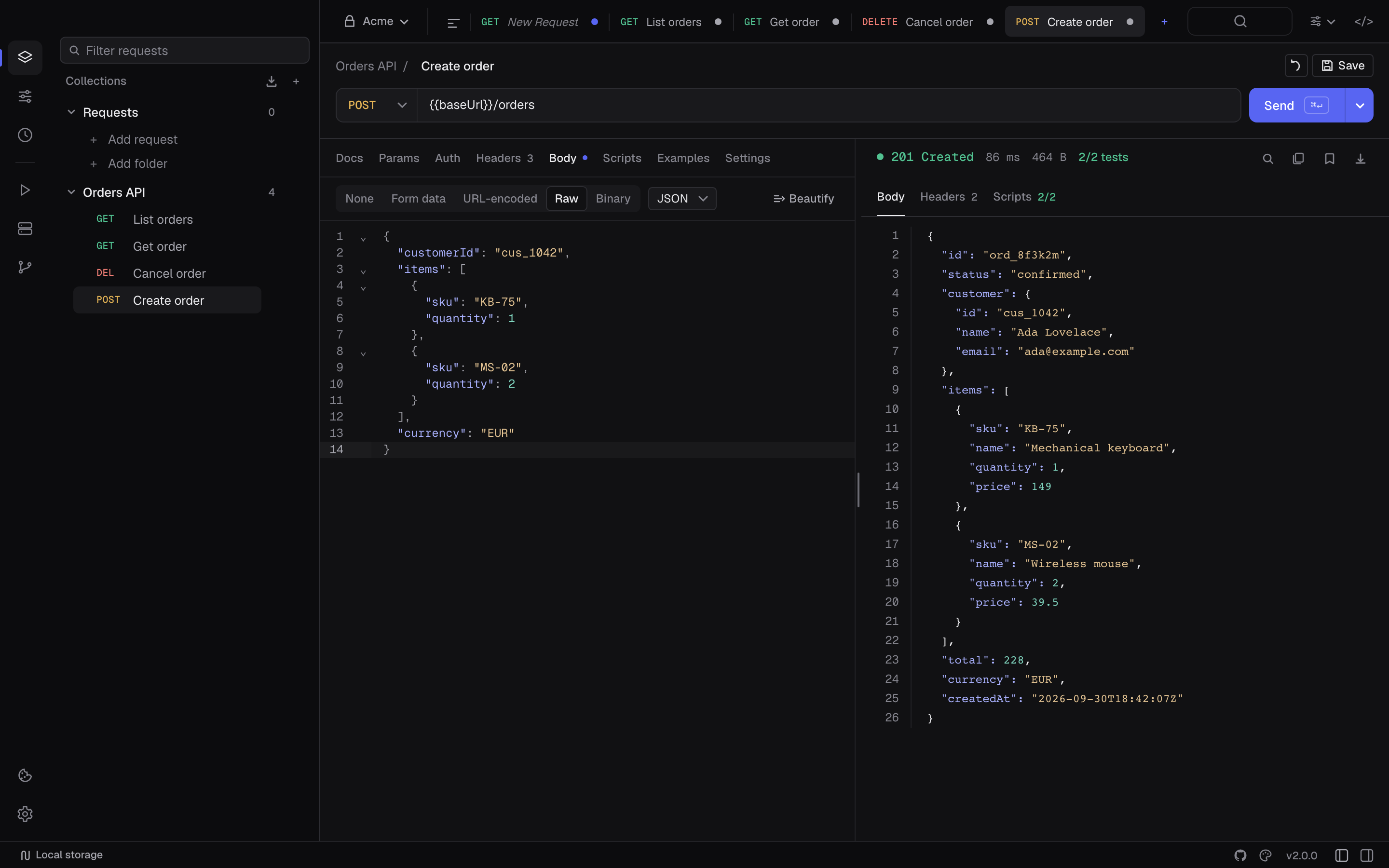
A fast, local-first desktop API client. No accounts, no cloud sync, no telemetry — just you and your APIs.



Built with Go, Svelte 5, and Wails.
Download
Grab the latest build from the releases page.
| Platform | Installer |
|---|---|
| macOS (Apple Silicon + Intel) | .dmg |
| Windows 10/11 (x64) | .exe (NSIS installer), .msix |
| Linux (x64) | .AppImage |
Every release ships SHA256 checksums and minisign signatures, and the in-app updater refuses any binary that fails either check.
The command line (kurlo run for CI, kurlo mcp for AI agents) is also on npm as @kurlo/cli, with prebuilt binaries for macOS, Linux and Windows on x64 and arm64. It does not need the desktop app:
npx -y @kurlo/cli --version
Guides, the scripting reference, and the YAML workspace format live in the documentation site.
Features
Requests
- All HTTP methods: GET, POST, PUT, PATCH, DELETE, HEAD, OPTIONS
- Query params, headers, body (JSON, form-data, x-www-form-urlencoded, raw text/XML/HTML, binary file)
- cURL import — paste a curl command into the URL field, it parses automatically
- Bulk edit for params, headers and form fields — switch the table to a
key: valuetext area and back - GraphQL, Server-Sent Events, WebSocket, Socket.IO, gRPC, and MCP request types — an MCP call discovers the server's tools, resources and prompts, seeds the arguments from the tool's schema, and shows the raw JSON-RPC exchange
- Postman, Insomnia, Bruno/OpenCollection, OpenAPI/Swagger, HAR, cURL, and all-data backup import paths
- OpenAPI/Swagger imports from a link as well as a file — paste the spec URL and Kurlo fetches it and builds the collection
- Postman, OpenAPI, OpenCollection, and all-data backup export paths
Authentication
- Bearer Token
- Basic Auth
- Digest Auth — MD5, SHA-256 and SHA-512-256 plus their
-sessvariants, withqop=authandauth-int - API Key — in header or query string
- OAuth 2.0 — Client Credentials, Authorization Code (with PKCE), Password, and Device Code grants; loopback browser sign-in, refresh tokens, and automatic token refresh before each send
- AWS Signature v4
- Client certificates (mutual TLS), per request or inherited from a collection
- Per-request and collection defaults with inheritance
Scripting — pre-request and test scripts in sandboxed JavaScript, with legacy Tengo support:
// pre-request: inject a header
pm.request.headers.set("X-Client", "kurlo")

// pre-request: rewrite and sign the body
pm.request.body.update(JSON.stringify({ ...pm.request.body.json(), nonce: pm.crypto.randomHex(8) }))

// test: assert status and shape
pm.test("status is 200", () => pm.response.to.have.status(200))
pm.test("has an id", () => pm.response.to.have.jsonSchema({ type: "object", required: ["id"] }))
require resolves bundled stand-ins for lodash, ajv, tv4, uuid, crypto-js, and chai, so imported Postman scripts keep working. pm.sendRequest makes an HTTP call from a script, and pm.execution.skipRequest() skips the send.
Environments & Variables
- Multiple environments per workspace, switch with one click
- Matrix view — every variable as a row, every environment as a column, edited in place
{{variable}}template syntax in URLs, headers, params, body, auth fields- Set variables from test scripts (
pm.variables.set,pm.environment.set) - Manual-save and autosave modes both cover request and environment edits
Workspaces & Collections
- Multiple workspaces for separate projects or clients
- Collections with nested folder hierarchy and empty-folder preservation
- Drag-and-drop organisation
- Request history — every send on its own page, request and stored response side by side, reopenable in the editor (14-day retention, 1000 entries)
- Collection runner — sequential or parallel, data files, iterations, an HTML report, and the last run of every collection kept
- Git-backed YAML workspaces with diagnostics, conflict helpers, and local-only secrets
- CLI runner —
npx -y @kurlo/cli run ./workspace --env CIexecutes requests and their test scripts for CI, with data-driven iterations (--data), pretty/JSON/JUnit reporters, variable export, and a non-zero exit code on failure
AI agents (MCP server) — the Kurlo binary is also a Model Context Protocol server, so Claude Code, Codex, Cursor, Claude Desktop or any other MCP client can list your collections and environments, run saved requests and whole collections with their auth, scripts and tests, and send one-off calls with your {{variables}}. It can also keep the workspace up to date: add and change requests with their pm.* tests, save responses as examples and set environment variables, in the same YAML the app writes, never storing a secret. It reads the last request you sent from the app, so "why did that fail?" needs no copying. Secret values are sent to the API but masked as [secret] in everything the model sees, and environments you mark protected are off limits. One command sets up every client on the machine:
npx -y @kurlo/cli mcp install --env Staging
Add --project to write a repository's shared .mcp.json and .cursor/mcp.json instead, so the whole team gets the server by cloning. Manual setup, the tools and the flags are covered in the MCP server guide.
Response examples — save any response as a named example on its request: the status, headers and body it came back with, alongside the request that produced it. Secrets are redacted on capture, a clean body is stored byte for byte, and examples ride along through Postman, OpenCollection, HAR and OpenAPI imports and exports. A response can be diffed against an example instead of against the previous send.
Cookies — a per-workspace cookie jar with a per-domain editor, disableable per request.
- Cookie sync: pair Kurlo with the in-repo browser extension (
apps/desktop/extension, Chromium + Firefox) and the session you already have in the browser is the session Kurlo sends with. A loopback-only bridge that stays off until you turn it on, an approval you give in Kurlo by matching a six-digit code, and a per-domain allowlist enforced on both sides. Cookies travel one way: browser into Kurlo.
Mock server — serve a collection's saved examples over HTTP on a local port, so a client can be built against an endpoint that does not exist yet. Routing is by method and the example's path template (/orders/:id), a recorded query narrows which example answers, and a live log shows what the client asked for and which example replied. Loopback only; CORS preflight is answered for any origin.
Response viewer
- Syntax-highlighted body with line numbers
- Paginated rendering for large responses (512 KB pages, once a response exceeds 10 MB)
- Full-text search with match navigation
- Save response to file, copy to clipboard
- Headers table, test results, script logs — all in one panel
- Preview tab for HTML, images and PDFs; binary bodies are detected rather than rendered as mojibake
- Diff against the previous response or a saved example
- Timeline with connection details and the request as it went on the wire, secrets masked, one block per redirect hop
- Realtime panels for SSE, WebSocket, Socket.IO, and gRPC responses
Code generation — copy the current request as a runnable snippet in one of 14 targets: cURL, HTTPie, JavaScript fetch, Node.js fetch, Axios, Python requests, Go net/http, Java OkHttp, C# HttpClient, PHP cURL, Ruby Net::HTTP, Swift URLSession, Kotlin OkHttp, and Rust reqwest. Secret variables stay as {{name}} placeholders.
Browser request emulation — send with a browser's rules instead of a client's: an Origin header, CORS preflight and response checks, and Content Security Policy enforcement, so a request can reproduce what the browser will do before the frontend is written.
Settings per request: HTTP version (auto / 1.1 / 2), SSL verification, redirect policy (follow, preserve method, preserve auth), cookie jar, timeout, proxy, URL encoding.
Keyboard-first: all actions have configurable shortcuts. A command palette (Cmd/Ctrl K) finds requests and runs commands, quick send (Cmd/Ctrl Enter), focus the URL (Cmd/Ctrl L), tab switching (Cmd/Ctrl 1–8, with 9 for the last tab). Kurlo shows Cmd on macOS and Ctrl on Windows and Linux.
Dark and light themes, with multiple built-in variations.
Local-first storage — the local Kurlo profile and its secrets are encrypted at rest with AES-256-GCM. The key is stored in the OS credential store when available and also kept as a 0600 recovery file in Kurlo's app-data directory. Git-backed workspace YAML is intentionally human-readable; secret values are replaced with local placeholders.
Building from source
Prerequisites
- Go 1.25+
- Node.js 22.12+
- Wails v2 —
go install github.com/wailsapp/wails/v2/cmd/wails@latest - macOS: Xcode Command Line Tools
- Windows: NSIS (for installer builds) and Windows SDK (for MSIX packaging/signing tools)
- Linux:
libgtk-3-dev,libwebkit2gtk-4.1-dev
Dev mode (hot-reload frontend + Go backend):
git clone https://github.com/stormhop/kurlo
cd kurlo
npm install
make dev
Production build for the current platform:
make build
All platforms (requires each platform's toolchain):
make build-all
Run the full check suite — frontend types, unit tests, gofmt, go vet, and race-enabled Go tests:
make check
See make help for every available target.
Project layout
apps/desktop/               Wails v2 desktop application
apps/desktop/main.go        Entry point, window config, native menus
apps/desktop/cmd/kurlo/     Headless CLI (run, mcp) published to npm as @kurlo/cli
apps/desktop/internal/
  api/                      HTTP executor, auth, request store, state
  api/auth/                 Bearer, Basic, Digest, API Key, OAuth2, AWS SigV4
  model/                    Shared Go types (request, response, auth config)
  script/                   JavaScript/Tengo scripting engines + pm.* API
apps/desktop/frontend/src/
  App.svelte                Root shell and layout
  lib/stores/app.svelte.ts  Composed app view-model
  lib/stores/features/      Feature slices for requests, collections, Git, import/export, etc.
  lib/components/           UI components
  lib/backend.ts            Wails bridge type definitions
apps/desktop/extension/     Cookie Sync browser extension (MV3 + Firefox event page)
apps/web/                   Astro Starlight documentation site
npm/cli/                    The @kurlo/cli npm launcher; scripts/build-npm-packages.mjs adds the binaries
schemas/                    Public Git/YAML workspace JSON Schema
perf/                       Generated performance fixtures (ignored by Git)
Scripting API reference
Scripts run in a sandboxed JavaScript environment by default, or in the legacy Tengo engine for existing requests. Imports, filesystem, process, and network access are disabled. Execution timeout: 2 seconds by default, configurable per request up to 60.
The full surface — every method, the variable-scope precedence rules, and the Chai-style assertion aliases — is in the scripting API reference. The short version:
| Surface | What it covers |
|---|---|
pm.request | url, method, set_url(), headers.get/set/unset, params.get/set |
pm.request.body | raw, mode, json(), update(), plus urlencoded / formdata field lists |
pm.response | code, status, responseTime, size, body(), json(), headers.get() — test scripts only |
pm.variables · pm.globals · pm.environment · pm.collectionVariables | get / set / unset / clear, differing only in which scope they read and write |
pm.iterationData.get(key) | The current data-row value in a data-driven run (read-only) |
pm.info | requestName, eventName, iteration, iterationCount |
pm.cookies | get / has / names for the cookies this request's jar would send |
pm.crypto · CryptoJS | MD5/SHA digests, HMAC, base64, randomHex(), uuid() |
pm.sendRequest(req, cb) | A synchronous HTTP call through the regular request engine |
pm.execution.skipRequest() | From a pre-request script, skips the send — reported as skipped, not failed |
pm.test(name, fnOrResult) | Register a named assertion |
pm.expect(value) | .equal · .contains · .exists · .has_key · … plus .to.equal(v), .to.include(v), .to.have.property(k) |
pm.response.to.have.* | status(code), header(name), jsonBody(path?, value?), jsonSchema(schema) (draft-07) |
pm.log(...values) | Output to the Scripts panel |
require resolves bundled stand-ins for lodash, ajv, tv4, uuid, crypto-js, and chai. There is no event loop: setTimeout, async and await are not available, and pm.sendRequest's callback runs immediately.
Contributing
Bug reports, feature requests, and pull requests are welcome. Start with CONTRIBUTING.md — it covers the dev setup, what CI enforces, and how to scope a change. Everyone taking part is expected to follow the Code of Conduct.
Found a security problem? Please don't open a public issue — see SECURITY.md for private reporting instead.
License
Installation
Source-derived launch command. Check the maintainer’s required arguments and credentials before running:
npx -y @kurlo/cliSet up in your AI client
Merge this template into ~/Library/Application Support/Claude/claude_desktop_config.json. Keep existing servers. Add any arguments, credentials, and permissions required by the maintainer; this template has not been install-tested.
{
  "mcpServers": {
    "dev-kurlo-kurlo": {
      "command": "npx",
      "args": [
        "-y",
        "@kurlo/cli"
      ]
    }
  }
}
Restart Claude Desktop completely for changes to take effect. Confirm the server appears connected in the client’s tool list, then try a read-only example from its documentation.
Claude Desktop setup referencePackage
Compatible MCP Clients
Kurlo works with any MCP-compatible client. Copy the config snippet from the Configuration section above and add it to the file shown for your client, then restart the application.
- Claude Desktop
~/Library/Application Support/Claude/claude_desktop_config.jsonRestart Claude Desktop completely for changes to take effect. - Cursor
~/.cursor/mcp.jsonRestart Cursor for changes to take effect. - VS Code
.vscode/mcp.jsonReload VS Code window for changes to take effect. - Windsurf
~/.codeium/windsurf/mcp_config.jsonRestart Windsurf for changes to take effect. - Claude Code
.mcp.jsonSave at the project root, then start Claude Code in that project and review the MCP server approval prompt. Keep real credentials out of shared files.