AgentLens
Tamper-evident, SHA-256 hash-chained audit trail and observability for AI agents.
📑 Table of Contents
- Tamper-Evident by Design
- Quick Start
- Architecture
- Integration Guides
- Key Features
- Dashboard
- AgentLens Cloud
- Packages
- API Overview
- CLI
- Development
- Contributing
- AgentKit Ecosystem
- License
AgentLens is a flight recorder for AI agents. It captures every LLM call, tool invocation, approval decision, and error — then presents it through a queryable API and real-time web dashboard.
🔒 Tamper-evident by design
What sets AgentLens apart from other observability tools: every event is SHA-256 hash-chained to the one before it, the same way git commits and blockchains are linked. The audit log is append-only and cryptographically verifiable — alter, delete, or reorder a single record after the fact and verification fails, pointing at the exact event that broke. Purpose-built for the record-keeping obligations of EU AI Act Article 12 and the emerging IETF Agent Audit Trail work.
See it for yourself in 30 seconds (needs Docker):
git clone https://github.com/agentkitai/agentlens && cd agentlens
./demo/aha.sh
1/5  Starting AgentLens (SQLite, zero-config)…   ✓ up at http://localhost:3400
2/5  Ingesting a 5-event agent trace…            ✓ 5 events ingested
3/5  Verifying the hash chain…                    ✓ CHAIN VALID — no tampering detected
4/5  Tampering with one event in the database…   ✓ altered llm_call (changed the logged model)
5/5  Re-verifying the hash chain…                 ✗ CHAIN BROKEN — tampering detected ✅
The demo ingests a real trace, verifies the chain (passes), edits one record directly in the database behind the audit log's back, then re-verifies (fails). Auditors get a signed, verifiable JSON snapshot from GET /api/audit/verify/export.
Five ways to integrate — pick what fits your stack:
| Integration | Language | Effort | Capture |
|---|---|---|---|
| 🔭 OpenTelemetry | Any | Point your OTLP exporter | Any gen_ai.*-instrumented agent — no AgentLens SDK |
| 🤖 OpenClaw Plugin | OpenClaw | Copy & enable | Every Anthropic call — prompts, tokens, cost, tools — zero code |
| 🐍 Python Auto-Instrumentation | Python | 1 line | Every OpenAI / Anthropic / LangChain call — deterministic |
| 🔌 MCP Server | Any (MCP) | Config block | Tool calls, sessions, events from Claude Desktop / Cursor |
| 📦 SDK | Python, TypeScript | Code | Full control — log events, query analytics, build integrations |
🚀 Quick Start
One command — server + dashboard on SQLite, zero config:
docker run -p 3400:3400 -e AUTH_DISABLED=true -e JWT_SECRET=dev-secret ghcr.io/agentkitai/agentlens
# Open http://localhost:3400
Or without Docker:
npx @agentkitai/agentlens-server
# http://localhost:3400 with SQLite — zero config
AUTH_DISABLED=trueis for a quick local trial (JWT_SECRETis still required by the hardened image). For anything shared, dropAUTH_DISABLED, set a realJWT_SECRET, and create an API key (below).
Full stack (Postgres + Redis, auth, TLS) — runs from source:
git clone https://github.com/agentkitai/agentlens && cd agentlens
cp .env.example .env
docker compose up
# production overlay (auth, restart policies):
docker compose -f docker-compose.yml -f docker-compose.prod.yml up
Create an API Key
curl -X POST http://localhost:3400/api/keys \
  -H "Content-Type: application/json" \
  -d '{"name": "my-agent"}'
Save the als_... key from the response — it's shown only once. Then head to the Integration Guides to instrument your agent.
🏗️ Architecture
graph TB
    subgraph Agents["Your AI Agents"]
        PY["Python App<br/>(OpenAI, Anthropic, LangChain)"]
        MCP_C["MCP Client<br/>(Claude Desktop, Cursor)"]
        TS["TypeScript App"]
        OC["OpenClaw Plugin"]
    end

    PY -->|"agentlensai.init()<br/>auto-instrumentation"| SERVER
    MCP_C -->|MCP Protocol| MCP_S["@agentkitai/agentlens-mcp"]
    MCP_S -->|HTTP| SERVER
    TS -->|"@agentkitai/agentlens-sdk"| SERVER
    OC -->|HTTP| SERVER

    subgraph Server["@agentkitai/agentlens-server"]
        direction TB
        INGEST[Ingest Engine]
        QUERY[Query Engine]
        ALERT[Alert Engine]
        LLM_A[LLM Analytics]
        HEALTH[Health Scoring]
        COST[Cost Optimizer]
        REPLAY[Session Replay]
        BENCH[Benchmark Engine]
        GUARD[Guardrails]
    end

    SERVER --> DB[(SQLite / Postgres)]
    SERVER --> DASH["Dashboard<br/>(React SPA)"]

    EXT["AgentGate / FormBridge"] -->|Webhook| SERVER
🔧 Integration Guides
🔭 OpenTelemetry (any GenAI agent — no SDK)
If your agent is already instrumented with the OpenTelemetry GenAI semantic conventions — via OpenLLMetry, OpenInference, or the official OTel instrumentations — just point its OTLP exporter at AgentLens. No AgentLens SDK required.
# Send standard OTLP/HTTP to AgentLens (JSON or protobuf, /v1/traces)
export OTEL_EXPORTER_OTLP_ENDPOINT=http://localhost:3400
export OTEL_EXPORTER_OTLP_TRACES_ENDPOINT=http://localhost:3400/v1/traces
AgentLens maps gen_ai.* spans into its model and into the tamper-evident audit log:
OTel GenAI span (gen_ai.operation.name) | Becomes |
|---|---|
chat / text_completion / generate_content | a paired llm_call + llm_response (model, provider, messages, usage.input_tokens/output_tokens, finish reason, latency, cost) |
execute_tool | tool_call (gen_ai.tool.name, gen_ai.tool.call.id, arguments) |
embeddings | embedding event with token usage |
invoke_agent / create_agent | agent-invocation event |
Each OTel trace maps to a session (or gen_ai.conversation.id if present), and every event is hash-chained like any other — so traces from any GenAI framework get the same verifiable audit trail. Set OTLP_AUTH_TOKEN to require a bearer token on the OTLP endpoints in production.
Cost with no SDK: OTel GenAI instrumentation reports tokens but rarely cost. AgentLens reconstructs
costUsdfrom the model's per-1M-token pricing (fuzzy-matched on the model id), so OTel-only agents get the same cost analytics as SDK-instrumented ones — no per-call cost attribute required.
🤖 OpenClaw Plugin
If you're running OpenClaw, the AgentLens plugin captures every Anthropic API call automatically — prompts, completions, token usage, costs, latency, and tool calls.
cp -r packages/relay-plugin /usr/lib/node_modules/openclaw/extensions/agentlens-relay
openclaw config patch '{"plugins":{"entries":{"agentlens-relay":{"enabled":true}}}}'
openclaw gateway restart
Set AGENTLENS_URL if your AgentLens instance isn't on localhost:3400. See the plugin README for details.
🐍 Python Auto-Instrumentation
One line — every LLM call captured automatically across 9 providers (OpenAI, Anthropic, LiteLLM, AWS Bedrock, Google Vertex AI, Google Gemini, Mistral AI, Cohere, Ollama):
pip install agentlensai[all-providers]
import agentlensai

agentlensai.init(
    url="http://localhost:3400",
    api_key="als_your_key",
    agent_id="my-agent",
)
# Every LLM call is now captured automatically
Key guarantees: ✅ Deterministic · ✅ Fail-safe · ✅ Non-blocking · ✅ Privacy (init(redact=True))
🔌 MCP Integration
For Claude Desktop, Cursor, or any MCP client — add to your config:
{
  "mcpServers": {
    "agentlens": {
      "command": "npx",
      "args": ["@agentkitai/agentlens-mcp"],
      "env": {
        "AGENTLENS_API_URL": "http://localhost:3400",
        "AGENTLENS_API_KEY": "als_your_key_here"
      }
    }
  }
}
AgentLens ships 22 MCP tools — covering core observability, intelligence & analytics, and operations. Full MCP tool reference →
📦 Programmatic SDK
Python:
pip install agentlensai
from agentlensai import AgentLensClient
client = AgentLensClient("http://localhost:3400", api_key="als_your_key")
sessions = client.get_sessions()
analytics = client.get_llm_analytics()
TypeScript:
npm install @agentkitai/agentlens-sdk
import { AgentLensClient } from '@agentkitai/agentlens-sdk';
const client = new AgentLensClient({ baseUrl: 'http://localhost:3400', apiKey: 'als_your_key' });
const sessions = await client.getSessions();
✨ Key Features
- 🐍 Python Auto-Instrumentation —
agentlensai.init()captures every LLM call across 9 providers automatically. Deterministic — no reliance on LLM behavior. - 🔌 MCP-Native — Ships as an MCP server. Works with Claude Desktop, Cursor, and any MCP client.
- 🔭 OpenTelemetry GenAI — Ingests
gen_ai.*OTLP traces from any OTel-instrumented agent (OpenLLMetry, OpenInference, official OTel) — no AgentLens SDK required. - 🧠 LLM Call Tracking — Full prompt/completion visibility, token usage, cost aggregation, latency measurement, and privacy redaction.
- 📊 Real-Time Dashboard — Session timelines, event explorer, LLM analytics, cost tracking, and alerting.
- 🔒 Tamper-Evident Audit Trail — Append-only event storage with SHA-256 hash chains per session.
- 💰 Cost Tracking — Track token usage and estimated costs per session, per agent, per model. Alert on cost spikes.
- 🚨 Alerting — Configurable rules for error rate, cost threshold, latency anomalies, and inactivity.
- ❤️🩹 Health Scores — 5-dimension health scoring with trend tracking.
- 💡 Cost Optimization — Complexity-aware model recommendation engine with projected savings.
- 📼 Session Replay — Step-through any past session with full context reconstruction.
- ⚖️ A/B Benchmarking — Statistical comparison of agent variants using Welch's t-test and chi-squared analysis.
- 🛡️ Guardrails — Automated safety rules with dry-run mode for safe testing.
- 🔌 Framework Plugins — LangChain, CrewAI, AutoGen, Semantic Kernel — auto-detection, fail-safe, non-blocking.
- 🔗 AgentKit Ecosystem — Integrations with AgentGate, FormBridge, Lore, and AgentEval.
- 🔒 Tenant Isolation — Multi-tenant support with per-tenant data scoping and API key binding.
- 🏠 Self-Hosted — SQLite by default, no external dependencies. MIT licensed.
📸 Dashboard
AgentLens ships with a real-time web dashboard for monitoring your agents.
📸 Dashboard Screenshots (click to expand)
Overview — At-a-Glance Metrics
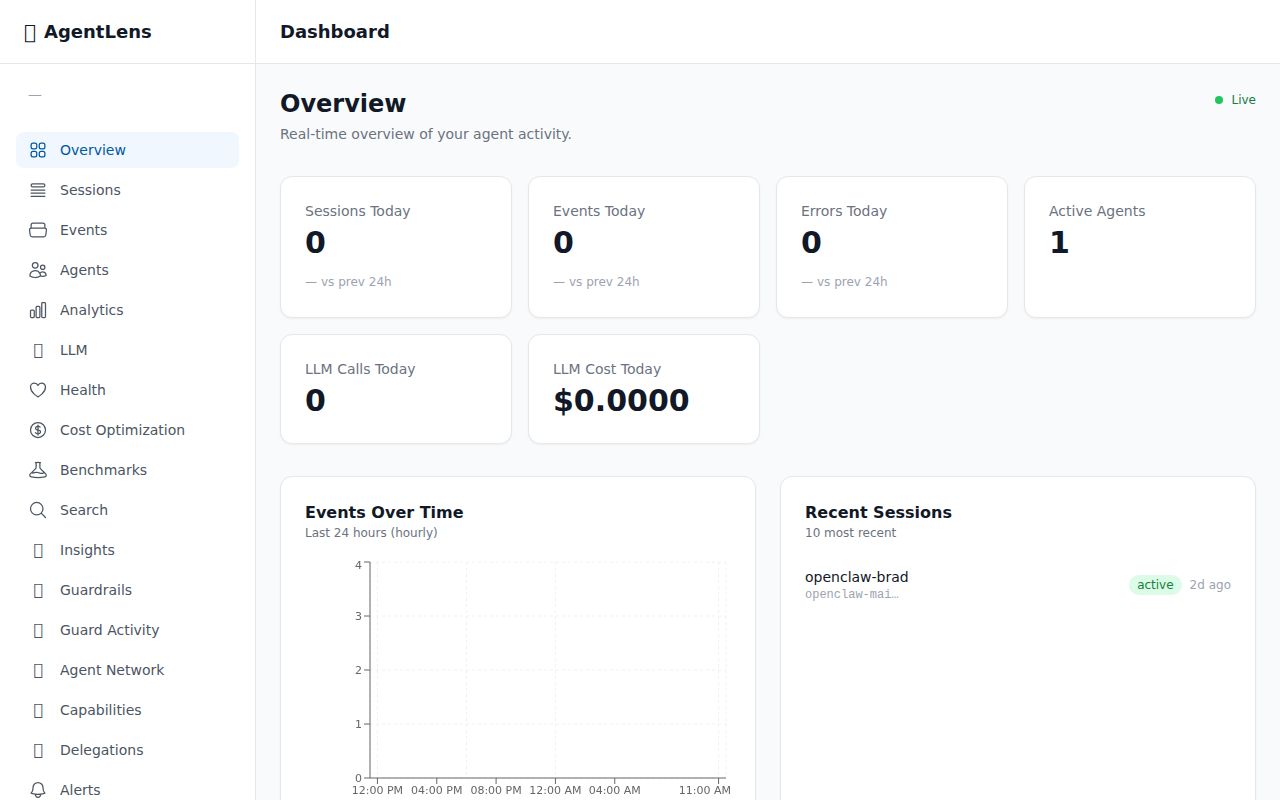
The overview page shows live metrics — sessions, events, errors, and active agents — with a 24-hour event timeline chart, recent sessions with status badges, and a recent errors feed.
Sessions — Track Every Agent Run
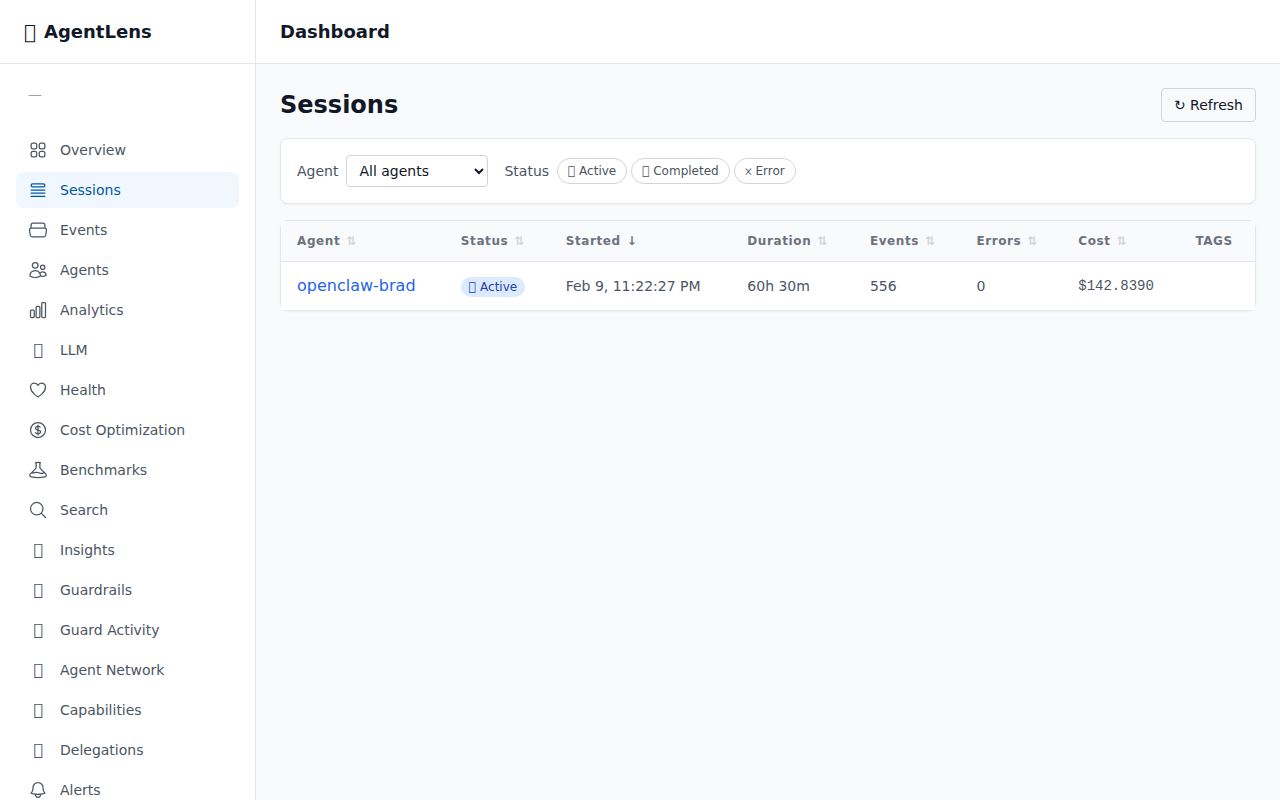
Every agent session with sortable columns: agent name, status, start time, duration, event count, error count, and total cost.
Session Detail — Timeline & Hash Chain
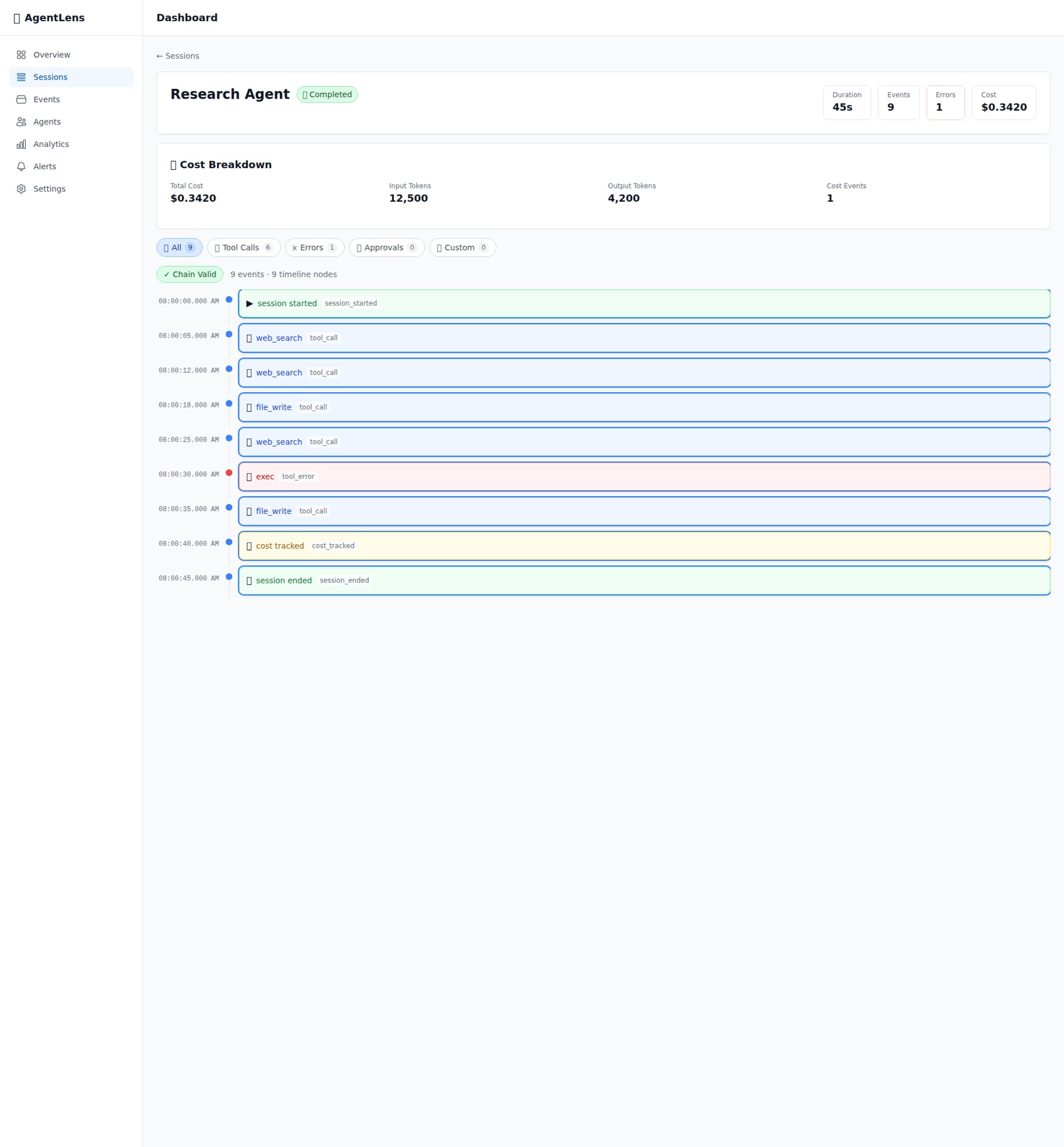
Full event timeline with tamper-evident hash chain verification. Filter by event type, view cost breakdown.
Events Explorer — Search & Filter Everything
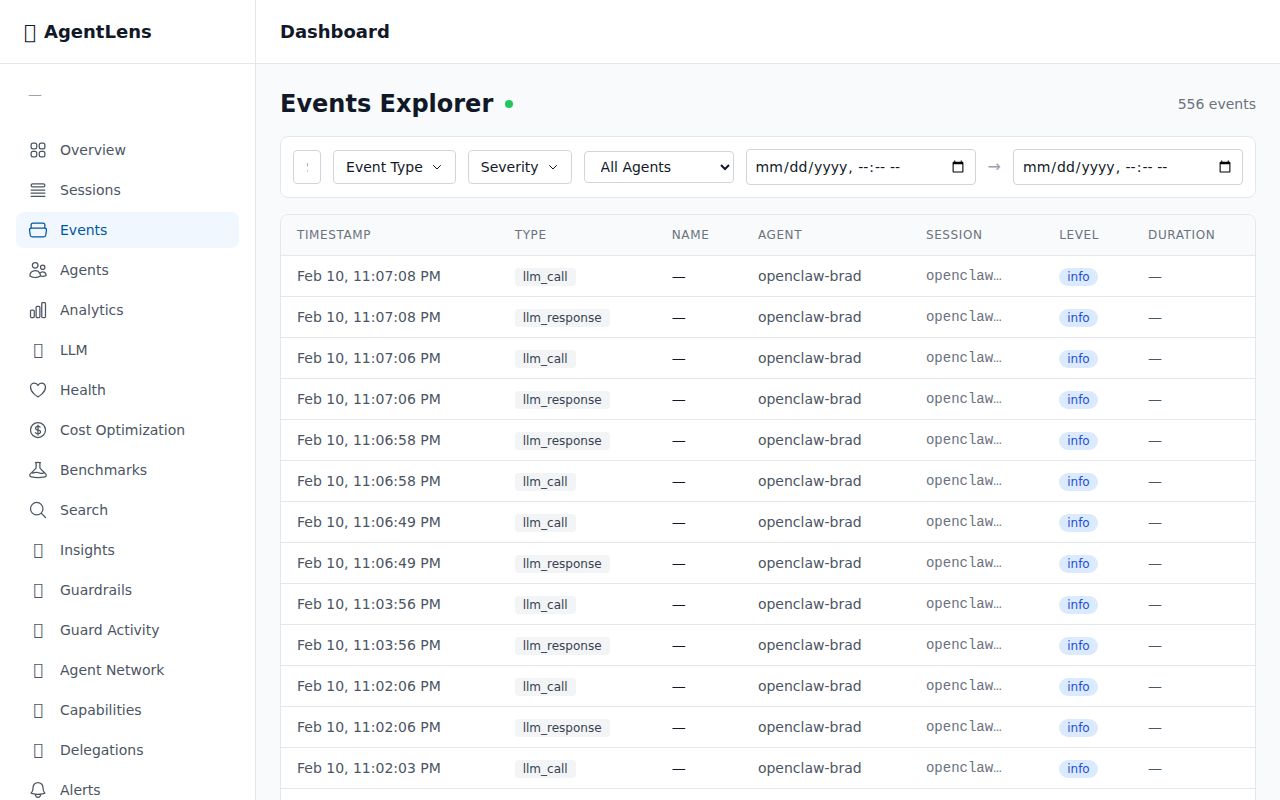
Searchable, filterable view of every event across all sessions.
🧠 LLM Analytics — Prompt & Cost Tracking
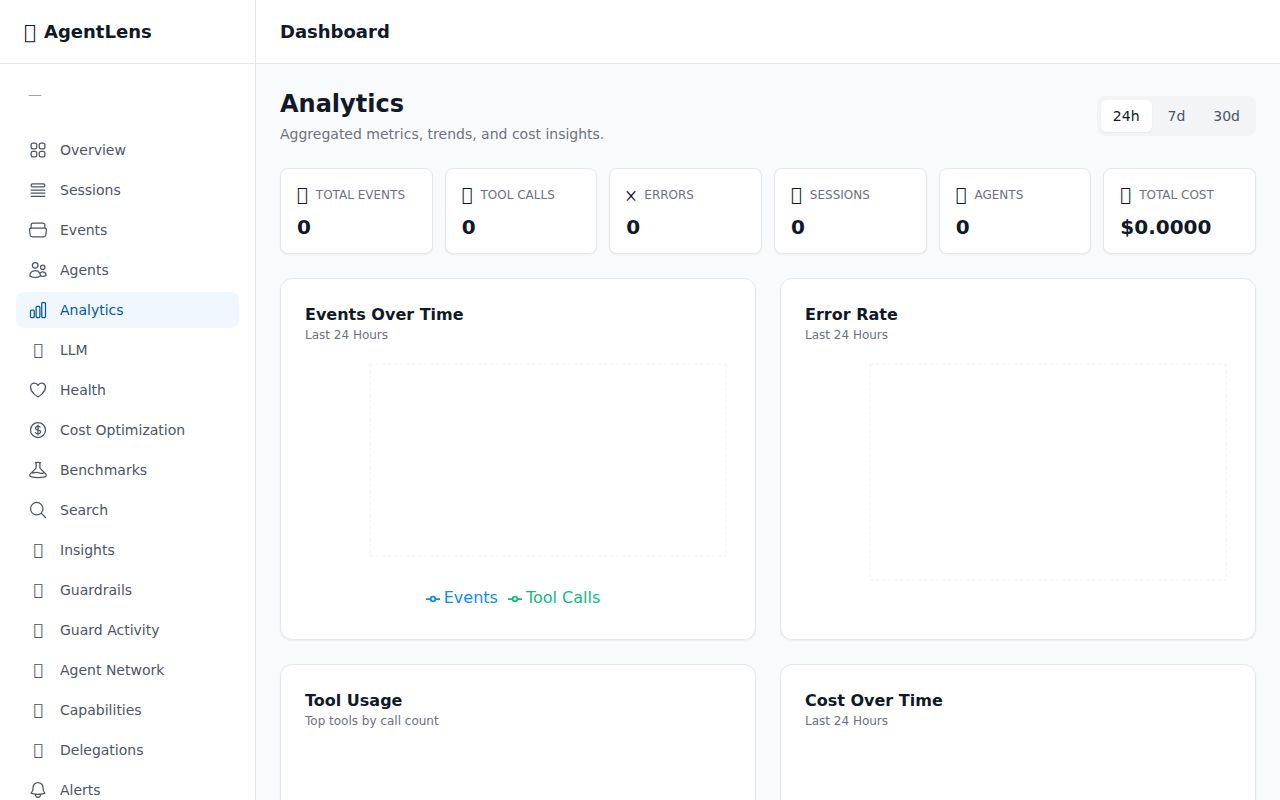
Total LLM calls, cost, latency, and token usage across all agents with model comparison.
🧠 Session Timeline — LLM Call Pairing
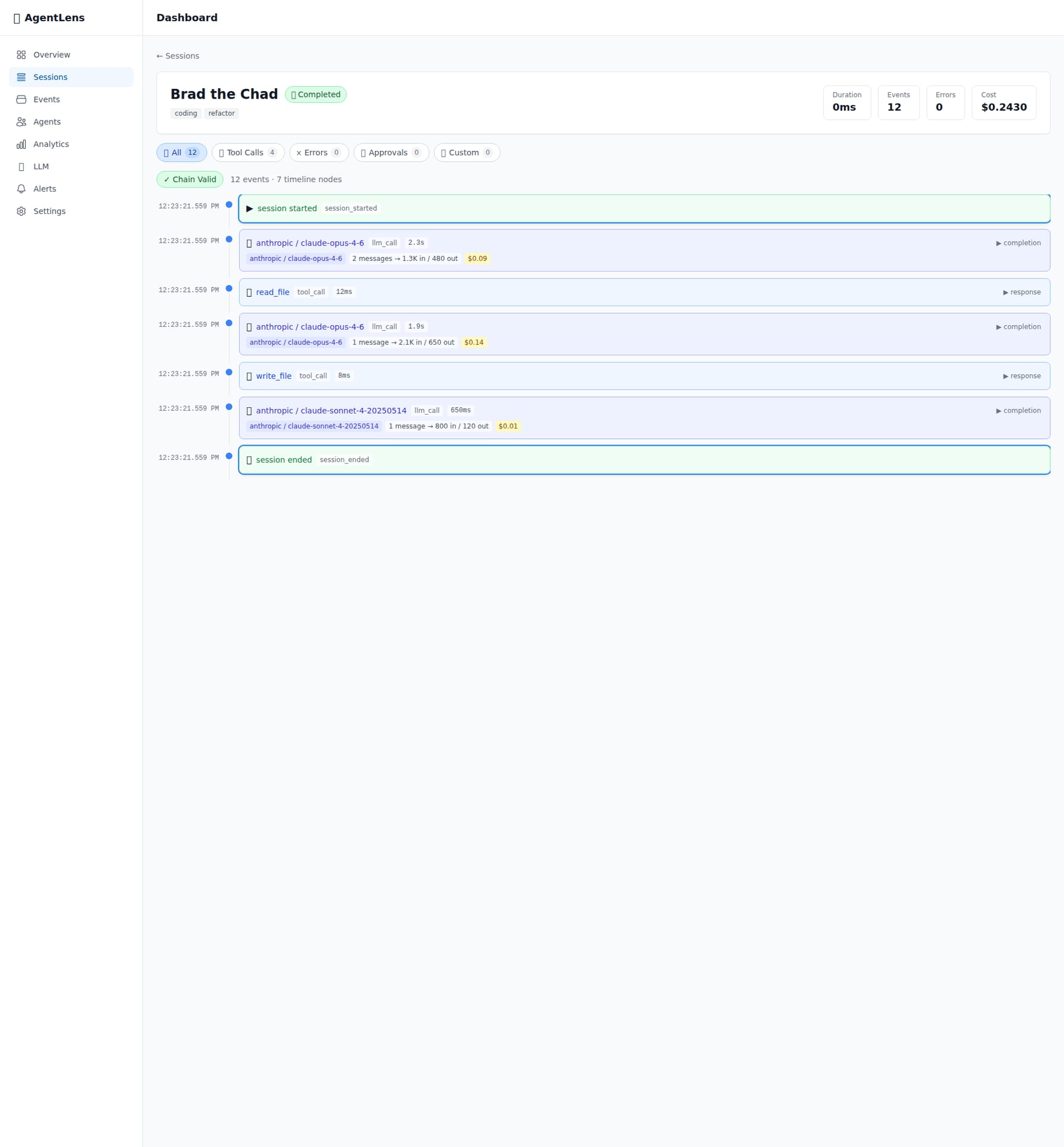
LLM calls in session timeline with model, tokens, cost, and latency.
💬 Prompt Detail — Chat Bubble Viewer
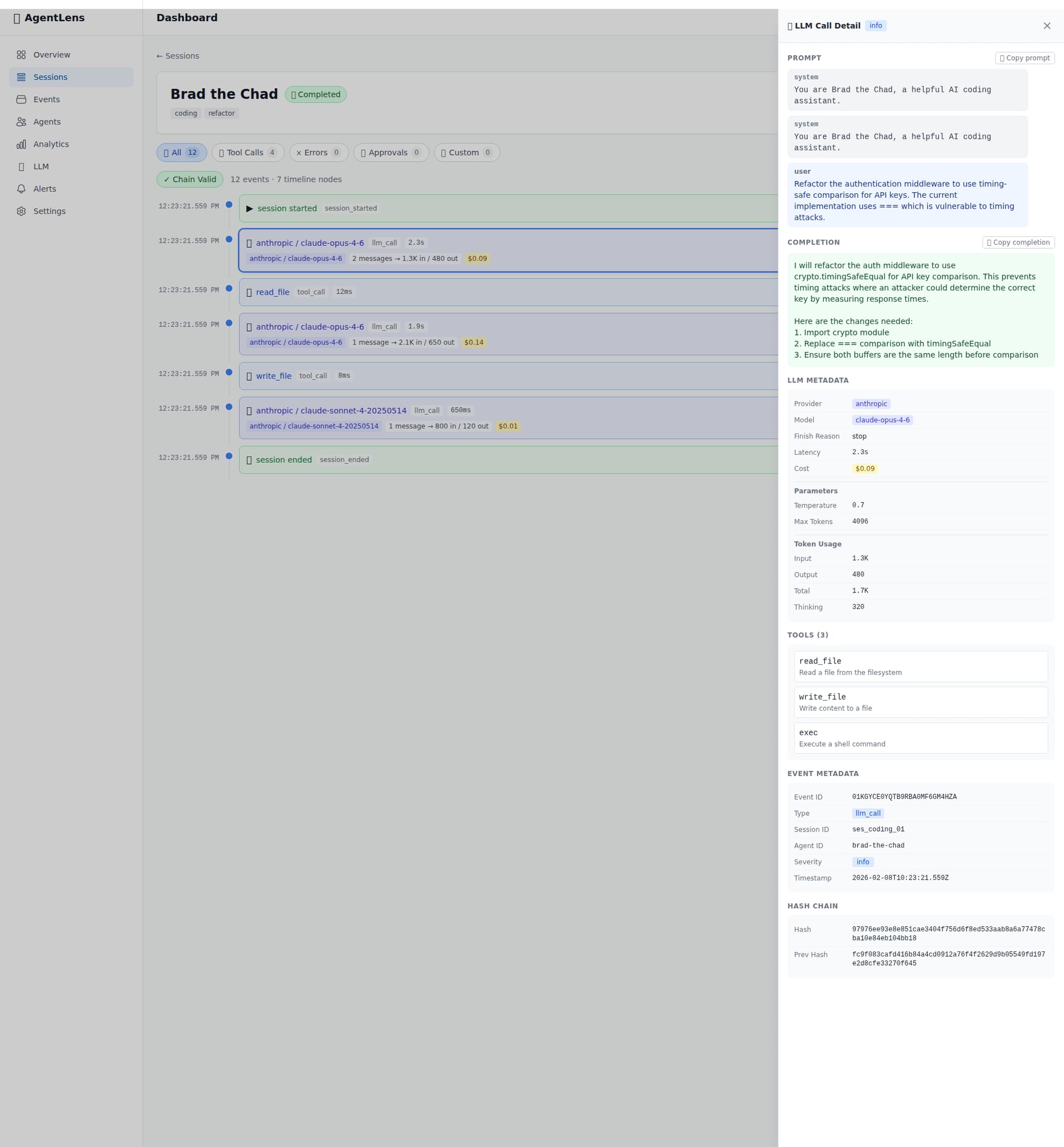
Full prompt and completion in a chat-bubble style viewer with metadata panel.
❤️🩹 Health Overview — Agent Reliability
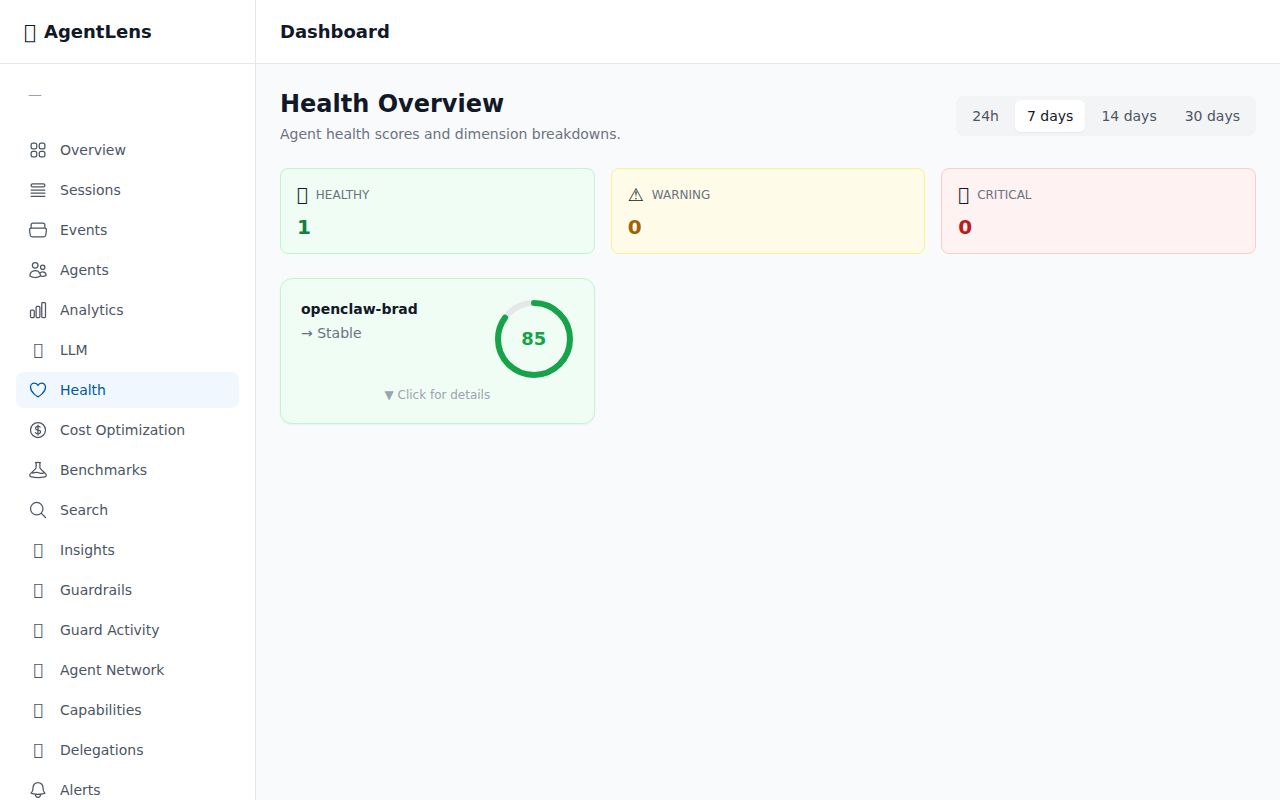
5-dimension health score for every agent with trend tracking.
💡 Cost Optimization — Model Recommendations
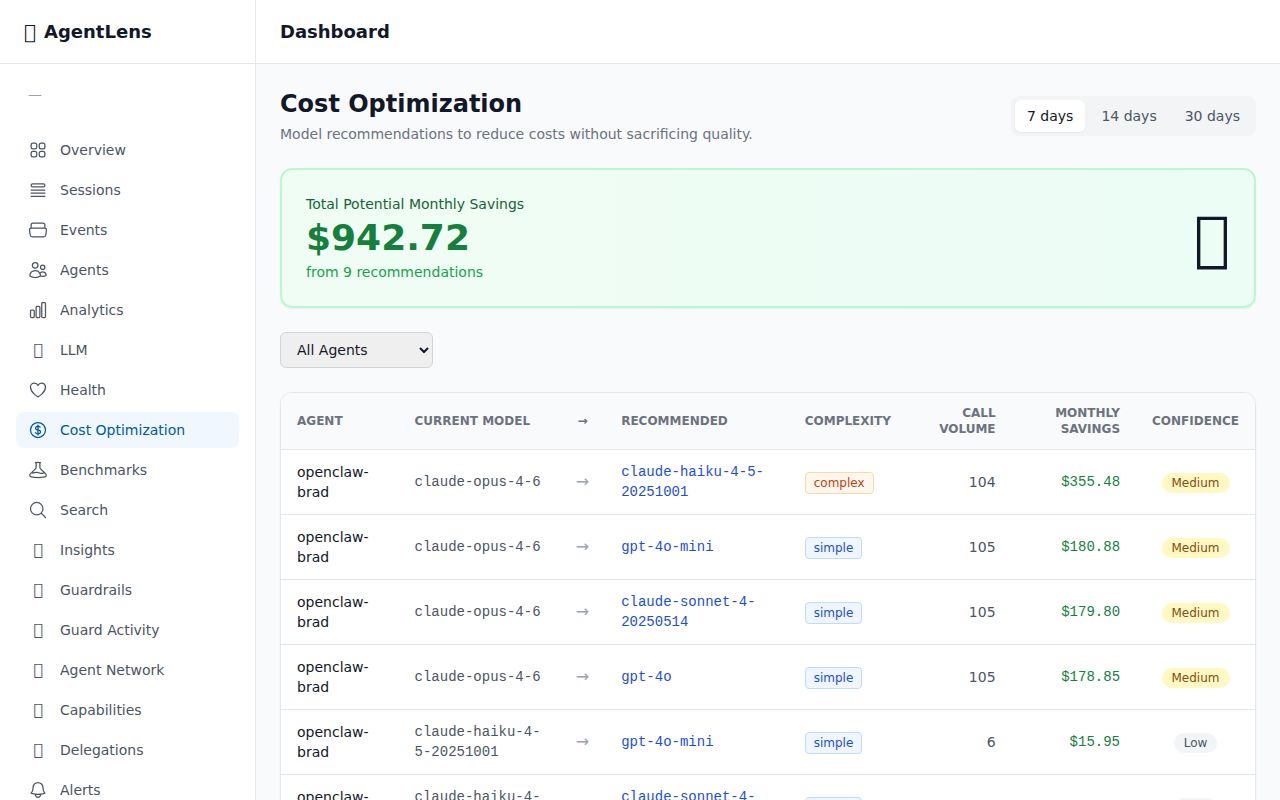
Analyzes LLM call patterns and recommends cheaper model alternatives with confidence levels.
📼 Session Replay — Step-Through Debugger
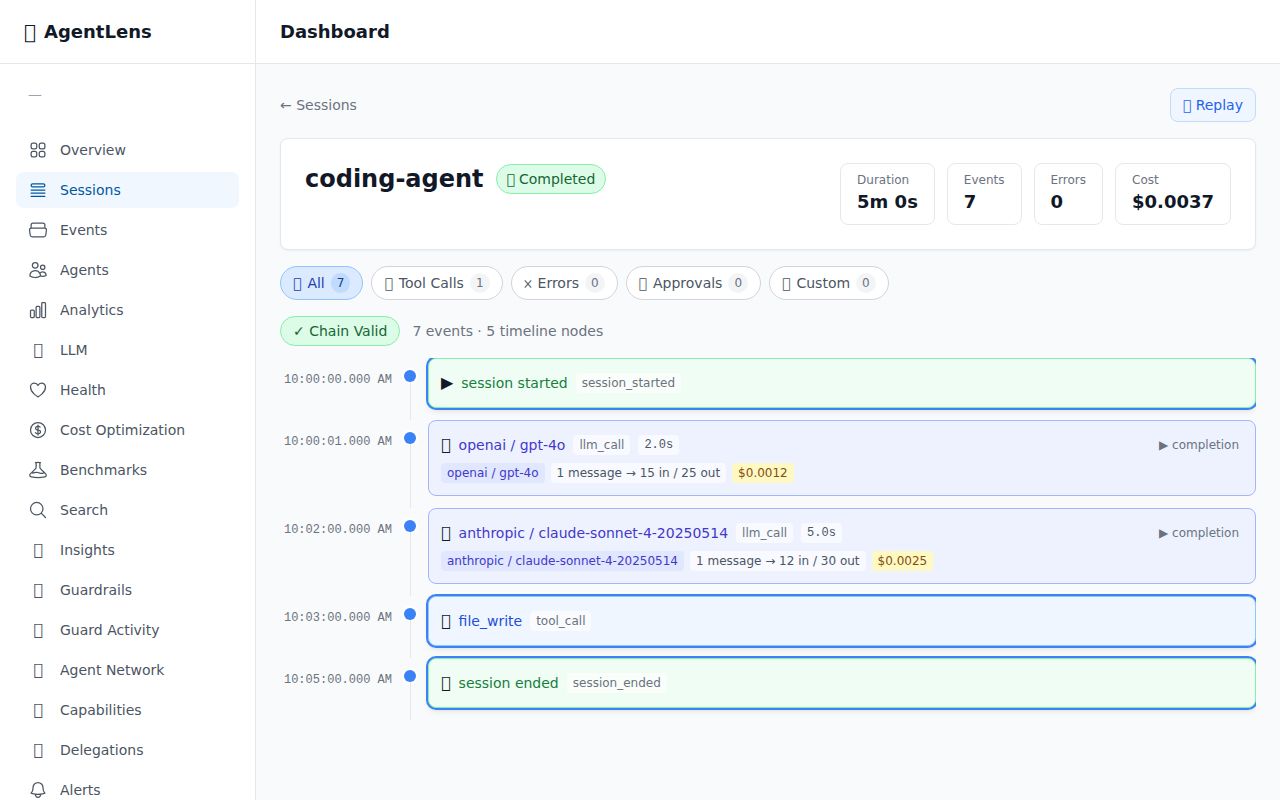
Step through any past session event by event with full context reconstruction.
⚖️ Benchmarks — A/B Testing for Agents
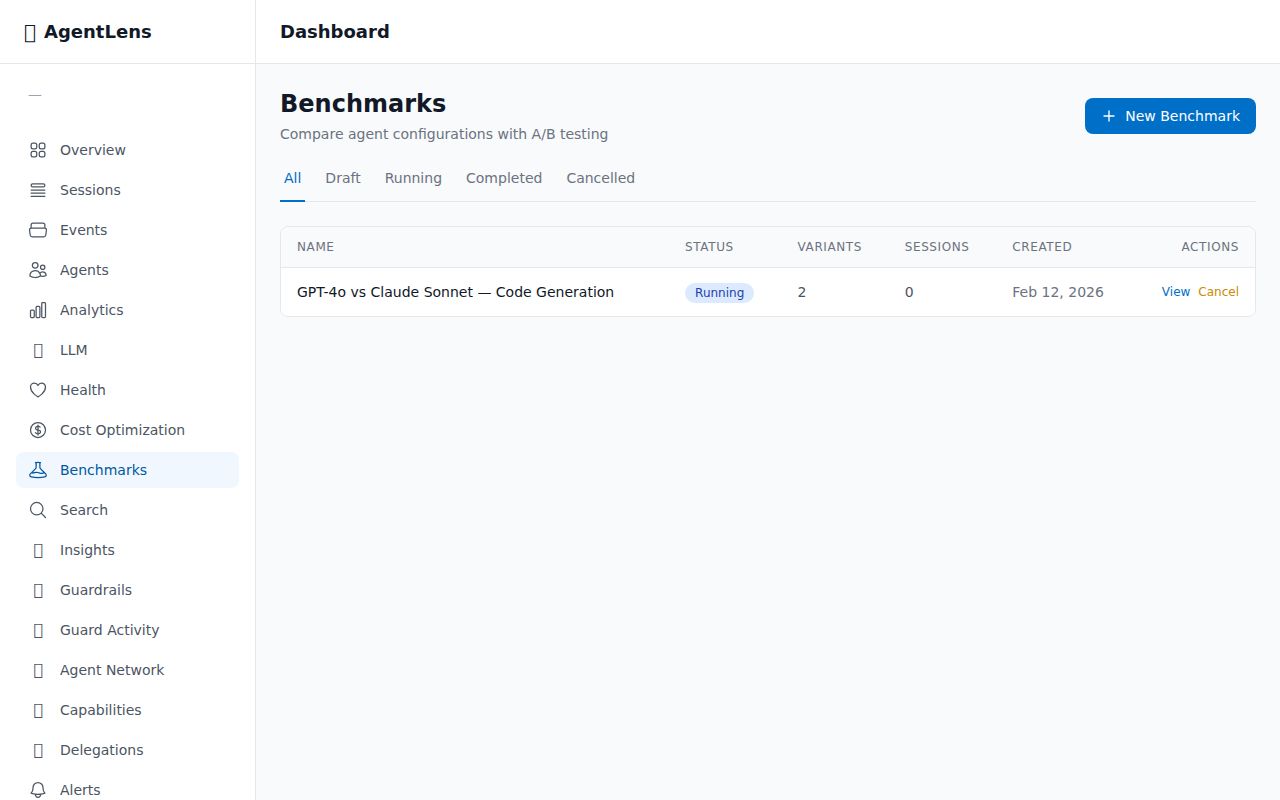
Create and manage A/B experiments with statistical significance testing.
🛡️ Guardrails — Automated Safety Rules
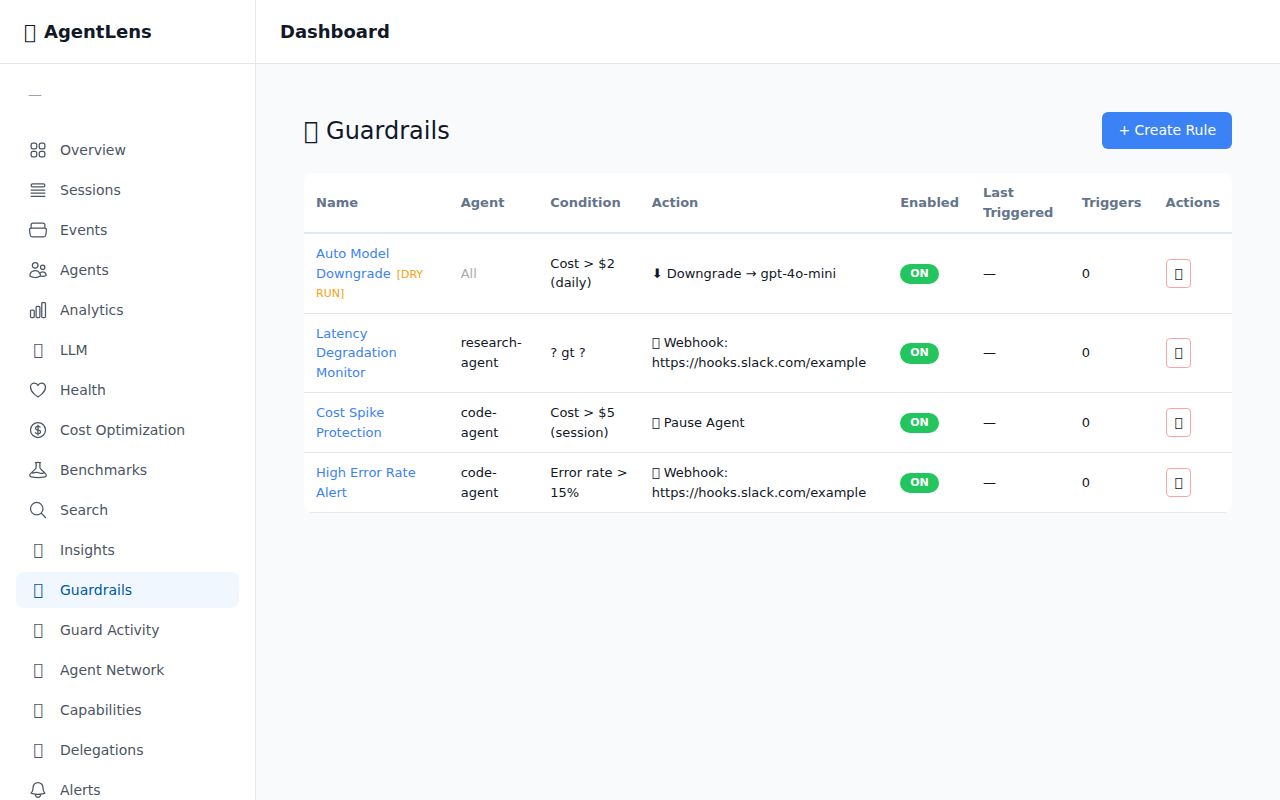
Create and manage automated safety rules with trigger history and activity feed.
☁️ AgentLens Cloud
Don't want to self-host? AgentLens Cloud is a fully managed SaaS — same SDK, zero infrastructure:
import agentlensai
agentlensai.init(cloud=True, api_key="als_cloud_your_key_here", agent_id="my-agent")
- Same SDK, one parameter change — switch
url=tocloud=True - Managed Postgres — multi-tenant with row-level security
- Team features — organizations, RBAC, audit logs
- No server to run — dashboard at app.agentlens.ai
📖 Cloud Setup Guide · Migration Guide · Troubleshooting
📦 Packages
Python (PyPI)
| Package | Description | PyPI |
|---|---|---|
agentlensai | Python SDK + auto-instrumentation for 9 LLM providers |  |
TypeScript / Node.js (npm)
| Package | Description | npm |
|---|---|---|
@agentkitai/agentlens-server | Hono API server + dashboard serving |  |
@agentkitai/agentlens-mcp | MCP server for agent instrumentation |  |
@agentkitai/agentlens-sdk | Programmatic TypeScript client |  |
@agentkitai/agentlens-core | Shared types, schemas, hash chain utilities |  |
@agentkitai/agentlens-cli | Command-line interface |  |
@agentkitai/agentlens-dashboard | React web dashboard (bundled with server) | private |
🔌 API Overview
| Endpoint | Description |
|---|---|
POST /api/events | Ingest events (batch) |
GET /api/events | Query events with filters |
GET /api/sessions | List sessions |
GET /api/sessions/:id/timeline | Session timeline with hash chain verification |
GET /api/analytics | Bucketed metrics over time |
⌨️ CLI
npx @agentkitai/agentlens-cli health                          # Overview of all agents
npx @agentkitai/agentlens-cli health --agent my-agent          # Detailed health with dimensions
npx @agentkitai/agentlens-cli optimize                          # Cost optimization recommendations
Both commands support --format json for machine-readable output. See agentlens health --help for all options.
🛠️ Development
git clone https://github.com/agentkitai/agentlens.git
cd agentlens
pnpm install

pnpm typecheck && pnpm test && pnpm lint  # Run all checks
pnpm dev                                   # Start dev server
Requirements: Node.js ≥ 20.0.0 · pnpm ≥ 10.0.0
🤝 Contributing
We welcome contributions! See CONTRIBUTING.md for setup instructions, coding standards, and the PR process.
🧰 AgentKit Ecosystem
| Project | Description | |
|---|---|---|
| AgentLens | Observability & tamper-evident audit trail for AI agents | ⬅️ you are here |
| AgentGate | Human-in-the-loop approval gateway + reactive guardrails | |
| Lore | Cross-agent memory and lesson sharing | |
| AgentEval | Testing & evaluation framework | |
| FormBridge | Agent-human mixed-mode forms |
📄 License
Installation
Source-derived launch command. Check the maintainer’s required arguments and credentials before running:
npx -y @agentkitai/agentlens-mcpSet up in your AI client
Merge this template into ~/Library/Application Support/Claude/claude_desktop_config.json. Keep existing servers. Add any arguments, credentials, and permissions required by the maintainer; this template has not been install-tested.
{
  "mcpServers": {
    "io-github-agentkitai-agentlens": {
      "command": "npx",
      "args": [
        "-y",
        "@agentkitai/agentlens-mcp"
      ]
    }
  }
}
Restart Claude Desktop completely for changes to take effect. Confirm the server appears connected in the client’s tool list, then try a read-only example from its documentation.
Claude Desktop setup referencePackage
Compatible MCP Clients
AgentLens works with any MCP-compatible client. Copy the config snippet from the Configuration section above and add it to the file shown for your client, then restart the application.
- Claude Desktop
~/Library/Application Support/Claude/claude_desktop_config.jsonRestart Claude Desktop completely for changes to take effect. - Cursor
~/.cursor/mcp.jsonRestart Cursor for changes to take effect. - VS Code
.vscode/mcp.jsonReload VS Code window for changes to take effect. - Windsurf
~/.codeium/windsurf/mcp_config.jsonRestart Windsurf for changes to take effect. - Claude Code
.mcp.jsonSave at the project root, then start Claude Code in that project and review the MCP server approval prompt. Keep real credentials out of shared files.