seatledger
Local ledger of Claude Code and Codex tokens, API-equivalent cost, limits and token-rate changes.
seatledger
What your coding-agent seats and tokens bought, from your own machine — and when the rate changed.
npx seatledger
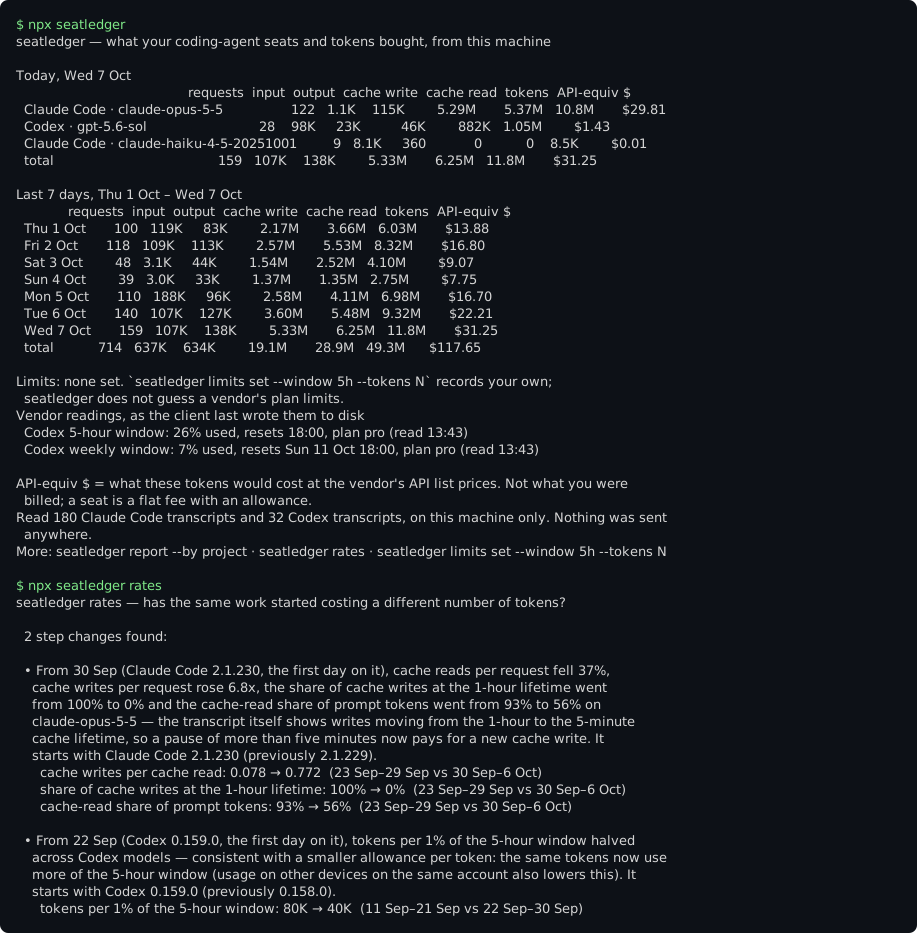
The picture is the real output of npx seatledger demo, which runs on synthetic history. It
is regenerated by pnpm screenshot and a test fails if it drifts from what the CLI prints.
seatledger reads the transcripts Claude Code and Codex already keep on your machine and tells you:
- tokens and API-equivalent dollars by day, project folder, model and client;
- how fast you are burning toward limits you set, and when you would reach them at this rate;
- when the rate changed: the same work suddenly costing more tokens per request, cache reads dropping because writes moved to a shorter cache lifetime, more tokens per turn after a client update, or Codex's own 5-hour window filling faster for the same tokens — with the date and the client version where it starts.
No vendor will build that last one: it is an alarm about their own rate. seatledger is MIT, has no
telemetry and no runtime dependencies, and needs no account. It makes no network calls unless you
create or join a team ledger — and then seatledger push sends daily
aggregates only, which seatledger push --dry-run prints in full.
Commands
npx seatledger                                  # today and the last 7 days, your limits, vendor readings
npx seatledger report --since 30d --by project  # --by day | project | model | client, --since 2026-09-01
npx seatledger rates                            # step changes over the last 90 days (--since, --client, --model)
npx seatledger limits set --window 5h --tokens 40M     # or --usd 25; --window weekly; --client codex
npx seatledger limits                           # your limits, burn rate, projected time to each
npx seatledger mcp                              # read-only MCP server on stdio
npx seatledger demo                             # all of the above on synthetic history

# the team ledger (optional; the only commands that send anything)
npx seatledger team create --name "Acme platform"   # a free team for up to 3; prints the invite link
npx seatledger team join <invite link> --as alice   # your key goes to ~/.seatledger/team.json (0600)
npx seatledger push --dry-run                   # exactly what would be sent; sends nothing
npx seatledger push                             # this machine's daily aggregates to the team
npx seatledger team                             # the team's plan and your seat
Every command takes --json, --client claude-code|codex, --claude-dir, --codex-dir,
--no-cache and --quiet. Without npm: npx github:agentwares/seatledger runs the same CLI from this
repository (it ships its built dist/).
What it reads
| Client | Where | What it takes |
|---|---|---|
| Claude Code | ~/.claude/projects/**/*.jsonl (or $CLAUDE_CONFIG_DIR/projects, ~/.config/claude/projects) | each response's usage (input, output, cache reads, cache writes split into 5-minute and 1-hour), model, version, requestId, timestamp, working-directory folder |
| Codex CLI | ~/.codex/sessions/** and archived_sessions/ (or $CODEX_HOME) | token_usage_record per response (newer versions) or token_count events, the turn's model, cli_version, and the rate_limits readings Codex writes |
Checked on 7 October 2026 against Claude Code transcripts written by versions up to 2.1.286 (the
changelog was at 2.1.292) and
Codex rollouts written by 0.144–0.159, plus the Codex source at
rust-v0.160.1
(TokenUsage, TokenUsageRecord, RateLimitSnapshot). Things the formats do that a naive
reader gets wrong, and seatledger handles:
- Claude Code writes one response as several lines, and only the last carries the final
output_tokens. seatledger merges them permessage.id:requestIdand keeps the largest count. - The same response appears in more than one file (subagent transcripts, resumed and set-aside sessions); requests are deduplicated across files.
- Codex's
input_tokensalready includes cached and cache-written input. - Unknown fields are ignored and a line cut off mid-write is skipped, never fatal.
Not read (yet): Gemini CLI was not installed where this was built, so its local record could not be checked against real files; Cursor's local store is an undocumented SQLite database and the copy checked held no per-request token counts. Neither is guessed at.
API-equivalent, not your bill
Dollars are API-equivalent: what the same tokens would cost at the vendor's API list prices. On a Pro, Max, Plus or Team seat you pay a flat fee; this is what that seat's usage would have cost on the API, which is the number to compare seats, plans and months by. It is labelled everywhere it appears. Prices come from a dated table in the package, with its sources:
- Anthropic, platform.claude.com/docs/en/about-claude/pricing, read 7 Oct 2026 — base input, 5-minute and 1-hour cache writes, cache reads, output; fast mode; 1.1x for US-only inference.
- OpenAI, developers.openai.com/api/docs/pricing, read 7 Oct 2026 — input, cached input, cache writes, output, and long-context prices above 272K input tokens.
A model without a list price (Codex's internal codex-auto-review, for one) is counted in tokens
and its dollars are reported as unpriced, never estimated.
The rate-change detector
seatledger rates looks, per client and model, at complete days with at least 20 requests:
| Metric | What a step in it usually means |
|---|---|
| tokens per request | a bigger fixed prompt (system prompt, tools, skills, MCP definitions) or bigger context |
| cache-read share of prompt tokens | the cache is being read less, written more |
| cache writes per cache read | the same, as a ratio |
| tokens per user turn | more requests per prompt: more tool calls or subagents |
| share of cache writes at 1-hour (CC) | recorded directly: writes moved between the 1-hour and 5-minute cache lifetimes |
| tokens per 1% of the 5-hour window (Codex) | the vendor's own quota reading against the tokens spent: allowance per token |
A day D is flagged when the median of D and up to 6 active days after it differs from the median of up to 7 active days before it by at least 30% (10 percentage points for shares), at least three quarters of the days on each side sit on their own side of the midpoint, and the difference is more than three times the day-to-day spread. It reports the date, the client version in use and whether D was the first day on it, the before and after values, and what the change is consistent with — for example:
From 30 Sep (Claude Code 2.1.230, the first day on it), cache reads per request fell 37%, cache writes per request rose 6.8x … — the transcript itself shows writes moving from the 1-hour to the 5-minute cache lifetime.
It sees requests on your machine, not the vendor's servers, so it never names a cause. A change in your own work (a new repository, a bigger task, more subagents) moves these numbers too, and when no client version change coincides it says so.
Limits
npx seatledger limits set --window 5h --tokens 40M
npx seatledger limits set --window weekly --usd 300 --client claude-code
npx seatledger limits clear --window 5h
seatledger does not ship any vendor's plan limits. They are not published as token counts, they
change without notice, and a hard-coded number would be wrong in a way you could not see. Set your
own — the "busiest window in 30 days" figure is a good start if you hit the limit then. A 5-hour
window opens at your first request and lasts five hours, the way Claude Code and Codex describe
theirs; weekly is the rolling last 7 days. Codex also writes its own 5-hour and weekly
percentages to disk; seatledger shows the latest as Codex reported them.
Your history outlives the transcripts
Claude Code deletes transcripts older than cleanupPeriodDays, 30 days by default
(docs). seatledger keeps the counts it has
taken — never text — in ~/.seatledger/cache-v1/, one small file per transcript, so the ledger and
the rate baselines keep their history after the transcript is gone. It also makes later runs fast:
only new or changed transcripts are read. Delete the directory to forget it, or pass --no-cache.
The team ledger
The local ledger answers "what did my seat buy". A team lead paying for ten seats wants the same for everyone, kept longer than a laptop keeps it, and an email when the rate changes on anyone's machine. That is the hosted team ledger, run by agentwares:
| Plan | Price | Developers | History | Alerts | CSV |
|---|---|---|---|---|---|
| Free | $0 | 3 | 30 days | findings on the dashboard | — |
| Team | $49/month | 10 | 13 months | email and Slack | yes |
| Business | $149/month | 50 | 13 months | email and Slack | yes |
Start one from the CLI
npx seatledger team create --name "Acme platform" # optional: --email <alert address> --as <your name>
That creates a Free team and saves its owner key to ~/.seatledger/team.json (readable by you
only, never printed), exactly as team join saves a developer's key, so npx seatledger push
works on this machine straight away. It prints the invite link to send your teammates — each runs
npx seatledger team join <link> --as <name> once, then npx seatledger push (by hand, or from a
cron or a session-end hook) — and the dashboard, where you sign in with GitHub and attach the team
with the owner key to upgrade, invite and revoke. --dry-run prints exactly what would be sent
and sends nothing. Creating a team accepts the
terms.
Or sign in with GitHub at
agentwares-agentcheck.vercel.app/seatledger,
which creates the team in the browser. An agent can create a free team with no human:
POST /api/seatledger/v1/teams {"accept_terms": true} returns an owner key and an invite link.
The one line about it
After seatledger, seatledger report and — when it found a step change — seatledger rates, a
terminal shows one dim line pointing at npx seatledger team create, at most once a day per
machine. It never appears with --json, in MCP output, when output is not a terminal, or once this
machine is on a team. --quiet or SEATLEDGER_QUIET=1 turns it off for good. It is text printed
on your screen; the only state is the day it was last shown, in ~/.seatledger/hint.json, and
nothing is sent.
Exactly what push sends
One JSON document (seatledger.push/v1); seatledger push --dry-run prints it in full and sends
nothing.
days— every local day the push covers, from the first day this machine has history for. The ledger's rows for those days become exactly the pushed rows, so pushing a day again replaces it, never adds to it.rows— one per day × client × client version × model:requests,input_tokens,output_tokens,cache_read_tokens,cache_write_tokensandapi_equivalent_usd(null for a model without a list price).findings— whatseatledger ratesfound in at least the last 90 days, as numbers and ids: client, model, the day it starts, the client version and the one before it, whether that was the first day on it, and per metric the before and after medians. The sentence you read locally is rebuilt by the service from these numbers; no text is sent. A finding sent again is the same finding.
Never sent: prompt, response, tool or file content; file paths; session or request ids; your
project folder names — unless you pass --project-names, which splits rows by working-directory
folder name (letters, digits, ., _, -; anything else becomes -). Every text field the
service accepts is an id with no spaces and a short length limit; a field that could carry a
sentence is refused.
The first push sends up to 400 days (the plan keeps what it keeps and says which days it did not
store); later pushes start two days before the last one. --since 30d or --since 2026-09-01
overrides that. The key is your own (the owner can revoke it); it lives in
~/.seatledger/team.json, readable by you only, or in SEATLEDGER_KEY. The invite link's host is
where your pushes go; SEATLEDGER_URL overrides it.
From your agent
MCP (npx -y seatledger mcp, stdio, read-only): seatledger_usage_summary and
seatledger_rate_changes read this machine and make no request; seatledger_team_summary reads the
team ledger this machine created or joined, with its saved key (one HTTPS request, changes
nothing). Strict
input schemas, errors with code, cause, fix, retryable.
claude mcp add seatledger -- npx -y seatledger mcp
{ "mcpServers": { "seatledger": { "command": "npx", "args": ["-y", "seatledger", "mcp"] } } }
Whatever a tool returns goes to your agent's model provider like any other tool result, project folder names included.
Claude Code plugin (and Copilot CLI, which reads the same marketplace file):
/plugin marketplace add agentwares/seatledger, then /plugin install seatledger@seatledger.
/seatledger:usage explains the ledger and your limits; /seatledger:rates explains any step
change.
Gemini CLI: gemini extensions install https://github.com/agentwares/seatledger, then
/seatledger:usage and /seatledger:rates.
Privacy
- Reads
~/.claude/projectsand~/.codex/sessions(or the directories you point it at). - Keeps counts, timestamps, request and session ids, model ids, client versions, working-directory folder names and the paths of the transcripts it read. It never stores or prints prompt, response, tool or file content: most transcript lines are skipped before they are parsed, and the records it keeps have no field that could hold text.
- Writes only to
~/.seatledger(limits.json,cache-v1/,hint.json— the day the team line was last shown — andteam.jsononce you create or join a team), or$SEATLEDGER_HOME. - Has no runtime dependencies. Makes no network calls, except
seatledger team create(the team name and the alert address you pass),seatledger team join,seatledger push,seatledger teamand theseatledger_team_summarytool, which talk to the team ledger you created or joined and send what is listed under Exactly whatpushsends.
As a library
import { load, groupRows, dailySeries, rateReport } from "seatledger";

const { requests, quota } = await load();
const byModel = groupRows(requests, "model");
const { findings } = rateReport(dailySeries(requests, quota));
Develop
pnpm install && pnpm test   # the test script builds dist/ first
node dist/cli.js demo
pnpm screenshot                # regenerate docs/screenshot.svg after changing the output
MIT © agentwares contributors.
Installation
Source-derived launch command. Check the maintainer’s required arguments and credentials before running:
npx -y seatledgerSet up in your AI client
Merge this template into ~/Library/Application Support/Claude/claude_desktop_config.json. Keep existing servers. Add any arguments, credentials, and permissions required by the maintainer; this template has not been install-tested.
{
  "mcpServers": {
    "io-github-agentwares-seatledger": {
      "command": "npx",
      "args": [
        "-y",
        "seatledger"
      ]
    }
  }
}
Restart Claude Desktop completely for changes to take effect. Confirm the server appears connected in the client’s tool list, then try a read-only example from its documentation.
Claude Desktop setup referencePackage
Compatible MCP Clients
seatledger works with any MCP-compatible client. Copy the config snippet from the Configuration section above and add it to the file shown for your client, then restart the application.
- Claude Desktop
~/Library/Application Support/Claude/claude_desktop_config.jsonRestart Claude Desktop completely for changes to take effect. - Cursor
~/.cursor/mcp.jsonRestart Cursor for changes to take effect. - VS Code
.vscode/mcp.jsonReload VS Code window for changes to take effect. - Windsurf
~/.codeium/windsurf/mcp_config.jsonRestart Windsurf for changes to take effect. - Claude Code
.mcp.jsonSave at the project root, then start Claude Code in that project and review the MCP server approval prompt. Keep real credentials out of shared files.