AlgoVault — Crypto Quant Trade Calls
The Brain Layer for AI Trading Agents — quant calls + cross-venue arb across perp venues via MCP.
Quick start (30 seconds)
No code. No API key. No install. The server speaks Streamable HTTP at https://api.algovault.com/mcp — any Model Context Protocol client connects directly.
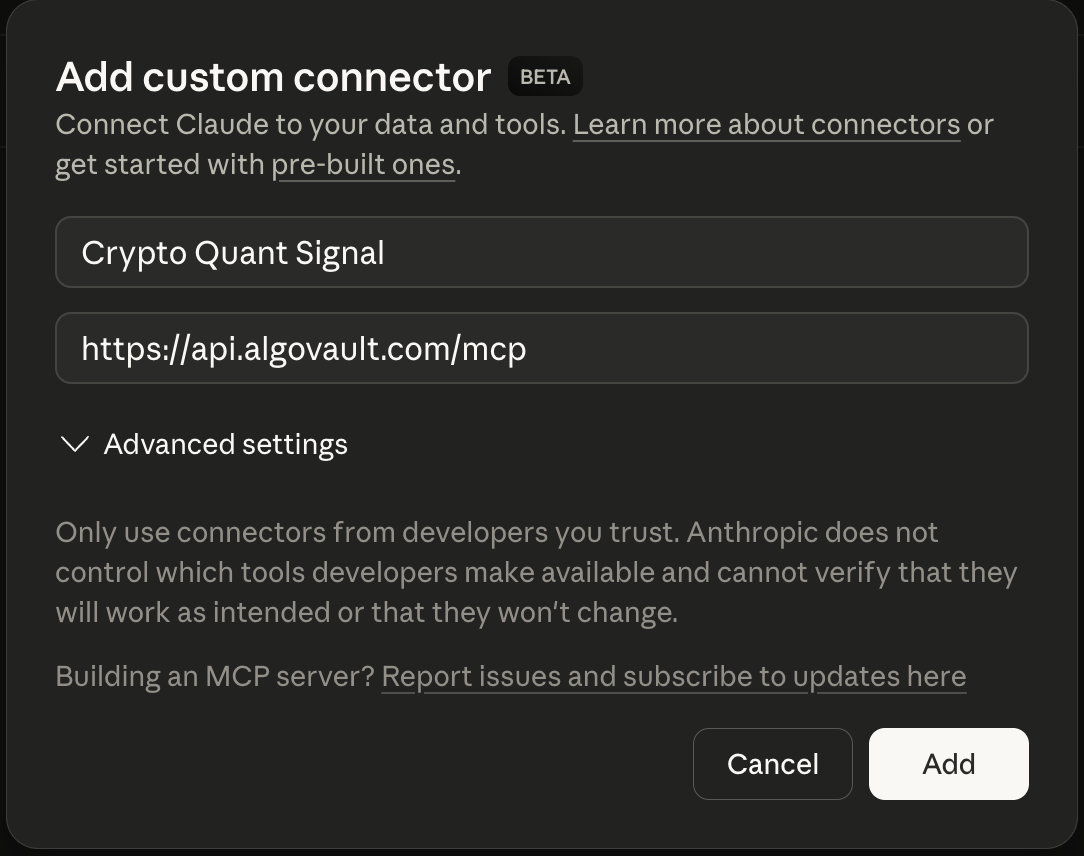
1. Add the connector. In Claude → Settings → Connectors → Add custom connector:
| Field | Value |
|---|---|
| Name | Crypto Quant Signal |
| URL | https://api.algovault.com/mcp |
2. Ask for a call. In plain language:
"Get me a trade call for ETH on the 4h timeframe"
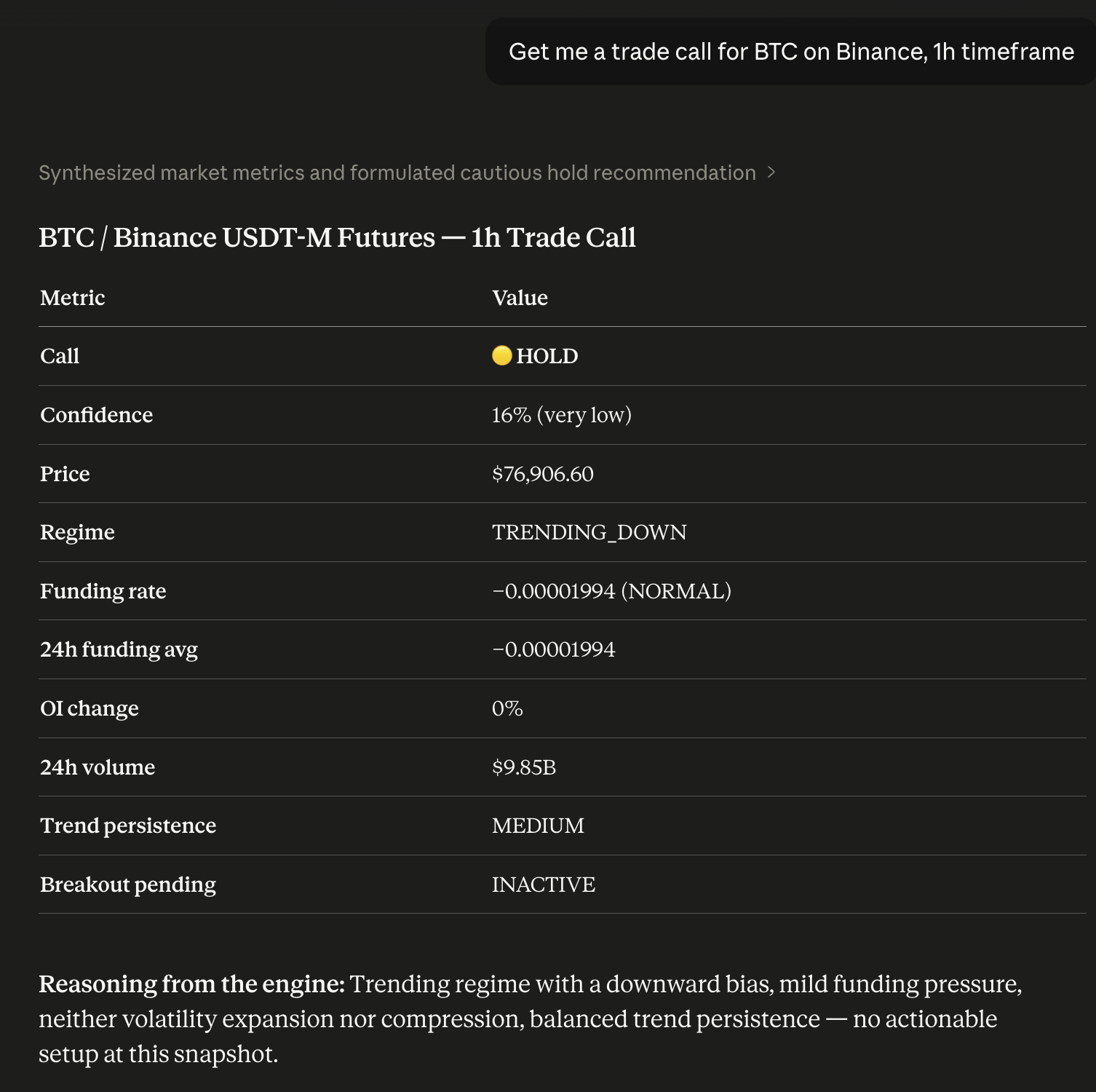
Your Claude now has a quant analyst built in. Prefer local? Run npx -y crypto-quant-signal-mcp.
Running locally on npm 12+? npm v12 disables dependency install scripts by default. AlgoVault's optional local SQLite mode uses the native
better-sqlite3module — if you install it into a project, runnpm approve-scripts(ornpm install --allow-scripts) to build it. The hosted HTTP transport (api.algovault.com/mcp) needs no local build.
What one call returns
One API call. One verdict. Not 8 raw indicators. get_trade_call returns a directional BUY / SELL / HOLD with a confidence score and the detected market regime — a composite verdict, not a data dump for your agent to interpret.
Under the hood, a self-tuning model fuses momentum, trend structure, derivatives positioning, open interest, and volume into one weighted call. Every call reports market regime — trending, ranging, or volatile — alongside direction and confidence. Directional calls fire only when conviction clears the threshold; roughly 99% of evaluations return HOLD.
{
  "call": "BUY",
  "confidence": 78,
  "price": 84250.50,
  "indicators": {
    "funding_rate": 0.0001,
    "funding_24h_avg": 0.00008,
    "funding_state": "NORMAL",
    "oi_change_pct": 2.4,
    "volume_24h": 2381602633,
    "trend_persistence": "HIGH",
    "breakout_pending": "INACTIVE"
  },
  "regime": "TRENDING_UP",
  "reasoning": "Trending regime, upward bias. Funding pressure mild. Volatility neither expanding nor compressed. Trend persistence elevated; momentum structure. Strong conviction from aligned signals.",
  "timestamp": 1712764800,
  "coin": "BTC",
  "timeframe": "1h",
  "also_see": [
    { "coin": "ETH", "timeframe": "1h", "confidence": 82 },
    { "coin": "SOL", "timeframe": "15m", "confidence": 73 }
  ],
  "_algovault": {
    "version": "1.30.0",
    "tool": "get_trade_call",
    "compatible_with": ["crypto-quant-risk-mcp", "crypto-quant-backtest-mcp"]
  }
}
The _algovault block makes outputs composable: downstream risk and backtest tools accept the object directly.
Live, verifiable track record
The full record is public and on-chain — no cherry-picking, no survivorship bias:
- Live dashboard — algovault.com/track-record
- Merkle batch verifier — algovault.com/verify
- Anchor contract on Base L2 —
0x6485…0f81 - All batches (raw JSON) — api.algovault.com/api/merkle-batches
AlgoVault is also a verified agent on the ERC-8004 Identity Registry (Base L2), agentId 44544 — a portable, on-chain handle AI orchestrators can resolve.
Works with your stack
AlgoVault is drop-in for every MCP-spec client, every major agent framework, and every official exchange Agent Trade Kit — no SDK, no wrapper. It serves Streamable HTTP at https://api.algovault.com/mcp; tools/list + resources/list is the API surface.
MCP clients.
| Client | Config |
|---|---|
| Claude Desktop | Settings → Connectors → Add custom connector → https://api.algovault.com/mcp |
| Claude Code (CLI) | claude mcp add crypto-quant-signal https://api.algovault.com/mcp |
| Cursor | ~/.cursor/config.json → mcpServers block → url: "https://api.algovault.com/mcp" |
| Cline | VS Code Cline extension → MCP server settings → add Streamable HTTP server |
| Codex (OpenAI CLI) | ~/.codex/config.toml → [mcp_servers.algovault] table + url = "https://api.algovault.com/mcp" (or codex mcp CLI) |
| Windsurf | ~/.codeium/windsurf/mcp_config.json → mcpServers.algovault.serverUrl = "https://api.algovault.com/mcp" |
| Continue.dev | config.yaml → mcpServers: [{ name: algovault, type: streamable-http, url: "https://api.algovault.com/mcp" }] |
| Any other MCP-spec-compliant client | Configure the Streamable HTTP transport with URL https://api.algovault.com/mcp |
Agent frameworks. First-party tutorials pair AlgoVault with each framework's canonical MCP adapter — copy-pasteable demo code, no SDK.
| Framework | Tutorial | Runnable demo | Mirror |
|---|---|---|---|
| LangChain | docs/integrations/langchain.md | examples/langchain/demo.py | algovault.com/integrations/langchain |
| LlamaIndex | docs/integrations/llamaindex.md | examples/llamaindex/demo.py | algovault.com/integrations/llamaindex |
| Microsoft Agent Framework | docs/integrations/maf.md | examples/maf/demo.py | algovault.com/integrations/maf |
| CrewAI | docs/integrations/crewai.md | examples/crewai/demo.py | algovault.com/integrations/crewai |
Each demo is runnable as python examples/<framework>/demo.py BTC 4h — gets a real BUY/SELL/HOLD verdict from api.algovault.com/mcp, prints it. ≤5 minutes to first call.
Exchange Agent Trade Kits. AlgoVault returns the analytics; your agent's risk policy decides what to execute. All demos run testnet/demo only. For Binance, the Agent OS path is the recommended default for new integrations — OAuth at connect time, no API keys on the machine; the key-based kit remains right for custom order types.
Tools & resources
The MCP tools live at https://api.algovault.com/mcp. Every asset works across the full supported timeframe range, on major crypto perpetual venues.
get_trade_call(aliasget_trade_signal) — composite BUY/SELL/HOLD verdict with confidence + regime, any asset, any timeframe.scan_trade_calls— scans the top-N perps by open interest on a venue; returns every actionable call in one shot.scan_funding_arb— cross-venue funding-rate spreads across 7 venues (Hyperliquid, Binance, Bybit, Gate, KuCoin, Aster, OKX), ranked. The only MCP server doing multi-exchange derivatives arbitrage.get_market_regime— classifies TRENDING_UP / TRENDING_DOWN / RANGING / VOLATILE for strategy selection.search_knowledge+chat_knowledge— free BM25 search and grounded Q&A over the full knowledge bundle.get_track_record— the published track record as a tool call, for clients that bridge tools but not resources.includeopens the per-asset, per-venue and recent-call sections.
Performance is exposed as a read-only MCP resource: performance://signal-performance (aggregated PFE win rate, never raw outcomes). Full parameter reference at algovault.com/docs.
Skills (20 ready-to-use Anthropic Agent Skills)
Single-prompt wrappers over 1–3 tool calls — regime gating, multi-timeframe consensus, funding-arb monitoring, and more. Install with claude plugin install AlgoVaultLabs/algovault-skills; browse at algovault.com/skills.
Show all 20 Skills
| # | Slug | Name | Difficulty | Tools |
|---|---|---|---|---|
| 01 | quick-btc-check | Quick BTC Check | Beginner | get_trade_signal |
| 02 | portfolio-scanner | Portfolio Scanner | Intermediate | get_trade_signal |
| 03 | regime-aware-trading | Regime-Aware Trading | Intermediate | get_market_regime, get_trade_signal |
| 04 | funding-arb-monitor | Funding Arb Monitor | Intermediate | scan_funding_arb |
| 05 | full-3-tool-pipeline | Full 3-Tool Pipeline | Advanced | get_market_regime, get_trade_signal, scan_funding_arb |
| 06 | multi-timeframe-confirmation | Multi-Timeframe Confirmation | Advanced | get_trade_signal |
| 07 | tradfi-rotation | TradFi Rotation | Advanced | get_market_regime, get_trade_signal |
| 08 | risk-gated-entry | Risk-Gated Entry | Advanced | get_market_regime, get_trade_signal |
| 09 | funding-sentiment-dashboard | Funding Sentiment Dashboard | Advanced | get_market_regime |
| 10 | contrarian-meme-scanner | Contrarian Meme Scanner | Advanced | get_market_regime, get_trade_signal |
| 11 | divergence-detector | Divergence Detector | Advanced | get_market_regime, get_trade_signal |
| 12 | hourly-digest-bot | Hourly Digest Bot | Advanced | get_trade_signal, get_market_regime |
| 13 | hedging-advisor | Hedging Advisor | Advanced | get_market_regime, get_trade_signal, scan_funding_arb |
| 14 | volatility-breakout-watch | Volatility Breakout Watch | Advanced | get_market_regime, get_trade_signal |
| 15 | cross-asset-correlation | Cross-Asset Correlation | Advanced | get_trade_signal |
| 16 | funding-cash-and-carry | Funding Cash-and-Carry | Advanced | scan_funding_arb, get_trade_signal |
| 17 | weekend-vs-weekday-patterns | Weekend vs Weekday Patterns | Research | get_trade_signal, get_market_regime |
| 18 | agent-portfolio-rebalance | Agent Portfolio Rebalance | Advanced | get_market_regime |
| 19 | smart-dca-bot | Smart DCA Bot | Advanced | get_trade_signal |
| 20 | multi-agent-war-room | Multi-Agent War Room | Expert | get_market_regime, get_trade_signal, scan_funding_arb |
Pricing
Quota-only tiers. Every tier gets all venues, all assets, all timeframes — you pay for call volume, nothing else.
Two meters per paid tier, monthly and daily, enforced independently: a call is refused when either is exhausted, and the daily window is a UTC calendar day resetting at 00:00 UTC. Quota is counted per call, regardless of verdict.
| Feature | Free | Starter ($9.99/mo · $39.90/6mo) | Pro ($49/mo · $129/6mo) | Enterprise (contact us) | x402 (per call) |
|---|---|---|---|---|---|
| Exchanges | All 15 | All 15 | All 15 | All 15 | All 15 |
| Assets | All 740+ | All 740+ | All 740+ | All 740+ | All 740+ |
| Asset classes | Crypto + TradFi | Crypto + TradFi | Crypto + TradFi | Crypto + TradFi | Crypto + TradFi |
| Timeframes | All 11 | All 11 | All 11 | All 11 | All 11 |
| Funding arb results | Top 5 | Unlimited | Unlimited | Unlimited | Unlimited |
| Track record | Full access | Full access | Full access | Full access | Full access |
| Monthly calls | 200/mo | 10,000/mo | 100,000/mo | Custom volume — contact us | Unlimited |
| Daily calls | 100/day | 1,000/day | 10,000/day | Custom volume — contact us | Unlimited |
| Price | $0 | $9.99/mo or $39.90/6mo | $49/mo or $129/6mo | Contact us | $0.01–0.05/call |
Subscriptions: Sign up at api.algovault.com/signup. Starter unlocks 10,000 calls/mo (up to 1,000/day) for $9.99/mo, or $39.90 for six months prepaid — add ?interval=6month to pick the prepay term. API key delivered instantly after checkout.
Pro 6-month is currently $129 — limited-time pricing; subscribe now and renewals keep your price.
x402 micropayments: AI agents pay per HTTP call with USDC on Base — no signup, no API key, no billing. The payment receipt is the credential. See x402.org.
What's new in v1.30.0
- 🔑 Your key, one click away. Every tool response that carries an auth block now returns
claim_urlandclaim_hintin the_algovaultenvelope — a direct link to keep the key you are already using, and a heads-up before you reach the cap. - 💵 Six-month pricing is machine-readable.
GET /api/plans/publicgainsprice_usd_6monthon every tier, so a client can render prepay pricing instead of hardcoding it. - 🤝 Enterprise is quoted, not published. The plans endpoint now returns
nullfor Enterprise price and limits rather than a fixed figure. No key was removed — the values are null.
Upgrading from v1.29.x — nothing breaking, but one value changed: if you rendered an Enterprise price from GET /api/plans/public, it is now null and Enterprise is quoted directly. Every tier key is still present. Two response fields were added, no tool was added or renamed.
v1.29.x highlights (recap)
- 📊 The track record is a tool, not only a resource.
get_track_recordreturns the same verified aggregate asperformance://signal-performance, so a harness that bridges tools but not resources can read it. - ✋ HOLD means HOLD. When a book is not currently trading, the call returns HOLD instead of a direction, and the reasoning says so and says when it resumes.
- 🔓 Allowances are machine-readable.
GET /api/plans/publicreturns the current free and paid call limits, unauthenticated.
v1.28.x highlights (recap)
- 🔐 Authentication tells you what happened. Every response carries
_algovault.auth. A well-formed but unrecognised key is refused instead of being quietly served free-tier data, and "malformed", "unknown" and "we couldn't verify" are three distinct outcomes. - 📘 Two parameters that were always there, now documented.
assetClasson the trade-call tools andminLiquidityUsdonscan_trade_calls, both projected from the live schema so the docs cannot drift from the server. - 🤝 Pair with Binance Agent OS. One MCP client, two servers: AlgoVault returns the verdict, Binance Agent OS executes it. OAuth at connect time — no API keys on your machine, and trading confined to a sub-account you fund yourself.
Refresh your MCP client to pick up this release. MCP clients cache
tools/listat session start — Claude.ai/Desktop: toggle the connector off+on; Cursor/Cline: restart the MCP server connection.
Privacy
Local mode: zero telemetry — call history stays on your machine. Remote mode: request metadata logged for analytics (IP hashed, never stored raw). See the privacy policy.
License
MIT
Disclaimer: AlgoVault provides directional entry interpretation for AI agents. Exit timing is determined by your agent or strategy. This is not financial advice. Past performance does not guarantee future results.
Installation
Source-derived launch command. Check the maintainer’s required arguments and credentials before running:
npx -y crypto-quant-signal-mcpSet up in your AI client
Merge this template into ~/Library/Application Support/Claude/claude_desktop_config.json. Keep existing servers. Add any arguments, credentials, and permissions required by the maintainer; this template has not been install-tested.
{
  "mcpServers": {
    "io-github-algovaultfi-crypto-quant-signal-mcp": {
      "command": "npx",
      "args": [
        "-y",
        "crypto-quant-signal-mcp"
      ]
    }
  }
}
Restart Claude Desktop completely for changes to take effect. Confirm the server appears connected in the client’s tool list, then try a read-only example from its documentation.
Claude Desktop setup referencePackage
crypto-quant-signal-mcpnpmCompatible MCP Clients
AlgoVault — Crypto Quant Trade Calls works with any MCP-compatible client. Copy the config snippet from the Configuration section above and add it to the file shown for your client, then restart the application.
- Claude Desktop
~/Library/Application Support/Claude/claude_desktop_config.jsonRestart Claude Desktop completely for changes to take effect. - Cursor
~/.cursor/mcp.jsonRestart Cursor for changes to take effect. - VS Code
.vscode/mcp.jsonReload VS Code window for changes to take effect. - Windsurf
~/.codeium/windsurf/mcp_config.jsonRestart Windsurf for changes to take effect. - Claude Code
.mcp.jsonSave at the project root, then start Claude Code in that project and review the MCP server approval prompt. Keep real credentials out of shared files.