Keel
Per-tenant bitemporal context graph built from domain events, shared by agents via five tools.
Keel



Stop rebuilding the pipeline for every agent.
Docs: angelkurten.github.io/keel · Why: We built four agents and four copies of our customer context
Keel is a context layer for the AI agents inside a product: a vertical SaaS, a consumer app, an internal tool. Domain events from your product go in; a bitemporal context graph per tenant comes out, whatever your unit is (an end-customer, a household, a team); every agent you build reads and writes it through the same five tools, over MCP, HTTP or a typed SDK.
You describe your vertical once, in a cartridge (ontology, event catalog, semantic rules, memory policies). Keel's core knows nothing about your domain. Your second agent connects in a day instead of weeks, because there is no second pipeline to write.
Status: 0.29.1, alpha. Container:
ghcr.io/angelkurten/keel. The five tools over MCP and an HTTP JSON API (/v1), Postgres, webhook, Kafka and SQS adapters, semantic search, consolidation, an agent registry and SDKs for TypeScript, Python, Go and PHP, on the in-memory store, SQLite (--db keel.db, stdlib, no server to run) or MySQL (--db mysql://...).

The problem
Every new agent in a product repeats the same work: extract the customer's data, normalize it, decide what "critical" means, keep its own memory, expose its own tools to the model. Four agents, four copies of the customer's context, four definitions of "critical", four memories that never talk.
Existing memory layers (Zep, Mem0, AgentCore Memory, Neo4j's MKG) ingest text and documents and model memory per user or per agent. None of them start from domain events, and none model the tenant your product already has: the end-customer of a B2B SaaS, the household of a consumer app, the team of an internal tool.
How Keel is different
- Cartridges. A vertical is declared in YAML plus a few ten-line handlers. The core stays generic. Write a cartridge for fleets, clinics, logistics, or your own product.
- Events in, not documents. Keel ingests structured facts with time: your Postgres tables through CDC, an outbox, a typed SDK, webhooks, Kafka, SQS. Ingestion is deterministic and cheap. The graph is exact because it is born from events, not inferred from text.
- Every fact carries its provenance. Source,
valid_from,valid_to,recorded_at, and who corrected it. Audit-ready by construction. - One graph per tenant. One subgraph per end-customer, household or team, with its own permissions and expiry.
Five tools, any agent
| Tool | The question it answers |
|---|---|
context | What do I know about this subject now, or at a past moment? Open facts, relations and rule verdicts. |
history | How did it change over time, and when did we learn it? |
search | Which subjects match? By text, kind, rule, attribute value or meaning. |
related | What is it connected to, up to three hops? |
annotate | Remember what an agent or a person concluded, with evidence and a scope. |
Every parameter is in the specification.
search(mode="semantic") finds subjects by meaning: ids in the query first, then a dense and a lexical leg fused, then an optional reranker. Where vectors live and which model makes them are adapters you choose: in memory, Chroma, Weaviate, any OpenAI-compatible embeddings endpoint, or your own vector database and model (how, example).
Expose them over MCP (keel serve) and point any agent framework at them. Declare agents: in the cartridge and keel serve --agent <id> binds a server to one of them: what it may read and write is enforced by the layer, not by the agent.
Quick start
uv sync --extra dev
uv run keel validate examples/fleet --events examples/fleet/events.jsonl
uv run keel ingest examples/fleet examples/fleet/events.jsonl
uv run keel context examples/fleet examples/fleet/events.jsonl unit:MXK-4821
Then write your own cartridge: see docs/first-cartridge.md (20 minutes). Settings (database, secret, embeddings keys) go in a .env: copy .env.example (reference).
In your own product it is a library: uv add keel-context (or pip install keel-context); the import is import keel. From another language, generate a typed client from your cartridge: keel sdk typescript|python|go|php examples/fleet -o <file>, with a small runtime per language (see docs/sdks.md).
Pilot it with us
Run Keel on your product's events with your agents, with our help: your first pilot in a day is the path, with a time budget per step. Open a pilot request, book 30 minutes at calendar.app.google/3oKUSqXTQPYmjya56, or write to angel@angelkurten.com.
Connect a real event stream
Point an MCP client at the five tools:
uv sync --extra mcp
uv run keel serve examples/fleet --tenant acme-logistics --events examples/fleet/events.jsonl
With Claude Code, one command registers it and the agent sees exactly five tools:
claude mcp add keel -- uv run --directory $PWD keel serve examples/fleet --tenant acme-logistics --events examples/fleet/events.jsonl
Codex CLI (OpenAI) works the same way from ~/.codex/config.toml; the four read tools are annotated read-only, so it runs them without prompting. Both clients answered the same questions through the same five tools: see serve the tools. A backend, or many tenants from one process, use the same five as a JSON API: keel serve --transport http (/v1/context, /v1/events, ... with OpenAPI; tenant and agent per request).
Send your product's events from wherever they already are (how, for each):
- Postgres CDC, no code in your product:
keel cdc <cartridge> --dsn postgresql://... --map cdc.yaml --db keel.db --setupfollows your own tables; each row change is an event. - The typed SDK, from your backend:
keel sdk typescript <cartridge> -o src/keel.ts, thenkeel.events([emit.tireDepthMeasured({...})])(also Python, Go, PHP). - An outbox table:
PostgresTableAdapterpolls it in order with a cursor, so restarts resume. - A webhook:
POST /v1/eventsonkeel serve --transport http, orbuild_app(ingestor, token=...). - SQS or Kafka:
keel consume --queue <url>, orKafkaAdapterfrom Python; at-least-once, acknowledged after each commit. - A
.jsonlfile, for backfills and tests:keel ingest <cartridge> events.jsonl --db keel.db.
keel export <tenant> --db keel.db writes one tenant's whole audit trail as JSONL, closed facts and provenance included.
Architecture
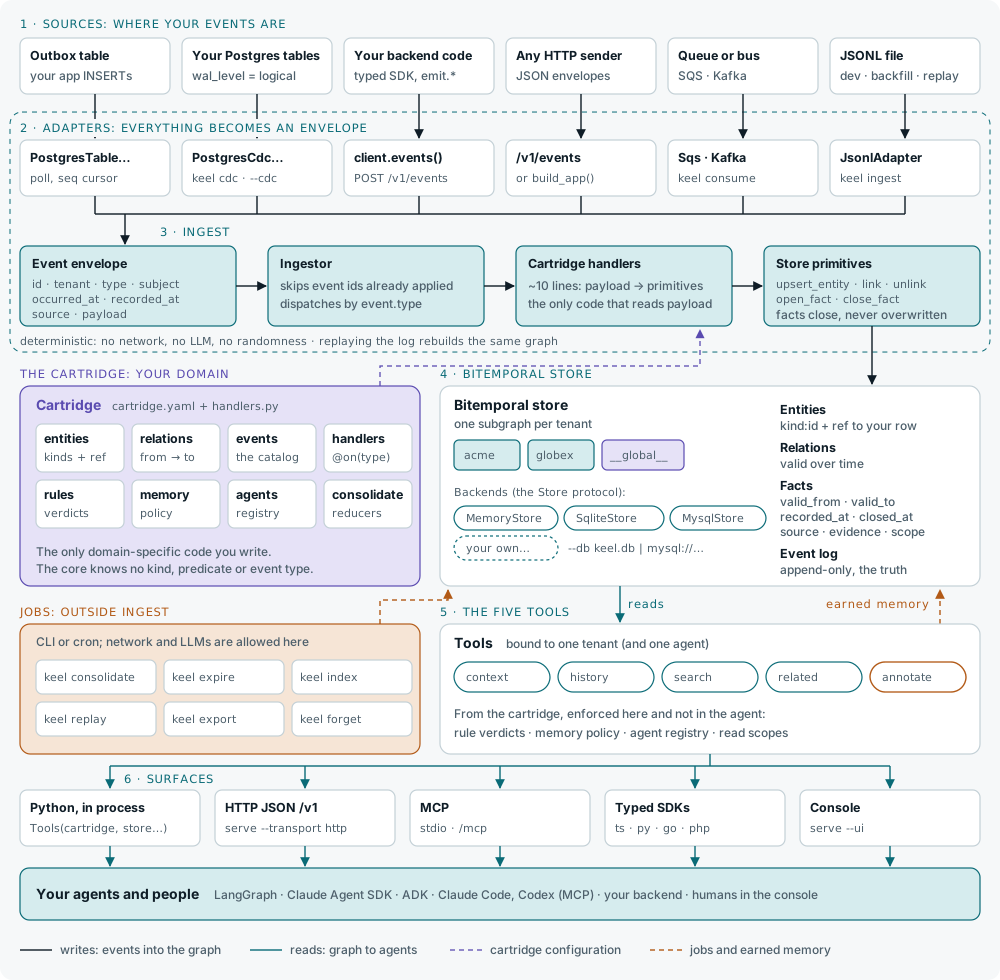
Every box, the options for each and when to pick which: docs/architecture.md.
Design rules the core enforces:
- Events are the truth. An append-only log; the graph is derived and can be replayed. What agents and people wrote is kept across a replay.
- Pointers, not copies. The graph holds references to your rows, the semantics, and earned memory. Never a copy of your tables.
- Explicit time. Facts close, they are not overwritten.
- Scopes, not a flat store.
global>tenant>task>agent. Nothing is promoted to a wider scope by accident. Agent memory is read only by the agent that wrote it; task memory tied to a task id only by calls that pass that task (context(task=),history(task=)); global memory lives in a reserved partition every tenant reads and no event writes.
Repository layout
keel/            core: envelope, handlers, store, scopes, cartridge loader, ingest, tools, cli
cartridges/      your own cartridges (empty here)
examples/        fleet (reference), crm, finance and clinics: four domains, one core, no core change between them;
                 each a cartridge, its events and its test; fleet also has a minimal agent and a multi-agent workflow
sdk/             SDK runtimes: typescript, go, php (the Python client ships in keel)
evals/           the semantic-search eval bench
docs/            site sources (mkdocs.yml at the root): architecture, first-cartridge, ingest, serve, sdks, operate, SPEC
tests/
Roadmap
A summary; the full plan, with what each release shipped, is in ROADMAP.md.
Shipped:
- Event envelope, handler registry, deterministic ingest with dedupe by event id and replay
- Bitemporal store: in memory, SQLite and MySQL, behind a store protocol with a conformance suite
- Memory scopes with TTL, evidence policy, expiry and consolidation into durable facts (
keel expire,keel consolidate) - The five tools over MCP (stdio and HTTP) and a JSON API, with an agent registry (people included)
- Adapters: Postgres outbox, webhook, Kafka, SQS
- Rules that compose, follow relations and measure durations
- Transaction time (
as_known_at), changes since a watermark, task ids, idempotent writes, proposals, conflicts, traces - SDKs generated from the cartridge: TypeScript, Python, Go, PHP
- Bulk ingest (a million events in under a minute and a half on MySQL)
- Semantic search: hybrid, ids first, rerankers, pluggable vector index and embedder, with an eval bench
- Postgres CDC: follow your own tables through logical replication (0.28.0)
Open:
- Real agent queries from pilots in the semantic-search eval bench
- Cartridge catalog, hosted Keel, enterprise features (2027)
License
Apache 2.0. The event envelope, the cartridge format and the five tools are the standard; they will always be free.
Installation
Source-derived launch command. Check the maintainer’s required arguments and credentials before running:
uvx keel-contextSet up in your AI client
Merge this template into ~/Library/Application Support/Claude/claude_desktop_config.json. Keep existing servers. Add any arguments, credentials, and permissions required by the maintainer; this template has not been install-tested.
{
  "mcpServers": {
    "io-github-angelkurten-keel": {
      "command": "uvx",
      "args": [
        "keel-context"
      ]
    }
  }
}
Restart Claude Desktop completely for changes to take effect. Confirm the server appears connected in the client’s tool list, then try a read-only example from its documentation.
Claude Desktop setup referencePackage
keel-contextpypiCompatible MCP Clients
Keel works with any MCP-compatible client. Copy the config snippet from the Configuration section above and add it to the file shown for your client, then restart the application.
- Claude Desktop
~/Library/Application Support/Claude/claude_desktop_config.jsonRestart Claude Desktop completely for changes to take effect. - Cursor
~/.cursor/mcp.jsonRestart Cursor for changes to take effect. - VS Code
.vscode/mcp.jsonReload VS Code window for changes to take effect. - Windsurf
~/.codeium/windsurf/mcp_config.jsonRestart Windsurf for changes to take effect. - Claude Code
.mcp.jsonSave at the project root, then start Claude Code in that project and review the MCP server approval prompt. Keep real credentials out of shared files.