Flutter MCP Toolkit
Inspect and drive Flutter debug apps/games: semantic snapshots, search, and custom client tools
flutter-mcp-toolkit

Inspect and drive a running Flutter app from your AI assistant.









- 📖 Docs: docs.page/arenukvern/mcp_flutter
- 🤝 Contribute: guide · contributors · code of conduct · security
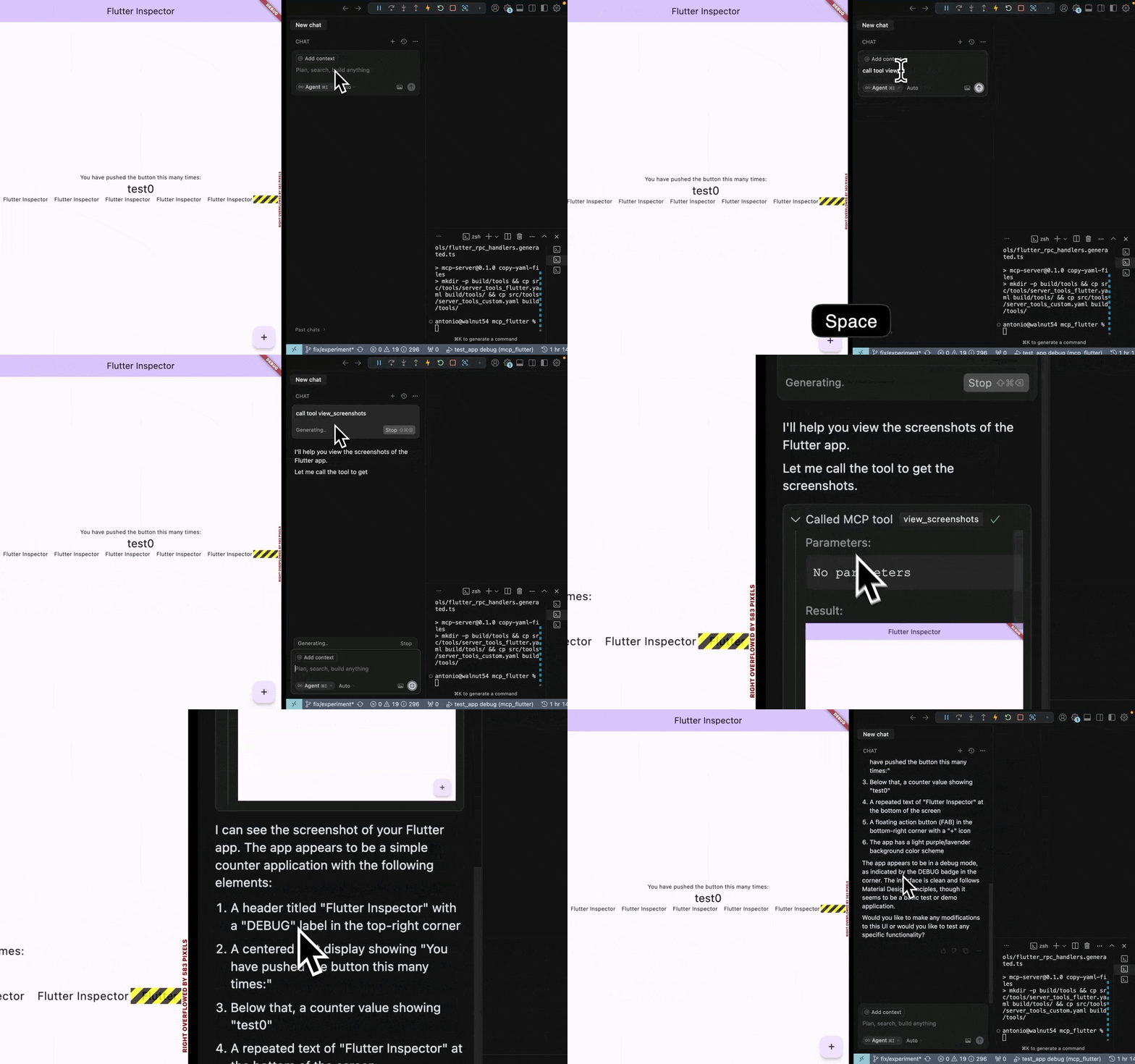
flutter-mcp-toolkit is a Dart MCP server + Flutter package for AI agents (Codex, Zed, Cursor, Intent, Claude Code, Cline, and more). Agents can inspect a running Flutter app, take semantic snapshots, tap widgets, type into forms, hot-reload, and read logs. Apps can also register their own MCP tools and resources at runtime via MCP Toolkit — all without leaving the conversation. The result is a closed feedback loop between agent and app; see OpenAI Agentic Harness for an example of this pattern.
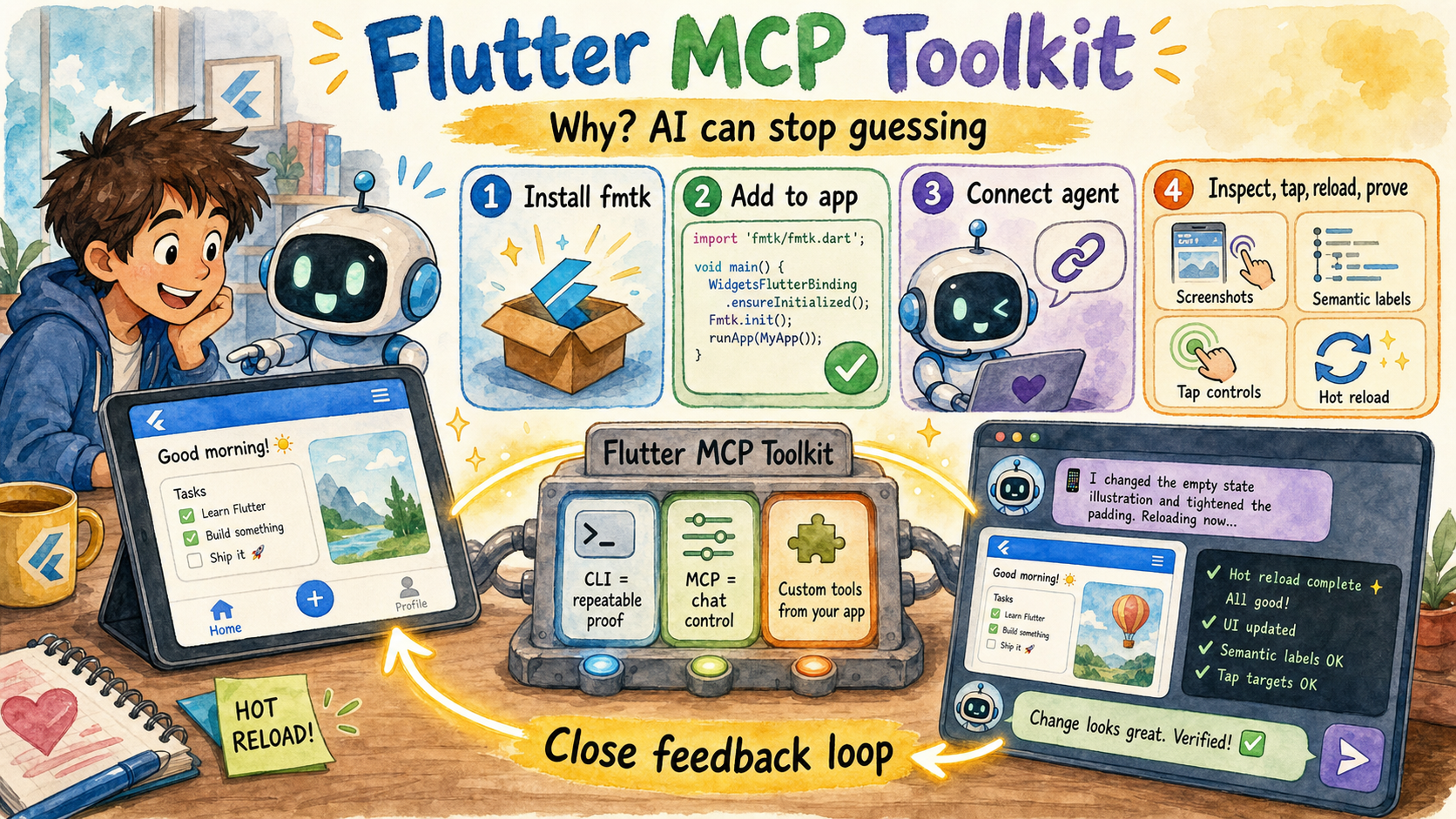
The picture's story: the toolkit gives an AI assistant a shared window and control loop into a running Flutter app, so it can inspect state, act like a user, hot reload, read proof, and use custom tools from your app instead of guessing.
![NOTICE]: Version 4 is now stable. Earlier
4.0.0-dev.*builds were prerelease testing builds of the new architecture.
Get started in 4 steps
# 1. Install the binary
curl -fsSL https://raw.githubusercontent.com/Arenukvern/mcp_flutter/main/install.sh | bash
# Installs flutter-mcp-toolkit plus the short fmtk alias for repeated CLI loops.

# 2. Add the toolkit to your Flutter app
cd my-flutter-app
flutter-mcp-toolkit codegen-init   # adds mcp_toolkit + emits main.dart snippet

# 3. Install skills for your AI agent
flutter-mcp-toolkit init claude-code   # or: cursor | codex | cline | agents-skills | all
# Alternative (skills only): npx skills add Arenukvern/mcp_flutter -a cursor -y

# 4. Run
flutter run --debug
That's it. Your AI agent can now inspect and drive the running app — and your app can expose custom MCP tools at runtime (see Dynamic Tools Registration below).
📰 News
-
2026-07-11 - v4 new Live Demos records: v4 semantic snapshot etc.. with Grok Build CLI, v4 with IntentCall power - WebMCP projection
-
2026-05-26 — v3.1.0: Platform-view capture routing, macOS/iOS Simulator host screenshots, web CDP tab capture (SCK → CDP → flutter_layer), and cross-platform showcase platform views.
Install from marketplaces
| Platform | Command / link |
|---|---|
| Any agent (recommended) | flutter-mcp-toolkit init <agent> — see AI agent setup |
| Claude Code (git catalog) | /plugin marketplace add Arenukvern/mcp_flutter then install flutter-mcp-toolkit |
| Codex (git catalog) | codex plugin marketplace add Arenukvern/mcp_flutter |
| Cursor (local plugin) | flutter-mcp-toolkit init cursor |
| Skills only | npx skills add Arenukvern/mcp_flutter -a <agent> -y (add MCP via init or manual JSON) |
| MCP registries | Official MCP Registry — server io.github.Arenukvern/flutter-mcp-toolkit (OCI image: ghcr.io/arenukvern/flutter-mcp-toolkit), Smithery, MseeP |
Docker / MCP Registry install
The official registry serves an OCI image from GHCR. Point any MCP client at it:
{
  "mcpServers": {
    "flutter-mcp-toolkit": {
      "command": "docker",
      "args": [
        "run",
        "-i",
        "--rm",
        "--network=host",
        "ghcr.io/arenukvern/flutter-mcp-toolkit:4.0.0"
      ]
    }
  }
}
See Docker guide for flags, version pinning, and networking notes.
Maintainers submitting to official stores: marketplace submission runbook. Full matrix: marketplace distribution.
Documentation
- Docs for AI Agent and Human - wiki + llms.txt
- Migrating v2 → v3 —
fmt_*MCP tools, binaries, client config keys,validate-runtime. - MCPCallEntry to AgentCallEntry migration —
MCPCallEntryremoval,AgentCallEntry, platformcodegen sync,fmt_migrate_agent_entries. - IntentCall consumer guide — hosted
intentcall_*dependency policy, consumer proof gates, and the boundary betweenmcp_flutterand upstream IntentCall architecture. - Why this repo matters — what it is, why it exists.
- CLI vs MCP — pick the right mode.
- Feature map — the 30 tools.
- AI agent setup - for AI Agents.
- Marketplace distribution — Claude, Cursor, Codex, skills.sh.
- Architecture — for contributors.
- Quick Start, Configuration, MCP RPC description
Published packages
| Package | Pub.dev | Role |
|---|---|---|
mcp_toolkit |  | Flutter app package for runtime MCP tools/resources and toolkit bootstrap. |
flutter_mcp_toolkit_core |   | Pure-Dart shared command/result/capability types. |
flutter_mcp_toolkit_capability_kernel |   | Capability kernel contracts for composable MCP units. |
flutter_mcp_toolkit_capability_core |   | Server-side fmt_* capability implementation. |
The server binary lives in mcp_server_dart and is shipped through GitHub
Release artifacts as flutter-mcp-toolkit, fmtk, and
flutter-mcp-toolkit-server; it is not a pub.dev package.
Development support
| Need | Start here |
|---|---|
| Contribute code or docs | CONTRIBUTING.md · Contribution guide |
| Add or credit contributors | Contributors guide · .all-contributorsrc |
| Report vulnerabilities | SECURITY.md |
| Validate local changes | steward probe --json --profile quick · make check-contracts |
| Maintain releases | Release train notes · flutter-mcp-toolkit-repo-maintainer |
| Install or update agent skills | AI agent setup · Marketplace distribution |
What it does
The default toolkit surface exposes 30 MCP tools under the fmt_* capability prefix across four categories:
- Inspection — semantic snapshot, view details, errors, screenshots, VM info
- Interaction — tap, scroll, type, fill forms, hot-reload, navigate, wait_for
- Debug — recent logs, evaluate Dart expressions
- Lifecycle — discover apps, hot-reload, hot-restart
See the flutter-mcp-toolkit-{guide,inspect,control,debug} skills for the full
reference (installed by flutter-mcp-toolkit init or npx skills add Arenukvern/mcp_flutter).
Install options: AI agent setup.
Dynamic Tools Registration
Flutter apps can register custom tools and resources at runtime. See how it
works in this short YouTube video.
The same arguments.connection targeting is supported by the CLI's exec,
batch, daemon command/execute, daemon watch/start, and snapshot step args.
[!NOTE] There is official MCP Server for Flutter from Flutter team which exposes Dart tooling. The main goal of this project is to bring power of MCP server tools by creating them in Flutter app, using dynamic MCP tools registration and close feedback loop for AI Agent. See how it works in short YouTube video. See Quick Start for more details. See original motivation behind the idea.
⚠️ Note on Dump RPCs
Dump RPC methods (like dump_render_tree) can produce huge token output and
are disabled by default. Enable with --dumps. See
mcp_server_dart README for the full flag surface.
🔒 Security
Generally, since you use MCP server to connect to Flutter app in Debug Mode, it should be safe to use. However, I still recommend to review how it works in ARCHITECTURE.md, how it can be modified to improve security if needed.
This MCP server is verified by MseeP.ai.
🔧 Troubleshooting
-
Connection Issues
- Ensure your Flutter app is running in debug mode
- Verify the port matches in both Flutter app and MCP server
- Check if the port is not being used by another process
- Safest explicit targeting: use
arguments.connection.uriand paste exact Flutter machineapp.debugPort.wsUri - If response includes
connection_selection_required, retry witharguments.connection.targetIdusing one URI fromavailableTargets(or setarguments.connection.uridirectly)
-
AI Tool Not Detecting Inspector
- Restart the AI tool after configuration changes
- Verify the configuration JSON syntax
- Check the tool's logs for connection errors
-
Dynamic Tools Not Appearing
- Ensure
mcp_toolkitpackage is properly initialized in your Flutter app - Check that tools are registered using
MCPToolkitBinding.instance.addEntries() - Use
fmt_list_client_tools_and_resourcesto verify registration - Hot reload your Flutter app after adding new tools
- Ensure
The Flutter MCP Server is registered with Smithery's registry, making it discoverable and usable by other AI tools through a standardized interface.
Integration Architecture
┌─────────────────┐     ┌───────────────────────┐     ┌─────────────────┐
│                 │     │  Flutter App with     │     │                 │
│  Flutter App    │<--->│  mcp_toolkit          │<--->│ flutter-mcp-    │
│  (Debug Mode)   │     │  (VM Svc. Extensions  │     │ toolkit-server  │
│                 │     │  + Dynamic Tools)     │     │                 │
└─────────────────┘     └───────────────────────┘     └─────────────────┘
🤝 Contributing
Contributions are welcome! See CONTRIBUTING.md (maintainer releases, binary checksums) and the contribution guide. Pull requests and issues: GitHub.
✨ Contributors
Huge thanks to all contributors for making this project better!
This roster is maintained with all-contributors.
To add someone, update .all-contributorsrc and
regenerate the README table, or use the all-contributors bot/CLI from a PR.
More detail: docs/contributing/contributors.mdx.


📖 Learn More
- Flutter DevTools Documentation
- Dart VM Service Protocol
- Flutter DevTools RPC Constants (I guess and hope they are correct:))
Star History
📄 License
MIT - Feel free to use in your projects!
Flutter and Dart are trademarks of Google LLC.
Installation
Source-derived launch command. Check the maintainer’s required arguments and credentials before running:
docker run -i --rm ghcr.io/arenukvern/flutter-mcp-toolkit:7.0.0Set up in your AI client
Merge this template into ~/Library/Application Support/Claude/claude_desktop_config.json. Keep existing servers. Add any arguments, credentials, and permissions required by the maintainer; this template has not been install-tested.
{
  "mcpServers": {
    "io-github-arenukvern-flutter-mcp-toolkit": {
      "command": "docker",
      "args": [
        "run",
        "-i",
        "--rm",
        "ghcr.io/arenukvern/flutter-mcp-toolkit:7.0.0"
      ]
    }
  }
}
Restart Claude Desktop completely for changes to take effect. Confirm the server appears connected in the client’s tool list, then try a read-only example from its documentation.
Claude Desktop setup referencePackage
ghcr.io/arenukvern/flutter-mcp-toolkit:7.0.0dockerCompatible MCP Clients
Flutter MCP Toolkit works with any MCP-compatible client. Copy the config snippet from the Configuration section above and add it to the file shown for your client, then restart the application.
- Claude Desktop
~/Library/Application Support/Claude/claude_desktop_config.jsonRestart Claude Desktop completely for changes to take effect. - Cursor
~/.cursor/mcp.jsonRestart Cursor for changes to take effect. - VS Code
.vscode/mcp.jsonReload VS Code window for changes to take effect. - Windsurf
~/.codeium/windsurf/mcp_config.jsonRestart Windsurf for changes to take effect. - Claude Code
.mcp.jsonSave at the project root, then start Claude Code in that project and review the MCP server approval prompt. Keep real credentials out of shared files.