Hardcover OAuth MCP
Read and update your Hardcover library, progress, lists, and goals. Sign in with Hardcover OAuth.
hardcover-oauth-mcp
Manage your Hardcover library, reading progress, reviews, lists, and goals from Claude, ChatGPT, and other AI assistants with this remote Model Context Protocol (MCP) server. Connect to the public instance at https://hardcover.benjuntilla.com/mcp (quick start) or deploy your own.
- Works in web and mobile clients. The public instance is a hosted remote server, so Claude on the web and on phones, ChatGPT, and other remote clients can connect to it. Other Hardcover MCP servers run on your own computer, where only desktop clients can reach them.
- Sign in with Hardcover (OAuth). No pasting unsafe API keys. Each person connects their own account through Hardcover's OAuth and picks which permissions to grant.
- 53 read/write tools. 47 custom task-oriented tools cover the library, progress, reviews, journal, lists, goals, follows, notifications, and vibes. Six raw GraphQL and schema-discovery tools reach anything else in the Hardcover API.
Example workflows
Track a book
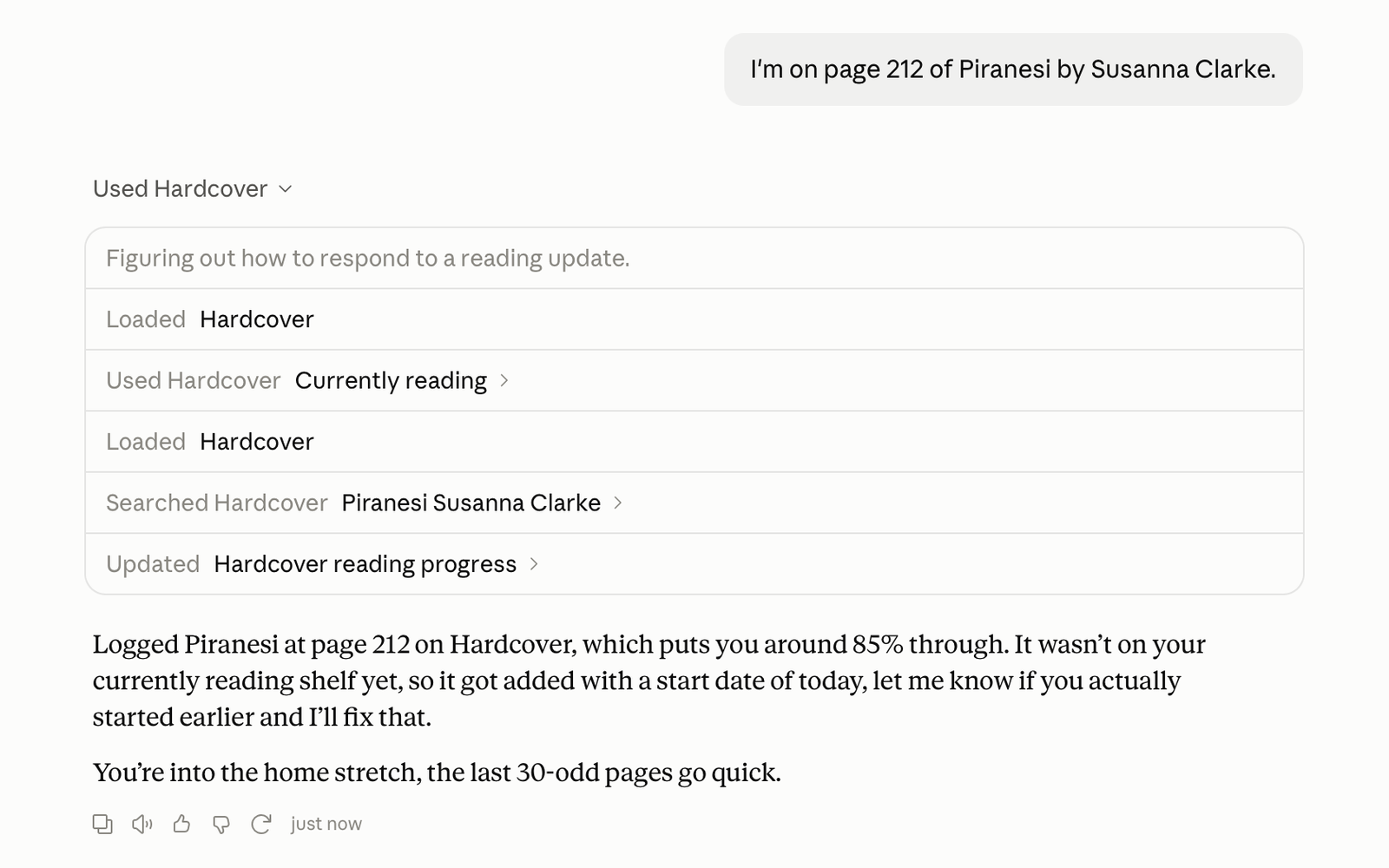
- "I'm on page 212 of Piranesi." The book moves to Currently Reading and the page goes on its reading session.
- "Finished it today, 4.5 stars." The book moves to Read, finished today, with a 4.5-star rating.
Plan what's next
- "Add Kindred and The Dispossessed to my want-to-read."
- "Make a ranked list called Summer with both, Kindred first."
- "Move The Dispossessed to the top."
Set a reading goal
- "Set a goal of 30 books this year."
- "How am I doing on my goal?"
Keep a journal
- "Save this quote from Piranesi: 'The Beauty of the House is immeasurable; its Kindness infinite.'"
- "Show my notes on Piranesi."
Pick an edition
- "Which audiobook editions of Dune are there, and how long are they?"
- "Switch my copy to the shortest one."
Ask anything else
- "Which of the books I read last year had the most pages?" With no tool for that, the client looks up the API with
hardcover_find_operationsand runs a read-onlyhardcover_query. - "Answer the prompt 'What book made you cry uncontrollably?' with Kindred." The client finds the prompt with
hardcover_search, looks up the mutation withhardcover_find_operations, and runshardcover_mutate.
Quick start
Anyone with a Hardcover account can use the public instance. Add this URL to your MCP client as a remote server:
https://hardcover.benjuntilla.com/mcp
- Claude (web, desktop, mobile): Settings → Connectors → Add custom connector, then paste the URL.
- Claude Code:
claude mcp add --transport http hardcover https://hardcover.benjuntilla.com/mcp, then run/mcpto sign in. - ChatGPT (web, desktop, mobile): on chatgpt.com, open Plugins, select + → Add custom MCP server, paste the URL, keep OAuth as the authentication, and create it. Type
@in a chat to use it. - Cursor and others: add a remote (Streamable HTTP) server with that URL. The client discovers OAuth by itself.
- MCP Inspector:
bunx @modelcontextprotocol/inspector, choose Streamable HTTP, and enter the URL.
Your client opens a consent page where you pick permissions, then Hardcover asks you to sign in.
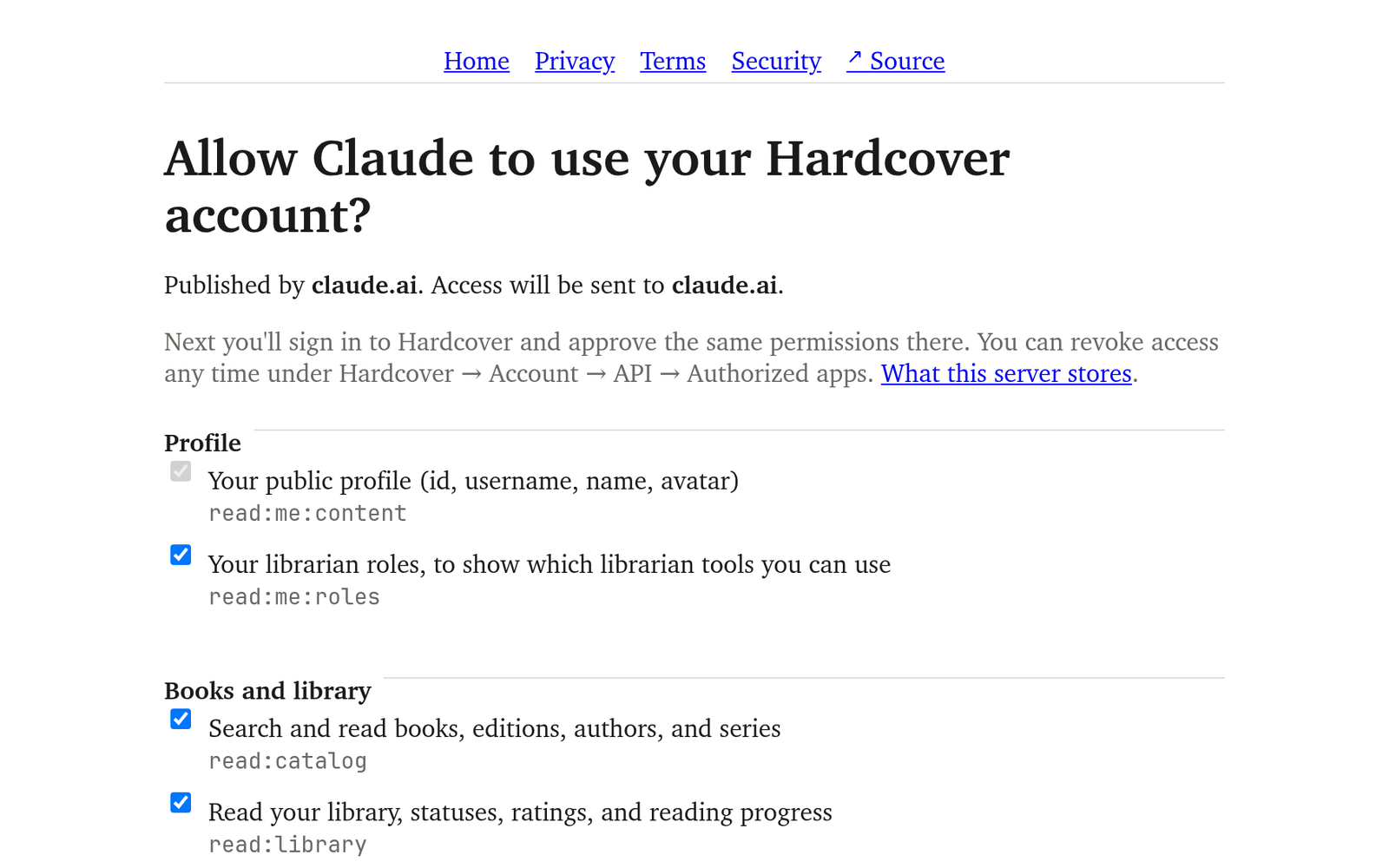
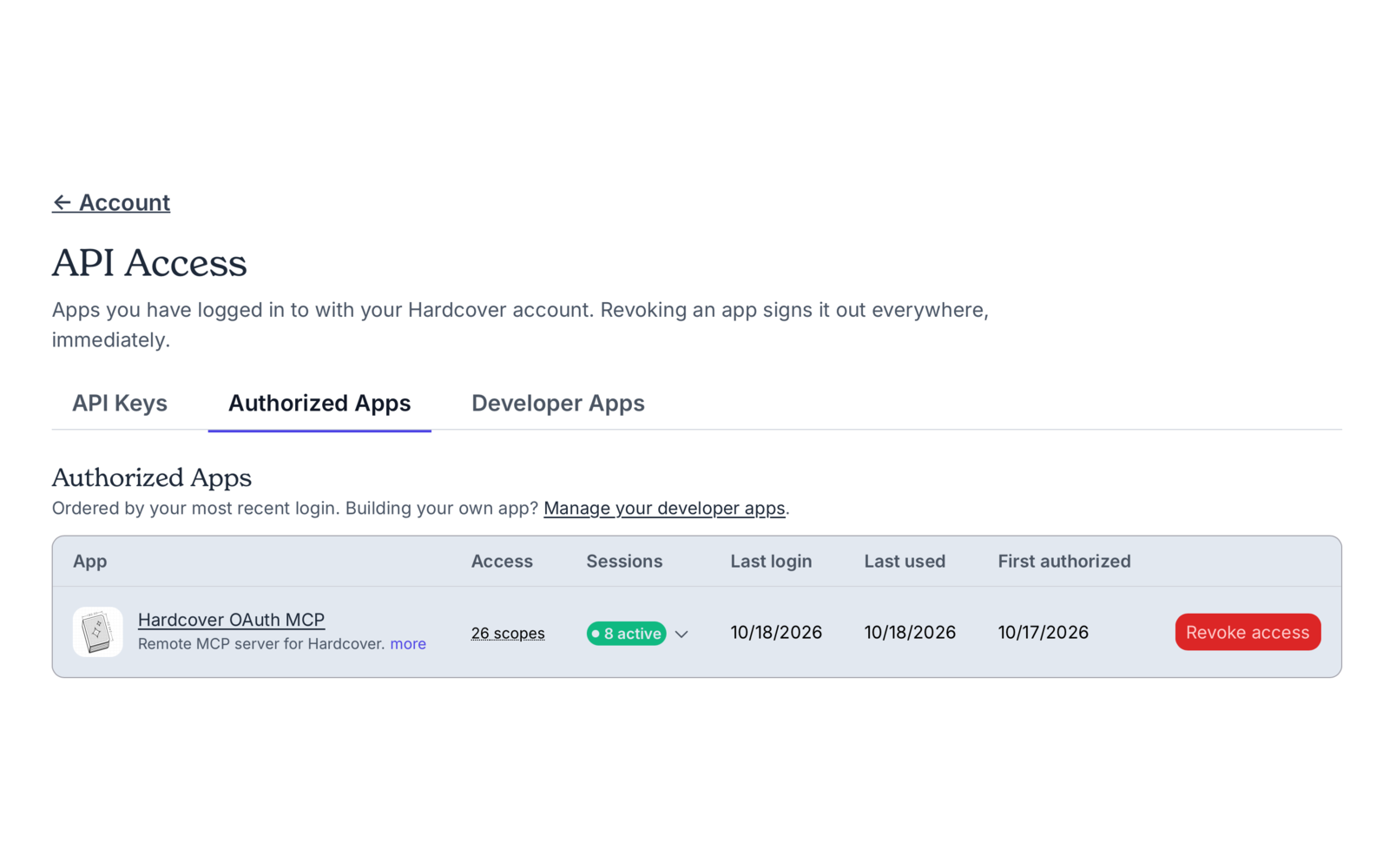
Revoke access any time from Hardcover's Authorized apps page. See the privacy notice and terms, or deploy your own.
Report an issue
Something not working? Open an issue on GitHub, or email ben@benjuntilla.com. For security problems, follow the security policy instead.
How it works
It runs on the Cloudflare Developer Platform (Workers, Durable Objects, and KV), chosen for its convenient developer experience and cost efficiency. A Durable Object per connection holds the tokens and serves MCP; KV holds OAuth state. Alchemy deploys it in one command, and alchemy dev runs the same code locally. It's built with Effect 4 (including Effect's own MCP server), TypeScript 7, Bun, mise, and Astro.
┌──────────────┐  MCP + OAuth 2.1   ┌──────────────────────────────┐
│ MCP client   │ ─────────────────▶ │ Worker                       │
│ (Claude, …)  │ ◀───────────────── │  OAuthProvider, consent page │
└──────────────┘  MCP access token  │  auth + rate limits on /mcp  │
                                    └──────────────┬───────────────┘
                                                   │ one per connection
                                    ┌──────────────▼───────────────┐
                                    │ HardcoverConnection (DO)     │
                                    │  Hardcover tokens            │
                                    │  Effect McpServer + tools    │
                                    └──────────────┬───────────────┘
                                                   │ OAuth + GraphQL
                                    ┌──────────────▼───────────────┐
                                    │ Hardcover API                │
                                    └──────────────────────────────┘
The Worker is an OAuth authorization server for MCP clients, built on @cloudflare/workers-oauth-provider. It supports dynamic client registration and Client ID Metadata Documents.
The Worker checks each /mcp request (token, allowlist, the server's own rate limit, scopes) and forwards it to the connection's Durable Object. The object runs Effect's MCP server. It speaks the sessionless 2026-07-28 revision as well as 2025-11-25, 2025-06-18, and 2025-03-26. Sessions for the 2025 revisions live in the object's memory. When Cloudflare evicts an idle object, its sessions end: the client gets a 404 and, as the protocol requires, starts a new session.
Tools
Kinds: read, write (adds or changes data), and delete. A tool appears only if you chose its scopes for your connection.
All 53 tools
| Tool | What it does | Kind | Scopes | Needs |
|---|---|---|---|---|
hardcover_me | Get your Hardcover profile | read | read:me:content | |
hardcover_get_user | Look up a reader | read | read:users | |
hardcover_list_follows | List follows | read | read:social | |
hardcover_follow_user | Follow a reader | write | write:social, read:users | |
hardcover_unfollow_user | Unfollow a reader | delete | write:social, read:users | |
hardcover_list_notifications | List notifications | read | read:notifications | |
hardcover_mark_notifications_read | Mark notifications read | write | write:notifications | |
hardcover_search | Search Hardcover | read | read:catalog | |
hardcover_get_book | Get a book | read | read:catalog | |
hardcover_get_editions | Get editions | read | read:catalog | |
hardcover_get_author | Get an author | read | read:catalog | |
hardcover_get_series | Get a series | read | read:catalog | |
hardcover_trending_books | Trending books | read | read:catalog | |
hardcover_list_vibes | List your vibes | read | read:vibes | |
hardcover_create_vibe | Create a vibe | write | write:vibes | Supporter |
hardcover_list_library | List your library | read | read:library | |
hardcover_currently_reading | Currently reading | read | read:library | |
hardcover_list_reviews | List your reviews | read | read:library | |
hardcover_get_library_entry | Get your entry for a book | read | read:library | |
hardcover_set_status | Set reading status | write | write:library, read:library | |
hardcover_update_progress | Update reading progress | write | write:library, read:library | |
hardcover_mark_finished | Mark a book finished | write | write:library, read:library | |
hardcover_rate_book | Rate a book | write | write:library, read:library | |
hardcover_write_review | Write a review | write | write:library, write:reviews, read:library | |
hardcover_delete_review | Delete a review | delete | write:library, write:reviews, read:library | |
hardcover_update_library_entry | Edit your entry for a book | write | write:library, read:library | |
hardcover_set_owned | Mark an edition owned | write | write:library, read:lists, write:lists | |
hardcover_remove_from_library | Remove a book from your library | delete | write:library, read:library | |
hardcover_add_read | Add a reading session | write | write:library, read:library | |
hardcover_update_read | Edit a reading session | write | write:library, read:library | |
hardcover_delete_read | Delete a reading session | delete | write:library, read:library | |
hardcover_list_journal | List journal entries | read | read:journal | |
hardcover_add_journal_entry | Add a journal entry | write | write:library | |
hardcover_update_journal_entry | Edit a journal entry | write | write:library | |
hardcover_delete_journal_entry | Delete a journal entry | delete | write:library | |
hardcover_list_lists | List your lists | read | read:lists | |
hardcover_get_list | Get a list | read | read:lists, read:catalog | |
hardcover_create_list | Create a list | write | write:lists | |
hardcover_update_list | Edit a list | write | write:lists, read:lists | |
hardcover_delete_list | Delete a list | delete | write:lists, read:lists | |
hardcover_add_to_list | Add a book to a list | write | write:lists | |
hardcover_remove_from_list | Remove a book from a list | delete | write:lists, read:lists | |
hardcover_reorder_list | Reorder a list | write | write:lists, read:lists | |
hardcover_list_goals | List your reading goals | read | read:goals | |
hardcover_create_goal | Create a reading goal | write | write:goals | |
hardcover_update_goal | Edit a reading goal | write | write:goals, read:goals | |
hardcover_delete_goal | Delete a reading goal | delete | write:goals, read:goals | |
hardcover_find_operations | Find Hardcover API operations | read | none | |
hardcover_describe_type | Describe a Hardcover GraphQL type | read | none | |
hardcover_query | Run a Hardcover GraphQL query | read | none | |
hardcover_mutate | Run a Hardcover GraphQL mutation | write | any write:* scope | Supporter for write:vibes |
hardcover_delete | Run a Hardcover GraphQL deletion | delete | any write:* scope | Supporter for write:vibes |
hardcover_catalog_edit | Add to or edit the Hardcover catalog | write | any write:* catalog scope | Librarian for write:catalog:edit, Librarian (book_mapper) for write:catalog:map |
Supporter is a paid Hardcover membership and Librarian a Hardcover librarian role. Hardcover enforces both; a tool that always needs one says so in its title and description. Sign-in drops write:catalog:edit and write:catalog:map from accounts without the role, but anyone can add catalog records with write:catalog:append.
The raw tools check each document's operation kind, root fields, needed scopes, and size (at most 10 top-level fields) before sending it. They also reject text operators Hardcover has disabled, such as _like and _regex. Mistakes come back as clear errors instead of using up your Hardcover rate limit. hardcover_find_operations and hardcover_describe_type search an index built from Hardcover's API docs. hardcover_find_operations ranks operations by how well their names and return types match, so a phrase like "add a book to a list" works. For a type name that doesn't exist, hardcover_describe_type suggests the closest ones, so UserBook points to user_books.
Hardcover's rate limits are per user, and every app shares them. Each user gets 60 requests a minute (bursts of 10, or 15 for Supporters) and 5,000 a day (50,000 for Supporters). Each top-level field costs one request.
Deploy your own
You need mise, a Cloudflare account, and a Hardcover account. A custom domain is optional; without one, the server lives at https://hardcover-oauth-mcp.<your-subdomain>.workers.dev.
1. Install
git clone https://github.com/benjuntilla/hardcover-oauth-mcp
cd hardcover-oauth-mcp
mise install
cp .env.example .env
2. Register a Hardcover app
Create one at hardcover.app/account/developer-apps/new:
- Application type: Web app (server-side). You can't change this later.
- Redirect URIs:
https://<your-domain>/callback, plushttp://localhost:1337/callbackfor local runs. - Scopes this app may request:
read:me:content read:me:roles read:catalog read:library write:library write:reviews read:journal read:lists write:lists read:goals write:goals read:users read:social write:social read:notifications write:notifications read:prompts write:prompts read:vibes write:vibes read:account write:catalog:append write:catalog:edit write:catalog:map openid offline_access. Leaveallunticked, since it would also cover scopes Hardcover adds later. - Device Authorization Grant: off.
Put the client id and secret into .env as HARDCOVER_CLIENT_ID and HARDCOVER_CLIENT_SECRET. Hardcover shows the secret only once.
3. Configure
In alchemy.run.ts, edit DEPLOYMENTS. Each key is a stage: mise run deploy --stage prod uses prod, and mise run dev uses local.
const DEPLOYMENTS: Readonly<Record<string, DeploymentSettings>> = {
  local: { allowedUsers: ["*"] },
  prod: { allowedUsers: ["your-username"], domain: "hardcover.example.com" },
}
allowedUsers: your Hardcover username (or several, or numeric ids). Use"*"to let anyone connect, as the public instance does. Every person uses their own account and Hardcover rate limit.domain: a hostname on a zone in your Cloudflare account. Leave it out to use the auto-assigned workers.dev URL.
4. Sign Alchemy in to Cloudflare
bun alchemy profile edit --add Cloudflare
5. Deploy
mise run deploy --stage prod
This builds the site, creates the Cloudflare resources, and prints the URL. Run it again after changes. mise run logs --stage prod tails logs. mise run destroy --stage prod removes everything.
Deploys keep Alchemy's state in your Cloudflare account, so any machine signed in with Alchemy can redeploy or destroy. The first deploy sets up the state store there. mise run dev and the tests keep theirs in .alchemy/.
Pushes to main deploy prod once mise run check and mise run test:e2e pass. This needs a main-only production environment with a CLOUDFLARE_ACCOUNT_ID variable and CLOUDFLARE_API_TOKEN, HARDCOVER_CLIENT_ID, and HARDCOVER_CLIENT_SECRET secrets. The token needs Account Settings and Zone read, plus Workers Scripts, Workers KV Storage, Secrets Store, Workers Routes, and SSL and Certificates edit.
- Plan: use Workers Paid. A connection's Durable Object builds its MCP server when it wakes. That takes about 100 ms of CPU, ten times the Free plan's per-request limit. After that, a call takes about 5 ms.
- The server's own rate limits: 10 registrations, 30 sign-in steps, and 60 token requests a minute per client IP. Each Hardcover account gets 120 MCP requests a minute.
- Observability: Workers Logs, Traces, and Issues are on. Cloudflare's request logs record each request's path, status, headers, and client IP, but not its query string or body. Cloudflare redacts the authorization and cookie headers. Leaving out query strings keeps Hardcover's one-time sign-in code out of logs and traces. What the token grants reaches the Durable Object as a method argument rather than a header, so it stays out of the logs. The OAuth provider files grants under a keyed pseudonym of the Hardcover user id, so the storage keys in traces don't reveal it. The Worker logs unexpected failures (defects) without tokens or request data, and Issues groups them. Expected ones, such as Hardcover rate limits, revoked access, or bad queries, go back to the agent as tool errors.
6. Connect a client
Connect the same way as the public instance, with https://<your-domain>/mcp as the URL.
Run locally
With the app and .env from steps 1 and 2 above, the whole flow works on your machine:
- Run
mise run dev. It serves the Worker in workerd athttp://localhost:1337, with local KV and Durable Objects, and reloads on code changes. It builds the static pages (README.md,PRIVACY.md,TERMS.md,SECURITY.md, andsite/) once at start, so restart it to see changes to them. You don't need a Cloudflare account. - Connect a client on the same machine to
http://localhost:1337/mcp, for exampleclaude mcp add --transport http hardcover-local http://localhost:1337/mcp.
Setup from the maintainer
This listing does not have a supported local package template. Use the maintainer’s documentation for its hosted endpoint, authentication, and client-specific setup. No install command has been inferred.