Evolith Architecture Governance
Executable architecture governance: an unevaluated rule is reported as a failure, never a pass.
Evolith Core
Bilingual Navigation: Versión en Español




Your architecture rules, running on every PR.
Real output of the published CLI on an empty repository (2026-09-14, abridged; full 71-row capture).
Evolith is an architecture linter for CI. It reads your repository — structure, workflows, manifests, architecture decisions — and checks it against a library of rules: layering, dependencies, security, CI/CD. If a blocking rule fails, the PR fails.
What sets it apart from other linters: it also counts the rules it could not evaluate. A blocking rule that never ran fails the PR exactly as one that failed. Coverage and compliance are never painted the same green.
It is for engineering teams that want their architecture decisions enforced in CI rather than reviewed by hand, for platform teams blocking non-conformant artifacts before production, and for AI agents that need to validate their own output against the same rules.
Try it · Four terms · In CI · What is inside · What it is not · Documentation · Interactive atlas
Try it in two minutes
You need Node ≥ 18. No database, no server, no Docker; your code never leaves your machine.
npx -y @beyondnet/evolith-cli init --name my-project --yes   # writes evolith.yaml in the current directory
npx -y @beyondnet/evolith-cli validate --engine opa          # evaluates; exits 2 if anything blocking did not pass
The first run will fail, and that is fine: it is a baseline, not a grade. Many rules assume a layout your repository does not have yet. To start only from what you have already adopted:
npx -y @beyondnet/evolith-cli rulesets                        # lists the packs your installation loads
npx -y @beyondnet/evolith-cli validate --engine opa --select rulesets/acl/anti-corruption-layer.rules.json
init writes evolith.yaml with the product's name, type and phase and your stack; --engine opa picks the engine with the most coverage today (why, in Known limitations). What a first run looks like, row by row: capture. Full guide: Quickstart.
Four terms you need
- Rule — a check with an id, a priority (
MUST/SHOULD/COULD) and a verdict:passed,failedorskipped(could not be evaluated). AMUSTthat endsskippedblocks exactly as afailedone. - Pack — a
*.rules.jsonfile grouping rules by topic (ACL, security, CI…).evolith rulesetslists them;--selectpicks which ones to apply. - Topology — the architecture style you declare:
modular-monolith,distributed-modules,microservices,event-driven,serverless,edge-computing,data-meshoragentic-ai. The same rules follow you when the monolith splits into services. - Phase — where the product is in its lifecycle: Discovery → Design → Construction → QA → Delivery. Each phase has gates that block the move to the next one.
An ADR (Architecture Decision Record) is an architecture decision in writing; evolith adr create drafts one, and many rules are derived from them. Full glossary.
In CI
- uses: beyondnetcode/evolith_arch32@v1
  with:
    fail-on-violation: true
Exit codes: 0 pass · 1 the tool failed · 2 the gate blocked · 3 invalid invocation. 1 and 3 mean the repository was not evaluated: they are not weaker forms of non-compliant, and the job summary says so in words.
For an AI agent, the same engine as an MCP server over stdio (Node ≥ 20):
{ "mcpServers": { "evolith": { "command": "npx", "args": ["-y", "@beyondnet/evolith-mcp"] } } }
What is inside
| Product | Role |
|---|---|
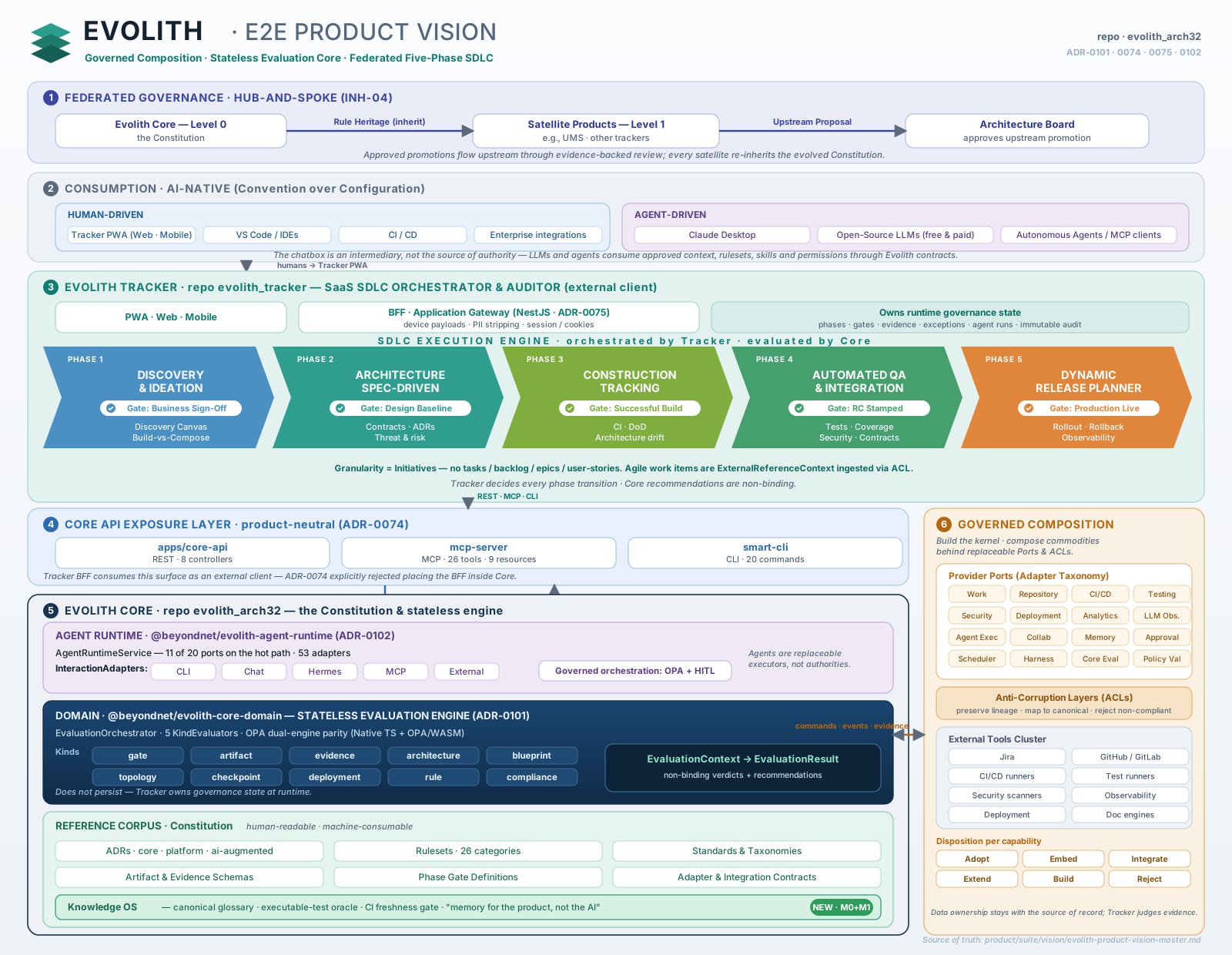
| Evolith Core | The library of rules, ADRs and phase schemas. MIT and free: files you can read, edit and version |
| Evolith CLI | Evaluates your repository locally or in CI; manages ADRs and phase gates |
| MCP Services | The rules as live context for an agent |
| Core API | REST to query and evaluate remotely |
| Agent Runtime | Drives the Core from an agent, through Ports and Adapters. Experimental |
| Evolith Tracker | Commercial lifecycle-governance product. Not yet launched; it will be the only paid one |
How many rules, packs and ADRs your installation loads is printed by evolith rulesets; the tree's counts are measured by CI on every PR and published in the corpus inventory.
What it is not
- Not a replacement for ArchUnit, Conftest or dependency-cruiser; it complements them. Rules live outside the codebase, as data that governs many repositories and that an agent can read. Evolith is OPA underneath, and adds the rule library, the ADR-to-rule derivation and the coverage accounting.
- It does not read your code's AST. It inspects structure, workflows, manifests and governance artifacts; the subset that looks at dependencies and linters assumes a Node/TypeScript repository.
- It does not call any LLM. No command in the published CLI reaches one; "the LLM proposes, a deterministic verifier disposes" is a documented direction, not shipped behaviour. Network egress disclosure: Security Policy.
What this front page does not say — what each engine covers, counts that disagree, real adoption, unverified platforms — lives on a single dated page: Known limitations. It exists because a README that only tells the good part is exactly the defect Evolith detects.
Documentation
| To… | Go to |
|---|---|
| Start from your role | Start by Role |
| Understand the rules and ADRs | Evolith Core hub |
| See the executable corpus | Rulesets · OPA policies · Schemas |
| Choose or migrate a topology | Topologies hub |
| Use the CLI, MCP or REST | Interfaces hub · Evolith CLI hub |
| See the project's state | Known limitations · Gap board · Maturity |
| Answer a specific question | Q&A · Glossary |
| Walk the whole corpus | Master Index · Product hub · Repository Taxonomy |
Contributing
Start here: issues that are good for a first contribution — most touch a single file. Unsure before opening a PR? Discussions.
Three ways to contribute without writing TypeScript: correct a count that disagrees between docs and code · translate a hub into Spanish · add a rule to src/rulesets/.
Before the PR: Contribution Guide · Security Policy · AGENTS.md · CHANGELOG
License
Released under the MIT License.
Installation
Source-derived launch command. Check the maintainer’s required arguments and credentials before running:
npx -y @beyondnet/evolith-mcpSet up in your AI client
Merge this template into ~/Library/Application Support/Claude/claude_desktop_config.json. Keep existing servers. Add any arguments, credentials, and permissions required by the maintainer; this template has not been install-tested.
{
  "mcpServers": {
    "io-github-beyondnetcode-evolith": {
      "command": "npx",
      "args": [
        "-y",
        "@beyondnet/evolith-mcp"
      ]
    }
  }
}
Restart Claude Desktop completely for changes to take effect. Confirm the server appears connected in the client’s tool list, then try a read-only example from its documentation.
Claude Desktop setup referencePackage
Compatible MCP Clients
Evolith Architecture Governance works with any MCP-compatible client. Copy the config snippet from the Configuration section above and add it to the file shown for your client, then restart the application.
- Claude Desktop
~/Library/Application Support/Claude/claude_desktop_config.jsonRestart Claude Desktop completely for changes to take effect. - Cursor
~/.cursor/mcp.jsonRestart Cursor for changes to take effect. - VS Code
.vscode/mcp.jsonReload VS Code window for changes to take effect. - Windsurf
~/.codeium/windsurf/mcp_config.jsonRestart Windsurf for changes to take effect. - Claude Code
.mcp.jsonSave at the project root, then start Claude Code in that project and review the MCP server approval prompt. Keep real credentials out of shared files.