io.github.chinwe/compound-memory
Local-first shared memory for multiple AI agents that compounds with use; Markdown + git, MCP + CLI.
compound-memory




English | 简体中文
Local-first shared memory for multiple AI agents — plain Markdown files that compound in value as they are used. Memory lives on your disk as frontmatter-annotated Markdown, gets stronger with every confirmed use, decays into a revivable archive when neglected, and auto-commits to a local git history on every write.
Why
Every agent session starts from zero: preferences get re-asked, project conventions get re-discovered, the same pitfall gets hit twice. compound-memory gives all your agents one shared store:
- Local-first — nothing leaves your machine; memories are human-readable Markdown files, not rows in an opaque database.
- MCP-native — exactly 5 tools (
memory_write/memory_search/memory_get/memory_link/memory_feedback) as the single read-write boundary; works with any MCP host (Claude Code, ZCode, WorkBuddy, …), plus a full CLI for operations. - Compounding — confirmed usage raises confidence, related memories are recalled as neighbors, validation from a different host counts as independent evidence, and distillation merges many raw memories into fewer, denser ones.
- Multi-agent by design — a
_sharednamespace everyone reads, plusagent-*private namespaces each host owns; cross-host validation is tracked per host. - Optional semantic recall — vector search via sqlite-vec + BGE embeddings, with automatic graceful fallback to pure lexical search when unavailable.
Quick Start
For AI agents
Paste this one-liner into your coding agent (Claude Code, Cursor, ZCode, …) and let it do the rest:
Set up compound-memory (https://github.com/chinwe/compound-memory) — a local-first multi-agent shared memory (MCP server + CLI) — on this machine: install it (`uv tool install compound-memory`, or clone the repo and `uv sync --extra dev`), initialize the store (`compound-memory init`, defaults to ~/.agents/memory), register its stdio MCP server in this host's MCP config — command `compound-memory-server` (PyPI install) or `uvx --from compound-memory compound-memory-server`, env `COMPOUND_MEMORY_ROOT=~/.agents/memory` and `COMPOUND_MEMORY_AGENT_ID=agent-<your-host-id>` — then verify by calling `memory_search` and expecting a `{"hits": [...]}` response; if the host needs a restart to load MCP servers, tell me. Host-specific configs and the usage protocol: docs/agent-integration.md in the repo.
For humans
1. Install
Python ≥ 3.11. Either route works:
# Route A: clone the repo (uv-managed; same path the MCP config uses)
git clone https://github.com/chinwe/compound-memory.git
cd compound-memory && uv sync --extra dev

# Route B: install from PyPI (no clone needed)
uv tool install compound-memory   # or: pip install compound-memory
2. Initialize your store
Defaults to ~/.agents/memory; override with the COMPOUND_MEMORY_ROOT env var.
uv run compound-memory init
3. Wire it into your MCP host (recommended)
This lets your everyday agents read/write the shared store automatically:
{
  "mcpServers": {
    "compound-memory": {
      "type": "stdio",
      "command": "uv",
      "args": ["run", "--directory", "<repo>", "compound-memory-server"],
      "env": {
        "COMPOUND_MEMORY_ROOT": "~/.agents/memory",
        "COMPOUND_MEMORY_AGENT_ID": "agent-<your-host-id>"
      }
    }
  }
}
Installed from PyPI? Swap command/args for uvx + ["--from", "compound-memory", "compound-memory-server"] — no repo clone needed. Setting COMPOUND_MEMORY_AGENT_ID is strongly recommended: the store then resolves caller identity from the process env, so a model misreporting its identity (or forging someone else's source) is rejected loudly.
Verify: ask your agent to call memory_search (any keyword) — a {"hits": [...]} response means you're connected. Or run uv run compound-memory stats from the CLI.
4. Next step
Inject the usage protocol from skills/compound-memory/SKILL.md into your host (the search → feedback → distill loop), per docs/agent-integration.md §6.
Demo
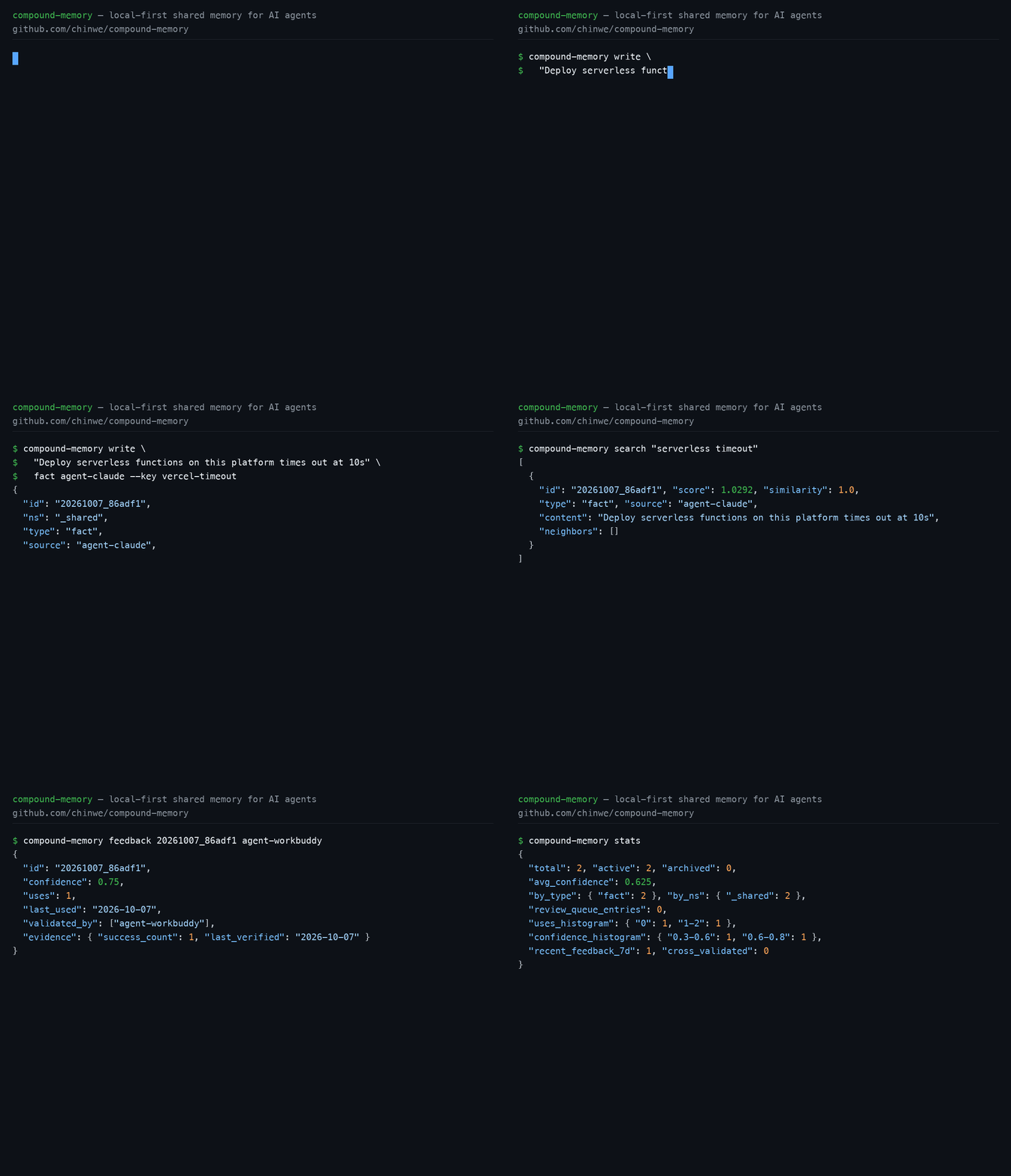
One full loop: write → search → feedback (with cross-host first-validation bonus) → store health. Real output from v0.4.0, long payloads trimmed:
uv run compound-memory init
{ "ok": true, "root": "~/.agents/memory" }
Two different hosts each write one stable fact (new memories start at confidence 0.5, uses 0):
uv run compound-memory write \
  "Deploy serverless functions on this platform times out at 10s — keep handlers under that budget" \
  fact agent-claude --key vercel-timeout
{
  "id": "20261007_86adf1",
  "ns": "_shared",
  "type": "fact",
  "source": "agent-claude",
  "content": "Deploy serverless functions on this platform times out at 10s — keep handlers under that budget",
  "confidence": 0.5,
  "uses": 0,
  "key": "vercel-timeout",
  "validated_by": []
  ...
}
uv run compound-memory write \
  "User prefers concise replies with tables and code examples" \
  fact agent-zcode --key user-style
Search ranks by score (--explain attaches per-hit ranking components for debugging):
uv run compound-memory search "serverless timeout"
[
  {
    "id": "20261007_86adf1", "score": 1.0292, "similarity": 1.0,
    "type": "fact", "source": "agent-claude",
    "content": "Deploy serverless functions on this platform times out at 10s — keep handlers under that budget",
    "neighbors": []
  },
  {
    "id": "20261007_6a0c0c", "score": 0.5211, "similarity": 0.4919,
    "type": "fact", "source": "agent-zcode",
    "content": "User prefers concise replies with tables and code examples",
    "neighbors": []
  }
]
A different host used this memory and reported it back — uses +1, conf +0.1; and since the reporter agent-workbuddy ≠ source agent-claude, the first cross-host validation adds another +0.15:
uv run compound-memory feedback 20261007_86adf1 agent-workbuddy
{
  "id": "20261007_86adf1",
  "confidence": 0.75,
  "uses": 1,
  "last_used": "2026-10-07",
  "validated_by": ["agent-workbuddy"],
  "evidence": {
    "success_count": 1, "failure_count": 0, "contradiction_count": 0,
    "last_verified": "2026-10-07",
    "recent": [{ "date": "2026-10-07", "agent": "agent-workbuddy", "outcome": "success" }]
  }
  ...
}
Store health at a glance (fixed-bucket histograms, liveness, distillation yield):
uv run compound-memory stats
{
  "total": 2, "archived": 0, "active": 2,
  "avg_confidence": 0.625,
  "by_type": { "fact": 2 },
  "by_ns": { "_shared": 2 },
  "review_queue_entries": 0,
  "uses_histogram": { "0": 1, "1-2": 1, "3-5": 0, "6-9": 0, "10+": 0 },
  "confidence_histogram": { "<0.3": 0, "0.3-0.6": 1, "0.6-0.8": 1, "0.8-1.0": 0 },
  "recent_feedback_7d": 1, "cross_validated": 0,
  "distilled_total": 0, "distilled_recent_7d": 0
}
Three things to notice:
- New memories start at
confidence0.5 and move on evidence — feedback carries an outcome:successraises it,failurelowers it (floor 0.05),contradictionfreezes it into the review queue,obsoletearchives immediately. - First validation from a different host earns an independent bonus (once per host per memory), with
validated_by/evidencetrails — confidence is evidence of correctness, not popularity. - Hits embed one-hop neighbors automatically (empty here — no links yet;
memory_linkcreates bidirectional links that get recalled for free).
How compounding works
| Interest source | Mechanism |
|---|---|
| ① Usage reinforcement | memory_feedback: uses+1, conf+0.1 |
| ② Link value | memory_link creates bidirectional links; memory_get pulls one-hop neighbors; search hits embed up to 3 compact neighbors (active memories only, --no-neighbors to disable) |
| ③ Distillation | distill-plan (CLI, deterministic candidates + dual-signal dedup annotations) → agent judgment → distill-apply atomic commit (product links back to sources; sources archived but revivable) |
| ④ Cross-agent validation | Feedback from an agent other than the source adds conf +0.15 |
Scoring (weights are the W_* constants in src/compound_memory/scoring.py): 0.70·similarity + 0.15·confidence + 0.10·recency(0.5+0.5·e^(−Δt/τ)) + 0.05·type weight. With the vector channel enabled, ranking switches to RRF fusion with an ε=0.04 prior tie-break (see the spec, "index as cache").
The 5 MCP tools
| Tool | Purpose | Key points |
|---|---|---|
memory_write | Write a memory | type: episode/fact/insight/skill/decision; source: your agent id; give fact/insight/decision a stable key; optional valid_from/valid_until (ISO dates) and project scope |
memory_search | Retrieve | Returns {"hits": [...]} ranked by score; embeds up to 3 one-hop neighbors; dual-channel by default (_shared + caller's own private ns); optional project (fail-closed) and explain |
memory_get | Fetch by id | Always contains a found key; pulls one-hop neighbors; private-ns targets require reader |
memory_link | Link two memories | Bidirectional; both sides must be in the same ns; private-ns links require owner identity |
memory_feedback | Report "this memory was actually used" | Default outcome=success: uses+1, conf+0.1; first cross-host validation +0.15; also failure / contradiction / obsolete / unknown. Mandatory after adopting a hit — that's the loop that makes the store compound |
Tool descriptions embed the protocol rules themselves, so agents keep the loop intact even without host-side rules injected. Full parameter reference: docs/agent-integration.md.
CLI
uv sync --extra dev              # first clone: build .venv (later `uv run` reuses it)

uv run compound-memory init               # initialize an empty store
uv run compound-memory write "Vercel Serverless has a 10s timeout" episode agent-workbuddy
uv run compound-memory search "Vercel timeout"   # hits embed one-hop neighbors (limit 3, --no-neighbors to disable)
uv run compound-memory feedback <id> agent-claude
uv run compound-memory decay          # run from cron
uv run compound-memory revive <id>    # revive an archived memory
uv run compound-memory distill-plan   # distillation candidates: merge_with (same-key strong) + possible_dup_of (BM25 weak) + promotion_candidate (high-activity episodes)
uv run compound-memory distill-apply "the merged insight" insight agent-workbuddy --sources <id1>,<id2>  # atomic: product (links, origin=distillation) + source archival, one commit
uv run compound-memory stats            # health: uses/confidence buckets + liveness + distillation yield
uv run compound-memory rebuild-index  # rebuild the search cache anytime
uv run compound-memory review-queue   # conflict queue (CLI-only entry)
uv run compound-memory git-log        # audit trail
More operations: explain <id> (confidence composition + evidence detail for one memory), forget <id> --agent <id> (terminal removal, ADR-0009), review-resolve (adjudicate conflicts), extract <transcript|dir> (deterministic session-transcript mining).
Architecture
Agent (MCP client / CLI)
  └─ memory_write | memory_search | memory_get | memory_link | memory_feedback
       └─ MemoryStore (~/.agents/memory)
            ├─ namespaces/_shared/{episode,fact,insight,skill}/*.md   shared area
            ├─ namespaces/agent-*/...                                  private areas
            ├─ archive/...                                             decayed archive (revivable)
            ├─ index/tokens.json                                       rebuildable search cache
            ├─ review-queue.md                                         fact/insight conflict queue
            └─ .git/                                                   auto-commit on every write
Scheduled distillation prep (launchd / cron / systemd)
Per ADR 0001, the deterministic prep runs on a schedule while judgment (summarizing / merging) stays with the calling agent. Every day at 09:00 the candidate list lands in <root>/distill/last-plan.json. Pick one scheduler — launchd (macOS standard, catches up after sleep), systemd user timer (Persistent=true, same catch-up), or cron (most portable, no catch-up) — all three drive the same platform-neutral scripts/distill-prepare.sh. Ready-made templates with copy-paste instructions: scripts/com.compound-memory.distill-prepare.plist.tmpl (launchd), scripts/compound-memory-distill-prepare.{service,timer}.example (systemd), and the Chinese README for cron. The script runs set -eu: any failure exits non-zero (visible via launchctl list / systemctl --user list-timers / cron mail, log at distill/prepare.log). distill/ is a runtime artifact directory (auto-gitignored) — no commit noise; only distill-apply after agent judgment lands one atomic commit.
Documentation
docs/specs/0001-compound-memory-spec.md— design specdocs/agent-integration.md— per-host MCP configs + the unified usage protocol (Chinese)docs/adr/— architecture decision recordsCONTEXT.md— glossary (Chinese)skills/compound-memory/SKILL.md— usage rules for hosts (Chinese)
Development
uv run pytest tests/ -q     # full suite (MCP tool boundary + distillation + lifecycle/index/CLI + input defense)
uv run mypy src/compound_memory/
Test seams: the MCP tool boundary via in-process mcp.Client(server) (no subprocess) plus unit tests for core modules (scoring / index / store ops). CI runs tests, type checks, and a pure-wheel install smoke across Python 3.11/3.12/3.13.
Release
PyPI versions are immutable and the tag must match pyproject.toml's version (the release workflow verifies this and fails loudly). Releases go through GitHub Actions + PyPI Trusted Publisher (OIDC, no token): push a tag like v0.1.0 and release.yml builds and publishes automatically.
MCP Registry name: mcp-name: io.github.chinwe/compound-memory
Installation
Source-derived launch command. Check the maintainer’s required arguments and credentials before running:
uvx compound-memorySet up in your AI client
Merge this template into ~/Library/Application Support/Claude/claude_desktop_config.json. Keep existing servers. Add any arguments, credentials, and permissions required by the maintainer; this template has not been install-tested.
{
  "mcpServers": {
    "io-github-chinwe-compound-memory": {
      "command": "uvx",
      "args": [
        "compound-memory"
      ]
    }
  }
}
Restart Claude Desktop completely for changes to take effect. Confirm the server appears connected in the client’s tool list, then try a read-only example from its documentation.
Claude Desktop setup referencePackage
compound-memorypypiCompatible MCP Clients
io.github.chinwe/compound-memory works with any MCP-compatible client. Copy the config snippet from the Configuration section above and add it to the file shown for your client, then restart the application.
- Claude Desktop
~/Library/Application Support/Claude/claude_desktop_config.jsonRestart Claude Desktop completely for changes to take effect. - Cursor
~/.cursor/mcp.jsonRestart Cursor for changes to take effect. - VS Code
.vscode/mcp.jsonReload VS Code window for changes to take effect. - Windsurf
~/.codeium/windsurf/mcp_config.jsonRestart Windsurf for changes to take effect. - Claude Code
.mcp.jsonSave at the project root, then start Claude Code in that project and review the MCP server approval prompt. Keep real credentials out of shared files.