Cluefinch MCP
Local-first web research for AI agents with SearXNG search and SSRF-safe page retrieval.
Cluefinch MCP

Deep Research infrastructure for AI agents.
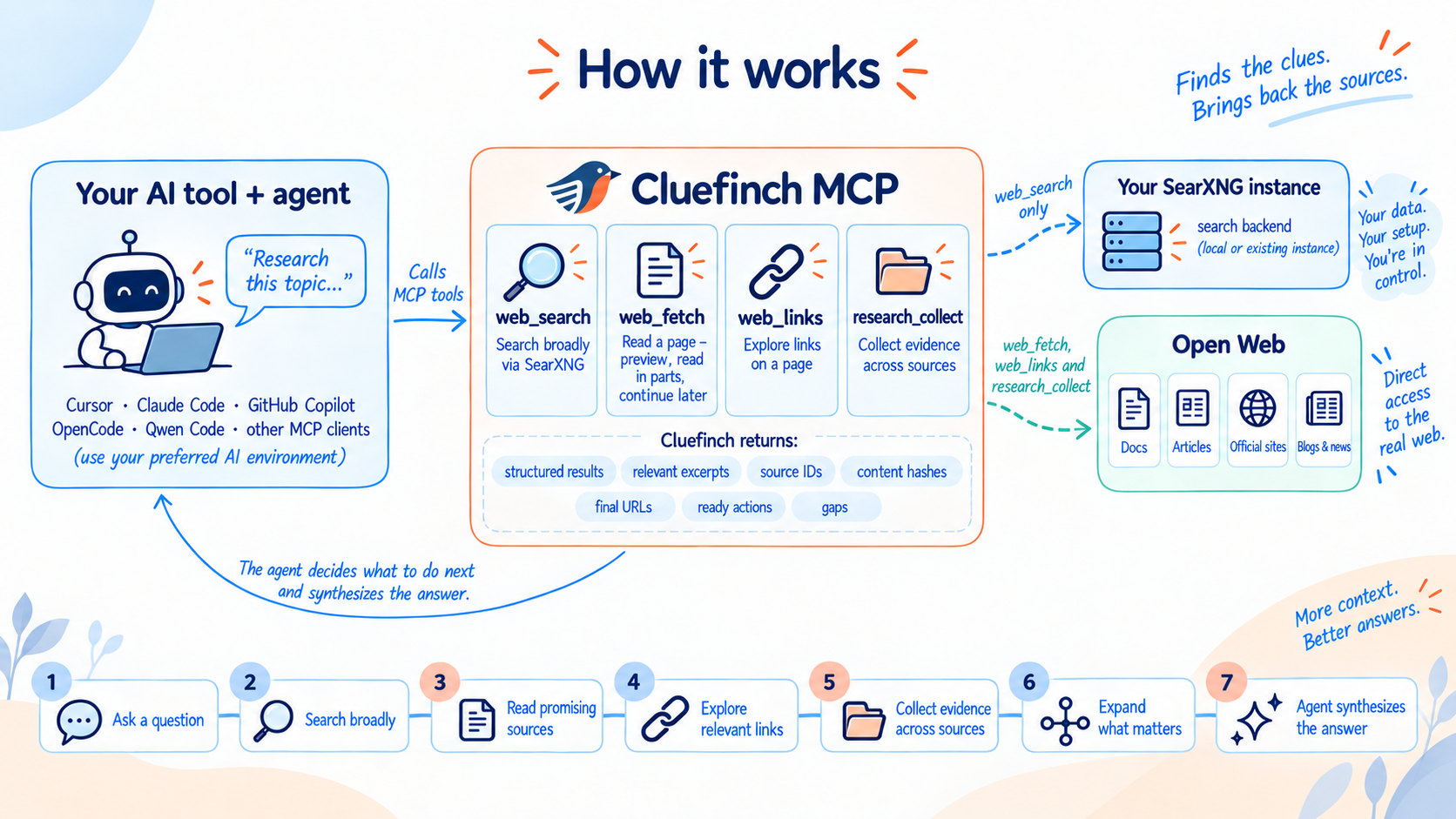
Cluefinch MCP gives AI agents a complete toolkit for working with the web through the Model Context Protocol (MCP).
With Cluefinch, an agent can search the web, read pages, navigate between related sources, and carry out in-depth research.
Cluefinch MCP can make the internet part of your AI agent's workspace — from finding a single fact to carrying out complex, multi-step research across multiple sources.
Cluefinch MCP is completely free to use and requires no paid subscription. It works with AI agents whether they are powered by local LLMs or cloud-based models, and does not require a commercial search API or a subscription to a cloud-hosted Deep Research service.
Cluefinch MCP does not impose its own limits on the number of search queries or research runs.
Your agent gets the tools it needs to work effectively with the web, while you retain control over how those tools are used. Cluefinch integrates easily with MCP-compatible AI tools and fits into the workflow you already use.
What Cluefinch MCP can do
Web Search
Cluefinch MCP lets an agent search the internet through your own SearXNG instance.
The agent can formulate and refine search queries, use different search engines, restrict searches by language or domain, and issue follow-up or revised queries when needed.
Web Reading
Once a useful link is found, the agent can open the page through Cluefinch MCP and receive cleaned text ready for model processing.
Large pages do not have to be loaded into the model's context all at once. The agent can read them in chunks, continue from a specific position, and request additional context only when it is actually needed.
Source Navigation
After finding a useful page, the agent can inspect its HTTP/HTTPS links and use the source's own structure to continue the research: move through documentation sections and report chapters, follow pagination, open related pages, and reach primary materials — without returning to a search engine at every step.
Deep Research
Cluefinch MCP gives the agent the tools to carry out multi-source research workflows.
The agent can pursue several lines of inquiry at once, work with both search results and known URLs, gather material from different sources, examine the most relevant parts of long documents, and deepen the investigation as new questions emerge.
The agent remains in control of the research process: it decides what to search for next, which sources deserve closer inspection, how to interpret the collected material, and when there is enough evidence to produce an answer.
The depth of the research — from a quick product lookup to complex, multi-stage analysis — depends on the task, the model, and the user's instructions.
Quick Start
Cluefinch MCP requires Python 3.12.4 or later.
1. Install Cluefinch MCP
python -m pip install cluefinch
After installation, make sure the cluefinch executable is available through the PATH environment variable.
On Windows:
where.exe cluefinch
On macOS and Linux:
command -v cluefinch
If cluefinch is not found, add the directory containing the installed executable to PATH.
2. Start SearXNG
Cluefinch uses SearXNG as its search backend. If you do not already have your own SearXNG instance, the repository includes a ready-to-use local configuration example:
examples/searxng/compose.yamlexamples/searxng/settings.yml
To run the example, you need Docker with Docker Compose support.
Download these files into a separate directory and create a .env file alongside them with a random SEARXNG_SECRET.
On macOS and Linux:
printf 'SEARXNG_SECRET=%s\n' "$(openssl rand -hex 32)" > .env
On Windows PowerShell:
$secret = -join ((1..64) | ForEach-Object { '{0:x}' -f (Get-Random -Maximum 16) })
"SEARXNG_SECRET=$secret" | Set-Content -Encoding ascii .env
Then start SearXNG with Docker Compose:
docker compose up -d
By default, the local SearXNG instance will be available at:
http://127.0.0.1:8081
3. Connect Cluefinch MCP to your AI tool
Cluefinch connects easily to popular AI tools and runs as a standard local MCP server over stdio.
Ready-to-use connection examples are provided in the next section.
Integrating with AI tools
Cluefinch MCP uses the standard local MCP stdio transport, so in most clients you only need to specify the cluefinch command.
Below are minimal examples of integrating Cluefinch with some popular AI tools. Cluefinch can also be used with other clients that support local MCP servers over stdio.
The examples below use SearXNG at http://127.0.0.1:8081, as shown in the Quick Start section above.
If your SearXNG instance does not use the default address, pass MCP_SEARCH_SEARXNG_URL through the MCP server environment in your client's configuration.
Cursor
Add Cluefinch to your project's .cursor/mcp.json or to Cursor's global MCP configuration:
{
  "mcpServers": {
    "cluefinch": {
      "type": "stdio",
      "command": "cluefinch"
    }
  }
}
After restarting the MCP connection, Cursor will discover the Cluefinch tools and can use them in agent tasks.
Claude Code
Cluefinch can be added with a single command:
claude mcp add --scope user cluefinch -- cluefinch
To verify the connection:
claude mcp list
Codex
Add Cluefinch with:
codex mcp add cluefinch -- cluefinch
To verify the connection:
codex mcp list
GitHub Copilot in VS Code
Add the local MCP server to .vscode/mcp.json:
{
  "servers": {
    "cluefinch": {
      "type": "stdio",
      "command": "cluefinch"
    }
  }
}
Cluefinch will then become available to GitHub Copilot in agent mode as a set of MCP tools.
OpenCode
Add Cluefinch to opencode.jsonc:
{
  "$schema": "https://opencode.ai/config.json",
  "mcp": {
    "cluefinch": {
      "type": "local",
      "command": ["cluefinch"],
      "enabled": true
    }
  }
}
Qwen Code
Add Cluefinch to ~/.qwen/settings.json for user-level configuration, or to .qwen/settings.json for a specific project:
{
  "mcpServers": {
    "cluefinch": {
      "command": "cluefinch",
      "args": []
    }
  }
}
After restarting Qwen Code, you can verify the connection with the /mcp command.
OpenClaw
Add Cluefinch with:
openclaw mcp add cluefinch --command cluefinch
Or configure it manually in openclaw.json:
{
  "mcp": {
    "servers": {
      "cluefinch": {
        "command": "cluefinch",
        "transport": "stdio"
      }
    }
  }
}
To verify the connection:
openclaw mcp probe cluefinch
Hermes Agent
Add Cluefinch to the config.yaml file used by your active Hermes profile:
mcp_servers:
  cluefinch:
    command: "cluefinch"
    args: []
Restart Hermes after saving the configuration.
Configuring agent behavior
The agent formulates search queries, selects sources, and manages the research process using the available Cluefinch MCP tools. You can define your own rules for that process through instructions in AGENTS.md or equivalent settings in your AI tool.
Those instructions can govern both ordinary searches and deep, multi-stage research, including how individual Cluefinch MCP tools should be used.
For example, you can ask the agent to begin with a research plan, run several refinement queries through web_search, use web_links to navigate chapters and related pages, prioritize primary sources, and read large documents incrementally with web_fetch.
For multi-source collection and initial filtering, the agent can use research_collect. Your instructions can also define rules for reusing already collected context, checking conflicting sources, limiting additional search iterations, and keeping factual evidence separate from interpretation.
The repository includes an AGENTS.md file with a ready-made example of this kind of Deep Research workflow. You can use it as a starting point, simplify it for quick research, or adapt it to your own tasks, model, and output requirements.
Cluefinch MCP tools
At the MCP level, Cluefinch exposes four complementary tools that take an agent from web search to reading specific sources and then to multi-source research.
web_search
web_search runs searches through the configured SearXNG instance and returns links to potentially useful sources.
The agent can control the number of results, choose search engines and language, use Safe Search, restrict the search to a particular domain, or exclude unwanted domains. Cluefinch also reports when one or more SearXNG engines fail to respond, so the agent does not mistake an incomplete result set for a complete one.
web_fetch
web_fetch reads web pages directly. Cluefinch downloads the HTML from the specified URL, extracts the main text, converts it to Markdown, and returns only the portion the agent needs.
The agent can first request a small preview of the page to judge whether the source is useful, then continue reading only if needed. A long document can be read incrementally from a chosen position. Cluefinch returns next_start and a ready-to-use continuation action, so the agent does not need to calculate the next position manually. Along with the content, it receives the metadata needed to continue navigating the same retained version of the extracted text safely.
web_links
web_links extracts navigational HTTP/HTTPS links from an HTML page and returns them in document order. It lets the agent inspect the structure of a source it has already found: documentation sections, report chapters, pagination, appendices, primary-source references, and related pages.
This is especially useful in Deep Research. After finding a strong source, the agent can inspect its structure, open only the relevant sections with web_fetch, and then collect material from several selected sources with research_collect. This reduces unnecessary searches, helps preserve research context, and enables deeper work with primary materials.
Relative links are resolved into absolute URLs using the document's base URL. Links can be filtered by origin when needed, and large link sets can be retrieved incrementally across multiple requests.
Cluefinch also versions each retained link set. If the page's navigation changes between requests, the agent will not continue from stale positions in an outdated list.
Extracting links does not make requests to their destinations. Full outbound safety validation is applied only if the agent later decides to fetch one of those URLs.
research_collect
research_collect is designed to work with multiple sources at once. You can provide several search queries, specific URLs, or both.
Cluefinch gathers available sources, deduplicates documents by their final URLs after redirects, and identifies the most relevant passages in long documents. Each selected passage remains an exact slice of the extracted text with stable coordinates, so the agent can return to it later and request additional context when needed.
Each source receives a stable source_id, while collection problems — such as an unreachable URL, a failed search, or a duplicate final document — are reported explicitly in gaps. The agent decides whether enough material has been collected and which sources deserve deeper inspection.
Full tool schemas, parameters, limits, and response semantics are documented in docs/REFERENCE.md.
What makes Cluefinch efficient and safe
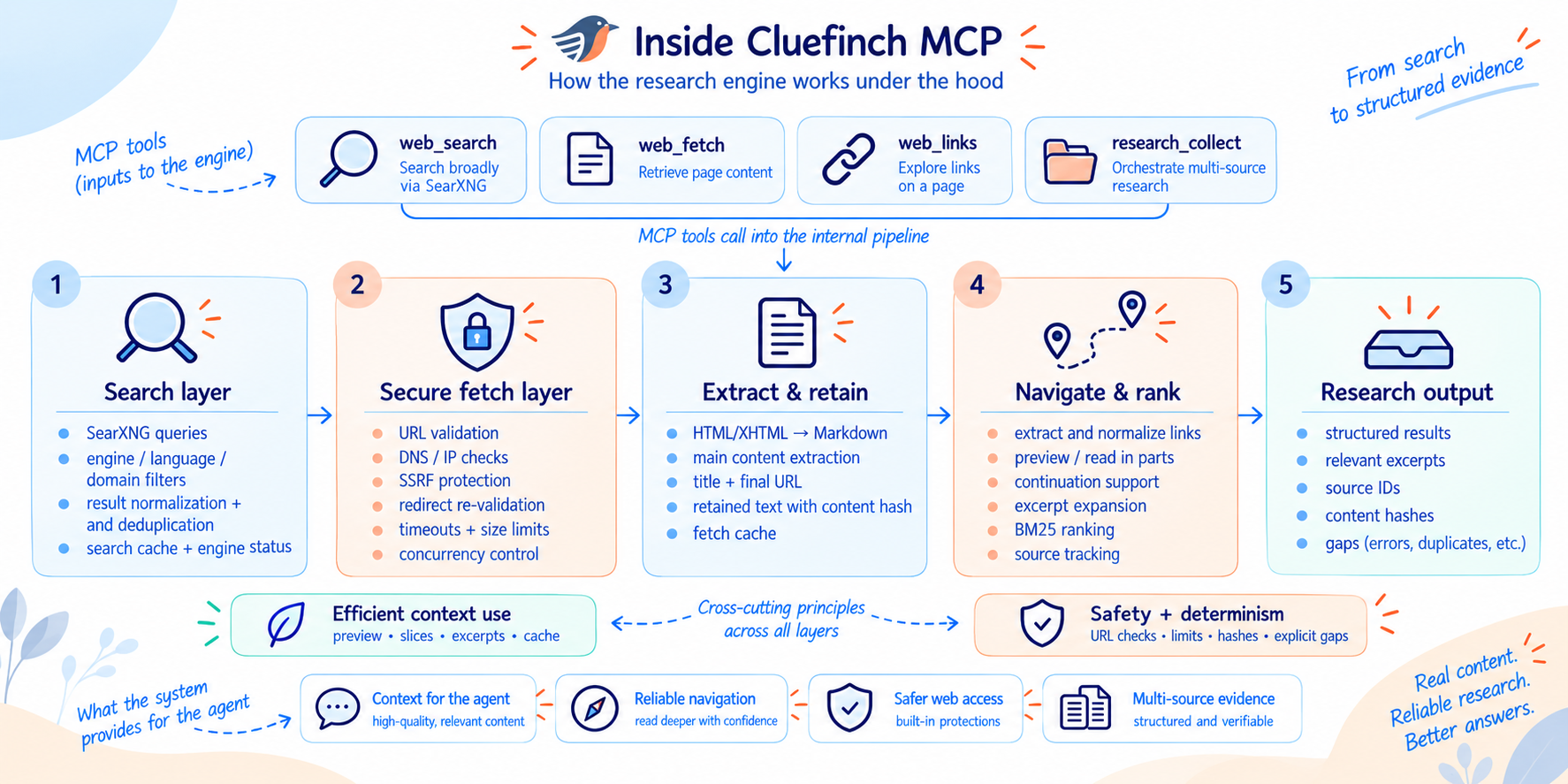
Behind the four Cluefinch MCP tools is a retrieval layer that handles long documents, repeated requests, network constraints, and safe access to external content.
Efficient use of context and tokens
Cluefinch lets the agent send only the portion of a page needed for the current task to the model, rather than loading the entire document into context.
An extracted document can be read incrementally. The agent receives the position of the next chunk and continues only when more content is actually needed. For individual research passages, it can also request more surrounding context without rereading the entire document.
Navigation uses positions in the retained extracted text, allowing the agent to return precisely to previously identified passages. This helps the model use its context window more efficiently and spend tokens only on the parts of a source that matter to the current stage of the work.
Version control for extracted text
Every retained version of extracted text receives a content_hash.
When the agent continues reading or expands a previously selected passage using expected_content_hash, Cluefinch verifies that hash. Ready-to-use actions for continuation and expansion pass it automatically. If the page content has changed and the old coordinates can no longer be considered reliable, the tool reports the change instead of returning an outdated passage from the old position.
This makes continued reading of changing sources more reliable and reduces the risk of silently mixing passages from different versions of a document.
Source provenance and traceability
Cluefinch preserves the final URL after redirects and deduplicates sources again against the final document address. As a result, different links that lead to the same material do not become separate independent sources.
Each normalized final URL receives a stable source_id, allowing the same source to be identified consistently across different stages of the research process.
For long documents, Cluefinch splits extracted text into bounded passages and ranks them for relevance with BM25. Selected passages remain exact slices of the extracted source text with coordinates, so the model receives source material that can later be revisited and expanded with additional context.
Explicit limitations instead of hidden assumptions
Cluefinch explicitly reports conditions that may affect the completeness of retrieved data.
research_collect returns gaps when some sources cannot be retrieved or processed. web_search separately reports SearXNG engines that did not respond. When reading a page, Cluefinch also distinguishes between cases where more retained text remains available and cases where the end of the extracted document was discarded because of the configured retention limit.
This makes incomplete retrieval visible to the agent instead of presenting a partial result as if it were complete. The agent still decides whether enough information has been collected to continue the analysis or produce an answer.
Caching and data reuse
Search results and extracted pages are temporarily stored in local per-process TTL/LRU caches. While a cached entry remains valid, requesting the same resource again avoids another HTTP request. Page URLs are still validated before cache reuse, which can involve DNS lookups.
Identical concurrent searches and fetches of the same page are coalesced so parallel agent actions do not create duplicate network traffic.
Caching complements context management: incremental reading helps conserve model tokens, while the local cache avoids repeatedly downloading the same data from the internet.
Safe access to external pages
An agent can receive links from search results and arbitrary websites, so Cluefinch treats every URL as potentially untrusted.
Before retrieving content, Cluefinch validates the URL scheme, hostname, DNS results, and final IP addresses. Local, private, reserved, multicast, and other unsafe addresses are blocked. Validation is repeated after redirects and again immediately before connection. Cluefinch connects to an already validated numeric IP while preserving the original hostname for HTTP and TLS.
Cluefinch also limits response and decompressed data size, redirect count, download time, concurrent network activity, and the resources used for text extraction. Requests to the same host are also spaced over time.
These measures are primarily designed to protect against SSRF and uncontrolled resource consumption. The text of a web page is still untrusted content and should not automatically be treated by an agent as an instruction.
Separation of search and web-page retrieval
Cluefinch uses SearXNG only as a search backend. It helps discover potential sources but is not used as a proxy for reading web pages.
When the agent opens a discovered URL, Cluefinch retrieves the page directly through its own protected fetch layer. Keeping discovery and retrieval separate allows security, caching, text extraction, and long-document reading to be managed independently.
SearXNG remains a separate service, while Cluefinch MCP runs locally in the user's environment and does not require its own cloud retrieval service or built-in telemetry.
Configuring Cluefinch MCP
Cluefinch MCP can be tuned to a particular environment and agent workload through environment variables prefixed with MCP_SEARCH_.
In most cases, the defaults are sufficient. The main settings are:
| Setting | Default | Purpose |
|---|---|---|
MCP_SEARCH_SEARXNG_URL | http://127.0.0.1:8081 | SearXNG address |
MCP_SEARCH_ENGINES | google,google cse,brave,wikipedia,wikidata | Allowed explicit engine subset; omitting engines uses SearXNG defaults |
MCP_SEARCH_MAX_RESULTS | 20 | Maximum number of results per search |
MCP_SEARCH_MAX_SOURCES | 10 | Maximum number of sources research_collect may attempt to collect |
MCP_SEARCH_MAX_QUERIES | 10 | Maximum number of search queries in one research_collect call |
MCP_SEARCH_MAX_FETCH_CHARS | 20000 | Maximum size of a single returned page fragment |
MCP_SEARCH_MAX_TEXT_CHARS | 100000 | Maximum amount of extracted text retained for one page |
MCP_SEARCH_FETCH_CONCURRENCY | 3 | Maximum number of concurrent page fetches |
MCP_SEARCH_FETCH_TTL | 600 | Lifetime of fetched pages in the local cache, in seconds |
MCP_SEARCH_SEARCH_TTL | 300 | Lifetime of search results in the local cache, in seconds |
For example, if SearXNG is running at a different address:
export MCP_SEARCH_SEARXNG_URL=http://127.0.0.1:8888
The same variables can also be passed directly through the MCP client's server configuration.
The complete list of settings, defaults, and exact behavior is documented in docs/REFERENCE.md.
Current limitations
Cluefinch MCP is designed for searching and retrieving ordinary web pages over HTTP/HTTPS. The current version supports HTML/XHTML and text extraction without running a full browser.
Cluefinch MCP currently does not include:
- JavaScript rendering or browser automation;
- PDF text extraction;
- authenticated sessions or private pages;
- CAPTCHA or paywall bypass;
- vector search or embedding-based retrieval;
- hosted SaaS, a REST API, or built-in telemetry.
If a page depends almost entirely on JavaScript or is unavailable without authentication, the agent should look for an alternative HTML source, public documentation, a mirror, or another accessible source.
These limitations apply to the current version of Cluefinch MCP and help keep the architecture local, predictable, and under your control.
Development setup
To work with the source code, you need uv and Python 3.12.4 or later.
git clone https://github.com/cluefinch/mcp-server.git
cd mcp-server
uv python install 3.12
uv sync --locked
You can then run the server directly from the working tree:
uv run cluefinch
If you need a local SearXNG instance for development, use the ready-made configuration example. If you already have your own SearXNG instance, simply set its address through MCP_SEARCH_SEARXNG_URL.
The main project checks are:
uv run ruff check mcp_search tests scripts
uv run ruff format --check mcp_search tests scripts
uv run pytest -q
uvx --from 'pyright==1.1.414' pyright --pythonpath .venv/bin/python mcp_search scripts
uv build
CI tests the supported Python versions on Ubuntu and Windows and also verifies the lower bounds of direct dependencies.
Detailed information about the local development environment, smoke tests, IDE setup, agent behavior evaluation, and publishable-tree requirements is available in docs/DEVELOPMENT.md.
Contributing, support, and security
If you want to propose a change, report a problem, or contribute to the project, start with CONTRIBUTING.md. It describes the requirements for pull requests, tests, and the Developer Certificate of Origin (DCO).
For usage questions and support, see SUPPORT.md.
If you discover a vulnerability or another security-related issue, do not publish the details in a regular GitHub Issue. The responsible reporting process is described in SECURITY.md.
When creating public Issues or Pull Requests, do not publish secrets, private URLs, content from non-public pages, local capture files, or other sensitive data.
License
The original Cluefinch MCP code is distributed under the Apache License 2.0.
SearXNG is used as a separate external service and remains licensed under GNU AGPL-3.0. The Apache-2.0 license for Cluefinch MCP does not apply to SearXNG, its dependencies, or the content of web pages retrieved by the agent.
Additional information about third-party components and their licenses is available in THIRD_PARTY_NOTICES.md, while SearXNG integration and distribution considerations are documented in docs/SEARXNG_COMPLIANCE.md.
See NOTICE for copyright and attribution information.
Installation
Source-derived launch command. Check the maintainer’s required arguments and credentials before running:
uvx cluefinchSet up in your AI client
Merge this template into ~/Library/Application Support/Claude/claude_desktop_config.json. Keep existing servers. Add any arguments, credentials, and permissions required by the maintainer; this template has not been install-tested.
{
  "mcpServers": {
    "io-github-cluefinch-mcp": {
      "command": "uvx",
      "args": [
        "cluefinch"
      ]
    }
  }
}
Restart Claude Desktop completely for changes to take effect. Confirm the server appears connected in the client’s tool list, then try a read-only example from its documentation.
Claude Desktop setup referencePackage
cluefinchpypiCompatible MCP Clients
Cluefinch MCP works with any MCP-compatible client. Copy the config snippet from the Configuration section above and add it to the file shown for your client, then restart the application.
- Claude Desktop
~/Library/Application Support/Claude/claude_desktop_config.jsonRestart Claude Desktop completely for changes to take effect. - Cursor
~/.cursor/mcp.jsonRestart Cursor for changes to take effect. - VS Code
.vscode/mcp.jsonReload VS Code window for changes to take effect. - Windsurf
~/.codeium/windsurf/mcp_config.jsonRestart Windsurf for changes to take effect. - Claude Code
.mcp.jsonSave at the project root, then start Claude Code in that project and review the MCP server approval prompt. Keep real credentials out of shared files.