mcp-scan
Passive security scanner: audits MCP servers against the OWASP MCP Top 10, graded A-F.
🛡️ mcp-scan
Passive security scanner for Model Context Protocol servers. Point it at any running MCP server; it audits the live server against the OWASP MCP Top 10 and grades it A–F. Read-only, so it is safe to run against production.




npx owasp-mcp-scan --stdio "npx -y @modelcontextprotocol/server-filesystem /tmp"
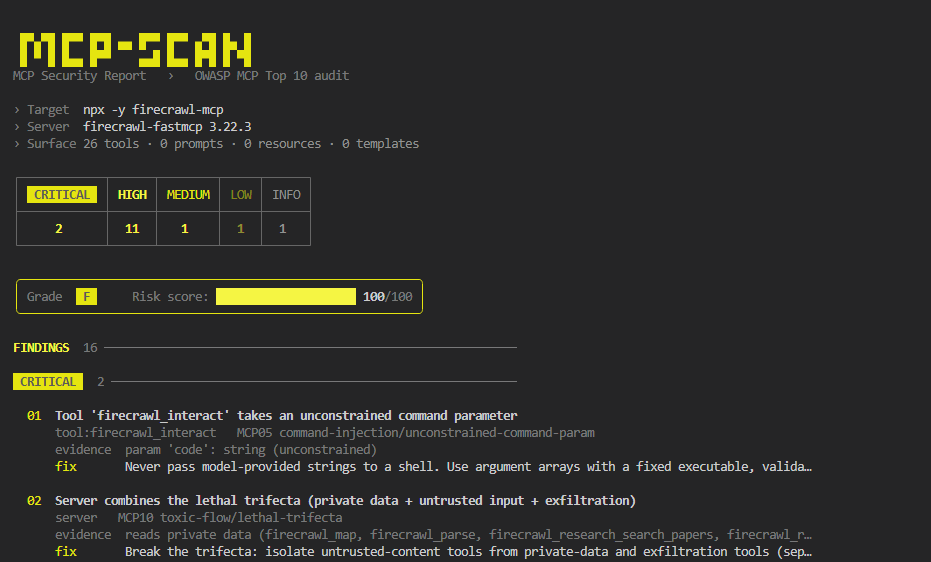
I ran it against the 12 most-installed MCP servers. 9 of them failed. No install, no config, no exploiting anything.
Why
MCP tool descriptions are fed straight into your model's context, and most public servers were never security-reviewed. A bad one can hide instructions in a description, expose a raw-shell tool, or leak a key; and your agent acts on it. Endor Labs found 82% of servers prone to path traversal, 34% to command injection.
mcp-scan is the gut-check before you wire a server in. It's passive: it reads advertised capabilities and analyzes them statically, never invoking tools, so it's safe against production servers.
How it works
- Connects to the server over stdio or Streamable HTTP and enumerates every advertised tool, prompt, and resource.
- Runs 12 static checks across that surface: secrets, injection, SSRF, path traversal, tool poisoning, excessive scope, and more.
toxic-flowreasons across the whole toolset for the lethal trifecta (reads private data + ingests untrusted content + can exfiltrate), the shape single-tool scanners miss.- Scores 0-100 and grades A-F (any critical forces F). Emits console, JSON, or SARIF.
It never calls a tool, never fuzzes, and never sends an exploit. The worst it does is read what the server already tells everyone.
Real findings on real servers
12 popular npm servers, actual output (snapshot 2026-07-11, full benchmark):
| Server | Tools | Grade | 🔴 | 🟠 | 🟡 | Notable |
|---|---|---|---|---|---|---|
firecrawl-mcp | 26 | F | 2 | 11 | 1 | lethal trifecta (MCP10) + code exec (MCP05) |
@modelcontextprotocol/server-filesystem | 14 | F | 0 | 1 | 11 | unconstrained path params (MCP01) |
@modelcontextprotocol/server-puppeteer | 7 | F | 1 | 2 | 0 | script param executes JS (MCP05) |
tavily-mcp | 5 | F | 0 | 3 | 1 | untrusted-input + exfiltration (MCP10) |
@modelcontextprotocol/server-memory | 9 | F | 0 | 3 | 0 | delete_* tools, no confirmation (MCP02) |
@modelcontextprotocol/server-github | 26 | D | 0 | 0 | 2 | state-changing tools (MCP02) |
@modelcontextprotocol/server-slack | 8 | C | 0 | 1 | 0 | reads + posts = data + exfil (MCP10) |
@modelcontextprotocol/server-everything | 13 | A | 0 | 0 | 0 | clean ✓ |
@kazuph/mcp-fetch | 1 | A | 0 | 0 | 0 | clean ✓ |
9 of 12 flagged, 3 clean, every row audited finding-by-finding, false positives stripped rather than padded. Reproduce any row yourself:
npx owasp-mcp-scan --stdio "npx -y firecrawl-mcp"     # F: lethal trifecta + code exec
npx owasp-mcp-scan --stdio "npx -y @modelcontextprotocol/server-everything"   # A: clean
Use it
CLI
npx owasp-mcp-scan --stdio "<command>"                                  # local stdio server
npx owasp-mcp-scan --url https://host/mcp --header "Authorization: Bearer $TOKEN"
npx owasp-mcp-scan --config ~/.cursor/mcp.json --format sarif --output mcp.sarif
As an MCP server, let your agent scan servers on demand ("scan this MCP server before I add it"). Add to any client; this mcpServers shape works in Claude Code, Claude Desktop, Cursor, Windsurf, VS Code, and Gemini CLI:
{ "mcpServers": { "mcp-scan": { "command": "npx", "args": ["-y", "owasp-mcp-scan", "--serve"] } } }
OpenAI Codex (~/.codex/config.toml):
[mcp_servers.mcp-scan]
command = "npx"
args = ["-y", "owasp-mcp-scan", "--serve"]
Exposes two tools: scan_mcp_server (audit a stdio/HTTP target) and list_checks.
Claude Code plugin
/plugin marketplace add CodingSelim/mcp-scan
/plugin install mcp-scan@mcp-scan
Also on the official MCP registry as io.github.CodingSelim/mcp-scan. Publishing steps: PUBLISHING.md.
What it checks
Full OWASP MCP Top 10 (2025) coverage, 12 checks:
| Check | OWASP | Catches |
|---|---|---|
secret-exposure | MCP01 | AWS / OpenAI / Anthropic / GitHub / GitLab / Stripe / SendGrid / npm / HF / DB URIs / JWT / private keys in advertised text |
transport | MCP01 | Plaintext http:// to a non-loopback host |
path-traversal | MCP01 | file:///{path} templates and unconstrained path params |
excessive-scope | MCP02 | Destructive tools (delete, drop, transfer) with no confirmation |
tool-poisoning | MCP03 | Instruction overrides, hidden exfiltration directives, zero-width / Unicode-tag smuggling |
tool-shadowing | MCP03 / MCP09 | Duplicate tool-name collisions and "call me first" precedence injection |
supply-chain | MCP04 / MCP09 | Unpinned/placeholder versions and homoglyph server names |
command-injection | MCP05 | Unconstrained command / shell / code params, raw SQL, advertised execution |
ssrf | MCP05 | Arbitrary url / host params with no allowlist |
tool-poisoning (dynamic) | MCP06 | Injection in resource contents and server instructions |
authn | MCP07 | HTTP servers that complete an unauthenticated handshake |
telemetry | MCP08 | High-impact tools with no audit trail (advisory, unscored) |
toxic-flow | MCP10 | Lethal trifecta: one server that reads private data, ingests untrusted content, and can exfiltrate |
toxic-flow is the standout, it reasons across the whole toolset, catching the GitHub-MCP / email-agent injection shape that per-tool checks miss.
Output & CI
console (default) · json · sarif (GitHub Code Scanning). Exit code is non-zero at/above --fail-on (default high), so it gates CI:
- run: npx owasp-mcp-scan --url ${{ secrets.MCP_URL }} --format sarif --output mcp.sarif
- uses: github/codeql-action/upload-sarif@v3
  with: { sarif_file: mcp.sarif }
Limitations (read these)
- Static analysis can't see runtime sandboxing, a server that safely confines paths still flags them. Verify against actual enforcement.
- Auth and transport checks apply to HTTP targets only.
- Heuristics favor recall, so triage findings in context. When a rule is tightened to kill a false positive, a test pins the intended behavior.
- Scanning a stdio target spawns that command, so run it only on servers you trust.
Develop
npm install && npm run build && npm test # 48 tests, incl. live end-to-end fixture scans
Checks are pure and isolated (src/checks/), reusing detectors in src/detectors/. See CONTRIBUTING.md.
References
OWASP MCP Top 10 · MCP Security Cheat Sheet · Vulnerable MCP Project · MCPTox
MIT © CodingSelim
Installation
Source-derived launch command. Check the maintainer’s required arguments and credentials before running:
npx -y owasp-mcp-scanSet up in your AI client
Merge this template into ~/Library/Application Support/Claude/claude_desktop_config.json. Keep existing servers. Add any arguments, credentials, and permissions required by the maintainer; this template has not been install-tested.
{
  "mcpServers": {
    "io-github-codingselim-mcp-scan": {
      "command": "npx",
      "args": [
        "-y",
        "owasp-mcp-scan"
      ]
    }
  }
}
Restart Claude Desktop completely for changes to take effect. Confirm the server appears connected in the client’s tool list, then try a read-only example from its documentation.
Claude Desktop setup referencePackage
Compatible MCP Clients
mcp-scan works with any MCP-compatible client. Copy the config snippet from the Configuration section above and add it to the file shown for your client, then restart the application.
- Claude Desktop
~/Library/Application Support/Claude/claude_desktop_config.jsonRestart Claude Desktop completely for changes to take effect. - Cursor
~/.cursor/mcp.jsonRestart Cursor for changes to take effect. - VS Code
.vscode/mcp.jsonReload VS Code window for changes to take effect. - Windsurf
~/.codeium/windsurf/mcp_config.jsonRestart Windsurf for changes to take effect. - Claude Code
.mcp.jsonSave at the project root, then start Claude Code in that project and review the MCP server approval prompt. Keep real credentials out of shared files.