AlbumentationsX MCP
AlbumentationsX MCP for batch previews, compare preview runs, segmentation masks, and exports.
AlbumentationsX MCP
Model Context Protocol server for AlbumentationsX: inspect datasets, preview augmentations, refine them with visual feedback, and export reproducible pipelines.




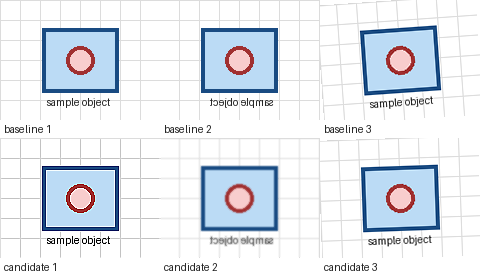
Ask an MCP host for several robustness variants, reject an excessive result such as too_noisy:high, compare the adjusted batch previews, and export the accepted pipeline.
Install
Claude Desktop
Download the latest albumentationsx-mcp.mcpb, install it from Settings -> Extensions -> Advanced settings, and select separate image and artifact directories.
Other MCP Hosts
Run the published server with bounded local access:
uvx --from albumentationsx-mcp albumentationsx-mcp \
  --allowed-root /absolute/path/to/images \
  --artifact-root /absolute/path/to/albu-artifacts
run_first_preview requires the default full or dataset capability profile. The smaller review profile uses the
explicit validate/render fallback in the usage guide, or you can restart with dataset or full; see
configuration. Copyable host configurations are in the install guide.
The repository also contains a native Codex plugin bundle. npx skills add dKosarevsky/albu-mcp installs agent guidance, not the MCP server.
First Preview
After connecting the server, ask your host:
Run the host smoke check. If preview_ready is true, call run_first_preview for /absolute/path/to/images with low
intensity and at most 8 images. Show me the contact sheet. When I mention a specific result, call
trace_preview_variant before adjusting it.
run_host_smoke_check returns preview_ready and a preview_request_template. If resource reads are unavailable, call
get_workflow_example with example_id="client-smoke".
Try the classification robustness use case, or follow the
First 10 Minutes guide. The validate_preview_request fallback, batch previews, and how to
compare preview runs are in Usage. Use too_noisy:high or exposure_too_weak:medium, then optionally
share one redacted loop through first-preview feedback.
If setup fails, read albumentationsx://diagnostics/guide and call diagnose_environment for bounded remediation actions.
Capabilities
- Transform discovery, schemas, recipes, and pipeline validation.
- Classification, detection, segmentation, OCR, bbox, mask, keypoint, and dataset-quality workflows.
- Deterministic previews, contact sheets, annotation overlays, comparison, ranking, and reports.
- Interactive MCP Apps review with a text-only fallback for other hosts.
- Structured feedback, tuning sessions, and Python, JSON, or YAML export.
- Runtime-aware CPU
torch.Tensorpipeline validation and guarded Python handoff. - MCP
2026-07-28plus legacy negotiation; stable agent workflow resources, diagnostics, and contract snapshots.
The server does not execute arbitrary Python, fetch remote images, overwrite datasets, or train models. Reads are restricted by --allowed-root; generated files stay under --artifact-root.
Integrations
- Official Albumentations MCP guide
- Official MCP Registry entry
- skills.sh agent skill
- Upstream documentation PR
Documentation
- Install and host configuration
- Runtime settings and capability profiles
- First 10 minutes
- First-preview feedback
- Usage and recipes
- CPU Tensor Compose validation and export
- MCP Apps review and compatibility policy
- Documentation index
- CHANGELOG.md
- server.json: public MCP Registry metadata.
Development
uv sync --all-extras --dev
uv run pytest
uv run ruff check .
uv run ruff format --check .
uv run ty check
Licensed under AGPL-3.0-or-later.
Installation
Source-derived launch command. Check the maintainer’s required arguments and credentials before running:
uvx albumentationsx-mcpSet up in your AI client
Merge this template into ~/Library/Application Support/Claude/claude_desktop_config.json. Keep existing servers. Add any arguments, credentials, and permissions required by the maintainer; this template has not been install-tested.
{
  "mcpServers": {
    "io-github-dkosarevsky-albu-mcp": {
      "command": "uvx",
      "args": [
        "albumentationsx-mcp"
      ]
    }
  }
}
Restart Claude Desktop completely for changes to take effect. Confirm the server appears connected in the client’s tool list, then try a read-only example from its documentation.
Claude Desktop setup referencePackage
albumentationsx-mcppypiCompatible MCP Clients
AlbumentationsX MCP works with any MCP-compatible client. Copy the config snippet from the Configuration section above and add it to the file shown for your client, then restart the application.
- Claude Desktop
~/Library/Application Support/Claude/claude_desktop_config.jsonRestart Claude Desktop completely for changes to take effect. - Cursor
~/.cursor/mcp.jsonRestart Cursor for changes to take effect. - VS Code
.vscode/mcp.jsonReload VS Code window for changes to take effect. - Windsurf
~/.codeium/windsurf/mcp_config.jsonRestart Windsurf for changes to take effect. - Claude Code
.mcp.jsonSave at the project root, then start Claude Code in that project and review the MCP server approval prompt. Keep real credentials out of shared files.