MCP ZAP Server
Safe, self-hosted ZAP operator for guided AI security scans and reports.
Note This project is not affiliated with or endorsed by the ZAP project. It is an independent implementation.
mcp-zap-server exposes ZAP through MCP over streamable HTTP so agentic tools can run operator-controlled security workflows without brittle glue scripts or unsafe scanner access.
Use it when you want:
- safe agentic scanning with guided defaults for spider, active scan, passive scan, API imports, findings, and reports
- operator control through API-key or JWT auth, tool scopes, runtime policy bundles, rate limits, and audit events
- self-hosted deployment with Docker Compose for local adoption and Helm for Kubernetes
- expert ZAP access when you intentionally need lower-level ZAP context, user, scan, and report controls
Full documentation: danieltse.org/mcp-zap-server
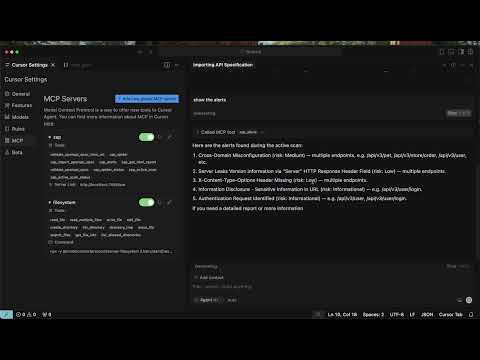
Watch the demo: browser demo or YouTube
Quick Start
Prerequisites:
- Docker 20.10+
- Docker Compose v2 (
docker compose) - your own MCP client with Streamable HTTP and custom-header support
git clone https://github.com/dtkmn/mcp-zap-server.git
cd mcp-zap-server

./bin/bootstrap-local.sh
./dev.sh
./bin/self-serve-doctor.sh
Those scripts are the supported local happy path, not hidden magic:
bootstrap-local.shcreates.env, generates local API keys, and prepares the ZAP workspace.dev.shstarts the Docker Compose stack with the faster JVM image.self-serve-doctor.shchecks Docker, auth, MCP initialize,tools/list, guided tools, and a harmless tool call.
The JVM image remains Java 25 end to end: source compilation, bytecode, and
runtime all target Java 25. Its final runtime is distroless, so it intentionally
contains no shell, package manager, or curl. A small built-in HTTP probe keeps
the normal Docker Compose health status; docker compose ps still reports the
MCP service as (healthy) after startup.
Connect your MCP client:
- MCP endpoint for host-side clients:
http://localhost:7456/mcp - Authentication: send
MCP_API_KEYfrom.envin theX-API-Keyheader - Codex setup
- Cursor config example:
examples/cursor/mcp.json - Client compatibility and setup
The stack runs the MCP server, ZAP, and demo targets. Install and configure your preferred MCP client separately.
When scanning the bundled demo targets, use the container URLs that ZAP can reach from inside Compose:
- Juice Shop scan target:
http://juice-shop:3000 - Petstore scan target:
http://petstore:8080
After connecting, try this first prompt:
Use the guided ZAP tools to crawl http://juice-shop:3000. Wait for the crawl
and passive analysis to finish, show a findings summary, generate an HTML
report, and read it back through MCP. Do not run an active scan.
Expect a completed crawl, a findings summary, and a report the client can read. Finding counts vary; a connection or scan error is not a clean result.
The default Compose stack publishes host ports on 127.0.0.1 only. Set MCP_ZAP_BIND_ADDRESS=0.0.0.0 only when you intentionally expose the stack behind trusted network controls.
Client setup:
- Self-Serve First Run
- MCP Access Authentication
- MCP Client Configuration
- Optional Target Form-Login
- Tool Surfaces
- Agent install notes
There are two independent authentication layers. The API key or JWT lets Cursor call MCP ZAP Server. An optional target-auth profile lets ZAP log in to an application you are authorized to scan. Most first runs need only the MCP API key; never put a target website password in Cursor or an MCP prompt.
Discovery Metadata
This repository includes MCP Registry metadata in .mcp/server.json.
Use metadata from the same version as the image you deploy. The image includes
the MCP server name expected by registry and catalog tooling. Check
GitHub Releases and the
release workflow before installing a versioned image or publishing its package
metadata; repository metadata alone is not proof of image availability.
Docker Compose remains the easiest installation path because the MCP server is designed to operate with a ZAP sidecar and explicit auth keys. The OCI package metadata is for advanced standalone installs where ZAP is already running and reachable from the MCP container.
What You Get
- Guided scans: intent-first tools for spider, active scan, passive scan, API imports, findings, reports, and scan history.
- Expert ZAP control: optional lower-level tools for advanced ZAP context, user, scan, and report workflows.
- Authentication: API key mode by default, optional JWT mode with refresh and revocation support.
- Runtime policy bundles: dry-run and enforcement support through
zap_policy_dry_runand policy-mode configuration. - Scan queue and history: queued active, traditional spider, AJAX Spider, and Client Spider jobs with claim-based recovery, durable Postgres state, and evidence export.
- Extension contracts: experimental policy, protection, evidence metadata, and extension metadata APIs with sample extension packaging.
- Operational guardrails: request body limits, rate limits, workspace quotas, tool-scope authorization, structured logs, metrics, and audit events.
- Deployment paths: local Docker Compose, published JVM container images, and Helm charts for Kubernetes.
In v0.13.0, Client Spider and browser authentication profiles support direct and queued browser crawling. See the Client Spider guide for setup, authenticated crawling, and reports. These features are not included in v0.12.0.
Version 0.13.0
See GitHub Releases for the latest published version and its publication date. Version-specific documentation describes that version's behavior; it does not announce image availability. Deploy only after the corresponding release workflow succeeds and the versioned image is available in your registry.
In v0.13.0, Client Spider explores JavaScript applications in direct and
queued workflows, with optional guided browser login and automatic session
detection for cookies and header tokens. Upgrade all workers sharing a queue
before submitting Client Spider jobs, and review the browser prerequisites and
timeout settings in the release notes. Preparing or merging this version does
not publish its release or container images.
Security Defaults
The default posture is intentionally conservative:
api-keymode is the base runtime default.nonemode is for explicit local dev/test only.- Docker Compose binds published ports to loopback by default.
- The Java 25 JVM image uses a digest-pinned distroless runtime with no shell or package manager; debug it through logs, metrics, and external diagnostic containers rather than installing tools into the application container.
- URL validation blocks localhost, private networks, and link-local targets by default.
- Target authentication is optional and profiles default to an empty list. When enabled, guided auth binds an exact server-side credential reference and login settings to one approved origin; callers provide only
profileIdandtargetUrl. - Public auth exchange endpoints are rate-limited.
- MCP request bodies have a hard early size cap.
Production and shared deployments should review:
- Security Modes
- JWT Authentication
- Optional Target Form-Login
- Authenticated Scanning Reference
- Abuse Protection
- Production Readiness Checklist
- Security Policy
Architecture
flowchart LR
  Client["Your MCP Client"] -->|"MCP over Streamable HTTP"| MCP["MCP ZAP Server"]
  MCP -->|"ZAP API"| ZAP["ZAP"]
  ZAP -->|"scan"| Target["Authorized target app"]
  MCP -->|"reports / findings / history"| Evidence["Evidence + reports"]
For multi-replica queueing, durable Postgres state, claim recovery, and ingress affinity, use the operations docs instead of this README:
- Queue Coordinator and Worker Claims
- Multi-Replica Deployment Requirements
- Scan History Ledger
- Helm Deployment
Extension Model
ZAP is the first scanner engine, not the whole product boundary. The current public extension work is intentionally small:
mcp-zap-extension-apipackages selected policy, protection, evidence, and metadata contracts without gateway runtime internals.- How extensions work explains the core versus extension boundary.
- Build your own extension shows the target standalone repository shape.
- Extension API release policy explains publication stages and compatibility gates.
- Standalone sample extension proves a separate project can compile against the API artifact.
This is not runtime multi-engine support yet. Additional scanner engines need an adapter design and explicit fail-closed capability boundaries before they become product claims.
Documentation Map
Start here:
- Full documentation
- Self-Serve First Run
- OSS Extension Model
- MCP Access Authentication
- MCP Client Authentication
- Optional Target Form-Login
- Tool Surfaces
Scanning:
- MCP Client Scan To Evidence
- Scan Execution Modes
- Seeded API Gate Playbook
- API Schema Imports
- AJAX Spider
- Client Spider (v0.13.0)
- Findings and Reports
Operations:
Open Source Core And Extension Model
mcp-zap-server is the Apache-2.0-licensed open-source core. It is intended to be useful on its own for self-hosted MCP and ZAP workflows.
Private or enterprise capabilities may be built as separate extensions around this core. Those extensions are not required to run the OSS project, and enterprise implementation code is not shipped in this repository.
The boundary is intentional:
- this repository remains the public OSS distribution
- extension points should be documented and kept stable where practical
- private extensions must not weaken the security, licensing, or usability of the OSS core
- security scanning and open-source program entitlements for this repository apply only to this public project
Contributing And Support
If this project saves you time or becomes part of your security workflow, you can sponsor the maintainer to support ongoing maintenance.
Agentic Lab offers optional paid support for teams adopting the public core in production. Commercial support is separate from the Apache-2.0-licensed OSS distribution, and the public core should remain usable without private extensions or paid services.
License
Apache License 2.0. Copyright 2025-2026 Daniel Tse. See LICENSE.
Installation
Source-derived launch command. Check the maintainer’s required arguments and credentials before running:
docker run -i --rm ghcr.io/dtkmn/mcp-zap-server:v0.14.0Set up in your AI client
Merge this template into ~/Library/Application Support/Claude/claude_desktop_config.json. Keep existing servers. Add any arguments, credentials, and permissions required by the maintainer; this template has not been install-tested.
{
  "mcpServers": {
    "io-github-dtkmn-mcp-zap-server": {
      "command": "docker",
      "args": [
        "run",
        "-i",
        "--rm",
        "ghcr.io/dtkmn/mcp-zap-server:v0.14.0"
      ]
    }
  }
}
Restart Claude Desktop completely for changes to take effect. Confirm the server appears connected in the client’s tool list, then try a read-only example from its documentation.
Claude Desktop setup referencePackage
ghcr.io/dtkmn/mcp-zap-server:v0.14.0dockerCompatible MCP Clients
MCP ZAP Server works with any MCP-compatible client. Copy the config snippet from the Configuration section above and add it to the file shown for your client, then restart the application.
- Claude Desktop
~/Library/Application Support/Claude/claude_desktop_config.jsonRestart Claude Desktop completely for changes to take effect. - Cursor
~/.cursor/mcp.jsonRestart Cursor for changes to take effect. - VS Code
.vscode/mcp.jsonReload VS Code window for changes to take effect. - Windsurf
~/.codeium/windsurf/mcp_config.jsonRestart Windsurf for changes to take effect. - Claude Code
.mcp.jsonSave at the project root, then start Claude Code in that project and review the MCP server approval prompt. Keep real credentials out of shared files.