GoModel
Self-hosted gateway aggregating upstream MCP servers behind one authenticated HTTP endpoint.
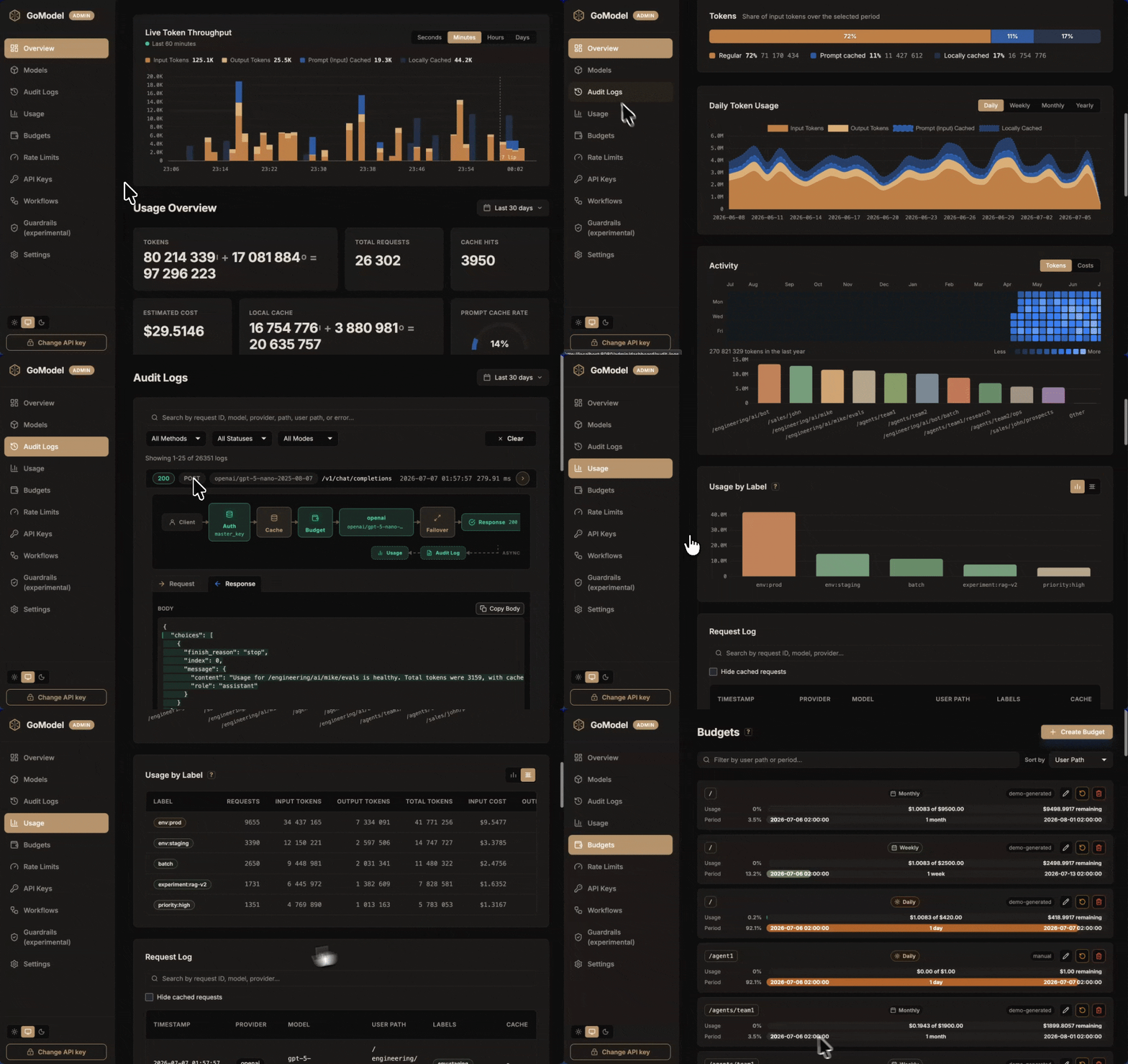
GoModel saves you money and nerves.
Money - because you can remember the responses on this layer (caching), track your spending and do tricks like prompt compression and intelligent routing.
Nerves - because we strive to achieve good quality and reliability. Our ambition is to be the last AI gateway you will need - the most reliable, resource-optimal, feature-rich and fast.
Quick Start
Step 1: Install and start GoModel
macOS / Linux
curl -fsSL https://gomodel.enterpilot.io/install.sh | sh
# OPENAI_API_KEY="your-openai-key" # (optional)
gomodel
Windows (PowerShell)
irm https://gomodel.enterpilot.io/install.ps1 | iex
# $env:OPENAI_API_KEY = "your-openai-key" # (optional)
gomodel
Docker
docker run --rm -p 8080:8080 \
  -e OPENAI_API_KEY="your-openai-key" \
  enterpilot/gomodel
ℹ️ Configure GoModel with .env, a config.yaml file, or manage the most important settings directly in the dashboard.
ℹ️ See .env.template for the complete list of environment variables, including all available providers.
Step 2: Open the dashboard
http://localhost:8080/admin/dashboard
Step 3: Make an API call
curl http://localhost:8080/v1/responses \
  -H "Content-Type: application/json" \
  -d '{
    "model": "gpt-5-chat-latest",
    "input": "Hello!"
  }'
GoModel and official SDKs
GoModel accepts requests in two compatible formats:
- OpenAI-compatible at
/v1 - Anthropic-compatible at
/v1/messages
The official SDKs therefore work unchanged. Configure their base URLs as follows:
- OpenAI SDK:
http://localhost:8080/v1 - Anthropic SDK:
http://localhost:8080(the SDK appends/v1/messages)
List of Supported LLM Providers
- OpenAI
- Anthropic
- xAI (Grok)
- Google Gemini
- Cohere
- Vertex AI
- DeepSeek
- Groq
- Fireworks AI
- Meta (Muse Spark)
- OpenRouter
- Z.ai
- Alibaba Cloud Model Studio (Bailian)
- Kilo AI
- MiniMax
- Xiaomi MiMo
- OpenCode Go
- Azure OpenAI
- Oracle
- Ollama
- SGLang
- vLLM
- llm-d
- Amazon Bedrock Runtime and Bedrock Mantle
- ChatGPT (the Codex backend) and Claude
- ElevenLabs (text-to-speech and speech-to-text)
- Jev (TypeSafe System One decision API) and self-hosted Kev
- All OpenAI-compatible providers
See the Providers Overview for the full per-provider feature matrix.
Docker Compose
Infrastructure only (Redis, PostgreSQL, MongoDB, Adminer - no image build):
cp .env.template .env
# Add your API keys to .env
docker compose up -d
# or: make infra
Full stack (adds GoModel + Prometheus; builds the app image):
docker compose --profile app up -d
# or: make image
API docs
Gateway Configuration
GoModel resolves configuration in the following order, with each source overriding those to its left:
Good defaults → config.yaml → .env → exported environment variables
See the Configuration reference for the full list of settings.
Features
- Caching - exact and semantic response caching, so repeated prompts cost nothing
- Cost tracking - per-request cost estimates, usage analytics, and spending breakdowns in the dashboard
- Budgets - hard spend limits per user, team, or key
- Rate limits - requests, tokens, and concurrency caps per user path, provider, or model
- Usage API - clients check their own usage, remaining budget, and rate-limit headroom with the key they already use for inference
- Virtual models - aliases and load balancing (round-robin or cost-based) behind stable model names
- Session keeping - detect a client session and pin it to one target and provider key, so provider prompt caches stay warm and audit logs read as threads
- Failover - automatic rerouting to backup providers, with retries and circuit breakers
- Labelling - tag requests from HTTP headers or API keys and break down usage by label
- User paths - hierarchical scoping of keys, model access, budgets, usage, and audit logs
- Model access control - per-group, per-user, and per-key model allowlists that intersect down the user-path tree
- MCP gateway - aggregate your MCP servers behind one authenticated endpoint
- Passthrough API - provider-native APIs under
/p/{provider}/..., with GoModel auth and tracking - Audio and image APIs - OpenAI-compatible text-to-speech, transcription, and image generation and editing with the same access rules, budgets, and cost tracking as chat
- Provider replay state - preserves Gemini thought signatures and Anthropic thinking blocks across turns, APIs, and providers
- Guardrails - request and response policies enforced at the gateway
- Plugins - one contract for guardrails, response and stream filters, header edits, and routing strategies; built in, compiled in, or loaded from a
.soat startup - Workflows - versioned per-request policies that scope cache, budgets, audit logging, guardrail phases, and failover by user path, provider, or model
- Provider key rotation - round-robin over multiple API keys to lift per-key rate limits
- Observability - Prometheus metrics, OpenTelemetry traces, audit logs, and live request streaming in the dashboard
- Playground - try any model or virtual model from the dashboard and inspect the exact request and response JSON
GoModel Pro
GoModel Pro is the commercial build: the same gateway, configuration, and dashboard, with licensed extensions.
- Prompt compression - remove repeated and structural context before it reaches the provider, without changing the request shape
- Intelligent routing - classify each request as easy or hard, then pick the healthiest and cheapest provider in that tier
- OIDC single sign-on - protect the dashboard with your identity provider using Authorization Code flow with PKCE
More in the documentation...
Roadmap
See the roadmap for GoModel Pro and the upcoming 0.2.0 release.
Sponsors
Community
We are on Discord. Feel free to stop by and tell us what you think about GoModel.
Installation
Source-derived launch command. Check the maintainer’s required arguments and credentials before running:
docker run -i --rm docker.io/enterpilot/gomodel:0.1.99Set up in your AI client
Merge this template into ~/Library/Application Support/Claude/claude_desktop_config.json. Keep existing servers. Add any arguments, credentials, and permissions required by the maintainer; this template has not been install-tested.
{
  "mcpServers": {
    "io-github-enterpilot-gomodel": {
      "command": "docker",
      "args": [
        "run",
        "-i",
        "--rm",
        "docker.io/enterpilot/gomodel:0.1.99"
      ]
    }
  }
}
Restart Claude Desktop completely for changes to take effect. Confirm the server appears connected in the client’s tool list, then try a read-only example from its documentation.
Claude Desktop setup referencePackage
docker.io/enterpilot/gomodel:0.1.99dockerCompatible MCP Clients
GoModel works with any MCP-compatible client. Copy the config snippet from the Configuration section above and add it to the file shown for your client, then restart the application.
- Claude Desktop
~/Library/Application Support/Claude/claude_desktop_config.jsonRestart Claude Desktop completely for changes to take effect. - Cursor
~/.cursor/mcp.jsonRestart Cursor for changes to take effect. - VS Code
.vscode/mcp.jsonReload VS Code window for changes to take effect. - Windsurf
~/.codeium/windsurf/mcp_config.jsonRestart Windsurf for changes to take effect. - Claude Code
.mcp.jsonSave at the project root, then start Claude Code in that project and review the MCP server approval prompt. Keep real credentials out of shared files.