rekey
Rotate API keys across AWS, GitLab, Cloudflare, OpenAI & more. Secrets never reach the model.
rekey
Rotate API keys and tokens across providers from one CLI: mint the new key, push it to everything that uses it, verify it, retire the old one. Includes an MCP server.
Only touches accounts you administer — every provider acts with your own credential.
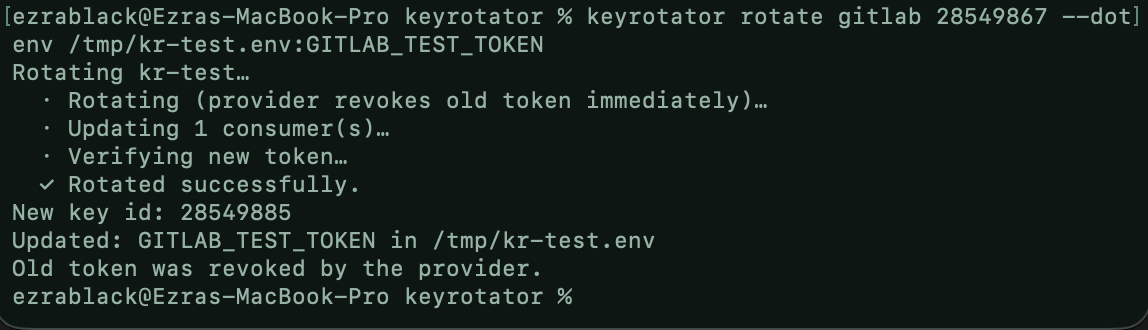
CLI — rotate a GitLab token straight into a .env file:
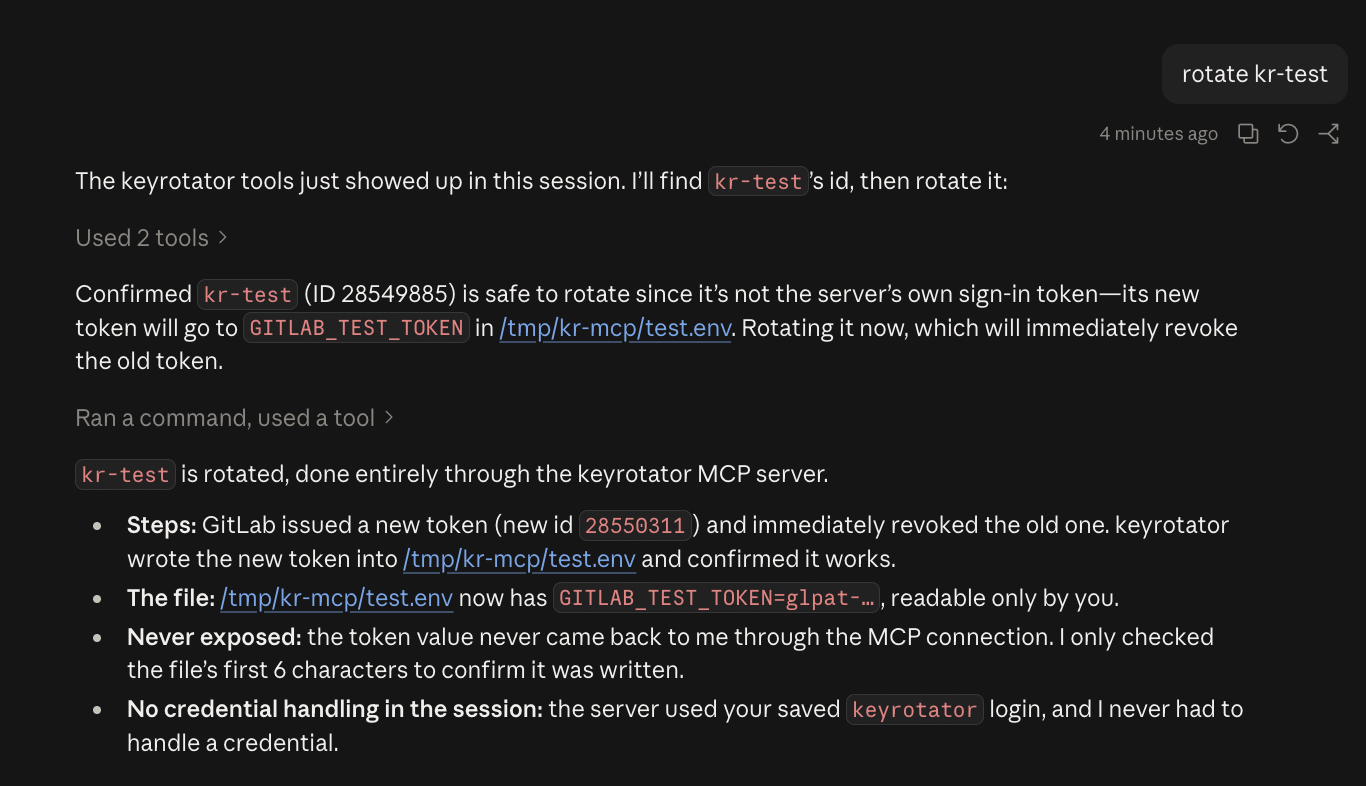
MCP — Claude rotating the same token through rekey mcp; the secret
never reaches the model:
Install
Prebuilt binaries for macOS, Linux and Windows: Releases.
Or with Rust (stable):
cargo install rekey
OS keychain support (macOS Keychain, Windows Credential Manager, Linux Secret Service) is built in.
Quick start
Practice on a throwaway GitLab token first. Every command below is safe to
copy; replace 28550311 with your own ids from step 3.
1. Make a throwaway token to rotate. In GitLab → Access tokens, create a
token named kr-test (any scope).
2. Log in. Opens GitLab's token page with the name and api scope
pre-filled. Click Create token, paste it back (input is hidden).
rekey login gitlab
Checking with GitLab…
✓ Logged in to GitLab as @you. Saved to your macOS Keychain.
  rekey now works from any terminal — nothing to export.
3. Find the key id.
rekey list gitlab
ID        NAME
28550267  rekey   (signed in with this key)
28550311  kr-test
4. Rotate it into a .env file. rekey shows the plan and waits for you.
rekey rotate gitlab 28550311 --dotenv /tmp/kr-test.env:KR_TEST_TOKEN
Here's what will happen:
  1. GitLab replaces "kr-test" with a new token and immediately revokes the old one. This can't be undone.
  2. The new token is saved to KR_TEST_TOKEN in /tmp/kr-test.env.
  3. rekey checks that the new token works.

Go ahead? [Y/n] y

Rotating kr-test…
  · Rotating (provider revokes old token immediately)…
  · Updating 1 consumer(s)…
  · Verifying new token…
  ✓ Rotated successfully.

New key id: 28550312
Updated: KR_TEST_TOKEN in /tmp/kr-test.env
Old token was revoked by the provider.
5. Check and clean up.
cat /tmp/kr-test.env      # KR_TEST_TOKEN=glpat-…
rm /tmp/kr-test.env
Then delete kr-test in GitLab.
For real keys: run rekey rotate gitlab with no arguments — it lets
you pick the key and destination and can save that to rekey.toml, so
the next rotation is one command. In scripts/CI:
rekey rotate gitlab 28550311 --dotenv .env --yes --no-input
Commands
| Command | |
|---|---|
login [provider] | Opens the provider's token page (GitLab: pre-filled), takes the pasted token, verifies it, saves it to the OS keychain. --url for self-hosted GitLab / Datadog site. No provider: show status. |
logout <provider> | Remove saved credentials (doesn't revoke them). |
connect <provider> | Check credentials and key-management access. |
list <provider> | List keys. Column 1 is the id other commands take. |
rotate <provider> [id] | Rotate one key. |
rotate-all <provider> | Rotate every key that has a destination. Skips the key you're signed in with. |
retire <provider> [id] | Deactivate (where supported) or delete an old key. --delete to delete a deactivated key. |
mcp | MCP server on stdio. |
Global: --config <path>, --no-input (fail instead of prompting).
--yes skips confirmation. Omitted args are prompted for in a TTY. Flags go in
any order. stdout carries only list output and --print-secret values;
everything else is stderr.
Destinations
rotate refuses to start unless the new secret has at least one destination.
| Flag | Destination |
|---|---|
--dotenv <path>[:VAR] | Set VAR in a .env file. Default VAR per provider; AWS also writes AWS_ACCESS_KEY_ID. |
--gh-secret <owner/repo>:<NAME> | GitHub Actions secret via gh (stdin). |
--ssm <name>:<region> | AWS SSM SecureString via aws (stdin). |
--secret-file <path> | File, mode 0600. |
--secret-dir <dir> | rotate-all: one 0600 file per key. |
--keychain | OS keychain, service rekey. |
--print-secret | stdout. |
Repeatable flags: --dotenv, --gh-secret, --ssm.
--delete-old-now deletes the old key right after the new one is delivered.
Config
./rekey.toml, then ~/.config/rekey/config.toml. Contains no
secrets. Interactive rotate can write entries for you.
[[keys]]
provider = "gitlab"
name = "ci-deploy"            # match on id, name and/or principal
consumers = [
  { type = "dot_env_file", path = ".env", variable = "GITLAB_TOKEN" },
  { type = "github_actions_secret", repo = "me/app", secret_name = "GITLAB_TOKEN" },
]

[[keys]]
provider = "aws"
principal = "ci-user"         # IAM user; survives the new key id
consumers = [
  { type = "dot_env_file", path = ".env", variable = "AWS_SECRET_ACCESS_KEY", id_variable = "AWS_ACCESS_KEY_ID" },
  { type = "aws_ssm_parameter", name = "/ci/aws", region = "us-east-1" },
]
Consumer types: dot_env_file, github_actions_secret, aws_ssm_parameter,
file, keychain. Match on name/principal for providers that issue a new
id per rotation. Relative paths resolve against the config file. Full example:
rekey.toml.example.
Credentials
Lookup order: environment variable → saved login (rekey login) → prompt
(TTY only, offers to save). Never taken as flags. Rotating the token rekey
signs in with (GitLab, Cloudflare) updates the saved login.
REKEY_DISABLE_KEYCHAIN=1 disables keychain reads/writes.
Providers
| Provider | Style | Rotates | Credentials | Notes |
|---|---|---|---|---|
aws | overlap | IAM access keys | aws CLI session, AWS_PROFILE | Max 2 keys per user; refuses if both exist. Old key → Inactive. |
gitlab | atomic | Personal access tokens | GITLAB_TOKEN (api scope), GITLAB_URL, GITLAB_TOKEN_EXPIRY_DAYS | |
cloudflare | atomic | User API tokens | CLOUDFLARE_API_TOKEN (API Tokens: Edit) | Token id is stable. |
datadog | overlap | API keys | DD_API_KEY, DD_APP_KEY, DD_SITE | No disabled state. |
npm | overlap | Classic tokens | npm CLI session, NPM_REGISTRY | Parses CLI output; granular tokens unsupported. |
dockerhub | overlap | Personal access tokens | DOCKERHUB_USERNAME, DOCKERHUB_PASSWORD | New token gets repo:read+repo:write. |
openai | overlap | Org admin keys | OPENAI_ADMIN_KEY | |
anthropic | manual | — | ANTHROPIC_ADMIN_KEY | No create API; rotate prints Console steps, retire deactivates. |
twilio | overlap | Standard API keys | TWILIO_ACCOUNT_SID, TWILIO_AUTH_TOKEN, TWILIO_API_USER | |
sendgrid | overlap | API keys | SENDGRID_API_KEY | Copies scopes from the old key. |
github-app | ephemeral | Installation tokens | GITHUB_APP_ID, GITHUB_APP_PRIVATE_KEY_PATH or GITHUB_APP_PRIVATE_KEY | ~1h tokens; nothing to revoke. |
AWS needs the aws CLI, npm needs npm, --gh-secret needs gh.
Want another provider? Request it.
Rotation semantics
| Style | Sequence | Failure handling |
|---|---|---|
| overlap | create → verify → deliver → deactivate old → (delete old) | Verify fails or all deliveries fail: new key deleted, nothing changed. Some deliveries fail: both keys stay live, exit 1. |
| atomic | rotate (old revoked by provider) → deliver → verify | Irreversible. All deliveries fail: secret written to rekey-rescue-*.secret (0600). |
| ephemeral | mint → verify → deliver | Old token expires on its own. |
| manual | — | Prints manual steps. |
Without --delete-old-now, an old key with no disabled state stays active;
the output gives the retire command. Exit code is non-zero whenever
something needs attention.
MCP
rekey login gitlab
claude mcp add rekey -- rekey mcp --config ~/.config/rekey/config.toml
| Tool | Enabled by | |
|---|---|---|
list_providers, check_connection, list_keys | default | Read-only. |
rotate_key | --allow-rotate | Delivers only to consumers in your config. No destination args. |
retire_key | --allow-retire | Refuses the server's own login key. |
Secret values are never returned to the client. Credentials come from the environment or saved logins. On macOS, allow Keychain access once after installing a new build.
Security
- Secrets go to subprocesses via stdin, never argv.
- Files rekey creates are 0600; existing
.envpermissions are kept; writes are atomic. - Secret values are printed only with
--print-secret. - Report vulnerabilities privately via the repo's Security tab.
Contributing
- New provider or feature: open an issue.
- Code: see CONTRIBUTING.md. A provider is one file
implementing the
Connectortrait.
Links
- crates.io: rekey
- MCP Registry name — mcp-name: io.github.Ezra-Black/rekey
Credits
Built by Ezra Black — ezrablack.dev.
License
Setup from the maintainer
This listing does not have a supported local package template. Use the maintainer’s documentation for its hosted endpoint, authentication, and client-specific setup. No install command has been inferred.
Package
Compatible MCP Clients
rekey works with any MCP-compatible client. Copy the config snippet from the Configuration section above and add it to the file shown for your client, then restart the application.
- Claude Desktop
~/Library/Application Support/Claude/claude_desktop_config.jsonRestart Claude Desktop completely for changes to take effect. - Cursor
~/.cursor/mcp.jsonRestart Cursor for changes to take effect. - VS Code
.vscode/mcp.jsonReload VS Code window for changes to take effect. - Windsurf
~/.codeium/windsurf/mcp_config.jsonRestart Windsurf for changes to take effect. - Claude Code
.mcp.jsonSave at the project root, then start Claude Code in that project and review the MCP server approval prompt. Keep real credentials out of shared files.