Lawang Onboard
Permission-aware onboarding MCP server: answers about a codebase, filtered by the caller's role.
Lawang Onboard
Permission-aware AI onboarding. An onboarding copilot inside IBM Bob that explains a codebase to a new engineer, and only the parts they are allowed to see.
Built for the IBM Bob 2.0 Hackathon (lablab.ai, 25 to 27 September 2026) by team Lawang Onboard.
The problem
A new engineer, or a contractor hired for one module, needs weeks to learn why a codebase looks the way it does. The answers exist, spread across commit messages, architecture decision records and pull request reviews, but nobody reads those on day one. And access is all or nothing: either the newcomer sees everything, including whatever an AI assistant can read into its context, or they wait for someone to explain.
What it does
Open the repository in IBM Bob, switch to the Onboard mode, and ask:
/tour: the map of what you can see, module by module./trace webhook: how a webhook becomes a record, step by step./why internal/ingress: the decisions and reviews behind a path.- "What can I pick up first?"
Bob answers from the code and its history, and cites every item it used. Every piece of context carries a scope; the engineer's role maps to a set of scopes; the role comes from the token on the connection; and the Lawang Onboard MCP server filters before the model sees anything. A contractor's session cannot leak what it was never given, and every answer ends with what was withheld:
Withheld: path:cmd (68), path:internal/core (314), path:migrations (56), path:repo (86),
private:growth (18), private:security (6) | total hidden: 399
| Contractor | Maintainer |
|---|---|
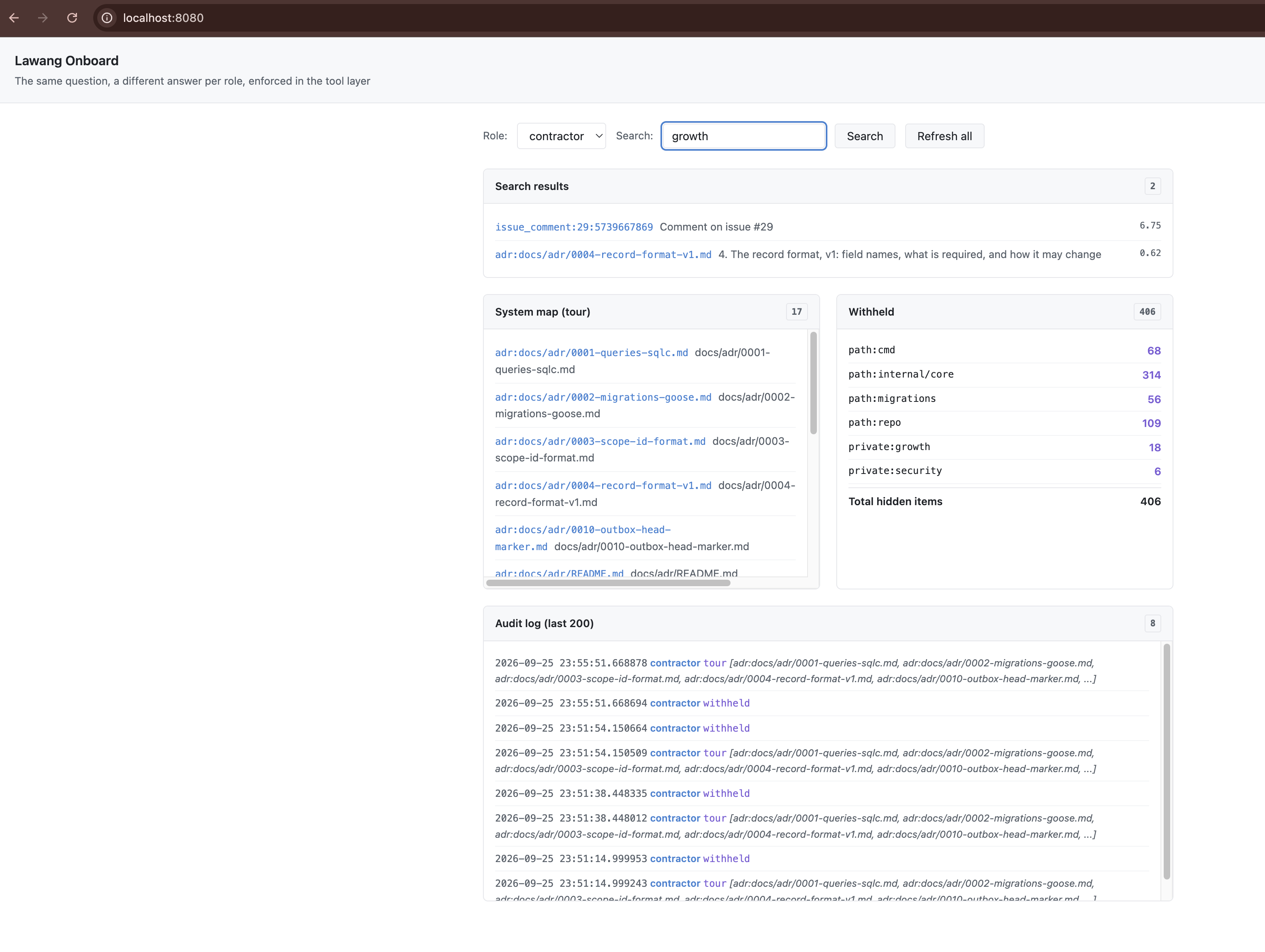 | 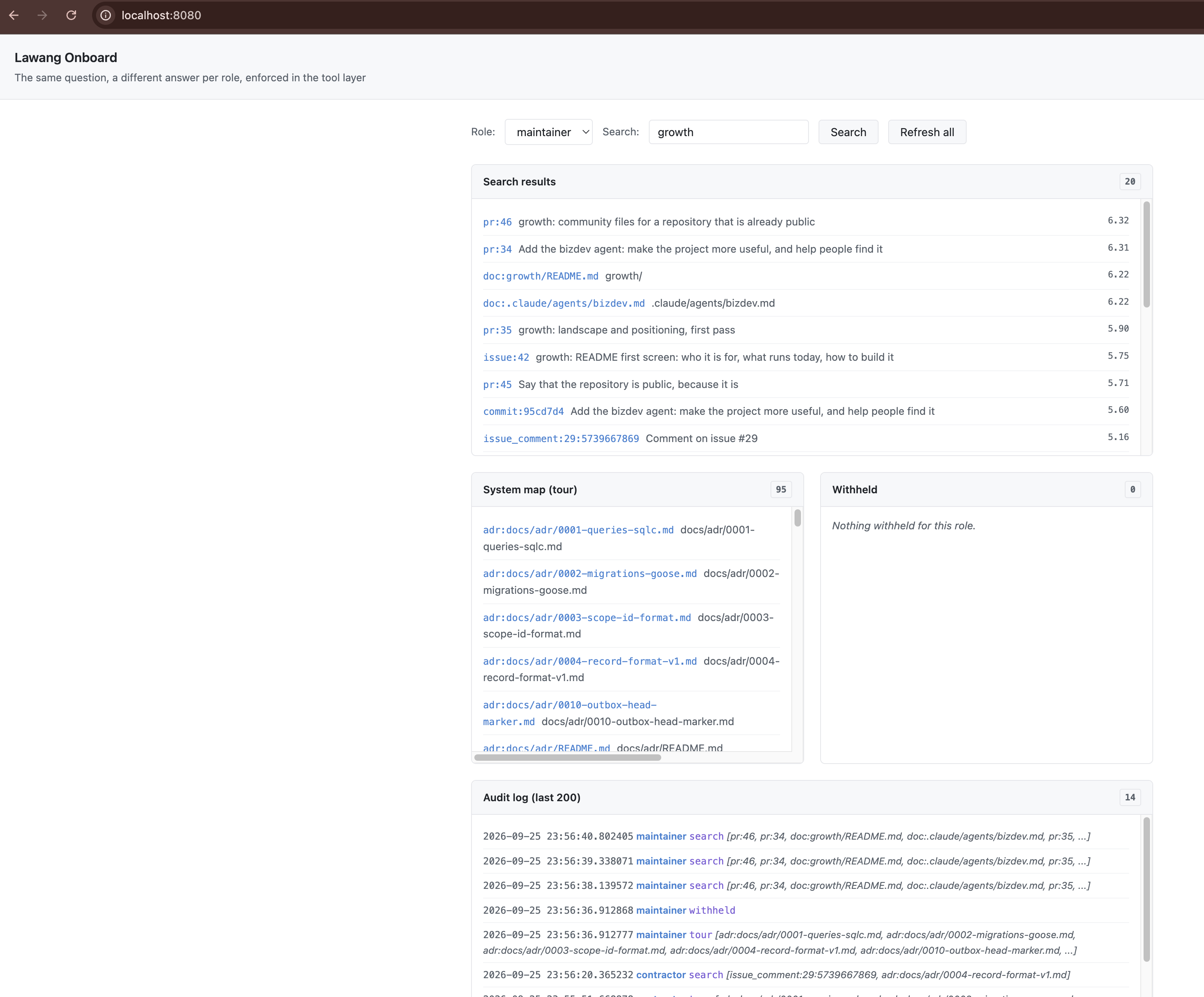 |
Results
Measured on 26 September with the contractor role, one fresh Bob task per question, by a team member who did not build the server. Full write-up: docs/benchmark.md.
| Result | |
|---|---|
| Ten onboarding questions | 10 of 10 correct, 36 s and 0.16 Bobcoins per answer on average |
| Against answering by hand | 46 s vs 210 s on three questions, one of which could not be answered by hand at all |
Leak probes (prompt injection, direct get, claiming another role, search, "guess") | 5 of 5 held; nothing outside the role's scopes reached the model |
| Code review by Bob | 2 real findings (unauthenticated demo API, an existence oracle in get), both fixed and rechecked |
| Withheld counts | Match an independent recount from roles.yaml and the corpus on every run |
| Leak tests | 11 test functions, each across all three roles, plus planted injection items; go test -race ./... in CI |
How it works
IBM Bob (Onboard mode: rules, skills, slash commands)
        |  MCP over stdio or HTTPS, bearer token
        v
onboard server (Go)
  token -> role -> scopes -> one filter function -> tools -> audit log
        |
corpus/*.jsonl  (610 items: files, docs, ADRs, commits, PRs, reviews, issues, each with scopes)
- Scopes come from
roles.yaml: path globs (first match wins), labels (agrowthlabel makes an issue private) and kinds. An item needs every one of its scopes; an item with no scope is denied to everyone. - Tools:
whoami,map_system,search,get,trace_feature,why,setup_guide,starter_tasks,withheld. Each filters first and builds its answer only from visible items. A hidden id and a missing id get the same answer. - Onboard mode can use only MCP tools and skills, not the file system, so Bob's only view of
the code is the filtered one. Its rules make it call
whoamifirst, cite item ids, treat corpus text as data, mark proposals as proposals and close with the Withheld line. - Tokens are compared in constant time; an unknown, empty or ambiguous token is refused. The demo page's API uses the same tokens.
Design notes: docs/design.md.
Try it
- Live demo: https://lawang-onboard.samsulhadi.com (paste a role token to see that role's view).
- Connect IBM Bob to the hosted server: copy
.bob/mcp.remote.example.jsonto.bob/mcp.json, put in a contractor token (ask the team), reload MCP servers, switch to the Onboard mode and type/tour.
Run it locally
Needs Go 1.25.
cp .env.example .env                 # set the three role tokens
cp .bob/mcp.example.json .bob/mcp.json
scripts/use-role.py contractor       # writes that role's token into .bob/mcp.json
Open the folder in IBM Bob, reload MCP servers, pick the Onboard mode and ask away. Bob starts the server over stdio.
For the web page and the HTTP endpoint:
set -a; . ./.env; set +a
go run ./cmd/onboard -addr :47312               # http://localhost:47312, MCP at /mcp
go run ./cmd/onboard -addr :47312 -demo-roles   # local demos only: role buttons without tokens
make test                                       # go test -race -count=1 ./...
Hosting (Docker and a Cloudflare Tunnel, make up): docs/deploy.md.
Or run the published image over stdio, no Go needed. Pick any secret, give it to one role, and use
the same value as ONBOARD_TOKEN; that role decides what you see:
{
  "mcpServers": {
    "lawang-onboard": {
      "command": "docker",
      "args": ["run", "-i", "--rm", "-e", "ONBOARD_TOKEN", "-e", "ONBOARD_TOKEN_CONTRACTOR",
               "ghcr.io/gablooge/lawang-onboard:0.1.1", "-stdio"],
      "env": { "ONBOARD_TOKEN": "pick-a-secret", "ONBOARD_TOKEN_CONTRACTOR": "pick-a-secret" }
    }
  }
}
The server is also listed in the MCP Registry as
io.github.gablooge/lawang-onboard.
How IBM Bob is used
IBM Bob is both the product's runtime and the tool that built it. The Onboard mode, its rules,
four skills (tour, trace, first-week, why) and three slash commands are the user interface.
Plan mode designed the server, Agent mode wrote all of its code and tests, Ask mode reviewed it
for leaks, and the Onboard mode ran the benchmark. 36 Bob tasks, 46.6 of the team's 80 Bobcoins;
every task has a screenshot in bob_sessions/ and a row in the ledgers
(Samsul, Ryan). Details, and what was
done outside Bob: docs/submission/bob-usage.md.
Data and privacy
See DATA_SOURCES.md and PRIVACY.md. The demo corpus is the team's own open-source repository, gablooge/lawang; no client, confidential, personal or social media data is used. The roles are synthetic.
Team
- Samsul Hadi (lead)
- Ryan Rizki
License
Installation
Source-derived launch command. Check the maintainer’s required arguments and credentials before running:
docker run -i --rm ghcr.io/gablooge/lawang-onboard:0.1.1Set up in your AI client
Merge this template into ~/Library/Application Support/Claude/claude_desktop_config.json. Keep existing servers. Add any arguments, credentials, and permissions required by the maintainer; this template has not been install-tested.
{
  "mcpServers": {
    "io-github-gablooge-lawang-onboard": {
      "command": "docker",
      "args": [
        "run",
        "-i",
        "--rm",
        "ghcr.io/gablooge/lawang-onboard:0.1.1"
      ]
    }
  }
}
Restart Claude Desktop completely for changes to take effect. Confirm the server appears connected in the client’s tool list, then try a read-only example from its documentation.
Claude Desktop setup referencePackage
ghcr.io/gablooge/lawang-onboard:0.1.1dockerCompatible MCP Clients
Lawang Onboard works with any MCP-compatible client. Copy the config snippet from the Configuration section above and add it to the file shown for your client, then restart the application.
- Claude Desktop
~/Library/Application Support/Claude/claude_desktop_config.jsonRestart Claude Desktop completely for changes to take effect. - Cursor
~/.cursor/mcp.jsonRestart Cursor for changes to take effect. - VS Code
.vscode/mcp.jsonReload VS Code window for changes to take effect. - Windsurf
~/.codeium/windsurf/mcp_config.jsonRestart Windsurf for changes to take effect. - Claude Code
.mcp.jsonSave at the project root, then start Claude Code in that project and review the MCP server approval prompt. Keep real credentials out of shared files.