Coating Lab
Real surface finishes for game gun models: sourced finishes, variants, wear baked from use
An MCP server that gives game gun models real surface finishes, worn where use wears a gun.
- A finish library with sources. Anodized aluminium, manganese and zinc phosphate, blued and nitrided steel, ceramic coatings (FDE, OD green, tungsten, graphite, coyote), stainless, polymer, rubber, brass, copper, lead, walnut. Each is a physically based value (linear colour, metallic, roughness) with what shows when it wears through and the sources of its numbers. Values reasoned from descriptions are marked as estimates.
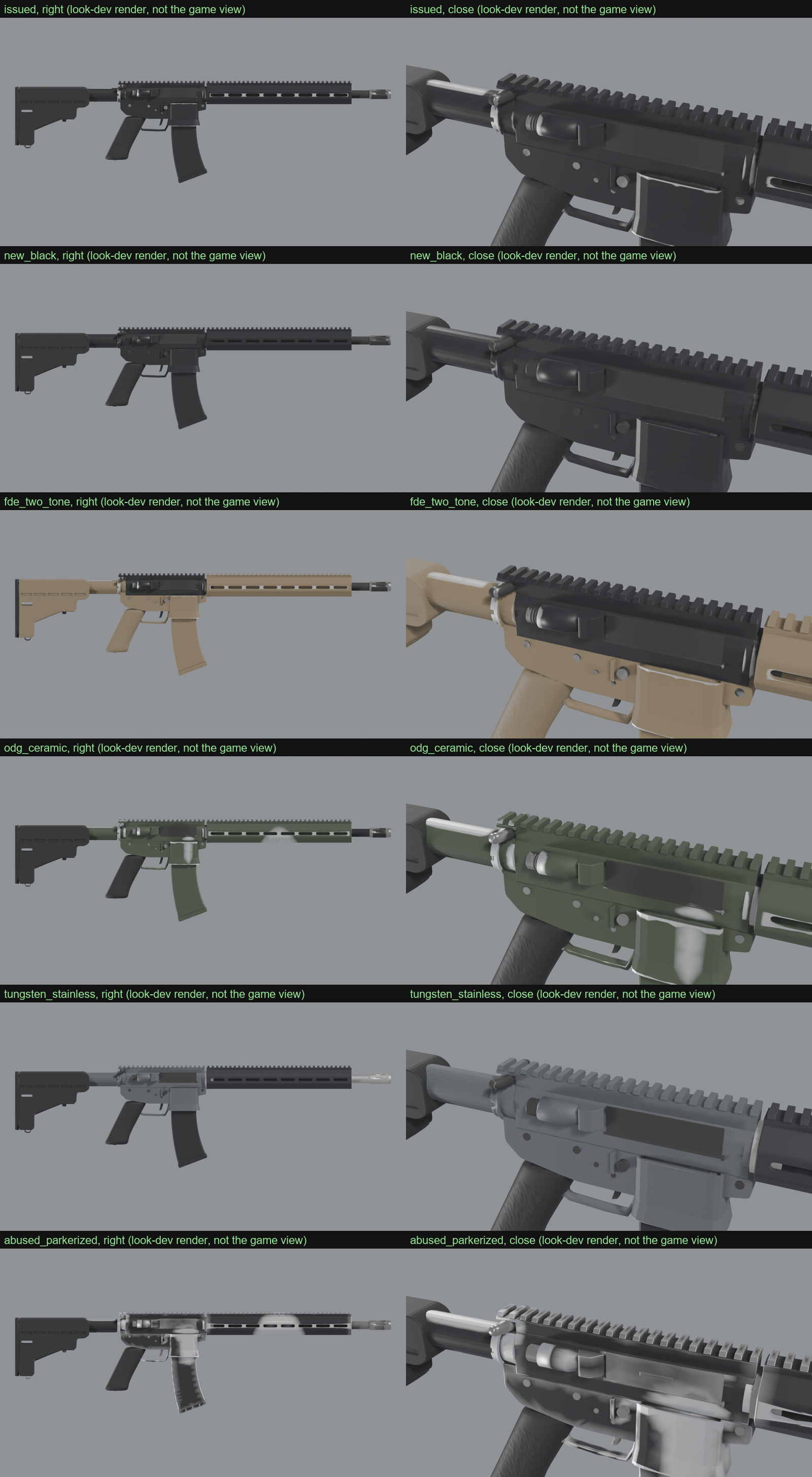
- Coating variants. A spec puts a finish on each material slot of a model, in as many variants as you want (an issued rifle, a two-tone FDE build, an abused one), each at a wear level: new, issued, worn or abused.
- Wear from evidence, baked once. In Blender, into the model's vertex colours: exposed edges, where the hands work the gun (its grip, the support hand, the controls), where parts slide (a magazine in its well, a stock on its tube), and dirt where the surface is occluded and round the muzzle and the port. Every variant reads the same masks, so a new variant costs nothing.
- Checks. Every finish against the rules physically based rendering rests on. Every variant's worn share against its level, and no wear inside corners.
- One formula everywhere. The checks, the look-dev renders and an engine's material compute wear the same way
(
coat.py), so what passes is what the player sees.
Model Lab (modellab-mcp) builds give their own slots (upper, lower,
barrel and more), marks and parts: spec_for_modellab makes a coating spec from a build in one call.
Install
Python 3.10 or later and Blender 4.2 or later.
pip install coatinglab-mcp
{"mcpServers": {"coatinglab": {"command": "coatinglab-mcp"}}}
| Setting | Meaning |
|---|---|
COATINGLAB_OUT | The only folder Coating Lab writes to. ~/.coatinglab by default. |
COATINGLAB_BLENDER | Blender, when it is not on the PATH or in the usual install folder. |
COATINGLAB_LIBRARY | A finishes JSON of your own, merged over the built-in library. |
COATINGLAB_WAIT_FOR | Process names that hold the machine. A bake waits for none of them to run. |
Tools
| Tool | What it does |
|---|---|
list_finishes, read_finish | The library, and one finish with its notes and sources. |
check_library, check_finish | The library, or a finish of your own, against the physical rules. |
list_wear_levels, list_templates | The wear levels, and the ready variant sets. |
spec_for_modellab | A coating spec for a Model Lab build. |
validate_spec | A spec's problems: a slot without a finish, a finish on the wrong material. |
bake | Bakes the wear masks into a copy of the model. |
check_coating | Each variant's wear against its level, and wear kept out of corners. |
render_variants | Look-dev renders and a sheet. |
engine_params | A variant's values by slot for an engine material. |
The masks and the formula
The bake writes the vertex colour Col:
| Channel | Meaning |
|---|---|
| R | Edge: 1 on flat ground, 0 on a sharp exposed edge |
| G | Handling: 1 where the hands work the gun |
| B | Rub: 1 along the lines parts slide on |
| A | Dirt: 1 where the surface is occluded, and round the muzzle and the port |
An engine's material follows the formula in src/coatinglab/coat.py. A wear level is a threshold: the higher the
level, the weaker the mask that already wears through. A grunge texture breaks wear up but never makes wear.
What is estimated
- Every roughness value. No source maps a finish's surface to a rendering roughness.
- The colours of the anodized, phosphate, blued, nitrided and most ceramic finishes. The standards set processes, not colours. OD green and coyote come from FED-STD-595 colour numbers.
- The wear amounts. Sources say where guns wear, not how fast. Each level is set so Model Lab's M4A1 lands in the middle of its band.
- A hand's zone is a sphere: on a round handguard the support hand's wear reaches its top as well as its underside.
License
MIT
Installation
Source-derived launch command. Check the maintainer’s required arguments and credentials before running:
uvx coatinglab-mcpSet up in your AI client
Merge this template into ~/Library/Application Support/Claude/claude_desktop_config.json. Keep existing servers. Add any arguments, credentials, and permissions required by the maintainer; this template has not been install-tested.
{
  "mcpServers": {
    "io-github-hpdkhoa-coatinglab-mcp": {
      "command": "uvx",
      "args": [
        "coatinglab-mcp"
      ]
    }
  }
}
Restart Claude Desktop completely for changes to take effect. Confirm the server appears connected in the client’s tool list, then try a read-only example from its documentation.
Claude Desktop setup referencePackage
coatinglab-mcppypiCompatible MCP Clients
Coating Lab works with any MCP-compatible client. Copy the config snippet from the Configuration section above and add it to the file shown for your client, then restart the application.
- Claude Desktop
~/Library/Application Support/Claude/claude_desktop_config.jsonRestart Claude Desktop completely for changes to take effect. - Cursor
~/.cursor/mcp.jsonRestart Cursor for changes to take effect. - VS Code
.vscode/mcp.jsonReload VS Code window for changes to take effect. - Windsurf
~/.codeium/windsurf/mcp_config.jsonRestart Windsurf for changes to take effect. - Claude Code
.mcp.jsonSave at the project root, then start Claude Code in that project and review the MCP server approval prompt. Keep real credentials out of shared files.