Pose Lab
Measured spatial answers for posing first-person arms and a rifle in Blender
Pose Lab
Measured spatial answers for posing first-person arms and a rifle in Blender, over MCP.
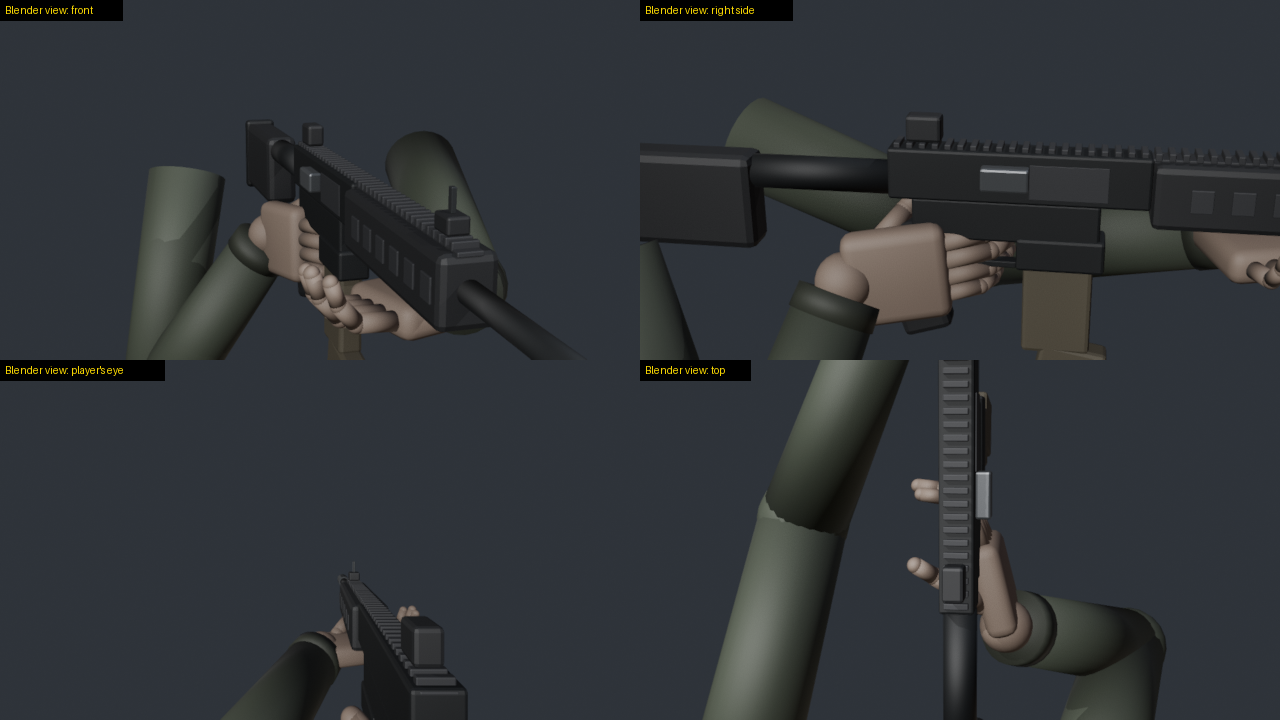
Models are weak at judging 3D space from pictures: which side of a rifle faces the eye, whether a finger sits inside the receiver, whether any turn of the gun can ever show its ejection port. Pose Lab gives a model numbers instead. It reports positions in named frames and how deep anything clips. It measures how squarely a surface faces the eye and what the eye can see. Its solver searches rifle moves against goals and reports which goals no move can meet. For animation, it scans a clip frame by frame against the same checks and mends what fails.
I built it while hand-making chamber checks for my first-person shooter. One question took me several full Blender
runs: can turning the rifle show its ejection port to the eye? With Pose Lab it is one solve call. On my game's AK
rig, turning alone met the goal in 0 of 60 samples. That is a fact of the geometry: the eye looks along the barrel.
Turning and moving the rifle met each goal on its own, but no sample of 400 met all four goals together. So that
check needs a new hand pose, not only a new rifle position. On the built-in sample rig, turning alone also met the port
goal in 0 of 60 samples, and turning and moving met every goal in 9 s.
What it gives a model
| Tool | Answers |
|---|---|
list_rigs, load_rig, describe | the rigs, the frames, the sign rules, named points, clips, moving parts |
pose_idle, pose_clip, move_part, snapshot | put the rig in a pose: a clip at a time, the carrier drawn back, saved poses |
move_gun | roll, swing, pitch and move the rifle; the hands keep their hold by arm IK |
reach | a wrist onto a point by arm IK (try elbow poles to clear a forearm) |
where, distance | positions in a named frame |
clearance | how deep the rifle sits inside a forearm, palm or finger, and where |
faces_eye, visible, screen | how squarely a surface faces the eye, how much of it the eye sees, where it falls on screen |
solve | searches rifle moves against goals; reports each goal and how often any sample met it |
render | a contact sheet: the player's eye and outside views, each tile labelled as a Blender view |
record_clip, load_clip | a clip from keyed poses, or from a file: .pose.json, FBX or BVH |
scan_clip | every frame against checks; the worst value, when, and the time spans that fail |
fix_clip | mends what fails and reports the scan before and after, and what no fix can reach |
save_clip | writes a clip as .pose.json bone data and as FBX for a game engine |
Frames and signs
Every position goes in and comes out in a named frame, so no one has to guess axes:
gun: the gun bone as it stands, Unreal-style axes, cm: +X the gun's left, +Y along the barrel, +Z up (the default)arms: the arms' space, Unreal-style axes, cmview: from the eye, cm: +X right, +Y forward, +Z up
Turns use the player's words: roll + turns the gun's right side up, swing + takes the muzzle left, pitch + the
muzzle up. Moves (right, forward, up) are in the view.
A hand round its grip touches the rifle on the idle pose already (a finger on the trigger, fingers round the
handguard). Call clearance at pose_idle for that baseline, and leave those segments out with ignore wildcards.
Motion: scan and fix clips
scan_clip plays a clip frame by frame and runs checks on each frame. The checks are the solver's goals
(clearance, faces_eye, visible, on_screen, barrel) and three more:
contact: a point of the hand on its mark, such as a fingertip on the charging handle (a,b,max_cm)hold: how far a hand drifts on the rifle from its grip atref_s(side,max_cm)pop: a sudden jump, as the fastest bone speed between frames (bones,max_cm_per_s)
Any check takes during: [from_s, to_s]. fix_clip then mends a copy of the clip:
- a pop: it blends the jumping frames again from the good frames round them
- a hold: it puts the hand back on its grip by arm IK
- a contact: it moves the wrist until the point touches its mark
- clearance: it swings each elbow about the shoulder to wrist line by the least angle that clears, wrist kept, and eases that swing over the neighbouring frames
It reports the scan before and after. It also lists the frames where a hand must be somewhere its arm cannot reach, since only a new pose can mend those.
examples/motion_test.py records a clip on the sample rig with two common faults. The rifle rolls 75 degrees and
back, keyed only at its ends, so the hands drift off the rifle between keys. One frame also jumps 15 cm. The scan and
the fix gave these numbers:
| Check | Before | After |
|---|---|---|
| left hand drift on the rifle | 1.76 cm | 0.48 cm |
| right hand drift on the rifle | 1.14 cm | 0.49 cm |
| fastest hand speed (the pop) | 450 cm/s | 33 cm/s |
| clearance | 0.0 cm | 0.0 cm |
The fix changed 26 of 43 frames, and every check passed after it. It also flagged 5 frames where the left arm fell 0.46 cm short of its grip. That still passed the 0.5 cm limit.
Install
You need Blender and Python 3.10 or newer. I tested it on Windows 10 with Blender 5.2.2 and Python 3.14. I have not tested macOS, Linux or older Blender versions yet.
uvx poselab-mcp
or pip install poselab-mcp and run poselab-mcp.
Add it to Claude Code:
claude mcp add poselab -- uvx poselab-mcp
or to any MCP client's configuration:
{
  "mcpServers": {
    "poselab": {
      "command": "uvx",
      "args": ["poselab-mcp"],
      "env": { "POSELAB_BLENDER": "C:/Program Files/Blender Foundation/Blender 5.2/blender.exe" }
    }
  }
}
Settings
| Variable | Meaning |
|---|---|
POSELAB_BLENDER | Blender's executable, if it is not on the PATH or in the usual install folder |
POSELAB_RIGS | a rigs.json describing your own rigs (see examples/rigs.example.json) |
POSELAB_OUT | the only folder Pose Lab writes to (renders, saved clips, the worker's log); default ~/.poselab |
Rigs
The built-in sample (load_rig {"rig": "sample"}) needs no files. Pose Lab builds it in Blender from code: two
arms with Unreal mannequin bone names hold an AR-style rifle with a charging handle that slides back.
Your own rigs come from FBX files: the arms mesh, an idle pose, the rifle, and clips. Describe them in a
rigs.json (copy examples/rigs.example.json) and point POSELAB_RIGS at it. Clips can be FBX animations on the same
skeleton, or <clip>.pose.json bone data: {"fps": 30, "frames": [{"bone": [[x, y, z], [w, x, y, z]], ...}, ...]},
local location and rotation per bone on the idle armature. (Blender misreads an FBX animation it exported itself when
it imports it again; bone data avoids that. describe reports each FBX clip's skeleton fit.)
Safety
- Pose Lab only reads your rig and clip files. It writes renders, saved clips and its log, and only inside
POSELAB_OUT. - The Blender worker listens on 127.0.0.1 only, on a free port, and answers only requests that carry the session's random token. It runs only Pose Lab's own commands.
How it works
poselab_mcp/server.py: the MCP server (the official Python SDK, stdio).poselab_mcp/worker_client.py: starts one headless Blender on the first call and keeps the rig loaded.poselab_mcp/blender/lab.py: inside Blender: the rig, the frames, the measures, the IK, the solver, the renders.poselab_mcp/blender/sample.py: the built-in sample rig.
Test
python examples/selftest.py
It starts the server as an MCP client does and loads the sample rig. Then it replays the question above: turning
alone never shows the port, and turning and moving does. The contact sheet lands in ~/.poselab/renders/sheet.png.
python examples/motion_test.py
It records the faulty clip described above, scans it, fixes it, and saves roll_fixed.pose.json and roll_fixed.fbx
in ~/.poselab/clips/.
Benchmark
benchmarks/ asks whether a model poses the rig better with Pose Lab's measurements than with renders alone. It runs
five tasks on the sample rig and grades them with Pose Lab. A scripted oracle and a do-nothing control check the
graders. See benchmarks/README.md.
License
MIT
Installation
Source-derived launch command. Check the maintainer’s required arguments and credentials before running:
uvx poselab-mcpSet up in your AI client
Merge this template into ~/Library/Application Support/Claude/claude_desktop_config.json. Keep existing servers. Add any arguments, credentials, and permissions required by the maintainer; this template has not been install-tested.
{
  "mcpServers": {
    "io-github-hpdkhoa-poselab-mcp": {
      "command": "uvx",
      "args": [
        "poselab-mcp"
      ]
    }
  }
}
Restart Claude Desktop completely for changes to take effect. Confirm the server appears connected in the client’s tool list, then try a read-only example from its documentation.
Claude Desktop setup referencePackage
poselab-mcppypiCompatible MCP Clients
Pose Lab works with any MCP-compatible client. Copy the config snippet from the Configuration section above and add it to the file shown for your client, then restart the application.
- Claude Desktop
~/Library/Application Support/Claude/claude_desktop_config.jsonRestart Claude Desktop completely for changes to take effect. - Cursor
~/.cursor/mcp.jsonRestart Cursor for changes to take effect. - VS Code
.vscode/mcp.jsonReload VS Code window for changes to take effect. - Windsurf
~/.codeium/windsurf/mcp_config.jsonRestart Windsurf for changes to take effect. - Claude Code
.mcp.jsonSave at the project root, then start Claude Code in that project and review the MCP server approval prompt. Keep real credentials out of shared files.