HydraDNS
Manage a self-hosted DNS firewall: block domains, create policies, read query logs and metrics.
HydraDNS
A self-hosted DNS firewall in Go. Blocks ads, malware and trackers network-wide, like Pi-hole. API-first control plane, a real dashboard, a CLI, and a built-in Model Context Protocol server so Claude or any MCP agent can manage policy for you.





Screenshots and product site at hydradns.app (a marketing site with static screenshots, not an interactive demo)
HydraDNS vs Pi-hole
| HydraDNS | Pi-hole | |
|---|---|---|
| Core | Go, gRPC control/data plane split | C (pihole-FTL), embedded web server |
| Setup | docker compose up -d pulls the published core + dashboard images once a release exists, and builds them from source before that | installer script or Docker |
| AI management (MCP) | ✅ built in (hydra mcp, 14 tools: block/unblock, policies, logs, metrics, anomaly explain) | ❌ third-party community bridges only |
| DoH bypass blocking | ✅ curated DoH bootstrap endpoints blocked at query time | ⚠️ Firefox canary domain only; add third-party lists for the rest |
| Policies | priority-based allow/block/redirect via API or UI; CLI covers block/unblock/list/delete (no generic create yet) | groups, regex, and per-client rules (more mature today) |
| Maturity | young, pre-1.0, moving fast | 10+ years, huge community, built-in DHCP |
Choose Pi-hole today for battle-tested stability, regex rules, and community support. Choose HydraDNS for a hackable Go codebase, an API-first control plane, and AI-agent management over MCP that self-hosted alternatives only get through third-party bridges.
Honest limits: like every DNS-layer filter, HydraDNS cannot stop a client that hardcodes a DoH server by raw IP. Pair it with a firewall rule on 443/853 to close that path. For the fuller list (no TLS on the dashboard/gRPC yet, no DNSSEC, regex/wildcard policies not enforced, and more), see docs/limitations.md.
Why HydraDNS
I spent 15 months building an enterprise next-generation firewall in Go, and kept wishing the self-hosted version of that tooling existed: something a home or small-office network could run, with a real API and a control plane you could drive from a script or an AI agent instead of a settings page. HydraDNS is that tool. The built-in Model Context Protocol server comes from the same work I do upstream as a CNCF Jaeger contributor, where I build MCP tooling for observability.
It is pre-1.0 and moving fast. If it is useful to you, a star and an issue both help.
Built by Roshan Singh (@lopster568).
Quick Start
# Clone (single repo, no submodules)
git clone https://github.com/hydradns/hydradns.git
cd hydradns

# Start everything
docker compose up -d

# Verify DNS is working
dig @localhost example.com

# Check the dashboard
open http://localhost:3000
Port 53 already in use? On Linux or WSL2,
systemd-resolvedmay already hold port 53. Free it before starting:sudo systemctl disable --now systemd-resolved(then set a DNS server in/etc/resolv.conf), or edit the port mapping indocker-compose.yml. See docs/pi-deployment.md for details.
That's it. DNS filtering is active. Give this machine a static IP and point your router's DNS to it. See docs/pi-deployment.md for static IP setup on Linux, macOS, and Windows plus per-router DNS instructions.
Architecture
                    +-----------+
                    |  Browser  |
                    +-----+-----+
                          |
                    +-----v-----+
                    |  Dashboard |  :3000  (Next.js)
                    +-----+-----+
                          |
                    +-----v-----+
         +--------->  Control   |  :8080  (Go + Gin REST API)
         |          |   Plane   |
         |          +-----+-----+
         |                |  gRPC :50051
         |          +-----v-----+
  CLI/MCP|          |   Data    |  :53    (DNS UDP/TCP)
  hydra  +--------->   Plane    |
                    +-----+-----+
                          |
               +----------+----------+
               |          |          |
          +----v---+ +----v---+ +----v---+
          |Blocklist| | Policy | |Upstream|
          | Engine  | | Engine | |Resolvers|
          +--------+ +--------+ +--------+
| Service | Directory | Tech | Port |
|---|---|---|---|
| Core (Control + Data Plane) | apps/core | Go 1.26, Gin, gRPC, GORM/SQLite | 8080, 53 |
| Dashboard | apps/ui | Next.js 16, React 19, TypeScript, Tailwind | 3000 |
| Scanner | apps/scanner | Go, network detection | — |
| CLI + MCP | apps/cli | Go, Cobra, JSON-RPC 2.0 | — |
DNS Query Pipeline
Every DNS query is scored by a heuristic threat detector (domain entropy, DGA-pattern, length, subdomain depth); scoring is non-blocking and only tags the query log, with no auto-block yet. The query then goes through this pipeline with early exit:
- DoH bootstrap interception: known DoH provider bootstrap hostnames get NXDOMAIN so browsers fall back to system DNS
- Blocklist check: in-memory membership test; if the domain is blocked, respond per
BLOCK_RESPONSE(default: A/AAAA →0.0.0.0/::;nxdomainandrefusedalso available) - Policy evaluation: Bloom filter for O(1) negative lookup, then exact match. Highest priority wins
- Response cache: TTL-respecting LRU for allowed queries; blocked/redirect responses are never cached
- Upstream forward: pool-per-resolver with failover (1.5s per-attempt timeout, 2 retries)
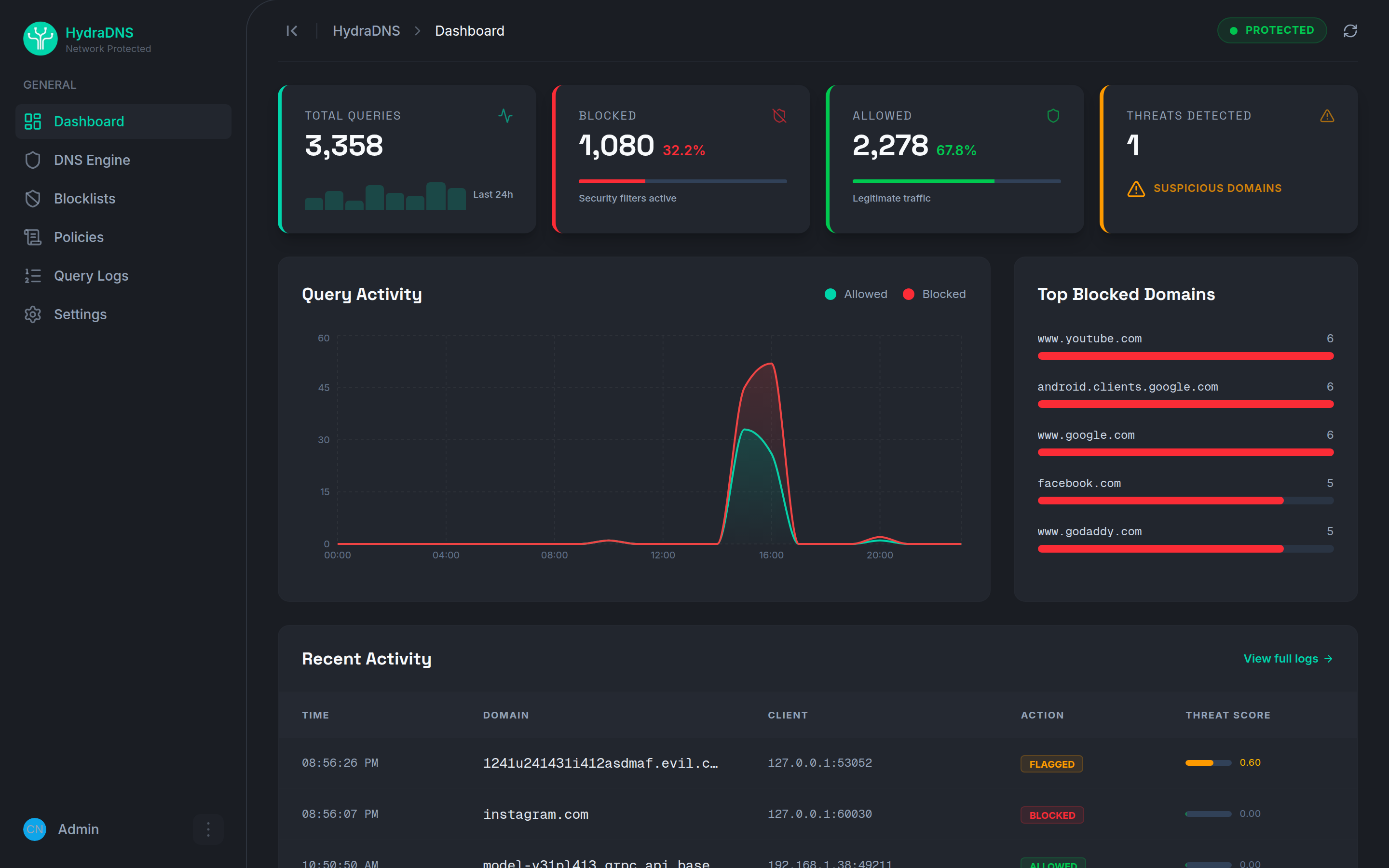
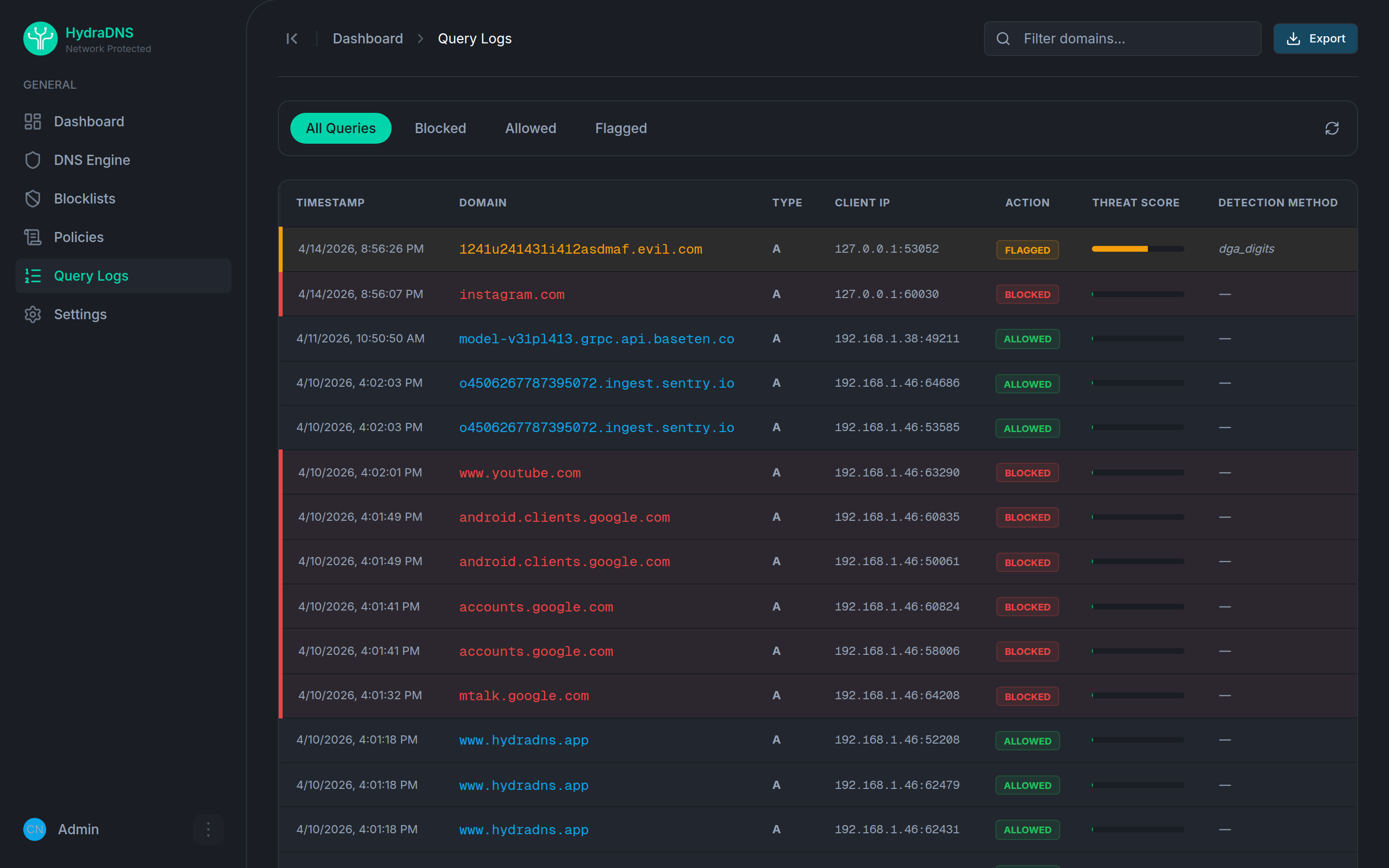
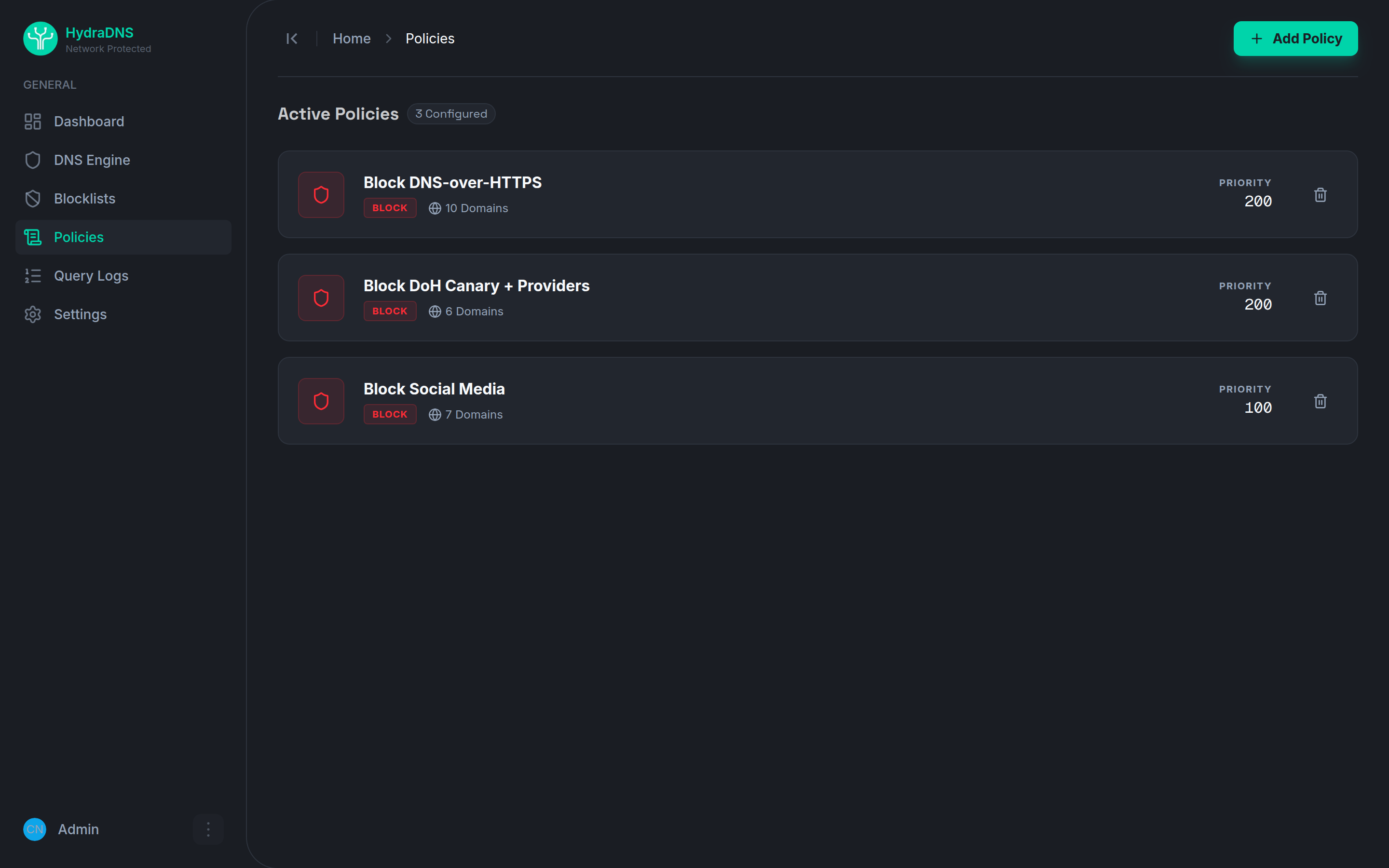
Dashboard
The web dashboard at localhost:3000 lets you:
- View real-time query statistics (total, blocked, allowed, block rate)
- Toggle the DNS engine on/off
- Manage blocklist sources (add/remove/view domain counts)
- Create and delete DNS policies (block, allow, redirect)
- Search and filter query logs
CLI
The hydra CLI wraps the control plane API for terminal-based management.
# Build the CLI
cd apps/cli && go build -o hydra .

# First boot: create the admin account and store the API token
hydra setup

# Check status
hydra status

# Block a domain
hydra block ads.example.com

# View query logs
hydra logs

# Manage blocklists
hydra blocklists
hydra blocklists add --id steven-black --name "StevenBlack" \
  --url "https://raw.githubusercontent.com/StevenBlack/hosts/master/hosts"

# Manage policies
hydra policies
hydra policies delete my-policy-id

# Engine control
hydra engine enable
hydra engine disable

# View metrics
hydra metrics
Set HYDRA_API_URL to point at a remote instance (default: http://localhost:8080).
MCP Server (AI Integration)
HydraDNS includes a built-in Model Context Protocol server, letting AI assistants manage your DNS firewall conversationally.
# Start MCP server (JSON-RPC 2.0 over stdio)
hydra mcp
Claude Code Setup
Add to your Claude Code MCP config:
{
  "mcpServers": {
    "hydradns": {
      "command": "/path/to/hydra",
      "args": ["mcp"],
      "env": {
        "HYDRA_API_URL": "http://localhost:8080"
      }
    }
  }
}
Available MCP Tools
| Tool | Description |
|---|---|
get_status | Engine status and query statistics |
toggle_engine | Enable or disable DNS engine |
block_domain | Block a domain (creates a policy) |
unblock_domain | Remove a block policy |
list_policies | List all DNS policies |
list_blocklists | List blocklist sources |
get_query_logs | Recent DNS query logs |
get_metrics | Latency percentiles and performance grade |
create_policy | Create an allow/block/redirect policy |
delete_policy | Delete a policy by ID |
bulk_unblock | Remove block policies for many domains at once |
get_weekly_summary | Week-over-week query and block summary |
explain_anomaly | Explain a block-rate or volume anomaly |
compare_to_last_month | Compare current stats against the previous month |
Example conversation: Say "Block all social media domains" and Claude calls block_domain for each domain.
Development
Prerequisites
- Go 1.26+
- Node.js 20+
- Docker & Docker Compose
Working on a Service
Each service lives under apps/ in this repo. Work inside its directory:
cd apps/core
make build        # Compile controlplane & dataplane
make test         # Run tests with coverage
make fmt          # Format code
make vet          # Vet code
make lint         # golangci-lint

cd apps/ui
npm run dev       # Dev server on :3000
npm run build     # Production build

cd apps/cli
go build -o hydra .  # Build CLI binary
Full Stack Commands (from root)
make setup        # One-time local setup (.env)
make start        # docker compose up -d
make stop         # docker compose down
make update       # git pull --ff-only
make logs         # Tail all logs
make build-core   # Rebuild core service
make restart-core # Rebuild + restart core
Project Structure
hydradns/
├── apps/
│   ├── core/           # Go DNS engine + API
│   │   ├── cmd/        #   controlplane + dataplane binaries
│   │   ├── internal/   #   blocklist, dnsengine, policy, storage
│   │   ├── configs/    #   config.yaml + policies.json
│   │   └── proto/      #   gRPC protobuf definitions
│   ├── ui/             # Next.js dashboard
│   ├── scanner/        # Network detection worker
│   └── cli/            # CLI + MCP server
│       ├── cmd/        #   Cobra commands
│       ├── api/        #   HTTP client for control plane
│       └── mcp/        #   MCP JSON-RPC server
├── docker-compose.yml  # Full stack orchestration
├── Makefile            # Convenience commands
└── scripts/            # Setup scripts
Deployment
Docker Compose (recommended)
docker compose up -d
Core runs as a combined container (controlplane + dataplane) with:
- SQLite database persisted in a Docker volume
- Health check on
/healthendpoint - Automatic blocklist fetching on startup
Raspberry Pi / VPS
curl -fsSL https://raw.githubusercontent.com/hydradns/hydradns/main/scripts/install.sh | bash
Then give the device a static IP and point your router's DNS server to it. Full walkthrough (static IP on Linux/macOS/Windows, router config): docs/pi-deployment.md.
Documentation
- Deployment Guide: install on a Raspberry Pi or any always-on machine; static IP setup (Linux, macOS, Windows), per-router DNS configuration, troubleshooting
- Hardware Guide: choosing a device to run HydraDNS on
- Known Limitations: what's not implemented yet, with impact and workarounds
- MCP Server Guide: the 14 tools, roles, and client configuration for the built-in MCP server
- Release Runbook: what
release.ymlpublishes and how tags are cut - Public Demo: hosting a read-only, public instance of the dashboard
Configuration
| Env Variable | Default | Description |
|---|---|---|
HYDRA_CONFIG | /app/configs/config.yaml | Path to config file |
HYDRA_DB | /app/data/hydradns.db | SQLite database path |
HYDRA_POLICIES | /app/configs/policies.json | Policy file path |
CORS_ORIGINS | http://localhost:3000,http://127.0.0.1:3000 (compose sets http://localhost:3000) | Comma-separated allowed CORS origins |
CORS_ALLOW_SAME_HOST | true | Also allow the dashboard when it is opened by the box's own IP address (Origin host equals the API host and is an IP or localhost). Named hosts need a CORS_ORIGINS entry |
TRUSTED_PROXIES | (empty) | Comma-separated CIDRs/IPs allowed to set X-Forwarded-For for client-IP purposes (login/setup throttle, audit log). Empty means no proxy is trusted, so the real socket address is always used |
HYDRA_API_URL | http://localhost:8080 | CLI/MCP API target |
HYDRA_TOKEN | (none; falls back to ~/.hydra/token) | CLI/MCP bearer token |
MCP_ROLE | admin | Scopes MCP tool access: admin, operator (no toggle_engine), or reporter (read-only) |
HYDRA_DEMO_MODE | false | Turns this instance into a public, read-only demo (rejects all mutations, seeds a fixed-password demo user and synthetic data, masks client IPs). See demo/README.md (not for a normal install) |
HYDRA_ANONYMIZE_CLIENT_IPS | false | Hash (HMAC-SHA256) client IPs before writing them to the query log instead of storing them as-is. This is pseudonymisation, not anonymisation, and it's off by default |
HYDRA_ANON_SECRET | (generated per-install) | HMAC key used only when HYDRA_ANONYMIZE_CLIENT_IPS is enabled |
BLOCK_RESPONSE | zero | Answer for blocked domains: zero (A 0.0.0.0), nxdomain, or refused |
BLOCKLIST_UPDATE_INTERVAL | 6h | How often blocklist sources are re-downloaded from their URL |
BLOCKLIST_POLL_INTERVAL | 5s | How often the dataplane checks the DB for blocklist changes (add, toggle, delete, finished download) and rebuilds the in-memory blocklist; 0 disables |
QUERY_LOG_RETENTION_DAYS | 7 | Delete query logs older than N days; 0 disables |
QUERY_LOG_MAX_ROWS | 1000000 | Keep at most N newest query-log rows; 0 disables |
QUERY_LOG_CLEANUP_INTERVAL | 1h | How often the query-log retention loop above runs |
NEXT_PUBLIC_API_URL | http://localhost:8080 | Dashboard API URL override (build time). By default the dashboard uses the page's own hostname on port 8080 |
NEXT_PUBLIC_SHOW_BYPASS_PANEL | unset (hidden) | Build-time flag to show the DoH-bypass-attempts panel on the dashboard |
Contributing & Community
Contributions are welcome, HydraDNS is pre-1.0 and there is a lot to build.
- Contributing guide how to set up, build, and open a pull request
- Roadmap what is planned and where help is most useful
- Code of Conduct
- Security policy report vulnerabilities privately
- Changelog
- Discussions questions and ideas
License
Installation
Source-derived launch command. Check the maintainer’s required arguments and credentials before running:
docker run -i --rm ghcr.io/hydradns/hydra-cli:0.1.0Set up in your AI client
Merge this template into ~/Library/Application Support/Claude/claude_desktop_config.json. Keep existing servers. Add any arguments, credentials, and permissions required by the maintainer; this template has not been install-tested.
{
  "mcpServers": {
    "io-github-hydradns-hydra-mcp": {
      "command": "docker",
      "args": [
        "run",
        "-i",
        "--rm",
        "ghcr.io/hydradns/hydra-cli:0.1.0"
      ]
    }
  }
}
Restart Claude Desktop completely for changes to take effect. Confirm the server appears connected in the client’s tool list, then try a read-only example from its documentation.
Claude Desktop setup referencePackage
ghcr.io/hydradns/hydra-cli:0.1.0dockerCompatible MCP Clients
HydraDNS works with any MCP-compatible client. Copy the config snippet from the Configuration section above and add it to the file shown for your client, then restart the application.
- Claude Desktop
~/Library/Application Support/Claude/claude_desktop_config.jsonRestart Claude Desktop completely for changes to take effect. - Cursor
~/.cursor/mcp.jsonRestart Cursor for changes to take effect. - VS Code
.vscode/mcp.jsonReload VS Code window for changes to take effect. - Windsurf
~/.codeium/windsurf/mcp_config.jsonRestart Windsurf for changes to take effect. - Claude Code
.mcp.jsonSave at the project root, then start Claude Code in that project and review the MCP server approval prompt. Keep real credentials out of shared files.