Formhaus
Validate Formhaus form definitions and simulate multi-step paths against the real engine.
Formhaus




Formhaus is a JSON form definition with a zero-dependency engine, React and Vue renderers, a Figma plugin, a JSON Schema and an MCP server for AI agents. One file describes fields, validation, conditional fields, multi-step navigation, branching routes and skippable steps.
Example · Packages · Install · Quick start · Custom components · Figma plugin · Docs · Spec · Playground
What it's for
- Multi-step forms with branching in React or Vue.
- Rendering a form from JSON with your own components.
- Designing the form in Figma from the same file.
- Generating and checking definitions with AI agents: Claude Code skills, the MCP server (
claude plugin marketplace add ignsm/formhaus && claude plugin install formhaus@formhaus), the JSON Schema and the format specification. - A headless engine for Svelte or vanilla JS.
Example
Business accounts get a company step; everyone converges on review.
{
  "$schema": "https://formhaus.dev/schema/form-definition.json",
  "id": "signup",
  "title": "Sign up",
  "submit": { "label": "Create account" },
  "steps": [
    {
      "id": "account",
      "title": "Account",
      "fields": [
        { "key": "email", "type": "email", "label": "Email", "validation": { "required": true } },
        { "key": "kind", "type": "radio", "label": "Account type", "autoAdvance": true,
          "options": [{ "value": "personal", "label": "Personal" }, { "value": "business", "label": "Business" }] }
      ],
      "routes": [
        { "to": "company", "show": [{ "field": "kind", "eq": "business" }] },
        { "to": "review" }
      ]
    },
    { "id": "company", "title": "Company", "routes": [{ "to": "review" }],
      "fields": [{ "key": "company", "type": "text", "label": "Company name", "validation": { "required": true } }] },
    { "id": "review", "title": "Review",
      "fields": [{ "key": "terms", "type": "checkbox", "label": "I accept the terms", "validation": { "required": true } }] }
  ]
}
import { FormRenderer } from '@formhaus/react';
import definition from './signup.json';

<FormRenderer definition={definition} onSubmit={save} />;
Compare with react-hook-form, TanStack Form, react-jsonschema-form and SurveyJS →
Packages
| Package | Description | npm |
|---|---|---|
@formhaus/core | Zero-dependency form engine: types, validation, visibility, multi-step | npm i @formhaus/core |
@formhaus/react | React adapter with native HTML defaults and custom component support | npm i @formhaus/react |
@formhaus/vue | Vue 3 adapter with native HTML defaults and custom component support | npm i @formhaus/vue |
@formhaus/mcp | MCP server: validate definitions and simulate paths from AI agents | claude mcp add formhaus -- npx -y @formhaus/mcp |
@formhaus/figma generates form mockups on the Figma canvas. It is not on Figma Community yet; build it locally, then import packages/figma/manifest.json.
Svelte, Solid, or anything else: use @formhaus/core directly. The playground has a Svelte example.
Install
npm install @formhaus/core
If you need a framework adapter:
npm install @formhaus/react   # React
npm install @formhaus/vue     # Vue
Or use @formhaus/core directly with any framework. See the Svelte example.
Quick start
Define a form
Write the JSON by hand, or use the /formhaus:formhaus-create-form Claude Code skill to generate it from a text description, a CSV table, or a screenshot of an existing form.
{
  "$schema": "https://formhaus.dev/schema/form-definition.json",
  "id": "contact",
  "title": "Contact Us",
  "submit": { "label": "Send" },
  "fields": [
    {
      "key": "name",
      "type": "text",
      "label": "Name",
      "placeholder": "Your name",
      "validation": { "required": true, "minLength": 2 }
    },
    {
      "key": "email",
      "type": "email",
      "label": "Email",
      "placeholder": "you@example.com",
      "validation": {
        "required": true,
        "pattern": "^[^\\s@]+@[^\\s@]+\\.[^\\s@]+$",
        "patternMessage": "Please enter a valid email address"
      }
    },
    {
      "key": "message",
      "type": "textarea",
      "label": "Message",
      "placeholder": "How can we help?",
      "rows": 4,
      "validation": { "required": true }
    }
  ]
}
React
npm install @formhaus/core @formhaus/react
import { FormRenderer } from '@formhaus/react';
import definition from './contact-form.json';

function ContactPage() {
  async function handleSubmit(values: Record<string, unknown>) {
    await fetch('/api/contact', {
      method: 'POST',
      body: JSON.stringify(values),
    });
  }

  return <FormRenderer definition={definition} onSubmit={handleSubmit} />;
}
Vue
npm install @formhaus/core @formhaus/vue
<script setup lang="ts">
import { FormRenderer } from '@formhaus/vue';
import definition from './contact-form.json';

async function handleSubmit(values: Record<string, unknown>) {
  await fetch('/api/contact', {
    method: 'POST',
    body: JSON.stringify(values),
  });
}
</script>

<template>
  <FormRenderer :definition="definition" @submit="handleSubmit" />
</template>
By default, both adapters render native HTML inputs. A step can hide Next with next: false, and cancellable async hooks run before and after navigation and submission. See lifecycle hooks.
Custom components
Both adapters accept a components prop (a FieldComponentMap) that lets you swap native HTML inputs for your own UI kit.
React
import type { FieldComponentMap, FieldComponentProps } from '@formhaus/react';

function MyTextInput({ field, value, error, onChange, onBlur }: FieldComponentProps) {
  return (
    <div>
      <label>{field.label}</label>
      <input
        type={field.type}
        value={(value as string) ?? ''}
        placeholder={field.placeholder}
        onChange={(e) => onChange(e.target.value)}
        onBlur={onBlur}
      />
      {error && <span className="error">{error}</span>}
    </div>
  );
}

const components: FieldComponentMap = {
  text: MyTextInput,
  email: MyTextInput,
};

<FormRenderer definition={definition} onSubmit={handleSubmit} components={components} />;
Vue
<script setup lang="ts">
import type { FormFieldProps } from '@formhaus/vue';

const props = defineProps<FormFieldProps>();
const emit = defineEmits<{ (e: 'update:value', value: unknown): void }>();
</script>

<template>
  <label>{{ props.field.label }}</label>
  <input
    :value="(props.value as string) ?? ''"
    @input="emit('update:value', ($event.target as HTMLInputElement).value)"
  />
</template>
<script setup>
import { FormRenderer } from '@formhaus/vue';
import MyTextInput from './MyTextInput.vue';
</script>

<template>
  <FormRenderer
    :definition="definition"
    :components="{ text: MyTextInput, email: MyTextInput }"
    @submit="handleSubmit"
  />
</template>
Each field component receives the full FormField descriptor, the current value, and any validation error. Implement as many or as few field types as you need. Unmapped types fall back to native HTML.
Figma plugin
@formhaus/figma renders form definitions in Figma with built-in Material 3 and iOS-like kits or with your own components. Branching forms get a flow map, multi-step forms a clickable prototype, and a generated form can be selected, edited and updated in place.
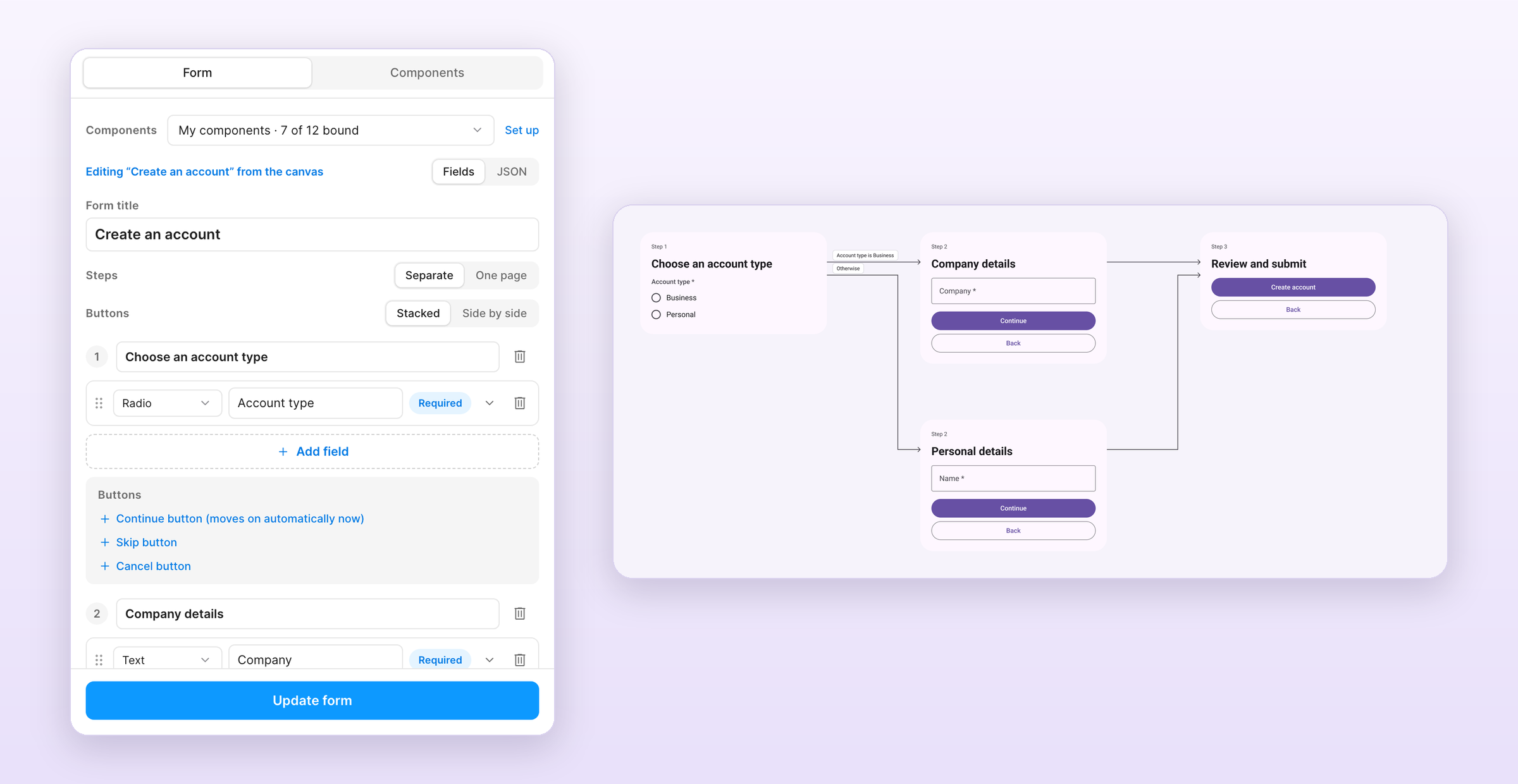
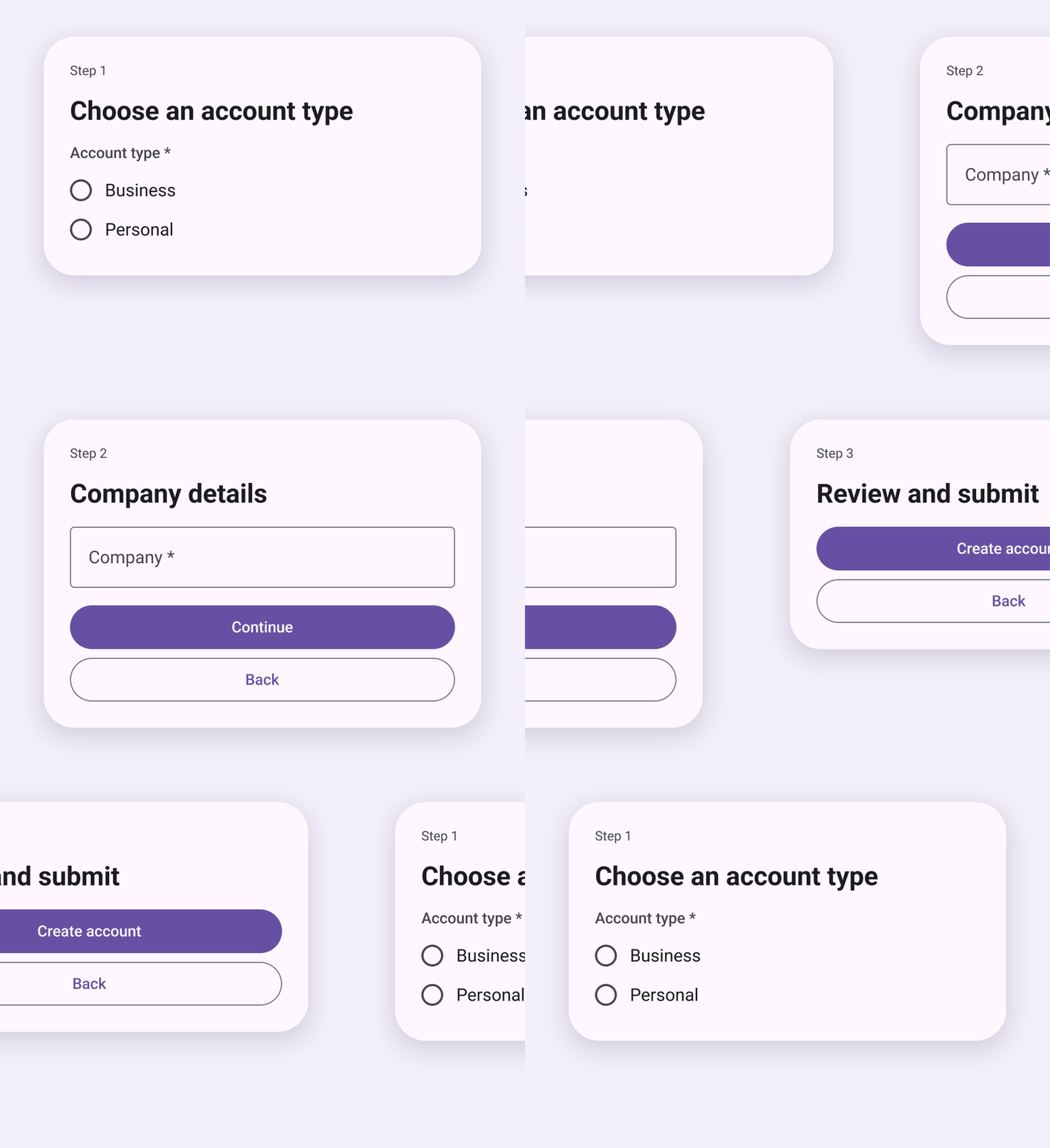
The /formhaus:formhaus-figma-connect Claude Code skill binds your library's components to the plugin. See the plugin guide for local installation.
Contributing
See CONTRIBUTING.md.
License
Installation
Source-derived launch command. Check the maintainer’s required arguments and credentials before running:
npx -y @formhaus/mcpSet up in your AI client
Merge this template into ~/Library/Application Support/Claude/claude_desktop_config.json. Keep existing servers. Add any arguments, credentials, and permissions required by the maintainer; this template has not been install-tested.
{
  "mcpServers": {
    "io-github-ignsm-formhaus": {
      "command": "npx",
      "args": [
        "-y",
        "@formhaus/mcp"
      ]
    }
  }
}
Restart Claude Desktop completely for changes to take effect. Confirm the server appears connected in the client’s tool list, then try a read-only example from its documentation.
Claude Desktop setup referencePackage
@formhaus/mcpnpmCompatible MCP Clients
Formhaus works with any MCP-compatible client. Copy the config snippet from the Configuration section above and add it to the file shown for your client, then restart the application.
- Claude Desktop
~/Library/Application Support/Claude/claude_desktop_config.jsonRestart Claude Desktop completely for changes to take effect. - Cursor
~/.cursor/mcp.jsonRestart Cursor for changes to take effect. - VS Code
.vscode/mcp.jsonReload VS Code window for changes to take effect. - Windsurf
~/.codeium/windsurf/mcp_config.jsonRestart Windsurf for changes to take effect. - Claude Code
.mcp.jsonSave at the project root, then start Claude Code in that project and review the MCP server approval prompt. Keep real credentials out of shared files.