io.github.l33tdawg/sage
Persistent, consensus-validated institutional memory for AI agents. Runs locally.
(S)AGE — Sovereign Agent Governed Experience
Persistent, consensus-validated memory infrastructure for AI agents.
SAGE gives AI agents institutional memory that persists across conversations, goes through BFT consensus validation, carries confidence scores, and decays naturally over time. Not a flat file. Not a vector DB bolted onto a chat app. Infrastructure — built on the same consensus primitives as distributed ledgers.
The architecture is described in Paper 1: Agent Memory Infrastructure.
Just want to install it? Download here — double-click, done. Works with any AI.
Architecture
Agent (Claude, ChatGPT, DeepSeek, Gemini, etc.)
  │ MCP / REST
  ▼
sage-gui
  ├── ABCI App (validation, confidence, decay, Ed25519 sigs)
  ├── App Validators (sentinel, dedup, quality, consistency — BFT 3/4 quorum)
  ├── CometBFT consensus (single-validator or multi-agent network)
  ├── SQLite + optional AES-256-GCM encryption
  ├── CEREBRUM Dashboard (SPA, real-time SSE)
  └── Network Agent Manager (add/remove agents, key rotation, LAN pairing)
Personal mode runs a real CometBFT node with 4 in-process application validators — every memory write goes through pre-validation, signed vote transactions, and BFT quorum before committing. Same consensus pipeline as multi-node deployments. Add more agents from the dashboard when you're ready.
Full deployment guide (multi-agent networks, RBAC, federation, monitoring): Architecture docs
CEREBRUM Dashboard
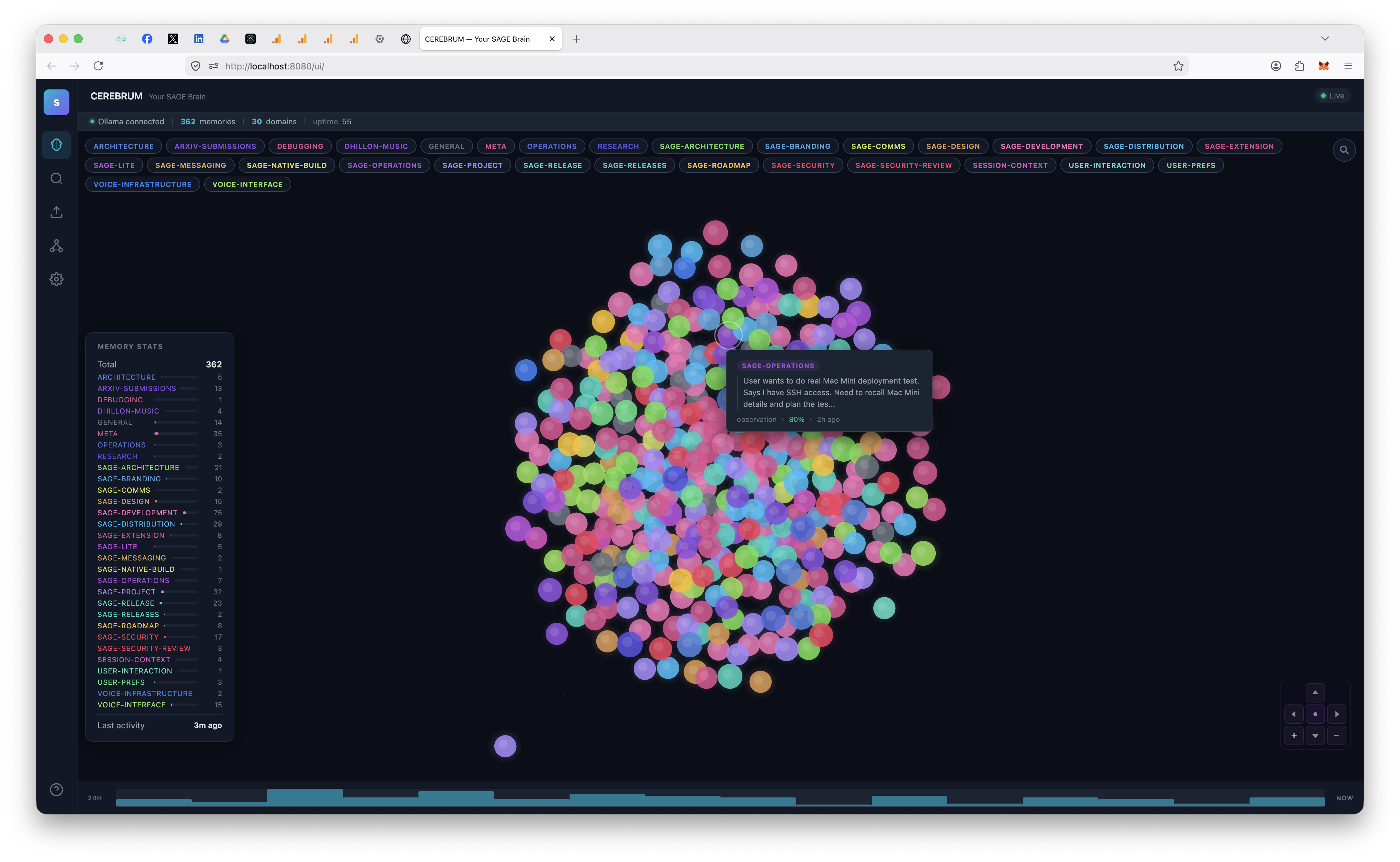
http://localhost:8080/ui/ — force-directed neural graph, domain filtering, semantic search, real-time updates via SSE.
Network Management
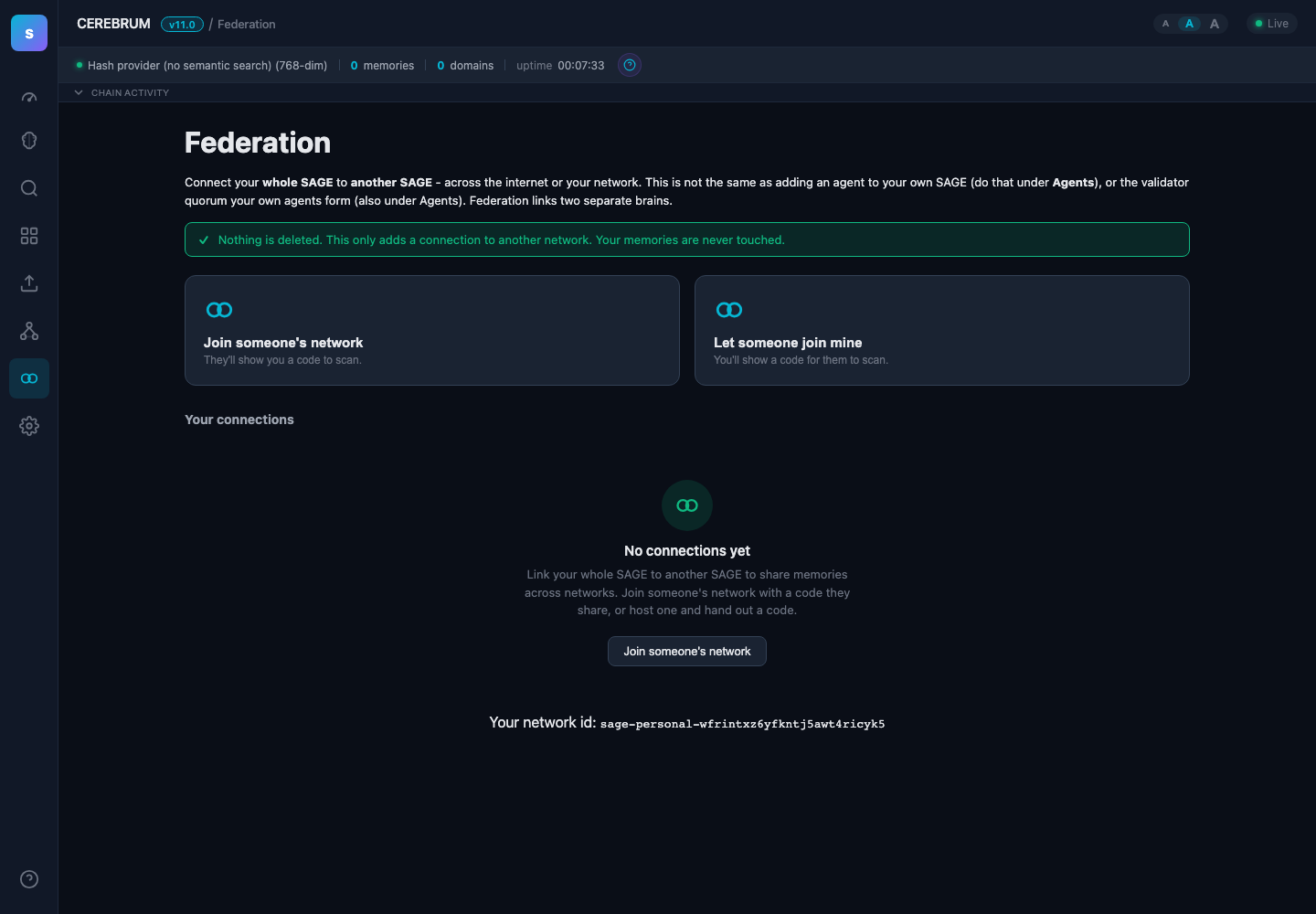
Add agents, configure domain-level read/write permissions, manage clearance levels, rotate keys, download bundles — all from the dashboard.
Settings
| Overview | Security | Configuration | Update |
|---|---|---|---|
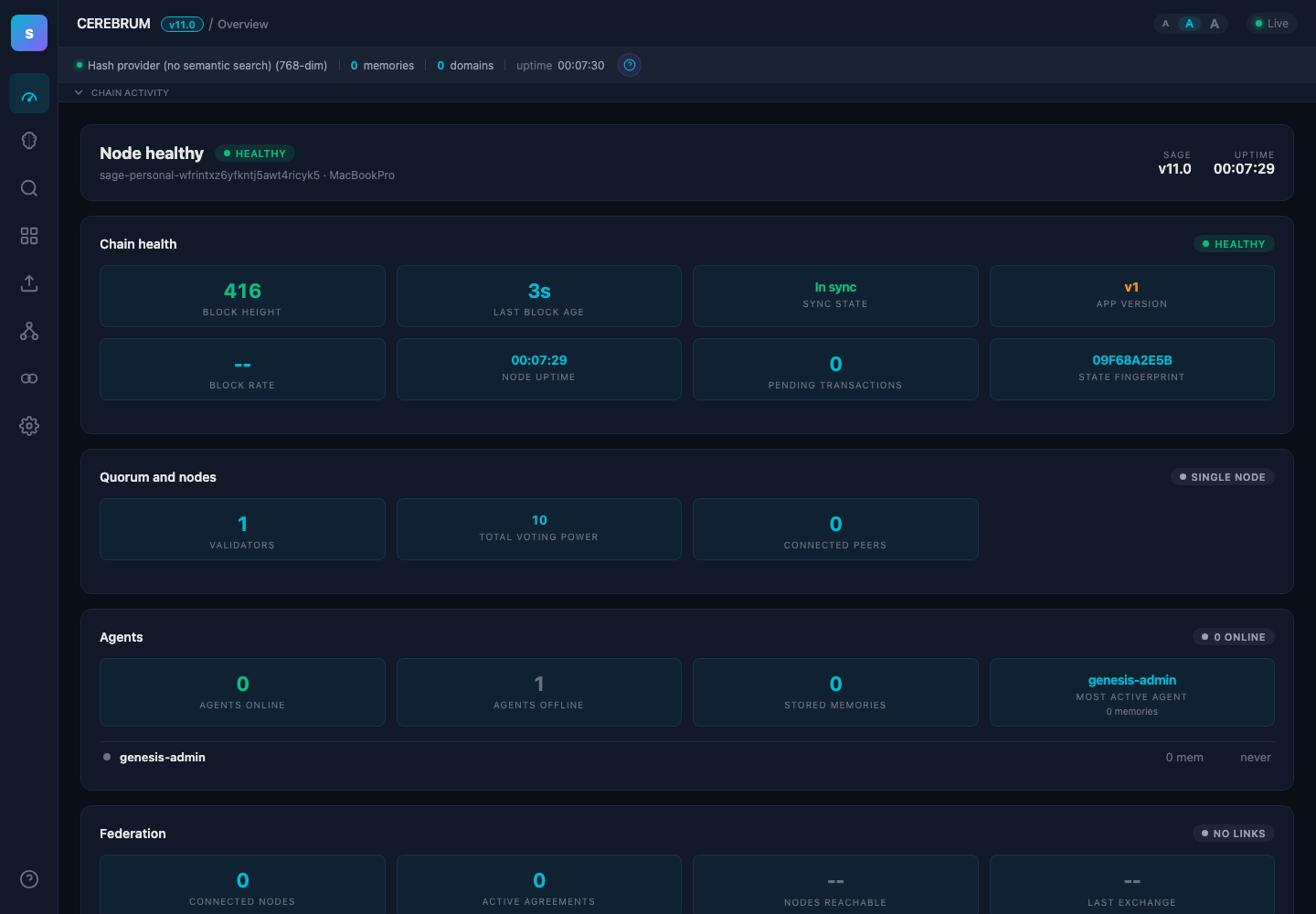 |  | 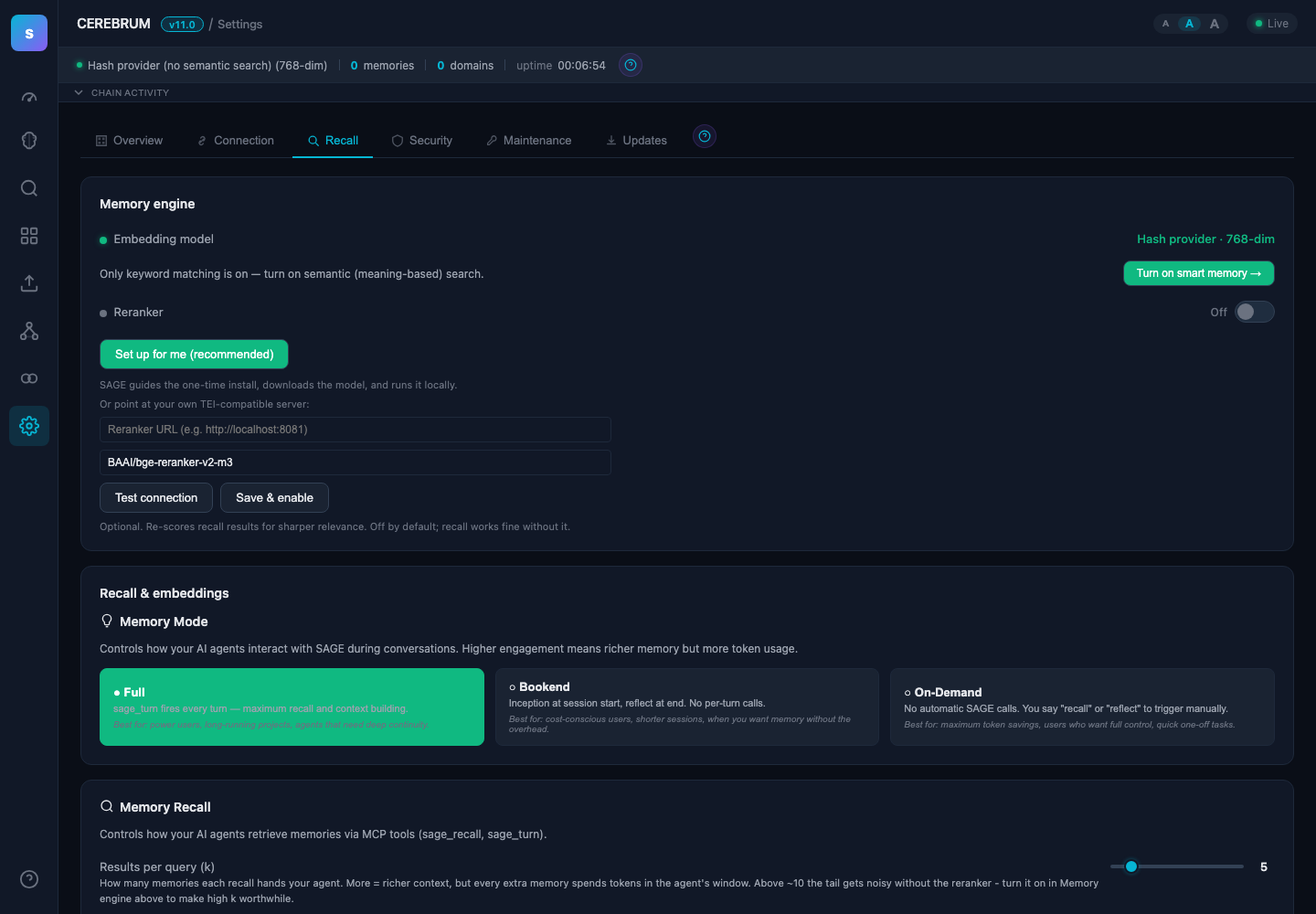 |  |
| Chain health, peers, system status | Synaptic Ledger encryption, export | Boot instructions, cleanup, tooltips | One-click updates from dashboard |
What’s New in v5.1.0
- Agent Rename Fix — Renaming an agent in the dashboard (Network → Agents → Edit) now reliably syncs to on-chain state. Previously, the CometBFT broadcast was fire-and-forget and could silently fail, causing
sage_inceptionto return the old auto-generated name. - Self-Healing Name Reconciliation — If on-chain and display names ever diverge,
sage_inceptionautomatically detects and repairs the mismatch on the agent’s next boot. - Broadcast Error Feedback — The dashboard now warns you if an on-chain sync fails instead of silently swallowing the error.
v5.0.12
- MCP Identity Fix —
sage-gui mcpandsage-gui mcp install --tokennow respectSAGE_IDENTITY_PATHenvironment variable as the highest priority (exactly matching the SDK’sAgentIdentity.default()). - Auto-creates directories + keypair if missing. Added clear INFO logs. 100% backward compatible.
- Enables clean multi-agent setups (e.g. multiple Claude Code instances in tmux). Closes the identity collision issue.
What’s New in v5.0.11
- Docker Fix — Container no longer stuck in restart loop. Default entrypoint changed from MCP stdio mode to
serve(persistent REST API + dashboard). MCP stdio still available viadocker run -i ghcr.io/l33tdawg/sage mcp. Fixes #14.
v5.0.10
- Multi-Agent Identity — New
SAGE_IDENTITY_PATHenv var andAgentIdentity.default()for running multiple Claude Code agents on the same machine without key collisions. (Community PR by @emx) - Dashboard Fix — "Synaptic Ledger" label in overview settings now reads "Synaptic Ledger Encryption" to clarify it refers to the encryption state, not the ledger itself.
v5.0.9
- Upgrade Hang Fix — Fixed CometBFT startup hang after drag-and-drop upgrades. Stale consensus WAL files left behind during migration caused a 60-second timeout and prevented the REST API from starting. Now cleaned up automatically at both migration and startup time.
v5.0.7
- Agent Pipeline — Inter-agent message bus (
sage_pipe) for direct agent-to-agent communication. Send messages, check results, coordinate work across agents in real-time. - Python Agent SDK —
sage-agent-sdkon PyPI with full v5 API coverage for building SAGE-integrated agents. CI-tested on every release. - Vault Recovery — Reset your Synaptic Ledger passphrase using a recovery key. No more permanent lockouts.
- Memory Modes — Choose
full(every turn),bookend(boot + reflect only), oron-demand(zero automatic token usage) to control how much context your agent spends on memory. - Vault Key Protection — Vault key is automatically backed up on every upgrade and in-app update. Prevents the silent overwrite that could cause permanent memory loss.
- macOS Tahoe Compatibility — Fixed Gatekeeper warnings and launch failures on macOS 15.x. Removed the
Install SAGE.commandthat triggered quarantine blocks. - Linux ARM64 Containers — Docker images now build for
linux/arm64in addition toamd64. /v1/mcp-configEndpoint — Agents can self-configure their MCP connection without manual setup.- Docker Images — Every release auto-builds and pushes to
ghcr.io/l33tdawg/sage. Pin a version or pulllatest.
v4.5
- Cross-Agent Visibility Fixed — Org-based access (clearance levels, multi-org federation) now correctly grants visibility across agents. Queries and list operations check direct grants, org membership, and unregistered domain fallback — no more 0-result queries when clearance should allow access.
- Domain Auto-Registration — First write to an unregistered domain auto-registers it with the submitting agent as owner and full access granted. No more propose-succeeds-but-query-404.
- RBAC Gate Simplification — DomainAccess (explicit allowlist) and multi-org gates are alternatives, not stacked. Passing one skips the other.
v4.4
- CEREBRUM UX Overhaul — Snap-back physics (nodes spring back to cloud on focus exit), forget animation (fade-and-remove instead of full reload), tab backgrounding fix (no physics jumps after alt-tab).
- Clean Synaptic Ledger — Always-visible button with double-click confirmation. Cleanup toggle auto-saves.
- Focus Mode — Single-click to view memory detail, side panel closes on exit. Graph defaults to committed status.
v4.3
- Synaptic Ledger Safeguards — Three-layer defense against silent encryption downgrade: server auto-re-enables if vault.key exists, web login now actually unlocks the vault for writes (was a bug), and the native macOS app icon prompts for your passphrase before launch. Plaintext writes are blocked when the vault is locked.
- Vault-Locked API —
/v1/dashboard/healthnow exposesvault_lockedstatus. MCP tools (sage_remember,sage_turn,sage_reflect) check this flag and return clear errors telling agents to prompt the user to unlock via CEREBRUM — no more silent plaintext fallback. - Isolated-by-Default RBAC — Agents can only see their own memories by default. Domain-level read/write permissions, clearance levels, and multi-org federation with department filtering.
- Bulk Operations — Multi-select memories in CEREBRUM for bulk domain moves, tag additions, and agent reassignment.
- Dashboard Update Check — Long-open tabs now poll for new releases every 12 hours so you never miss an update.
- Automated Docker + MCP Registry — Release CI now auto-builds Docker images, pushes to GHCR, and updates
server.json— MCP registries get new versions without manual intervention.
v4.0
- 4 Application Validators — Every memory now passes through 4 in-process validators before committing: Sentinel (baseline accept, ensures liveness), Dedup (rejects duplicate content by SHA-256 hash), Quality (rejects noise — greeting observations, short content, empty headers), Consistency (enforces confidence thresholds, required fields). Quorum requires 3/4 accept (BFT 2/3 threshold).
- Pre-Validation Endpoint —
POST /v1/memory/pre-validatedry-runs all 4 validators without submitting on-chain. Returns per-validator decisions and quorum result. MCP tools use this to reject low-quality memories before they hit the chain. - Memory Quality Gates —
sage_turnfilters low-value observations (greeting noise, short content).sage_reflectdetects similar existing memories and skips duplicates. Boot safeguard dedup prevents the same inception reminder from accumulating across sessions. - Upgrade Cleanup — On upgrade from v3.x, automatically deprecates duplicate boot safeguards, noise observations, very short memories, and content-hash duplicates. SQLite is backed up first. ~25-30 noisy memories cleaned per typical install.
v3.6
- Brain Graph Click-to-Focus — Click any memory bubble to focus its domain group. Others fade out while focused memories arrange in a timeline row sorted by creation date. Click again to view detail, click empty space to exit.
- Interactive Timeline — Click time buckets at the bottom of the brain graph to filter memories by time range. Multi-select hours to narrow down. Clear button to reset.
- Draggable Stats Panel — Grab the "Memory Stats" header to reposition the panel anywhere. Position persists between sessions. Resize horizontally with the drag handle.
- Chain Activity Log — Collapsible real-time event stream at the bottom of every page. See memory stored/recalled/forgotten events and consensus votes as they happen. Drag the top edge to resize.
- Agent Tab Ordering — Admin agents appear first in brain view tabs for faster access.
- Renamed to SAGE GUI — Binary renamed from sage-lite to sage-gui. Upgrade migration handles old launchd plists automatically.
v3.5
- On-Chain Agent Identity — Agent registration, metadata updates, and permission changes go through CometBFT consensus. Every identity operation is auditable, tamper-resistant, and federation-ready.
- Auto-Registration — Agents self-register on-chain during their first MCP connection. No manual setup needed.
- Visible Agents — Control which agents' memories each agent can see. Set per-agent visibility from the dashboard.
sage_registerMCP Tool — Agents can register themselves programmatically via MCP.- Permission Enforcement — On-chain clearance levels and domain access are enforced on every memory operation, with BadgerDB as the source of truth.
- Legacy Migration — Existing agents auto-migrate to on-chain identity on first boot after upgrade.
v3.0
- Multi-Agent Networks — Add and manage agents from the CEREBRUM dashboard. Each agent gets signing keys, role, clearance level, and per-domain read/write permissions.
- LAN Pairing — Generate a 6-character pairing code. New agents fetch their config over your local network in seconds.
- Agent Key Rotation — Rotate agent credentials with one click. Memories are re-attributed atomically.
- Redeployment Orchestrator — 9-phase state machine handles chain reconfiguration with rollback at every phase.
- In-App Auto-Updater — Check for updates, download, and restart from the Settings page.
- Boot Instructions — Customize what your AI does on startup from the admin dashboard.
- Tabbed Settings — Overview, Security, Configuration, and Update tabs keep everything organized.
- Brain Graph Search — Filter memories by content, domain, type, or agent. Only matching bubbles are shown.
Research
| Paper | Key Result |
|---|---|
| Agent Memory Infrastructure | BFT consensus architecture for agent memory |
| Consensus-Validated Memory | 50-vs-50 study: memory agents outperform memoryless |
| Institutional Memory | Agents learn from experience, not instructions |
| Longitudinal Learning | Cumulative learning: rho=0.716 with memory vs 0.040 without |
Quick Start
git clone https://github.com/l33tdawg/sage.git && cd sage
go build -o sage-gui ./cmd/sage-gui/
./sage-gui setup    # Pick your AI, get MCP config
./sage-gui serve    # SAGE + Dashboard on :8080
Or grab a binary: macOS DMG (signed & notarized) | Windows EXE | Linux tar.gz
Docker
docker pull ghcr.io/l33tdawg/sage:latest
docker run -p 8080:8080 -v ~/.sage:/root/.sage ghcr.io/l33tdawg/sage:latest
Pin a specific version with ghcr.io/l33tdawg/sage:5.1.0.
Upgrading from an older version?
If you installed SAGE before v5.0 and your AI isn't doing turn-by-turn memory updates, re-run the installer in your project directory:
cd /path/to/your/project
sage-gui mcp install
This installs Claude Code hooks that enforce the memory lifecycle (boot, turn, reflect) — even if your .mcp.json is already configured. Restart your Claude Code session after running this.
Documentation
| Doc | What's in it |
|---|---|
| Architecture & Deployment | Multi-agent networks, BFT, RBAC, federation, API reference |
| Getting Started | Setup walkthrough, embedding providers, multi-agent network guide |
| Security FAQ | Threat model, encryption, auth, signature scheme |
| Connect Your AI | Interactive setup wizard for any provider |
Stack
Go / CometBFT v0.38 / chi / SQLite / Ed25519 + AES-256-GCM + Argon2id / MCP
License
Code: Apache 2.0 | Papers: CC BY 4.0
Author
Dhillon Andrew Kannabhiran (@l33tdawg)
Installation
Source-derived launch command. Check the maintainer’s required arguments and credentials before running:
docker run -i --rm ghcr.io/l33tdawg/sage:11.23.15Set up in your AI client
Merge this template into ~/Library/Application Support/Claude/claude_desktop_config.json. Keep existing servers. Add any arguments, credentials, and permissions required by the maintainer; this template has not been install-tested.
{
  "mcpServers": {
    "io-github-l33tdawg-sage": {
      "command": "docker",
      "args": [
        "run",
        "-i",
        "--rm",
        "ghcr.io/l33tdawg/sage:11.23.15"
      ]
    }
  }
}
Restart Claude Desktop completely for changes to take effect. Confirm the server appears connected in the client’s tool list, then try a read-only example from its documentation.
Claude Desktop setup referencePackage
ghcr.io/l33tdawg/sage:11.23.15dockerCompatible MCP Clients
io.github.l33tdawg/sage works with any MCP-compatible client. Copy the config snippet from the Configuration section above and add it to the file shown for your client, then restart the application.
- Claude Desktop
~/Library/Application Support/Claude/claude_desktop_config.jsonRestart Claude Desktop completely for changes to take effect. - Cursor
~/.cursor/mcp.jsonRestart Cursor for changes to take effect. - VS Code
.vscode/mcp.jsonReload VS Code window for changes to take effect. - Windsurf
~/.codeium/windsurf/mcp_config.jsonRestart Windsurf for changes to take effect. - Claude Code
.mcp.jsonSave at the project root, then start Claude Code in that project and review the MCP server approval prompt. Keep real credentials out of shared files.