md-feedback
Review markdown plans before AI agents build. Annotate, gate-check, apply fixes, session handoffs.
MD Feedback
Review your plan. Guide your AI agent. Ship with confidence.




MD Feedback is a VS Code extension and MCP server for reviewing markdown plans before AI agents implement them. Annotate plans with Fix, Question, and Highlight — AI agents read your structured feedback directly through MCP. No copy-paste, no export step, no context lost between sessions.
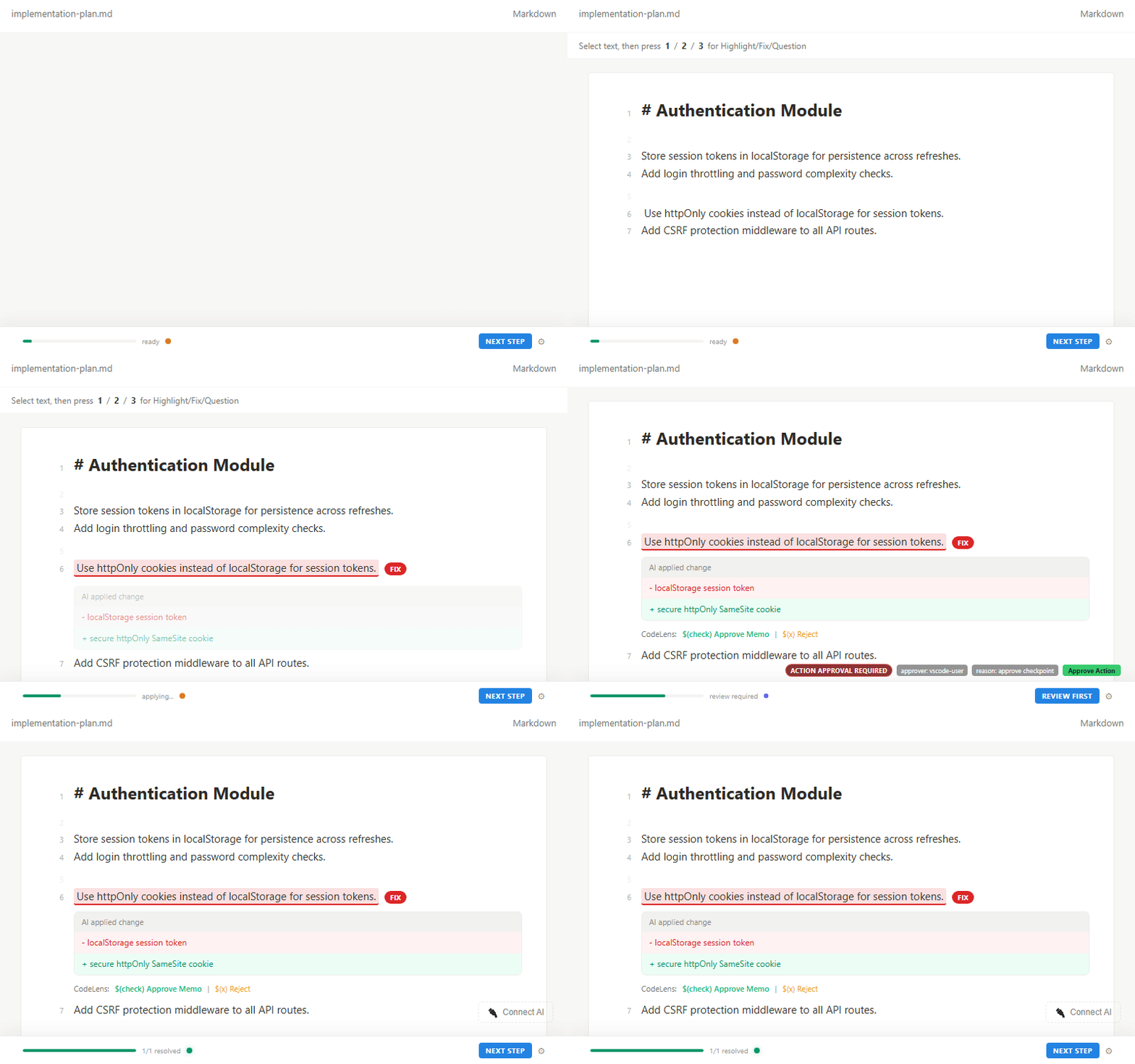
Install from VS Code Marketplace, open a .md plan, select text, press 1/2/3, and your agent can act on that review immediately.
You review. The agent builds. Gates track completion. Handoffs preserve context.
Latest (v1.5.7): Web UI for
npx md-feedback— open your markdown workspace in any browser.
How It Works
From plan to implementation, the complete AI coding loop:
Step 1  YOU        Write a plan in markdown
          │
Step 2  YOU        Open in MD Feedback sidebar → highlight, fix, question
          │         (press 1, 2, or 3)
          │
Step 3  AGENT      Reads annotations via MCP — no export step needed
          │
Step 4  AGENT      Implements fixes, answers questions
          │
Step 5  YOU        Review AI work → Approve, Request Changes, or Reject
          │
Step 6  AGENT      Gates auto-evaluate
          │         "3 fixes remaining" → "All done, ready to merge"
          │
Step 7  AGENT      Generates handoff → next session picks up where you left off
You do steps 1–2 and 5. The agent does the rest.
This is the MCP-first path. If you use export-based workflow, run export after step 2.
Features
- 3 annotation types: Highlight (reading mark), Fix (needs change), Question (needs clarification)
- 27 MCP tools for direct agent integration
- Export to 11 AI tools: Claude Code, Cursor, Copilot, Codex, Cline, Windsurf, Roo Code, Gemini, Antigravity, Generic, Handoff
- Quality gates with automatic pass/fail evaluation
- Session handoffs preserve context across AI agent sessions
- Checkpoints track review progress with snapshots
- Plan cursor tracks current position in a document
- Keyboard shortcuts: press 1, 2, 3 for instant annotation
- AI applies fixes via MCP — agent reports implementations, you see inline before/after diffs
- 7 status badges: Open, Working, Review, Answered, Done, Failed, Won't Fix
- Rollback: agent can undo its last change if something went wrong
- Batch operations: multiple fixes applied in one transaction
- Safe text replacement: when the same text appears multiple times, agents must specify which one to change (prevents accidental wrong-line edits)
- File safety: blocks writes to .env, credentials, node_modules
- Approve / Reject buttons — accept or dismiss annotations inline, always visible when review needed
- CodeLens in editor — approve or reject directly in the markdown file, no sidebar needed
- Activity Bar badge — see pending review count at a glance
- Status bar + toast notifications — never miss when AI delivers work for review
- Keyboard shortcuts — Ctrl+Shift+A to approve, Ctrl+Shift+X to reject
- Gate override — manually control gate status when auto-evaluation isn't enough
- External file diffs inline — see exactly what AI will change before applying
- Gate transition notifications — know when gates unblock or complete
- Concurrent safety — prevents data corruption when multiple AI operations run at the same time
- Auto-refresh: document updates in real-time when AI writes changes
- Portable format: annotations stored as HTML comments — works in any markdown renderer, survives git
- Rich rendering: Mermaid diagrams, callout blocks, syntax-highlighted code
Quick Start (under 2 minutes)
- Install from VS Code Marketplace
- Annotate first — select text in a markdown file, then press
1(highlight),2(fix),3(question) - Optional: Connect MCP — after first annotation, click
Connect AIin the sidebar and add config to your MCP client:
{ "mcpServers": { "md-feedback": { "command": "npx", "args": ["-y", "md-feedback"] } } }
- Done — MCP-compatible agents read annotations directly. If your agent is export-only (for example current Copilot flow), use Export.
Node.js 18+ required for MCP (
npx). Claude path:.claude/mcp.json
Cursor path:.cursor/mcp.json
Try it now: Install from Marketplace, open any
.mdfile, and press2to add your first Fix annotation.
Use Cases
Vibe Coding Workflow
Write a plan in markdown. Review it with MD Feedback. Let your AI agent build exactly what you reviewed. The plan is the contract — annotations are the instructions.
AI Plan Review
An AI agent generates an implementation plan. You review it with highlights, fixes, and questions before the agent writes any code. Catch errors at design time, not after implementation.
Session Continuity
Working with AI across multiple sessions? Handoffs preserve every decision, open question, and key context point. The next session starts where the last one ended.
Team Plan Review
Annotations are HTML comments in the markdown file. They survive git commits, PRs, and branch merges. Share reviewed plans with your team through your normal version control workflow.
Quality Gate Enforcement
Set conditions that must be met before the agent proceeds. Gates auto-evaluate based on annotation resolution status — blocked, proceed, or done.
Design Philosophy
- Humans only state what is wrong. AI decides how to fix it.
- Three annotation types are sufficient. AI infers intent from context — whether a fix means a document edit or a code change.
- Markdown is the source of truth. All state lives in the file itself.
- Zero cognitive load. Status bar shows progress passively. No extra decisions required.
- Portable and git-friendly. Annotations are HTML comments — they survive any markdown renderer and version control.
VS Code Settings
You can customize MD Feedback from VS Code Settings via md-feedback.*.
Advanced timing and performance tuning options are available for large workspaces.
MCP Server
MD Feedback includes an MCP server with 27 tools that let AI agents read your annotations without manual export. Agents can query memos, mark tasks done, apply fixes, check gate status, and generate handoffs — all through the Model Context Protocol.
Setup:
npx md-feedback
Workspace override — if your MCP client doesn't set cwd to the project folder (e.g. Antigravity), specify it explicitly:
{ "command": "npx", "args": ["-y", "md-feedback", "--workspace=/path/to/project"] }
Windows example: { "command": "npx", "args": ["-y", "md-feedback", "--workspace=C:\\\\work\\\\my-project"] }
Or via environment variable: MD_FEEDBACK_WORKSPACE=/path/to/project
For full details, see MCP Server documentation.
Links
License
SUL-1.0 — Free for personal and non-commercial use.
FAQ
What is MD Feedback? MD Feedback is a VS Code extension and MCP server for reviewing markdown plans before AI agents implement them. Select text, press 1 (highlight), 2 (fix), or 3 (question) — annotations are stored as portable HTML comments in the markdown file itself. AI agents read annotations directly via MCP, or you can export to 11 AI tools.
Does it work with Claude Code / Cursor / Copilot?
Yes. MD Feedback exports to Claude Code (CLAUDE.md), Cursor (.cursor/rules/), GitHub Copilot (.github/copilot-instructions.md), and 8 more tools. With MCP, agents read annotations directly — no export step needed.
What is MCP and why does it matter? MCP (Model Context Protocol) lets AI agents interact with external tools. MD Feedback's MCP server gives agents direct access to your annotations, so they can read feedback, mark tasks done, evaluate gates, and generate handoffs automatically. For example, when you mark a section as "Fix: use retry logic here," the agent reads that annotation via MCP, implements the fix, and marks it done — all without you switching tabs.
Can multiple people review the same plan? Yes. Annotations are HTML comments embedded in the markdown file. They travel with the file through git — commits, branches, pull requests, and merges all preserve annotations intact.
Is it free? Yes. MD Feedback is free for personal and non-commercial use under the SUL-1.0 license.
Who is this for? Developers using AI coding assistants who want to review plans before implementation, preserve context across sessions, and give agents structured feedback instead of unstructured chat messages.
More questions and advanced guidance: MCP Server docs and GitHub Issues.
Installation
Source-derived launch command. Check the maintainer’s required arguments and credentials before running:
npx -y md-feedbackSet up in your AI client
Merge this template into ~/Library/Application Support/Claude/claude_desktop_config.json. Keep existing servers. Add any arguments, credentials, and permissions required by the maintainer; this template has not been install-tested.
{
  "mcpServers": {
    "io-github-yeominux-md-feedback": {
      "command": "npx",
      "args": [
        "-y",
        "md-feedback"
      ]
    }
  }
}
Restart Claude Desktop completely for changes to take effect. Confirm the server appears connected in the client’s tool list, then try a read-only example from its documentation.
Claude Desktop setup referencePackage
md-feedbacknpmCompatible MCP Clients
md-feedback works with any MCP-compatible client. Copy the config snippet from the Configuration section above and add it to the file shown for your client, then restart the application.
- Claude Desktop
~/Library/Application Support/Claude/claude_desktop_config.jsonRestart Claude Desktop completely for changes to take effect. - Cursor
~/.cursor/mcp.jsonRestart Cursor for changes to take effect. - VS Code
.vscode/mcp.jsonReload VS Code window for changes to take effect. - Windsurf
~/.codeium/windsurf/mcp_config.jsonRestart Windsurf for changes to take effect. - Claude Code
.mcp.jsonSave at the project root, then start Claude Code in that project and review the MCP server approval prompt. Keep real credentials out of shared files.