Klarion
Secret scanning for AI agents: rules and entropy find candidates, a model decides which are real.
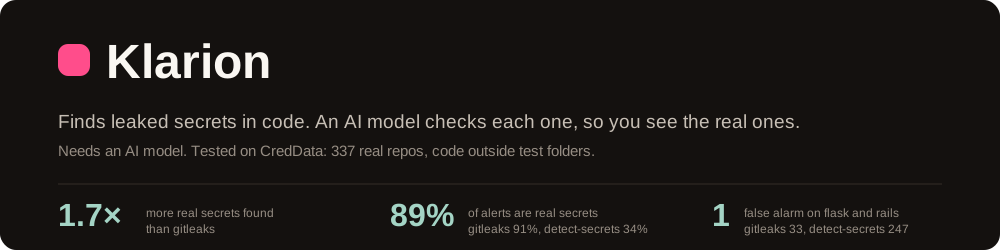


Klarion finds secrets in your code: API keys, passwords and tokens.
It works in two steps:
- Find. Fast local checks flag anything that looks like a secret.
- Check. An AI model reads each one with the code around it and decides if it is real.
Pattern scanners stop at step 1, so they also flag test values, IDs and hashes. Klarion shows you the real leaks.
$ klarion scan .

services/billing/client.py
  [critical] stripe-secret-key  39:18  sk_l****4bQx
    verdict: secret (confidence 0.96)
    | stripe.api_key = "sk_l****4bQx"

Summary: 1 finding(s) across 1 file(s), 198 suppressed [1204 files scanned in 612ms]
Install
go install github.com/0x1Adi/Klarion/cmd/klarion@latest
Or download a binary from the releases page.
Klarion needs an AI model. Pick one:
| Model | Setup |
|---|---|
| Anthropic (default) | export ANTHROPIC_API_KEY=... |
| OpenAI or compatible | export OPENAI_API_KEY=... and set provider = "openai" |
| Local model, nothing leaves your machine | Run Ollama and set provider = "ollama" |
| Your Claude Code login | Set provider = "claude-cli" |
Settings go in .klarion.toml under [ai]. All options are in the reference.
Use it
| What you want | How |
|---|---|
| Scan a folder | klarion scan . |
| Block commits that add a secret | klarion protect |
| Block commits with the pre-commit framework | The .pre-commit-config.yaml below |
| Stop Claude Code from writing a secret | /plugin marketplace add 0x1Adi/Klarion then /plugin install klarion@klarion |
| Stop Cline, Cursor or any MCP agent from writing a secret | The MCP server below |
| Fail pull requests that add a secret | The GitHub Action below |
| Start on a repo that already has findings | klarion baseline create, so only new secrets fail |
# .github/workflows/secrets.yml
name: secret-scan
on: [push, pull_request]

jobs:
  klarion:
    runs-on: ubuntu-latest
    permissions:
      contents: read
      security-events: write
    steps:
      - uses: actions/checkout@v6
        with:
          fetch-depth: 0
      - uses: 0x1Adi/Klarion@v0.4.1
        with:
          anthropic-api-key: ${{ secrets.ANTHROPIC_API_KEY }}
On a pull request it scans only what the PR adds. It caches the AI answers, so unchanged code
costs nothing. Findings show in the job log. On a private repo without GitHub Code Security,
add upload-sarif: "false" to skip the Security tab upload. GitLab CI and every option are in
the reference.
# .pre-commit-config.yaml
repos:
  - repo: https://github.com/0x1Adi/Klarion
    rev: v0.4.1
    hooks:
      - id: klarion
        stages: [pre-commit]
Without the stages line the hook is off and runs only when you ask for it, with
pre-commit run --hook-stage manual klarion. The klarion hook builds Klarion with Go the
first time it runs; use id: klarion-system if klarion is already installed. Everyone who
commits needs a model set up.
// ~/.cline/mcp.json, or the MCP settings of any other client
{
  "mcpServers": {
    "klarion": {
      "command": "klarion",
      "args": ["mcp"]
    }
  }
}
The agent calls scan_text before it writes code and scan_file before it commits. Approve
each call rather than auto-approving the server: scan_file reads any path it is given. With no
model configured the server hands each candidate and its decision rules to that agent to judge,
so it needs no API key. Configure one and Klarion judges instead. Full steps, including the
tools and how to verify the install: llms-install.md.
Results
Klarion found about 1.7× more real secrets than gitleaks, and 89% of its alerts were real (gitleaks: 91%).
We tested Klarion v0.3.0 on CredData: 337 real open source repos where Samsung labeled the lines that hold secrets. These numbers cover code outside test folders.
| Klarion | gitleaks | detect-secrets | |
|---|---|---|---|
| Real secrets found | 35% | 21% | 35% |
| Alerts that were real | 89% | 91% | 34% |
| False alarms on flask and rails | 9 | 33 | 247 |
Good to know:
- Klarion skips test fixtures and docs examples on purpose. CredData counts those as real. Counted that way, Klarion found 9% and gitleaks 46%.
- Klarion's numbers come from a sample of 612 AI checks with one model (Claude Haiku). The likely range is 30 to 40% found and 82 to 97% real.
- CredData's labels came from what other scanners found, which helps those scanners.
Full method and data: benchmark/REPORT.md.
How it works
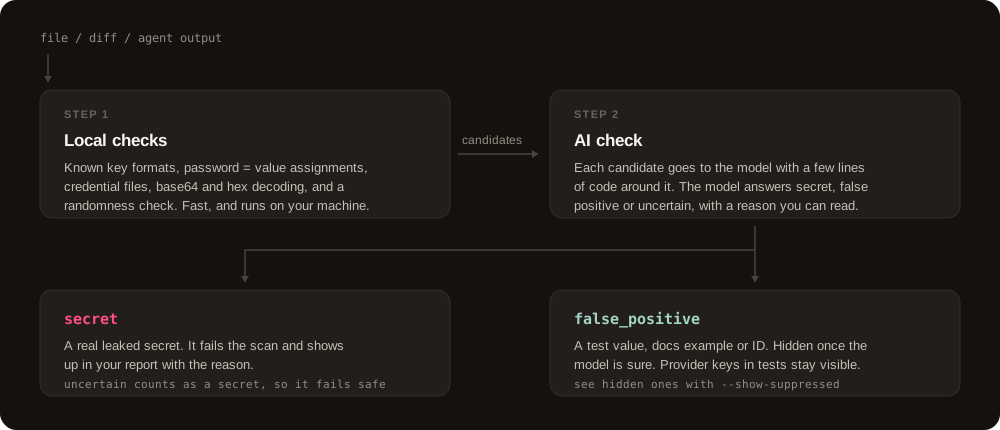
- Step 1 runs on your machine. It looks for known key formats,
password = valuestyle lines, credential files like.pgpass, and secrets hidden in base64 or hex. It also checks how random a string looks. - Step 2 asks the model. Each candidate goes out with a few lines of code. The model answers secret, false positive or uncertain. Uncertain counts as a secret.
- You can see what was hidden. Run
klarion scan . --show-suppressed. - Your code goes only to the model you pick. Set
send_secret = falseto send a masked value instead. It is less accurate.
Limits
- It needs a model. Without one,
klarion scanand the commit hooks stop with an error. The Claude Code hook still blocks provider keys such as AWS, GitHub and Stripe, and the MCP server hands the candidates and its rules to your agent to judge. - No API key? A hosted version with no setup is coming. Join the list.
- The model can be wrong. Check what it hid with
--show-suppressed. - It finds secrets, it does not fix them. Rotate any secret it finds.
- Local hooks can be skipped with
git commit --no-verify. Run Klarion in CI too, with the Action. The pre-commit hook checks staged changes only, so in CI it has nothing to check.
More
Reference · Benchmark · Design · Changelog · Contributing · Security
MIT © The Klarion Authors
Setup from the maintainer
This listing does not have a supported local package template. Use the maintainer’s documentation for its hosted endpoint, authentication, and client-specific setup. No install command has been inferred.
Package
https://github.com/0x1Adi/Klarion/releases/download/v0.4.3/klarion-mcp-v0.4.3.mcpbotherCompatible MCP Clients
Klarion works with any MCP-compatible client. Copy the config snippet from the Configuration section above and add it to the file shown for your client, then restart the application.
- Claude Desktop
~/Library/Application Support/Claude/claude_desktop_config.jsonRestart Claude Desktop completely for changes to take effect. - Cursor
~/.cursor/mcp.jsonRestart Cursor for changes to take effect. - VS Code
.vscode/mcp.jsonReload VS Code window for changes to take effect. - Windsurf
~/.codeium/windsurf/mcp_config.jsonRestart Windsurf for changes to take effect. - Claude Code
.mcp.jsonSave at the project root, then start Claude Code in that project and review the MCP server approval prompt. Keep real credentials out of shared files.