io.github.Advertflair/threadmap-mcp
Conversation drift visualization for Claude. Color-coded inflection points and one-click forking.
🗺️ ThreadMap MCP for Claude
Conversation drift visualization and forking for Claude.
Stop losing your original intent. See exactly where your conversation drifted. Fork from any point and pick up with clean context.
See it in action
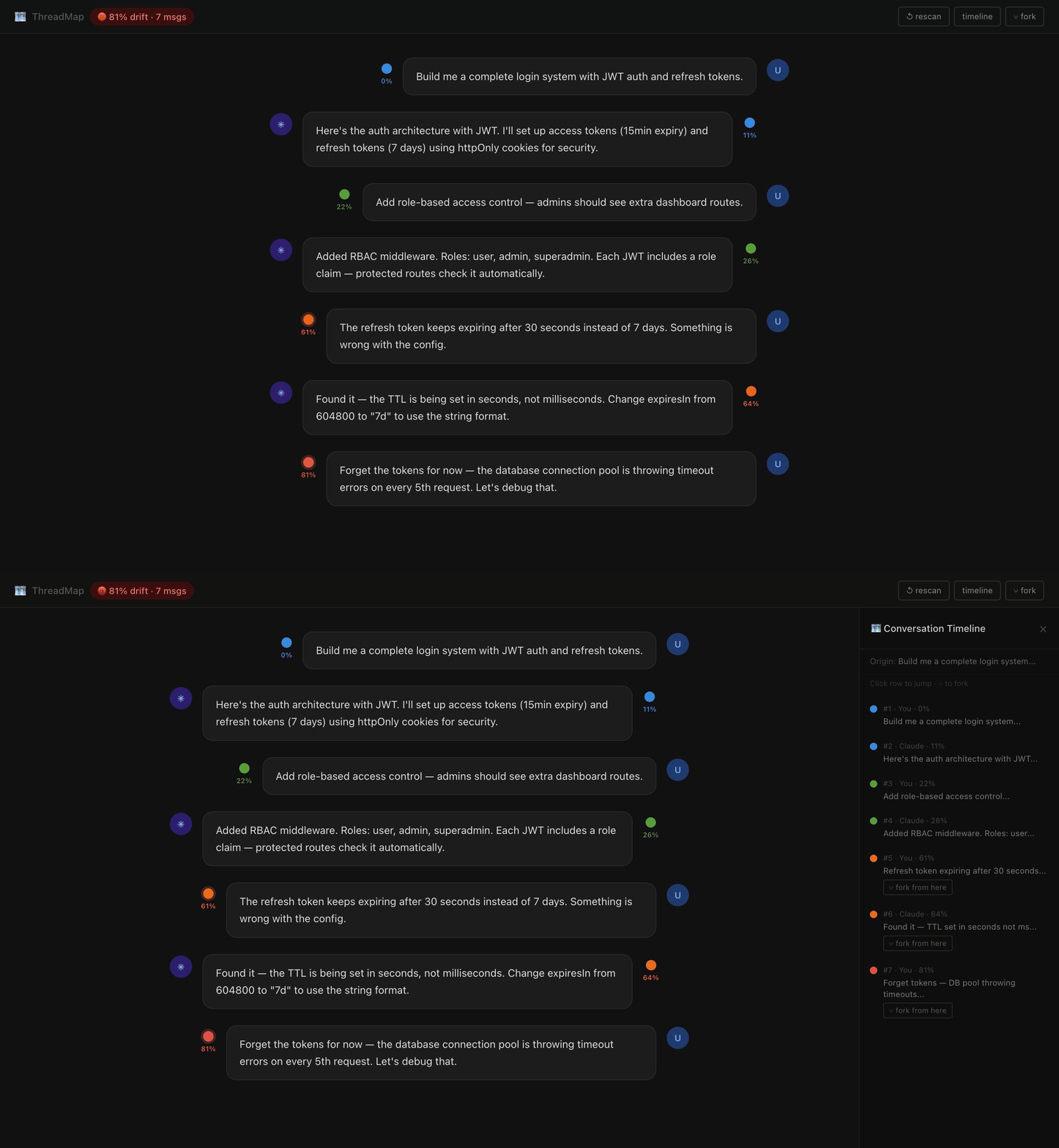
Color dots on every message — live drift tracking:
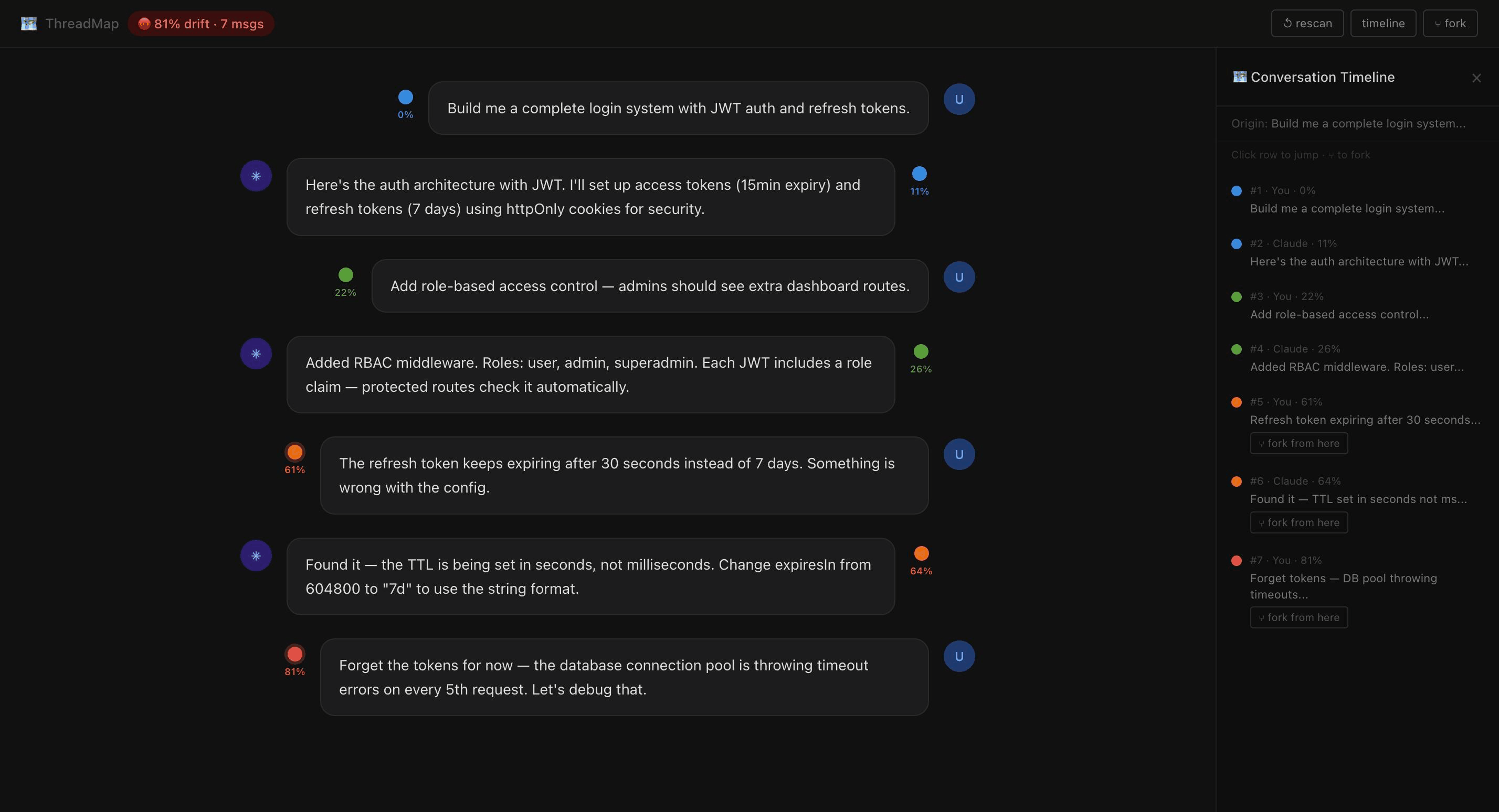
Timeline panel with fork buttons at every inflection point:
Two ways to use ThreadMap
| MCP Server | Chrome Extension | |
|---|---|---|
| Works in | Claude Code (terminal) | claude.ai (browser) |
| Install | claude mcp add threadmap npx threadmap-mcp | Load unpacked from chrome-extension/ folder |
| What you get | 7 tools — track, timeline, fork, branch | Color dots on every message, timeline panel, one-click fork |
| Best for | Developers building with Claude Code | Anyone using claude.ai daily |
Both are in this repo. Use one or both.
Chrome Extension — Visual dots in claude.ai
The Chrome extension injects ThreadMap directly into the claude.ai interface. No config. Just install and open Claude.
Install (2 minutes)
1. Clone or download this repo
2. Open Chrome → chrome://extensions
3. Enable Developer mode (top right toggle)
4. Click Load unpacked → select the chrome-extension folder
5. Open any Claude conversation — ThreadMap activates automatically
What you see
- Color dot next to every message showing drift % from your original intent
- Sticky bar at the top with live drift status and message count
- ↺ rescan — loads all messages from long previous conversations
- timeline — full conversation map, click any row to jump to that message
- ⑂ fork — opens a new Claude chat with full context pre-loaded in the input
How forking works
- Click ⑂ fork in the timeline or next to any message bubble
- A new claude.ai tab opens automatically
- The full context (origin intent + all messages up to that point) is pasted into the input
- Review and hit Send — Claude picks up from the clean version
Chrome extension files
chrome-extension/
├── manifest.json     — Extension config (Manifest v3)
├── content.js        — Core drift engine + DOM injection
├── threadmap.css     — All injected styles
├── popup.html        — Extension popup with color legend
├── icon16.png        — Icons
├── icon48.png
└── icon128.png
Heads up: The extension uses Developer mode (load unpacked). A Chrome Web Store version is on the roadmap.
MCP Server — Claude Code integration
The MCP server adds 7 tools to Claude Code for programmatic drift tracking.
Install
claude mcp add threadmap npx threadmap-mcp
Or manually add to ~/.claude/claude_desktop_config.json:
{
  "mcpServers": {
    "threadmap": {
      "command": "npx",
      "args": ["threadmap-mcp"]
    }
  }
}
Quick start
threadmap_track(sessionId="myproject", role="user", content="build me a login system with JWT auth")
→ 🔵 Blue — Drift: 0% — Origin intent set

threadmap_track(sessionId="myproject", role="user", content="the refresh token keeps expiring after 30 seconds")
→ 🟠 Orange — Drift: 63% — ⚡ INFLECTION POINT detected

threadmap_timeline(sessionId="myproject")
→ Full color-coded map of all messages with fork instructions

threadmap_fork(sessionId="myproject", messageIndex=6, branchName="jwt-debug")
→ 🌿 Branch created — clean context from messages 1–7
All 7 tools
| Tool | What it does |
|---|---|
threadmap_track | Track a message, get drift score + color |
threadmap_timeline | Full color-coded conversation map |
threadmap_fork | Fork from any message index |
threadmap_branch_context | Clean context packet for any branch |
threadmap_status | Quick current drift check |
threadmap_reset | Archive thread, start fresh |
threadmap_legend | Show color reference guide |
Color system
| Color | Drift | Meaning |
|---|---|---|
| 🔵 Blue | 0–15% | On track — core intent |
| 🟢 Green | 16–35% | Productive expansion |
| 🟡 Yellow | 36–55% | Adjacent drift |
| 🟠 Orange | 56–72% | Inflection point — meaningful pivot |
| 🔴 Red | 73–88% | Full context break |
| 🟣 Purple | 89–95% | Meta — talking about the conversation |
| ⚪ White | 96–100% | Resolution |
Orange and Red = fork candidates. The conversation has left your original intent behind.
Real-world use cases
Claude Code — architecture integrity Track every message while building. Orange = scope creep. Fork before the drift gets worse. Architecture decisions from the first 10 messages stay clean.
Long previous conversations Click ↺ rescan in the Chrome extension. ThreadMap scrolls to the top, loads all messages, scans every one, then returns you to the bottom — all dots appear.
Team handoffs
Use threadmap_branch_context to extract a clean summary of what was decided. Paste it into a new session — no scrolling through 200 messages.
Why open source?
Non-linear conversation navigation is the missing primitive for AI-native work. Right now Claude conversations are books with no table of contents, no chapters, no bookmarks.
ThreadMap is the table of contents. If this becomes the standard, it travels across Claude, GPT, Gemini, anything. Nobody owns it. Everybody benefits.
Roadmap
- Local embedding model (MiniLM) for richer semantic scoring
- Chrome extension on Chrome Web Store (no developer mode required)
- Cross-session persistence (SQLite mode)
- Visual timeline export (SVG/HTML)
- GPT / Gemini compatibility
Contributing
MIT licensed. See CONTRIBUTING.md.
git clone https://github.com/Advertflair/threadmap-mcp
cd threadmap-mcp
npm install
npm run build
PRs welcome especially for: better drift scoring, Chrome extension improvements, and other AI platform support.
License
MIT — see LICENSE
Built by Advertflair. Open source. Ship it.
Installation
Source-derived launch command. Check the maintainer’s required arguments and credentials before running:
npx -y threadmap-mcpSet up in your AI client
Merge this template into ~/Library/Application Support/Claude/claude_desktop_config.json. Keep existing servers. Add any arguments, credentials, and permissions required by the maintainer; this template has not been install-tested.
{
  "mcpServers": {
    "io-github-advertflair-threadmap-mcp": {
      "command": "npx",
      "args": [
        "-y",
        "threadmap-mcp"
      ]
    }
  }
}
Restart Claude Desktop completely for changes to take effect. Confirm the server appears connected in the client’s tool list, then try a read-only example from its documentation.
Claude Desktop setup referencePackage
threadmap-mcpnpmCompatible MCP Clients
io.github.Advertflair/threadmap-mcp works with any MCP-compatible client. Copy the config snippet from the Configuration section above and add it to the file shown for your client, then restart the application.
- Claude Desktop
~/Library/Application Support/Claude/claude_desktop_config.jsonRestart Claude Desktop completely for changes to take effect. - Cursor
~/.cursor/mcp.jsonRestart Cursor for changes to take effect. - VS Code
.vscode/mcp.jsonReload VS Code window for changes to take effect. - Windsurf
~/.codeium/windsurf/mcp_config.jsonRestart Windsurf for changes to take effect. - Claude Code
.mcp.jsonSave at the project root, then start Claude Code in that project and review the MCP server approval prompt. Keep real credentials out of shared files.