Aether Cache
Shared local memory for AI coding tools that stays true to your code.
Aether Cache
Shared memory for AI coding tools that stays true to your code.
Claude Code, Cursor, and other AI tools each forget your project between sessions, and when they do remember things, nothing checks whether those memories are still correct. Aether Cache gives every tool one shared, local memory, and keeps it honest:
- Memories go stale when the code changes. Each memory is linked to the files it's about, with a snapshot of their
git content hash. When
docker-compose.ymlchanges, the memory about it is retired automatically instead of being fed to your AI forever. - Contradictions get replaced, not hoarded. "We migrated to MySQL" retires "we use Postgres" instead of sitting next to it and confusing the model. Near-identical repeats are merged.
- Every memory can explain itself. Which tool and session saved it, which file versions it was based on, and every change since: created, seen again, went stale, confirmed, replaced.
- It works with the files you already use. Current memories sync into a managed section of
AGENTS.mdandCLAUDE.md, so they're committed, reviewed in PRs, and visible to teammates who don't run Aether Cache.
It runs entirely on your machine, on top of a database engine I wrote from scratch.
Not a Redis clone
Aether Cache started as a from-scratch rebuild of Redis in Java, then kept going. Every layer here is written from scratch, and each one does something the layer beneath it can't:
| Layer | What it adds |
|---|---|
| MCP server | Claude Code, Cursor, and any MCP tool share one memory |
| Git awareness | Memories retire themselves when the code they describe changes |
| Memory layer | Status, provenance, full history, duplicate merging, and conflict review, inside the engine |
| HNSW vector index | Semantic search: 99.4% recall at 0.84 ms on 100K vectors, 22× faster than exact search |
| Redis-compatible engine | RESP protocol, 50+ commands, replication, transactions, and crash-safe persistence (0 acknowledged writes lost across 1,039,890 writes and 8 kill -9 crashes), at 88–93% of real Redis's throughput |
The bottom layer alone is a working Redis: redis-cli, redis-benchmark, and redis-py talk to it unchanged. The
memory layer, git awareness, and MCP server are things Redis doesn't do at all.
Claude Code ─┐                       ┌─────────────────────────────────────────────┐
Cursor ──────┼─ MCP ─► aether_cache ─┼─ RESP ─► Java engine (Main.java)            │
other tools ─┘   (Python: embeddings,│          memories, HNSW vector index,       │
                  git hashing, sync) │          history, append-only file on disk  │
                                     └─────────────────────────────────────────────┘
What it looks like
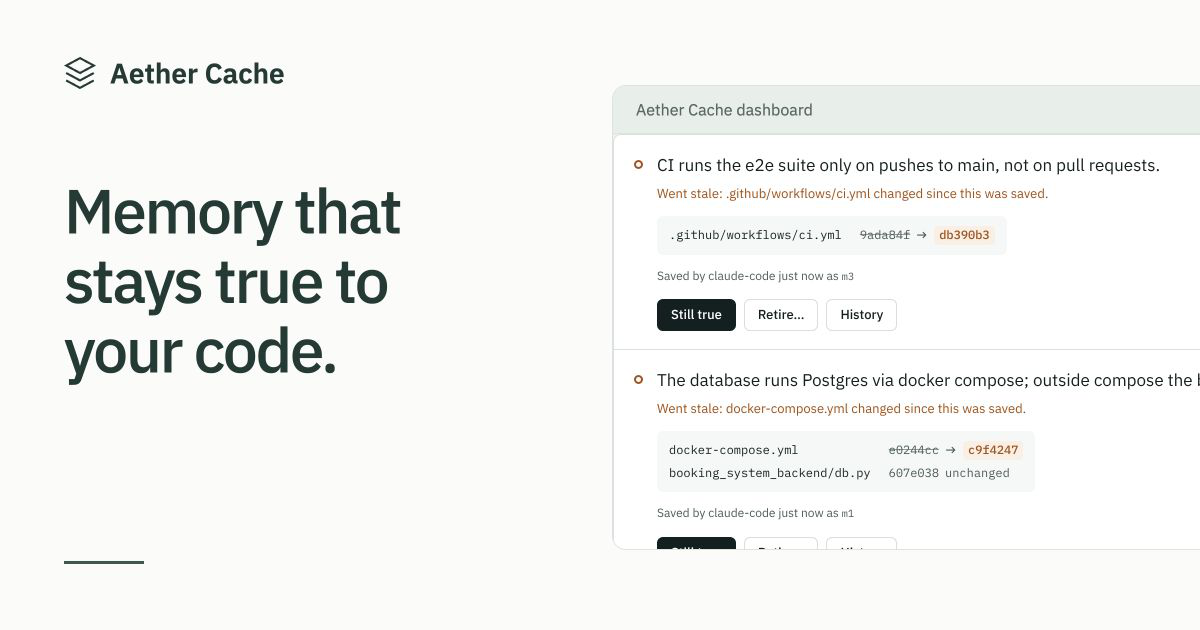
The dashboard (aether-cache ui): memories whose files changed wait for a decision, with the file versions side by side.
And from your AI tool's side, a memory linked to a file, the file changes, and the next lookup catches it:
> remember("The database runs Postgres via docker compose", files=["docker-compose.yml"])
Saved as m1.

        ... someone edits docker-compose.yml ...

> recall("database setup")
These memories were just retired because files they depend on changed. If one is still true,
call confirm_memory; if it's wrong, save the corrected fact with remember:
[m1] "The database runs Postgres via docker compose" is now marked outdated: docker-compose.yml changed.

> confirm_memory("m1")        # still true, so re-link it to the new version of the file
Confirmed m1; it's active again and linked to the current file versions.

> explain_memory("m1")
m1: "The database runs Postgres via docker compose"
status: active, project: demo
saved by: claude-code (session eea54b5c)
linked files: docker-compose.yml@02ea346...
history:
  19:16  created: by claude-code (session eea54b5c), linked to docker-compose.yml@87da641...
  19:16  active -> stale: docker-compose.yml changed since this was saved
  19:16  re-linked: to docker-compose.yml@02ea346... (confirmed still true)
  19:16  stale -> active: confirmed still true
A newer fact replacing an older one:
> remember("The API timeout was raised to 60 seconds")
Saved as m3.
Related existing memories:
[m1] (similarity 0.58) The API timeout is 30 seconds
If m3 makes any of these no longer true, call replace_memory(old_id, "m3"). Otherwise do nothing.

> replace_memory("m1", "m3")
m1 retired; m3 replaces it.
Quick start
One line installs everything and runs setup. On macOS or Linux:
curl -fsSL https://anishchugh05.github.io/Aether-Cache-Redis-Compatible-Vector-Store/install.sh | sh
On Windows (PowerShell):
powershell -ExecutionPolicy ByPass -c "irm https://raw.githubusercontent.com/anishchugh05/Aether-Cache-Redis-Compatible-Vector-Store/main/docs/install.ps1 | iex"
The installer (install.sh, install.ps1) gets uv if you
don't have it (uv brings Python), installs Aether Cache, and runs aether-cache setup. Prefer your own tools? Any of
these works, followed by aether-cache setup:
uv tool install aether-cache
pipx install aether-cache
pip install aether-cache        # Python 3.10+
setup starts the engine in the background, downloads the embedding model once (about 90 MB), and connects every
supported AI tool it finds on your machine: Claude Code, Cursor, and Codex. That's it. Open your AI tool in any git
repo and try:
Remember that our tests need DOCKER_HOST set. It depends on docker-compose.yml.
Then start a new session and ask how to run the tests.
The engine runs on Java 11+. If you have it, it's used. If you don't, Aether Cache downloads a private copy (about
50 MB) into ~/.aether-cache/java, checks it against its published checksum, and uses it only for Aether Cache;
nothing is installed system-wide, and aether-cache uninstall removes it.
Already keep notes for your AI in CLAUDE.md, AGENTS.md, or Cursor rules? Run aether-cache import in the repo
(or use Import notes in the dashboard) to turn them into memories, linked to the files they mention.
Memories are kept per project (the git repo's folder name), so projects never mix. Everything stays on your machine:
the engine only accepts connections from it, and your memories live in ~/.aether-cache.
| Command | What it does |
|---|---|
aether-cache setup | One-time setup: engine, model, and AI tools |
aether-cache add | Adds the repo you're in (or a path) so the dashboard can check its files; the dashboard can also find and add repos for you |
aether-cache ui | Opens the dashboard: see what your AI remembers, and confirm or retire memories whose files changed |
aether-cache import | Turns the notes in CLAUDE.md, AGENTS.md, and Cursor rules into memories; shows them first and asks |
aether-cache export | Saves memories, with their linked files and history, to a JSON file (-p for one project) |
aether-cache status | Is it running, and what's in this project's memory |
aether-cache doctor | Checks everything and tells you how to fix what's wrong |
aether-cache list / recall "query" / explain m1 | Look at memories from the terminal |
aether-cache sync | Writes current memories into AGENTS.md / CLAUDE.md |
aether-cache connect cursor | Connects one tool (--print shows config for any other MCP tool) |
aether-cache start / stop | Runs or stops the engine (it also starts on its own when a tool needs it) |
aether-cache uninstall | Disconnects your AI tools, stops the engine, and asks before deleting memories |
If aether-cache isn't found after installing, run uv tool update-shell and open a new terminal. Port 7380 taken?
Set AETHER_PORT and run setup again. To uninstall: aether-cache uninstall, then uv tool uninstall aether-cache.
Tools the AI can call
| Tool | What it does |
|---|---|
remember(fact, files?) | Saves a durable fact, optionally linked to files. Merges near-identical repeats and shows related memories so the AI can decide whether the new fact replaces one. |
recall(query, limit?) | Searches the project's memories by meaning. Checks linked files first, so it never returns a memory whose code changed underneath it. |
explain_memory(id) | Where a memory came from and its full history. |
replace_memory(old, new) | Retires an older memory that a newer one makes untrue. |
mark_outdated(id, reason) | Retires a memory that turned out to be wrong. |
confirm_memory(id) | Brings back a memory that's still true after its files changed, re-linked to the current versions. |
check_stale() | Runs the file check on demand. |
list_conflicts() / resolve_conflict(...) | Reviews pairs of very similar memories that may contradict each other. |
sync_to_files() | Writes current memories into AGENTS.md / CLAUDE.md (also: aether-cache sync). |
Design decisions, and what the measurements said
Similarity can't detect contradictions, so the AI judges
The first version flagged a new memory as a possible contradiction when it was similar to an existing one. Calibrating
with real all-MiniLM-L6-v2 embeddings showed that can't work:
| Pair | Kind | Similarity |
|---|---|---|
| "we use Postgres" / "the database is Postgres" | duplicate | 0.73 |
| "tests need DOCKER_HOST set" / "you have to set DOCKER_HOST before running tests" | duplicate | 0.92 |
| "we use Postgres" / "we migrated to MySQL" | contradiction | 0.30 |
| "API timeout is 30 seconds" / "API timeout is 60 seconds" | contradiction | 0.94 |
| "tests need DOCKER_HOST set" / "integration tests need a running Redis" | related, both true | 0.34 |
Duplicates scored 0.73 to 0.92 and contradictions 0.30 to 0.94, so no threshold separates them. A threshold low enough to merge real duplicates would silently merge "timeout is 30s" with "timeout is 60s", the worst bug this product could have. So the engine only auto-merges near-identical text (similarity ≥ 0.97). For everything else, embeddings find the related memories and the AI, which already understands the sentences, decides whether one replaces another.
Staleness compares file contents, not commits
Each linked file is stored as path@<git blob hash>, computed with git hash-object. Comparing contents rather than
commit ids catches uncommitted edits, ignores commits that didn't touch the file, and needs no git hooks: recall
re-hashes the handful of linked files before every search.
Memories never mutate silently
Every change is a logged event with a timestamp and a reason. The engine logs each memory with the id and timestamp it assigned, so replaying the log after a restart rebuilds the exact same memories and histories, down to the millisecond, instead of minting new ones.
The engine underneath
A Redis-compatible server written from scratch in Java. It speaks RESP, so redis-cli, redis-benchmark, and
redis-py work with it unchanged. The core was built by completing every stage and extension of the
CodeCrafters "Build Your Own Redis" challenge; the vector index,
persistence hardening, and the memory layer are my own additions.
Throughput vs. official Redis
redis-benchmark -t set,get, 100K requests, 50 parallel clients, 3-byte values, same machine:
| Aether Cache | Redis 8.10.2 | Aether Cache as % of Redis | |
|---|---|---|---|
| SET | 205.8K ops/sec | 233.6K ops/sec | 88% |
| GET | 225.7K ops/sec | 242.7K ops/sec | 93% |
| p50 latency | 0.119 ms | 0.111 ms | |
| p99 latency (SET / GET) | 0.375 / 0.231 ms | 0.359 / 0.159 ms | |
| max latency (SET) | 19.7 ms | 1.3 ms | JVM GC / JIT pauses |
Typical latency is on par with Redis. The gap is in worst-case latency, from JVM garbage collection and JIT warm-up, which Redis (written in C) doesn't have.
HNSW vector search vs. exact search
100,000 AG News headlines embedded with all-MiniLM-L6-v2 (384 dimensions, cosine similarity), 500 held-out queries,
k = 10. Recall is measured against exact brute-force search on the same data.
| Mode | Recall@10 | p50 latency | p99 latency |
|---|---|---|---|
| Exact (brute force) | 1.000 | 18.58 ms | 20.52 ms |
| HNSW, ef=10 | 0.905 | 0.49 ms | 1.38 ms |
| HNSW, ef=20 | 0.951 | 0.52 ms | 0.73 ms |
| HNSW, ef=50 | 0.985 | 0.66 ms | 0.89 ms |
| HNSW, ef=100 | 0.994 | 0.84 ms | 1.41 ms |
| HNSW, ef=200 | 0.998 | 1.24 ms | 2.19 ms |
At ef=100, HNSW returns 99.4% of the true top-10 about 22× faster than exact search. Building the index for 100K
vectors took 136 seconds (M=16, M0=32, efConstruction=200). Latencies are measured from the Python client, so they
include network and client overhead. Full setup and raw numbers: results.json.
How it works: each vector links to its nearest neighbors in a layered graph. A search starts on a sparse top layer
of long-range links, hops greedily toward the query, drops down a layer at a time, and finishes with a best-first search
on the bottom layer that keeps the ef best candidates. Neighbor selection uses the diversity heuristic from the HNSW
paper (prefer neighbors in different directions over near-duplicates), which is what keeps recall high.
Filtered search: HNSW doesn't know about memory status, so searches over-fetch candidates, drop the ones that don't match (stale or superseded), widen the search if too few survive, and fall back to an exact scan if needed. In a test with 2,000 memories where only 2% were active, filtered searches returned exactly the correct top 10 on 30/30 queries. The catch: at that selectivity, the exact fallback runs most of the time, which is the known weak spot of post-filtering on graph indexes.
Crash safety
Every write goes to an append-only file (AOF) that is replayed on startup.
kill -9 crash test (crash_test.py): a client writes as fast as it can, the server is killed at a random moment,
restarted, and every write the server acknowledged is checked.
| fsync policy | Crashes | Acknowledged writes | Lost |
|---|---|---|---|
everysec | 5 | 757,295 | 0 |
always | 3 | 282,595 | 0 |
Recovery took 0.6 seconds per restart, replaying up to ~185K writes.
Torn writes: a machine crash can cut the last write off halfway. The first version refused to start on such a file; now replay stops at the last complete command, trims the partial one, and starts normally with all earlier data intact.
Cost of each fsync policy (SET throughput, 50 clients):
| Policy | Throughput | p50 latency |
|---|---|---|
always (sync every write) | 42.9K/sec | 1.159 ms |
everysec (sync once a second) | 113.9K/sec | 0.103 ms |
no (let the OS decide) | 118.8K/sec | 0.103 ms |
everysec is 2.7× faster than always and within 4% of no, which is why it's the sensible default. On macOS, fsync
doesn't force the SSD's own cache to flush, so always looks cheaper here than it would on a Linux server.
Full command list
- Memory:
MEM.ADD,MEM.GET,MEM.SEARCH(withSTATUSfilter),MEM.STATUS,MEM.WHY,MEM.LISTMEM.FILES,MEM.SEEN,MEM.CONFLICTS,MEM.RESOLVE
- Vectors:
VADD,VSEARCH(HNSW, tunableEF,EXACTmode) - Strings:
GET,SET(EX/PX),INCR,STRLEN,TYPE,KEYS * - Lists:
RPUSH,LPUSH,LRANGE,LLEN,LPOP, blockingBLPOP - Streams:
XADD(explicit, partial, and auto IDs),XRANGE,XREAD(withBLOCKand$) - Sorted sets:
ZADD,ZRANK,ZRANGE,ZCARD,ZSCORE,ZREM - Bitmaps:
SETBIT,GETBIT,BITCOUNT,BITOP AND/OR(binary-safe strings) - Geospatial:
GEOADD,GEOPOS,GEODIST,GEOSEARCH ... FROMLONLAT ... BYRADIUS - Transactions:
MULTI,EXEC,DISCARD,WATCH,UNWATCH(optimistic locking via per-key write versions) - Pub/Sub:
SUBSCRIBE,UNSUBSCRIBE,PUBLISH - Replication:
- Master–replica handshake (
PING,REPLCONF,PSYNC) and command propagation REPLCONF GETACKoffset tracking andWAIT
- Master–replica handshake (
- Persistence: RDB loading; AOF with a manifest,
appendfsync always/everysec/no, and torn-write recovery - Auth:
AUTH,ACL WHOAMI/GETUSER/SETUSER(SHA-256 password hashes)
Running the engine on its own
java src/main/java/Main.java                                   # port 6379
java src/main/java/Main.java --bind 127.0.0.1                  # accept connections from this machine only
java src/main/java/Main.java --port 6380 --replicaof "localhost 6379"
java src/main/java/Main.java --dir /tmp/data --appendonly yes --appendfsync everysec
Reproducing the benchmarks
Each benchmark runs against the engine you've started:
redis-benchmark -p 6379 -t set,get                 # throughput; also run against redis-server to compare
python vector_bench.py                             # HNSW recall and latency (start the engine with -Xmx4g)
python crash_test.py everysec 5                    # kill -9 crash test
python memory_mcp/calibrate.py                     # embedding similarity calibration
Related work
Aether Cache is an early, open-source project. These are the production systems in the same space:
- Vector search in Redis-style stores:
- Redis 8 vector sets and valkey-search add HNSW vector search to Redis and Valkey.
- hnswlib is the reference HNSW implementation.
- Malkov & Yashunin (2016) is the paper this index follows.
- Memory for AI agents: Mem0, Zep, Letta, and the MCP reference memory server.
- Instruction files: AGENTS.md and
CLAUDE.md. Aether Cache syncs into these rather than replacing them.
Status and limitations
Aether Cache is v1 and early. It works end to end in automated tests and is now being tried in real Claude Code sessions.
Not done yet:
- A with-memory vs. without-memory evaluation on real coding tasks, to measure whether it actually reduces re-explaining.
- AOF compaction: the log only grows, and every status change adds a line.
Engine limitations:
- Threading: one OS thread per connection, not an event loop. That's fine for a local tool, but it won't scale to thousands of clients like Redis.
- Transactions:
EXECisn't isolated, so other clients' commands can interleave with a transaction's commands. - Vector index: re-adding a vector updates it without rewiring its graph links, and there's no delete. Retired memories are filtered out, not removed.
- Replication: full resync only, and a new replica assumes the master's dataset is empty.
- Smaller gaps:
KEYS *lists only string keys.GEOSEARCHscans every member.- ACL supports only the
defaultuser. HELLO(RESP3) isn't supported, so clients must use RESP2.
Project layout
src/main/java/Main.java      the engine (single file, from the CodeCrafters setup)
aether_cache/                the Python package behind the `aether-cache` command
  server.py                  MCP server: embeddings, git staleness, AGENTS.md/CLAUDE.md sync
  engine.py                  finds Java, starts and stops the engine in the background
  javart.py                  downloads a private copy of Java when the computer has none
  connect.py                 registers Aether Cache with Claude Code, Cursor, and Codex
  cli.py                     the `aether-cache` command
  ui.py, ui/index.html       the dashboard (`aether-cache ui`): a local server, its API, and the page
  portability.py             import from notes files, export to JSON
  engine/aether-engine.jar   the prebuilt engine (rebuild with `python scripts/build_engine.py`)
memory_mcp/calibrate.py      similarity calibration for duplicate/contradiction thresholds
vector_bench.py              HNSW benchmark (writes results.json)
crash_test.py                kill -9 crash-safety test
Releasing
Bump the version in pyproject.toml, aether_cache/__init__.py, and server.json, commit, then:
git tag v0.1.7 && git push --tags
The release workflow checks the versions match, builds and smoke-tests the package, publishes it to PyPI and the MCP Registry, and creates the GitHub Release.
License
MIT. See LICENSE.
Installation
Source-derived launch command. Check the maintainer’s required arguments and credentials before running:
uvx aether-cacheSet up in your AI client
Merge this template into ~/Library/Application Support/Claude/claude_desktop_config.json. Keep existing servers. Add any arguments, credentials, and permissions required by the maintainer; this template has not been install-tested.
{
  "mcpServers": {
    "io-github-anishchugh05-aether-cache": {
      "command": "uvx",
      "args": [
        "aether-cache"
      ]
    }
  }
}
Restart Claude Desktop completely for changes to take effect. Confirm the server appears connected in the client’s tool list, then try a read-only example from its documentation.
Claude Desktop setup referencePackage
aether-cachepypiCompatible MCP Clients
Aether Cache works with any MCP-compatible client. Copy the config snippet from the Configuration section above and add it to the file shown for your client, then restart the application.
- Claude Desktop
~/Library/Application Support/Claude/claude_desktop_config.jsonRestart Claude Desktop completely for changes to take effect. - Cursor
~/.cursor/mcp.jsonRestart Cursor for changes to take effect. - VS Code
.vscode/mcp.jsonReload VS Code window for changes to take effect. - Windsurf
~/.codeium/windsurf/mcp_config.jsonRestart Windsurf for changes to take effect. - Claude Code
.mcp.jsonSave at the project root, then start Claude Code in that project and review the MCP server approval prompt. Keep real credentials out of shared files.