io.github.baixianger/langchain-mcp
LangChain/LangGraph/DeepAgents knowledge + LangGraph agent debugging (Polly-like)
LangChain MCP
Give your AI assistant complete knowledge of LangChain, LangGraph & LangSmith



Overview
LangChain MCP is a Model Context Protocol (MCP) server that provides semantic search across the entire LangChain ecosystem. Build AI applications faster with instant access to documentation and source code for LangChain, LangGraph, LangSmith, and DeepAgents.
Features
- Semantic Search - Natural language queries across all LangChain ecosystem docs
- Source Code Search - Find code examples in Python and JavaScript repositories
- MCP Protocol - Works seamlessly with Claude Code, Claude Desktop, Cursor, and any MCP-compatible client
- Production Ready - Scalable API with authentication and usage tracking
- Fast & Accurate - Powered by ChromaDB and OpenRouter embeddings
Installation
Quick Start (Recommended)
# Install globally
npm install -g langchain-mcp

# Login with Google
langchain-mcp login

# Add to Claude Code
claude mcp add langchain-mcp -- npx langchain-mcp
Manual Configuration
Add the following configuration to your client's config file:
Claude Desktop
- macOS:
~/Library/Application Support/Claude/claude_desktop_config.json - Windows:
%APPDATA%\Claude\claude_desktop_config.json
Cursor
- macOS/Linux:
~/.cursor/mcp.json - Windows:
%USERPROFILE%\.cursor\mcp.json
{
  "mcpServers": {
    "langchain-mcp": {
      "command": "npx",
      "args": ["langchain-mcp"]
    }
  }
}
Usage
CLI Commands
langchain-mcp login      # Login via Google OAuth
langchain-mcp status     # Check usage and remaining credits
langchain-mcp logout     # Logout and clear credentials
Available MCP Tools
| Tool | Description | Parameters |
|---|---|---|
search_docs | Search documentation, references, and tutorials | query, limit (default: 5) |
search_langchain_code | Search LangChain source code | query, language (py/js), limit |
search_langgraph_code | Search LangGraph source code | query, language (py/js), limit |
search_deepagents_code | Search DeepAgents source code | query, language (py/js), limit |
Pricing
- Free tier available for new users
- Donation bonus for supporters
Documentation
Self-deploy
Project Structure
langchain-MCP/
├── packages/
│   ├── ingest/              # Python - Data ingestion (uv)
│   ├── api/                 # TypeScript - API server (Express)
│   ├── mcp-server/          # TypeScript - MCP client (npm package)
│   └── mcp-server-local/    # TypeScript - Local MCP server (dev)
├── config/
│   └── settings.json        # Shared configuration
└── deploy.sh                # Deployment script
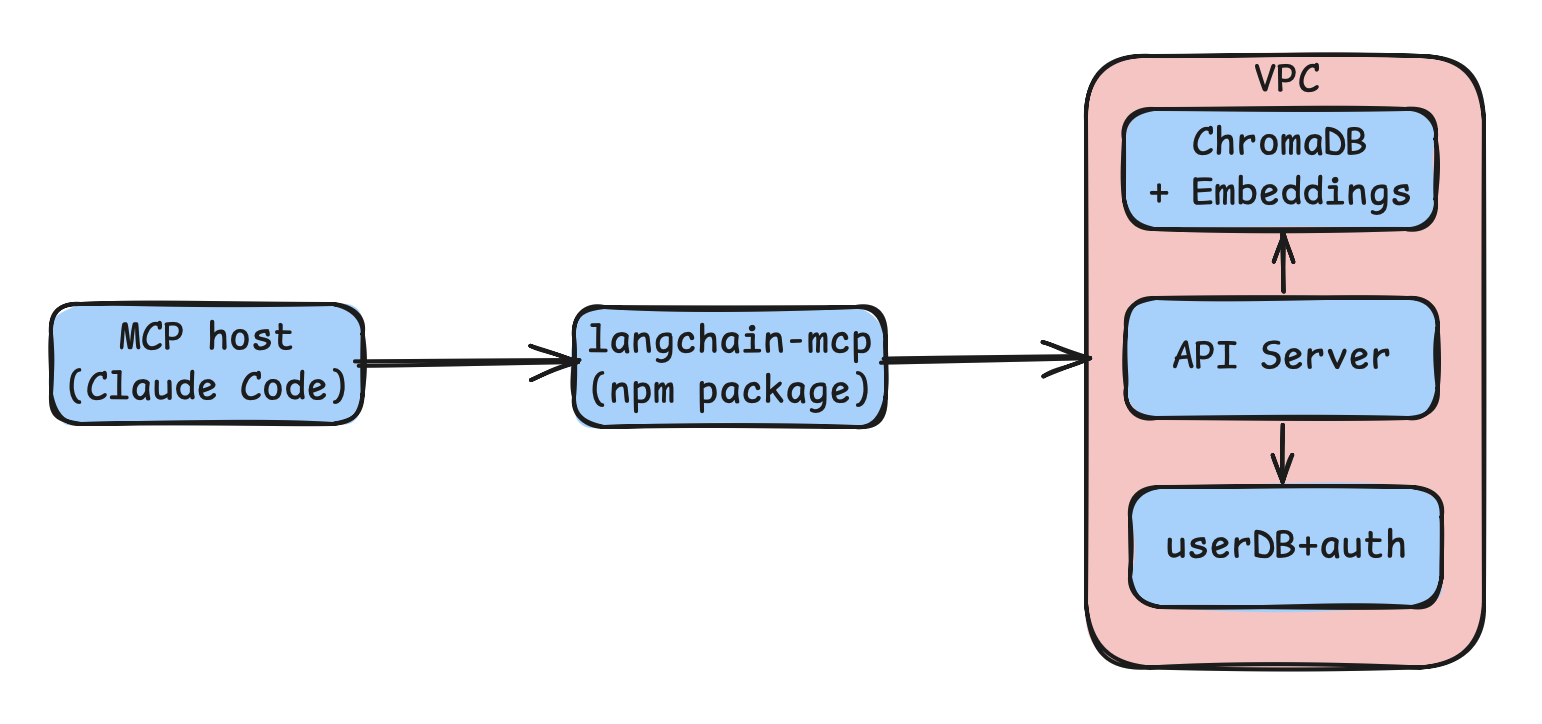
Architecture
Setup Development Environment
1. Ingest Documentation & Source Code
cd packages/ingest
uv sync
uv run ingest --list     # List available repositories
uv run ingest docs       # Ingest documentation only
uv run ingest            # Ingest all (docs + code)
2. Run API Server
cd packages/api
npm install
npm run dev              # Development server on port 3000
3. Test Local MCP Server
cd packages/mcp-server-local
npm install
npm run dev
Configuration
All settings in config/settings.json:
{
  "embedding": {
    "provider": "openrouter",
    "model": "qwen/qwen3-embedding-8b"
  },
  "chromadb": {
    "path": "./data/chroma"
  },
  "chunking": {
    "docs": { "chunk_size": 2000, "chunk_overlap": 200 },
    "code": { "chunk_size": 4000, "chunk_overlap": 200 }
  },
  "repos": [
    {
      "name": "langchain",
      "url": "https://github.com/langchain-ai/langchain",
      "type": "code",
      "languages": ["python", "javascript"]
    }
  ]
}
Supported Embedding Providers
sentence-transformer(local)openaicoheregoogleollamaopenrouter(default)
See ChromaDB Integrations for more options.
Deployment
The project includes automated deployment scripts for VPS hosting:
# Manual deployment
./deploy.sh

# GitHub Actions (production branch)
git push origin main:production
Deployment includes:
- Code synchronization via rsync
- Automatic npm installation and build
- PM2 process management
- Nginx static file serving
- Environment variable management
Roadmap
- Semantic search across docs and code
- Google OAuth authentication
- Usage tracking and credits system
- MCP registry registration
- Claude Code, Desktop, and Cursor support
- Rate limiting (per user / per IP)
- Additional embedding model options
- Local mode (no API key required)
- Browser extension for quick searches
- VSCode extension integration
Contributing
Forking and contributions are welcome!
Support
- Website: langchain-mcp.xyz
- Issues: GitHub Issues
- Donate: Support development at Ko-fi
License
MIT License - see the LICENSE file for details.
Built with ❤️ by baixianger
Installation
Source-derived launch command. Check the maintainer’s required arguments and credentials before running:
npx -y langchain-mcpSet up in your AI client
Merge this template into ~/Library/Application Support/Claude/claude_desktop_config.json. Keep existing servers. Add any arguments, credentials, and permissions required by the maintainer; this template has not been install-tested.
{
  "mcpServers": {
    "io-github-baixianger-langchain-mcp": {
      "command": "npx",
      "args": [
        "-y",
        "langchain-mcp"
      ]
    }
  }
}
Restart Claude Desktop completely for changes to take effect. Confirm the server appears connected in the client’s tool list, then try a read-only example from its documentation.
Claude Desktop setup referencePackage
langchain-mcpnpmCompatible MCP Clients
io.github.baixianger/langchain-mcp works with any MCP-compatible client. Copy the config snippet from the Configuration section above and add it to the file shown for your client, then restart the application.
- Claude Desktop
~/Library/Application Support/Claude/claude_desktop_config.jsonRestart Claude Desktop completely for changes to take effect. - Cursor
~/.cursor/mcp.jsonRestart Cursor for changes to take effect. - VS Code
.vscode/mcp.jsonReload VS Code window for changes to take effect. - Windsurf
~/.codeium/windsurf/mcp_config.jsonRestart Windsurf for changes to take effect. - Claude Code
.mcp.jsonSave at the project root, then start Claude Code in that project and review the MCP server approval prompt. Keep real credentials out of shared files.