io.github.bibinprathap/veritasgraph
Zero-trust, air-gapped Enterprise GraphRAG MCP server with offline, citation-grounded answers.
VeritasGraph — The Governed, On-Prem GraphRAG & Agent Framework
Stop chunking blindly. Combine Tree-Search structure with Knowledge-Graph reasoning — and wire it into governed AI agents. Runs 100% locally or in the cloud.




🎯 Traditional RAG guesses based on similarity. VeritasGraph reasons based on structure. Don't just find the document — understand the connection, then act on it with governed agents.
⭐ Star · 🍴 Fork · 💬 Discuss · 🐛 Report a bug
📚 Featured Guide — Build Governed AI Agents On-Prem
A complete walkthrough of designing, wiring, and shipping governed AI agents entirely on your own infrastructure.
📄 Read the guide: Build Governed AI Agents On-Prem (PDF)
🚀 Quick Start (2 lines, no GPU)
pip install veritasgraph
veritasgraph demo --mode=lite
That's it — an interactive demo using cloud APIs (OpenAI/Anthropic), no local models required.
| Mode | Best For | Requirements |
|---|---|---|
--mode=lite | Quick demo, no GPU | OpenAI/Anthropic API key |
--mode=local | Privacy, offline use | Ollama + 8GB RAM |
--mode=full | Production, all features | Docker + Neo4j |
export OPENAI_API_KEY="sk-..."        # Lite: cloud APIs, zero setup
veritasgraph demo --mode=lite

veritasgraph demo --mode=local --model=llama3.2   # 100% offline with Ollama
veritasgraph start --mode=full                    # full GraphRAG pipeline
Useful links: ⚡ Live docs · 🎮 Live demo · 📖 Article · 📄 Research paper
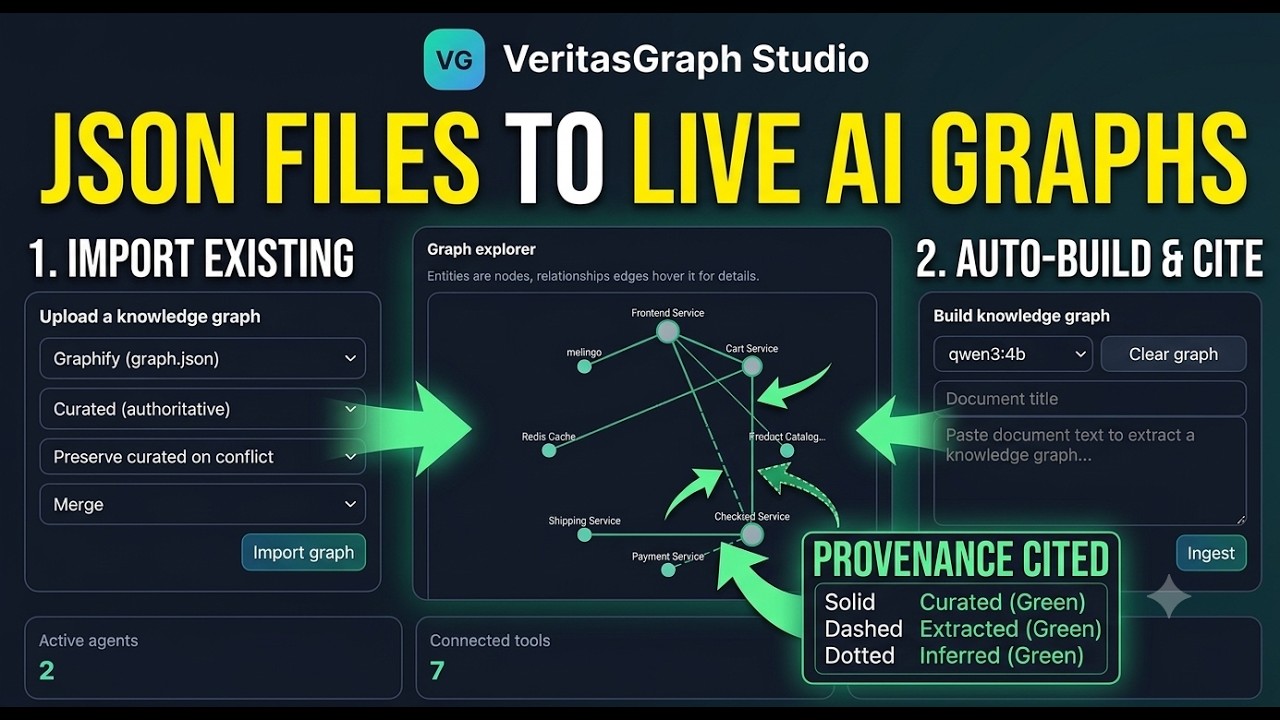
🛠️ VeritasGraph Studio — Build, wire & test governed agents locally
Studio is a local Agent Build Workspace (FastAPI + single-page UI) that lets you build a knowledge graph from your own documents and wire it into agents alongside tools, memory, data logging, guardrails, and headroom-style context budgeting — then chat with those agents live and watch every stage of the orchestration pipeline. Everything runs 100% locally against Ollama.
🎮 Try the Studio Live — stable URL that always redirects to the current running studio tunnel.
Run it:
pip install -r requirements.txt
ollama serve & ollama pull qwen3:latest          # any local chat model
STUDIO_DATA_DIR="$PWD/studio_api/data" \
  uvicorn studio_api.main:app --host 127.0.0.1 --port 8200 --log-level warning
# Studio UI → http://localhost:8200/studio   ·   API docs → /docs
One-command end-to-end demo (builds a graph + drives a fully-wired agent through graph reasoning, memory recall, PII redaction, and a guardrail block):
python3 demos/agent-studio/sample_pipeline.py --model qwen3:latest
What's inside — full Studio feature set
- 🧩 Knowledge Graph builder & explorer — ingest text, extract entities/relationships locally, inspect nodes/edges with grounded evidence.
- 🔎 Graph Q&A with citations — multi-hop answers backed by
[doc#chunk]source attribution. - 🤖 Agent workspace — create/edit agents with model selection, prompt/persona settings, and per-agent capability toggles.
- 🔀 Governed orchestration pipeline — per-turn flow of Guardrails → Memory → Knowledge Graph → Headroom budget → Tools → Data log, with full trace visibility.
- 🧰 Editable tools catalog — add, edit, enable/disable, test, and delete tools directly in Studio.
- 🌐 External real tool support — call real HTTP endpoints with configurable method, auth header, and custom headers.
- 🔌 MCP bridge integrations — local MCP proxy connectors (e.g. Chrome DevTools MCP, Unity MCP) with health-aware probing.
- 🛡️ Guardrails — PII redaction and policy-block controls with visible guardrail-block metrics.
- 🧠 Memory + Data logs — per-agent short-term memory and interaction-log persistence.
- 📈 Evaluation & fine-tune simulation — run eval suites, track pass-rate trends, and queue/monitor fine-tune jobs.
- 💬 Playground — run governed agent conversations live and inspect the pipeline trace.
- 📊 KPI dashboard — active agents, connected tools, eval pass rate, and guardrail-block counters.
See studio_api/README.md for API and architecture, and docs/STUDIO_ENTERPRISE_TEST.md for enterprise test scenarios.
📋 Examples
| # | Example | What it demonstrates | Run |
|---|---|---|---|
| 1 | sample_pipeline.py | Studio agent pipeline — ingests a company brief → builds KG → multi-hop Q&A with citations → memory recall → PII redaction → guardrail block → audit log. | python3 demos/agent-studio/sample_pipeline.py |
| 2 | sample_tools_explorer.py | Tool catalog seeder — registers 17 tools and creates sample explorer agents. Idempotent. | python3 demos/agent-studio/sample_tools_explorer.py |
| 3 | clinical-kg/ | Medical AI — Clinical Knowledge Graph — de-identifies notes (Safe Harbor), extracts entities, detects contradictions, normalizes to ICD-10/RxNorm/SNOMED/LOINC, builds patient KG with citations. | cd clinical-kg/backend && python run.py |
| 4 | municipality-incident-chatbot/ | DMT Inspection System — citizen incident reporting with CV validation (YOLO/VLM), KG-grounded routing, evidence fusion, case registration. | cd municipality-incident-chatbot && python cli.py |
🏥 Example 3 — Medical AI: HIPAA-Safe Clinical Knowledge Graph
Turn unstructured clinical notes into a governed, citable knowledge graph — fully on-prem.
The 7-step pipeline:
| Step | What it does |
|---|---|
| De-identify | Safe Harbor regex redaction with a sealed SurrogateVault for audited re-identification |
| Extract | Section-aware NER, med-sig / lab-value parsing, ConText axes (negation, certainty, temporality, experiencer) |
| Reconcile | Groups mentions by concept; detects contradictions across notes (e.g. "no diabetes" in HPI vs "T2DM" in problem list) |
| Normalize | Maps mentions → coded concepts (ICD-10-CM, RxNorm, SNOMED CT, LOINC) |
| Knowledge Graph | Patient / Encounter / Condition / Medication / LabResult nodes with EVIDENCED_BY provenance edges |
| Query | NL → structured CohortQuery → multi-hop traversal with [doc#chunk] citations |
| Governance | k-anonymity over released cohorts |
# Backend (FastAPI on :8300)
cd clinical-kg/backend
pip install -r requirements.txt
python run.py

# Frontend (Next.js dashboard on :3200)
cd clinical-kg/frontend
npm install && npm run dev
Open http://localhost:3200 → click Load sample notes → run queries. The UI has 6 tabs: Cohort Query, Ingest Note, Patients, Contradictions, Graph, Re-ID Risk.
🏛️ Example 4 — DMT Inspection System: Municipality Incident Chatbot
AI chatbot for citizens to report civic incidents, validated by computer vision and grounded by a knowledge graph.
Pipeline flow: citizen photo + description → KG classification → CV validation (YOLO/VLM) → cross-check (CCTV, location, prior reports) → evidence fusion → case registration.
Supported incidents: trash overflow · abandoned vehicles · overcrowding · illegal parking (extensible)
cd municipality-incident-chatbot
pip install -r requirements.txt

# Interactive CLI
python cli.py
#   you> trash overflowing near the market | photo=garbage_overflow.jpg | zone=downtown

# Test suite
python -m pytest -q
| Component | File |
|---|---|
| Knowledge graph (grounding + routing) | app/knowledge_graph.py |
| CV validation (YOLO + VLM) | app/cv_service.py |
| Evidence fusion & scoring | app/fusion.py |
| Chatbot orchestrator | app/orchestrator.py |
| Architecture docs | 01_architecture.md |
Enterprise scenario — follow the Northwind Bank compliance test playbook for a guided walkthrough using realistic financial-services data.
For API-level examples and curl recipes, see studio_api/README.md.
🌳 + 🔗 Graph + Tree: the ultimate retrieval
Why choose? VeritasGraph includes the hierarchical "Table of Contents" navigation of PageIndex PLUS the semantic reasoning of a Knowledge Graph.
Document Root
├── [1] Introduction
│   ├── [1.1] Background ←── Tree Navigation
│   └── [1.2] Objectives
├── [2] Methodology ←───────── Graph Links
│   └── relates_to ──────────→ [3.1] Findings
└── [3] Results
📊 Feature comparison
| Feature | Vector RAG | PageIndex | VeritasGraph |
|---|---|---|---|
| Retrieval type | Similarity | Tree search | 🏆 Tree + Graph reasoning |
| Attribution | ❌ Low | ⚠️ Medium | ✅ 100% verifiable |
| Multi-hop reasoning | ❌ | ❌ | ✅ |
| Tree navigation (TOC) | ❌ | ✅ | ✅ |
| Semantic search | ✅ | ❌ | ✅ |
| Cross-section linking | ❌ | ❌ | ✅ |
| Visual graph explorer | ❌ | ❌ | ✅ Built-in UI |
| 100% local/private | ⚠️ Varies | ❌ Cloud | ✅ On-premise |
| Open source | ⚠️ Varies | ❌ Proprietary | ✅ MIT license |
🎬 See it in action

💡 What you're seeing: a query triggers multi-hop reasoning across the knowledge graph. Nodes light up as connections are discovered, showing exactly how the answer was found — not just what was found.
🔌 MCP Server — connect your IDE agent to VeritasGraph
VeritasGraph ships a dedicated Model Context Protocol server — the first zero-trust, air-gapped Enterprise GraphRAG server for MCP. Connect Claude Desktop, Cursor, VS Code, Windsurf, Cline, or Continue directly to the GraphRAG engine over JSON-RPC 2.0 stdio, with zero external data egress.
python -m veritasgraph_mcp # from repo root (needs local Ollama for ingest/query)
Tools: veritasgraph_ingest_document, veritasgraph_query (multi-hop answers with [doc#chunk] citations), veritasgraph_search_entities, veritasgraph_get_graph, veritasgraph_clear_graph. See veritasgraph_mcp/README.md for IDE registration snippets.
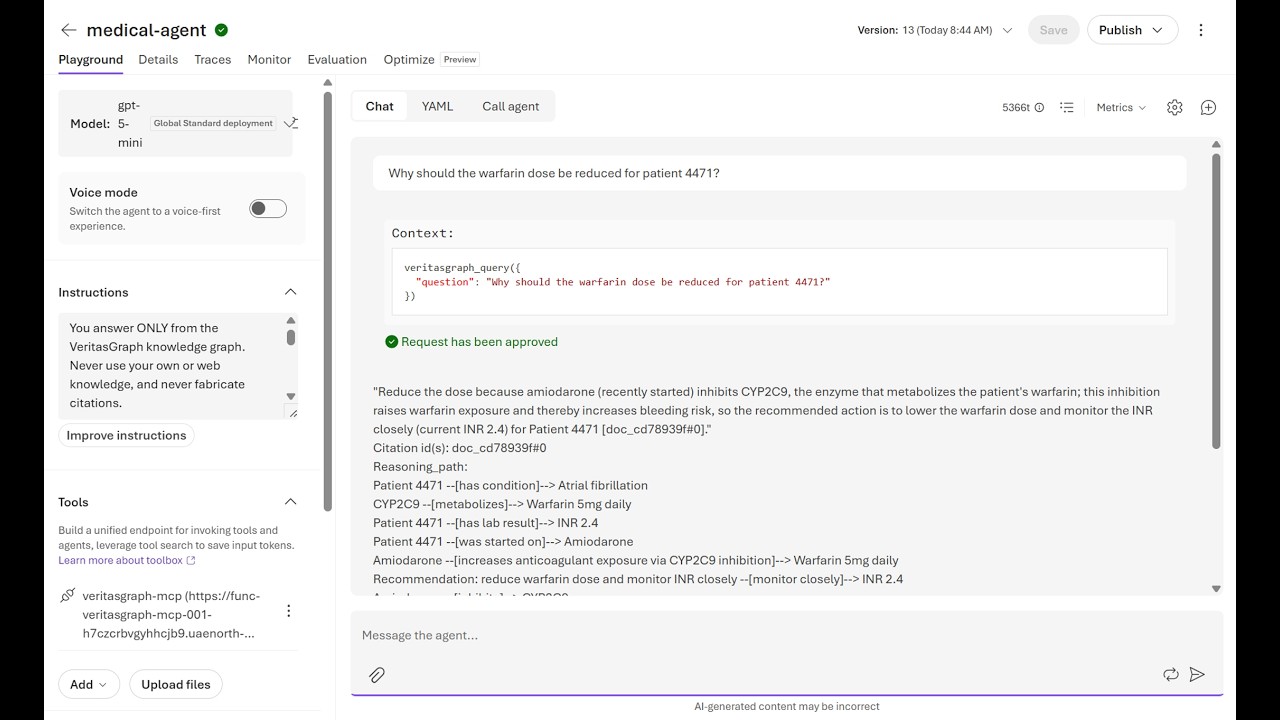
🏥 VeritasGraph-MCP Use Case — Production Medical AI on Azure
Real-world deployment: VeritasGraph MCP server running on Azure Functions with Azure AI Foundry, delivering GraphRAG-powered clinical decision support with verifiable citations and compliance-ready architecture.
📖 Production deployment walkthrough
The Challenge: 90% of Azure AI demos work. Most never ship. The gap isn't the model — it's architecture, security, state management, and compliance.
The Solution: VeritasGraph deployed as a remote MCP server that Azure AI Foundry agents call to answer clinical questions with:
- ✅ Multi-hop GraphRAG reasoning — assembles answers from separate graph edges
- ✅ Verifiable citations — every claim traces to
[doc#chunk]sources - ✅ Production-grade architecture — externalized state, identity at boundary, observability
- ✅ Compliance-ready — region-pinned, PHI-aware guardrails, semantic-layer RBAC
Architecture highlights:
Foundry Agent / MCP client
   → Identity (Entra ID + function key)
      → Azure Functions (Flex Consumption, 4 mcpToolTrigger tools)
         → veritasgraph-mcp + graphrag_engine
            → Azure OpenAI (extraction + reasoning)
            → Knowledge Graph
         → Durable Azure Files mount (externalized state)
         → Storage + App Insights (observability)
Key production lessons learned:
- State externalization — Flex Consumption wiped in-memory graphs; fixed with mounted Azure Files share
- Identity at boundary — Carry Entra identity; enforce Power BI RLS / Dataverse roles on-behalf-of user
- Self-correcting agents — Feed errors + schema back; retry up to 3× (e.g., DAX generation)
- Compliance by design — Foundry guardrails block PHI-leaking requests before reaching the model
- Observability layers — Application Insights + Foundry Traces + Evaluations + Alerts
Example query flow:
{
  "question": "Should we adjust warfarin for patient 4471 on amiodarone?",
  "answer": "Reduce the warfarin dose because amiodarone inhibits CYP2C9...",
  "citations": ["doc_warfarin_note#0", "doc_warfarin_note#1"],
  "reasoning_path": ["Amiodarone → CYP2C9", "CYP2C9 → Warfarin", "Warfarin → Bleeding Risk"]
}
Technical stack:
- Compute: Azure Functions (Flex Consumption) — scales to zero, fast event-driven scale-out
- State: Azure Files mount — survives cold starts and scale events
- Inference: Azure OpenAI (gpt-4-turbo/gpt-5-mini, swappable)
- Identity: Entra ID + function/system key
- Observability: Application Insights + Foundry Traces
- Compliance: Region-pinned deployments, PHI-aware guardrails, Key Vault secrets
Deployed systems:
- Medical MCP Server — Clinical knowledge graph with multi-hop reasoning and
[doc#chunk]citations - Power BI Natural-Language Agent — Validates OAuth token → discovers schema → generates DAX → executes via
executeQueriesREST API with row-level security enforced by the platform
Resources:
- 📄 Read the full guide: From Proof of Concept to Production: Azure AI That Actually Ships — Complete walkthrough covering architecture, deployment, GraphRAG reasoning, auditability, semantic-layer access control, resilience, observability, and compliance.
- 💻 Azure AI Foundry + VeritasGraph Implementation Repository — Production deployment code, configuration, and examples.
Production-ready checklist:
- ✓ Grounded — answers cite your data (
[doc#chunk]) - ✓ State externalized — no reliance on serverless memory
- ✓ Identity at boundary — Entra + keys; on-behalf-of for data
- ✓ Entitlements enforced — RLS/roles before data reaches model
- ✓ Resilient — handles bad params, throttling, tool failures
- ✓ Observable — logs, traces, evals, cost alerts
- ✓ Region-pinned & compliant — inference in-tenant, PHI-aware
- ✓ Secrets in Key Vault — managed identity, least privilege
- ✓ Reproducible deploy — remote build, pinned config
💡 Key insight: The gap between POC and production is architecture, not the model. Ground it, externalize state, secure it, observe it, make it resilient, keep it compliant.
📖 Python API
from veritasgraph import VisionRAGPipeline

pipeline = VisionRAGPipeline()                 # auto-detects available models
doc = pipeline.ingest_pdf("document.pdf")
result = pipeline.query("What are the key findings?")
print(result.answer)
🌳 Hierarchical tree navigation + graph search
from veritasgraph import VisionRAGPipeline

pipeline = VisionRAGPipeline()
doc = pipeline.ingest_pdf("report.pdf")

# View the document's hierarchical structure (like a Table of Contents)
print(pipeline.get_document_tree())
# Document Root
# ├── [1] Introduction (pp. 1-5)
# │   ├── [1.1] Background (pp. 1-2)
# │   └── [1.2] Objectives (pp. 3-5)
# └── [2] Methodology (pp. 6-15)

# Navigate to a specific section (tree-based retrieval)
section = pipeline.navigate_to_section("Methodology")
print(section['breadcrumb'])   # ['Document Root', 'Methodology']

# Or use graph-based semantic search
result = pipeline.query("What methodology was used?")
# → answer with section context: "📍 Location: Document > Methodology > Analysis Framework"
🔧 Custom configuration & ingestion modes
from veritasgraph import VisionRAGPipeline, VisionRAGConfig

config = VisionRAGConfig(ingest_mode="document-centric")  # tables stay intact!
pipeline = VisionRAGPipeline(config)
doc = pipeline.ingest_pdf("annual_report.pdf")
| Mode | Description | Best For |
|---|---|---|
document-centric | Whole pages/sections as nodes (default) | Most documents |
page | Each page = one node | Slide decks, reports |
section | Each section = one node | Structured documents |
chunk | Traditional 500-token chunks | Legacy compatibility |
CLI
veritasgraph --version                                    # show version
veritasgraph info                                         # check dependencies
veritasgraph init my_project                              # initialize a project
veritasgraph ingest document.pdf --ingest-mode=document-centric   # Don't Chunk. Graph.
veritasgraph ingest https://youtube.com/watch?v=xxx       # auto-extract transcript
veritasgraph ingest https://example.com/article           # extract web article
Installation options
pip install veritasgraph            # basic (includes lite mode)
pip install veritasgraph[web]       # Gradio UI + visualization
pip install veritasgraph[graphrag]  # Microsoft GraphRAG integration
pip install veritasgraph[ingest]    # YouTube & web-article ingestion
pip install veritasgraph[all]       # everything
🏛️ Enterprise Compliance — VeritasGraph + VeritasReason
GraphRAG is brilliant at describing what your documents say. But enterprise questions like "Which purchase orders violated our Segregation-of-Duties policy last quarter?" are rule-evaluation problems over structured records — not similarity search.
For those, VeritasGraph ships a sister module: VeritasReason — a deterministic reasoning engine (forward-chaining + Rete + SPARQL) that fires policy rules over a triplet store and returns auditable answers with W3C PROV-O provenance.
 Policy PDFs ─┐                        ┌─ ingest_structured.py (SQL → triples + text)
              ▼                        ▼
      VeritasGraph GraphRAG      VeritasReason (TripletStore + RuleSet
      (quotes policy text)       + ForwardChainer + PROV-O)
              └──────────┬───────────────┘
                         ▼
             Compliance answer + violators table + clause citations
30-second smoke test (no install, stdlib only)
python tests/test_policy_compliance_demo.py
Seeds a fake ERP into a tiny in-memory triple store, evaluates four SoD rules from rules/sod_policy.yaml, and prints violators with citations:
✓ Reasoner fired. Detected 4 violation(s):
  po:PO-2204 SOD-01   Approved & paid by emp:E118
  po:PO-2301 SOD-02   Requested & approved by emp:E091
  po:PO-2317 SOD-03   $48,750.00 approved by emp:E091 (role:Manager, not Director)
  po:PO-2402 SOD-04   Vendor vendor:V77 related to approver emp:E140
Or install and run the packaged demo:
pip install veritas-reason
veritasreason-policy-demo
The same pattern applies to leave-policy violations (HRIS attendance), expense-report fraud (ledger + receipts), clinical protocol breaches (EHR + guidelines), or KYC/AML (transactions + watchlists). Define the SQL → triple mapping in ingest_structured.py, write rules in rules/*.yaml, and ask in plain English. See veritas-reason/plan.md for a full walk-through.
🔗 Interactive Graph Visualization
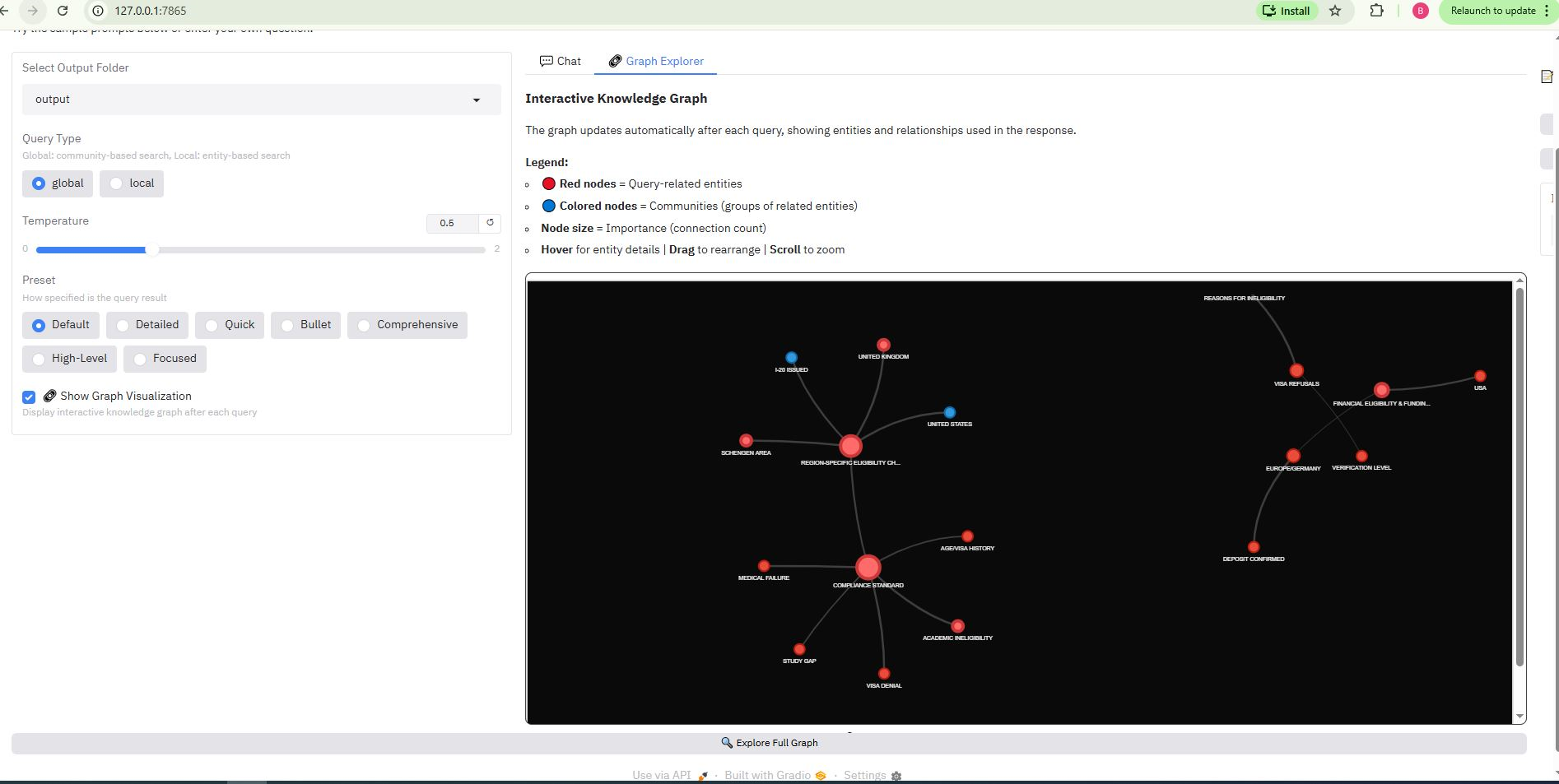
VeritasGraph includes an interactive 2D knowledge-graph explorer (PyVis) that visualizes entities and relationships in real time.
| Feature | Description |
|---|---|
| Query-aware subgraph | Shows only entities related to your query |
| Community coloring | Nodes grouped by community membership |
| Red highlight | Query-related entities shown in red |
| Node sizing | Bigger nodes = more connections |
| Interactive | Drag, zoom, hover for entity details |
| Full graph explorer | View the entire knowledge graph |
⚙️ Provider Support (OpenAI-compatible)
VeritasGraph works with any OpenAI-compatible API — mix and match cloud and local:
| Provider | API Base | API Key | Example Model |
|---|---|---|---|
| Ollama (default) | http://localhost:11434/v1 | ollama | llama3.1-12k |
| OpenAI | https://api.openai.com/v1 | sk-proj-... | gpt-4-turbo-preview |
| Groq | https://api.groq.com/openai/v1 | gsk_... | llama-3.1-70b-versatile |
| Together AI | https://api.together.xyz/v1 | your-key | Meta-Llama-3.1-70B-Instruct-Turbo |
| LM Studio | http://localhost:1234/v1 | lm-studio | (model loaded in LM Studio) |
Also supported: Azure OpenAI, OpenRouter, Anyscale, LocalAI, vLLM.
cd graphrag-ollama-config
cp settings_openai.yaml settings.yaml
cp .env.openai.example .env       # edit with your provider settings
python -m graphrag.index --root . --config settings_openai.yaml
python app.py
⚠️ Embeddings must match your index. If you indexed with
nomic-embed-text(768 dims), you must query with the same model — switching embedding models requires re-indexing. Full details in OPENAI_COMPATIBLE_API.md.
🐳 Deployment
Five-Minute Magic Onboarding (Docker)
Run a full stack (Ollama + Neo4j + Gradio) with one command:
cd docker/five-minute-magic-onboarding
# set your Neo4j password in .env, then:
docker compose up --build
Services: Gradio UI → http://127.0.0.1:7860 · Neo4j → http://localhost:7474 · Ollama → http://localhost:11434. See docker/five-minute-magic-onboarding/README.md.
Share with your team (free)
| Method | Duration | Local Ollama | Setup | Best For |
|---|---|---|---|---|
python app.py --share | 72 hours | ✅ | 1 min | Quick demos |
| Ngrok tunnel | Unlimited* | ✅ | 5 min | Team evaluation |
| Cloudflare tunnel | Unlimited* | ✅ | 5 min | Team evaluation |
| Hugging Face Spaces | Permanent | ❌ (cloud LLM) | 15 min | Public showcase |
*Free tier has some limitations.
🏗️ Architecture
graph TD
    subgraph "Indexing Pipeline (one-time)"
        A[Source Documents] --> B{Document Chunking};
        B --> C{"LLM Extraction<br/>(Entities & Relationships)"};
        C --> D[Vector Index];
        C --> E[Knowledge Graph];
    end
    subgraph "Query Pipeline (real-time)"
        F[User Query] --> G{Hybrid Retrieval Engine};
        G -- "1. Vector search for entry points" --> D;
        G -- "2. Multi-hop graph traversal" --> E;
        G --> H{Pruning & Re-ranking};
        H -- "Rich context" --> I{LoRA-Tuned LLM Core};
        I -- "Answer + provenance" --> J{Attribution Layer};
        J --> K[Attributed Answer];
    end
    style A fill:#f2f2f2,stroke:#333,stroke-width:2px
    style F fill:#e6f7ff,stroke:#333,stroke-width:2px
    style K fill:#e6ffe6,stroke:#333,stroke-width:2px
The four stages:
- Automated Knowledge Graph construction — chunk documents into
TextUnits, extract(head, relation, tail)triplets, assemble nodes + edges in a graph DB (e.g. Neo4j). - Hybrid retrieval engine — vector search finds entry nodes, multi-hop traversal uncovers hidden relationships, pruning & re-ranking keeps the most relevant facts.
- LoRA-tuned reasoning core — a locally hosted, LoRA-tuned open model generates attributed answers with efficient fine-tuning for reasoning + attribution.
- Attribution & provenance layer — propagates source IDs, chunks, and graph nodes into a structured, traceable JSON output.
On-premise prerequisites
Hardware: 16+ CPU cores · 64GB+ RAM (128GB recommended) · NVIDIA GPU with 24GB+ VRAM (A100 / H100 / RTX 4090).
Software: Docker & Docker Compose · Python 3.10+ · NVIDIA Container Toolkit.
Copy .env.example → .env and populate with environment-specific values.
Why VeritasGraph?
- ✅ Fully on-premise & secure — 100% control over your data and models.
- ✅ Verifiable attribution — every claim traces back to its source.
- ✅ Advanced graph reasoning — answers complex, multi-hop questions.
- ✅ Hierarchical tree + graph — PageIndex-style TOC navigation with graph flexibility.
- ✅ Governed agents — guardrails, memory, tools, and context budgeting wired together in Studio.
- ✅ Open-source & sovereign — MIT-licensed, no vendor lock-in.
Who is it for? Engineers building enterprise search, compliance assistants, research copilots, scientific literature explorers, and agent memory systems — anywhere "the answer" depends on how facts connect, not just whether they appear near each other in a vector index.
🙌 Acknowledgments
Builds on the foundational work of HopRAG, Microsoft GraphRAG, LangChain & LlamaIndex, and Neo4j.
🏆 Awards & Citation
Presented at the International Conference on Applied Science and Future Technology (ICASF 2025) — 📄 Appreciation Certificate.
@article{VeritasGraph2025,
  title={VeritasGraph: A Sovereign GraphRAG Framework for Enterprise-Grade AI with Verifiable Attribution},
  author={Bibin Prathap},
  journal={International Conference on Applied Science and Future Technology (ICASF)},
  year={2025}
}
Star History
Installation
Source-derived launch command. Check the maintainer’s required arguments and credentials before running:
uvx veritasgraph-mcpSet up in your AI client
Merge this template into ~/Library/Application Support/Claude/claude_desktop_config.json. Keep existing servers. Add any arguments, credentials, and permissions required by the maintainer; this template has not been install-tested.
{
  "mcpServers": {
    "io-github-bibinprathap-veritasgraph": {
      "command": "uvx",
      "args": [
        "veritasgraph-mcp"
      ]
    }
  }
}
Restart Claude Desktop completely for changes to take effect. Confirm the server appears connected in the client’s tool list, then try a read-only example from its documentation.
Claude Desktop setup referencePackage
Compatible MCP Clients
io.github.bibinprathap/veritasgraph works with any MCP-compatible client. Copy the config snippet from the Configuration section above and add it to the file shown for your client, then restart the application.
- Claude Desktop
~/Library/Application Support/Claude/claude_desktop_config.jsonRestart Claude Desktop completely for changes to take effect. - Cursor
~/.cursor/mcp.jsonRestart Cursor for changes to take effect. - VS Code
.vscode/mcp.jsonReload VS Code window for changes to take effect. - Windsurf
~/.codeium/windsurf/mcp_config.jsonRestart Windsurf for changes to take effect. - Claude Code
.mcp.jsonSave at the project root, then start Claude Code in that project and review the MCP server approval prompt. Keep real credentials out of shared files.