maplibre-mcp
An MCP server that lets AI agents check, render and show MapLibre styles
maplibre-mcp

An MCP server that lets AI agents check, render and show MapLibre styles.
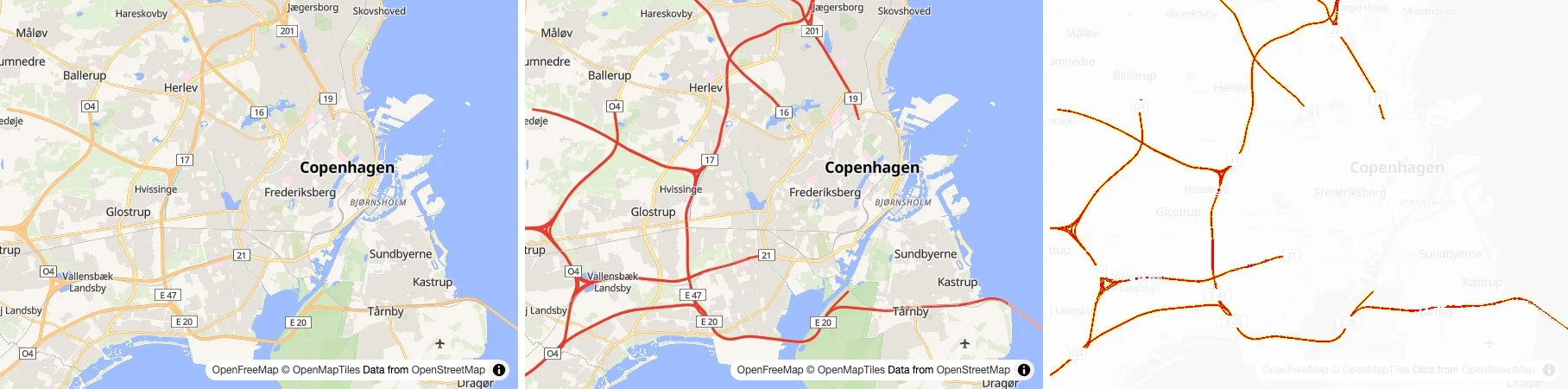
An agent turned the motorways in OpenFreeMap's Liberty style red, and compare_styles showed it the map before, after, and the pixels that changed.
Coding agents like Claude Code, Codex and Cursor can edit a MapLibre style, but they can't see the map, and they can mix up MapLibre and Mapbox. With maplibre-mcp, an agent can validate a style against the MapLibre Style Specification, render it with MapLibre GL JS, MapLibre Native or a Martin server, compare two versions of it, and show you an interactive map in the chat. It runs on your machine and needs no API key.
Website · Getting started · Examples · Tools
Install
It needs Node.js 22 or newer.
| Client | Command |
|---|---|
| Claude Code | claude mcp add maplibre -- npx -y maplibre-mcp |
| Codex | codex mcp add maplibre -- npx -y maplibre-mcp |
| Gemini CLI | gemini mcp add maplibre npx -- -y maplibre-mcp |
| Grok | grok mcp add maplibre -- npx -y maplibre-mcp |
| VS Code | code --add-mcp '{"name": "maplibre", "command": "npx", "args": ["-y", "maplibre-mcp"]}' |
Claude Desktop, Cursor, Windsurf and most other clients read this JSON. Getting started says where each one keeps it.
{
  "mcpServers": {
    "maplibre": {
      "command": "npx",
      "args": ["-y", "maplibre-mcp"]
    }
  }
}
Rendering with MapLibre GL JS uses the installed Google Chrome. Without Chrome, the first render fails with the command that installs the Chromium it can use instead.
Command line
Agents that work in a shell, and people, can also run the rendering and data tools, and the GL JS API lookup, as commands, without setting up MCP. A style is a file or a URL.
npx -y maplibre-mcp render style.json --center 12.57,55.68 --zoom 12
npx -y maplibre-mcp compare before.json after.json --zoom 10
npx -y maplibre-mcp compare-renderers style.json --renderers gl-js,native
npx -y maplibre-mcp describe-sources style.json
npx -y maplibre-mcp debug-layers style.json --center 12.57,55.68 --zoom 14
npx -y maplibre-mcp inspect-tile https://tiles.openfreemap.org/planet --center 12.57,55.68 --zoom 14
npx -y maplibre-mcp describe-gl-js-api Map#flyTo
The images go to map.png, compare.png and renderers.png, or to --out. npx -y maplibre-mcp --help lists the options, and Command line has the details. To validate, format or migrate a style, use gl-style-validate, gl-style-format and gl-style-migrate from @maplibre/maplibre-gl-style-spec.
Tools
validate_stylechecks a style against the MapLibre Style Specification, and lists each problem with the path to its property.describe_style_speclooks up a layer type, property, source type or expression, with its documentation and the GL JS and Native versions that support it. For a misspelled name, it suggests the closest real ones.describe_gl_js_apilooks up a class, method, option or event of MapLibre GL JS, with its signature, documentation, default and examples, in the type definitions of the version the server renders with, or of another version. It also says when a method is not in MapLibre, like one from Mapbox GL JS.describe_sourcesreads the TileJSON, PMTiles header or GeoJSON of each source in a style, lists the source layers and fields, and finds layers that use a source layer or field that is not there.inspect_tilereads the vector tile at a place and lists each source layer with its geometry types, the values of its fields and how often they occur, and a few example features, plus the zoom range of the source and the source layers the tile lacks. The source can be a source in a style, a TileJSON URL like a Martin source, a PMTiles archive or a tile URL, with MVT or MLT tiles.debug_layerssays for each layer of a style whether it draws at a place and zoom, and if not, why, like a missing source layer, a filter that matches nothing (next to the values the data has), a fill layer without polygons, paint that comes out as 0 or transparent, or icons missing from the sprite. It also notes text that falls back to local fonts, since the glyph server lacks its font stack.format_styleandmigrate_styledo whatgl-style-formatandgl-style-migratedo. Given a file, they rewrite it.render_stylerenders a style to a PNG, and reports map errors and missing icons. It takes a center, zoom, bearing and pitch, or bounds to fit.compare_stylesrenders two versions of a style at the same camera, and returns one image with the style before, after, and their differences in red.compare_renderersdoes the same for one style in two renderers, for example to check that a style looks the same on the web and on mobile.show_mapshows the user an interactive map with GeoJSON layers and markers on an OpenFreeMap basemap, in clients that support MCP Apps.martin_list_sourceslists the tiles, sprites, fonts and styles a Martin server serves, with the URLs to use in a style.
The tools that take a style accept it as an object (style), a URL (url) or a file (path, relative to where the server runs). The tool reference lists every parameter.
Toolsets
The tools are grouped by the MapLibre project they belong to. style and gl-js are on by default. Choose others with --toolsets, or with the MAPLIBRE_MCP_TOOLSETS environment variable, and all turns on every toolset:
npx -y maplibre-mcp --toolsets style,gl-js,martin
| Toolset | What it adds |
|---|---|
style | validate_style, describe_style_spec, describe_sources, inspect_tile, debug_layers, format_style, migrate_style |
gl-js | Rendering with MapLibre GL JS, describe_gl_js_api and show_map |
native | Rendering with MapLibre Native |
martin | Rendering with a Martin server, and martin_list_sources |
With any renderer on, there are render_style and compare_styles, and with two or more, compare_renderers. Rendering with MapLibre Native needs one more package, and rendering with Martin needs a Martin build with rendering. Rendering covers both.
Remote server
--http serves Streamable HTTP at http://127.0.0.1:3100/mcp instead of stdio, and --host and --port change the address. On a loopback address it only answers requests from localhost. On any other address it does not read or write files, it still fetches the URLs it is given from its own network, and it has no authentication, so put it behind a proxy that has. Remote server has the details.
Development
npm install
npm test
npm run dev:site
License
MIT © 2026 Birk Skyum
Installation
Source-derived launch command. Check the maintainer’s required arguments and credentials before running:
npx -y maplibre-mcpSet up in your AI client
Merge this template into ~/Library/Application Support/Claude/claude_desktop_config.json. Keep existing servers. Add any arguments, credentials, and permissions required by the maintainer; this template has not been install-tested.
{
  "mcpServers": {
    "io-github-birkskyum-maplibre-mcp": {
      "command": "npx",
      "args": [
        "-y",
        "maplibre-mcp"
      ]
    }
  }
}
Restart Claude Desktop completely for changes to take effect. Confirm the server appears connected in the client’s tool list, then try a read-only example from its documentation.
Claude Desktop setup referencePackage
maplibre-mcpnpmCompatible MCP Clients
maplibre-mcp works with any MCP-compatible client. Copy the config snippet from the Configuration section above and add it to the file shown for your client, then restart the application.
- Claude Desktop
~/Library/Application Support/Claude/claude_desktop_config.jsonRestart Claude Desktop completely for changes to take effect. - Cursor
~/.cursor/mcp.jsonRestart Cursor for changes to take effect. - VS Code
.vscode/mcp.jsonReload VS Code window for changes to take effect. - Windsurf
~/.codeium/windsurf/mcp_config.jsonRestart Windsurf for changes to take effect. - Claude Code
.mcp.jsonSave at the project root, then start Claude Code in that project and review the MCP server approval prompt. Keep real credentials out of shared files.