io.github.Brunovncs/texel-mcp
Minecraft skins and textures as code: JSON specs compiled to PNG, with a review an agent can act on.
Texel
Texel is a format and a toolchain for making Minecraft textures as code. A texture is a JSON
spec: a palette and an ordered list of drawing operations addressed to named parts and faces of
the model (head.front, rightArm.sides@overlay). A compiler turns the spec into the PNG the game
reads, the same bytes every time, and a review returns what is wrong with it as JSON paths, fix
hints, an art score and pixel-art advice. The tools are built for AI agents: an MCP server, a
command-line tool and an Agent Skill, also packaged as a Claude Code plugin.
It covers player skins (classic and slim) and, through layouts, 68 other textures, all in the Java Edition 1.21 texture layouts: 57 mob textures (zombies, skeletons, creepers, horses, llamas, foxes, bees, axolotls, illagers, wardens, golems and more), armor layers, capes with elytra, items, blocks with their top and side files (logs, grass, furnaces), plants, GUI sprites, particles and paintings. Textures can animate and glow, and a set of specs builds a resource pack that Texel also checks.
Texel is open source (MIT) and in development, at version 0.9.0. The format is versioned (version: 1)
but may still change between minor releases. Treat everything as a beta. The site
texel.dev.br is built on this toolchain.
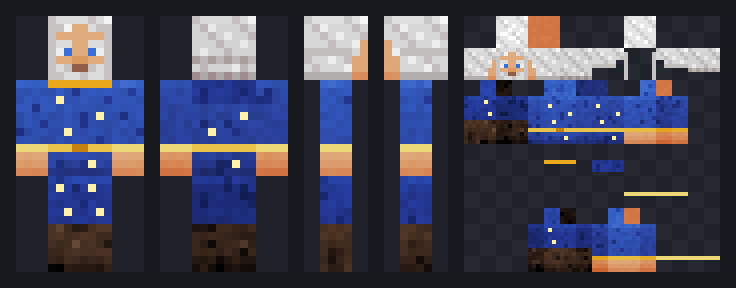
The image above is the review sheet the tools return for this spec. It is the wizard example
without its $schema, description, author and tags fields and the layers' note comments,
which do not change the pixels (both compile to the same PNG):
{
  "version": 1,
  "name": "Star Wizard",
  "model": "classic",
  "palette": {
    "skin": "#e0ac7e", "robe": "#2f4fb0", "gold": "#e8c34a", "beard": "#dcdcdc",
    "eyes": "#3a6fd9", "boots": "#4a3324", "star": "#fff1a8"
  },
  "layers": [
    { "op": "material", "target": "all", "color": "skin", "kind": "skin" },
    { "op": "material", "target": "body+arms", "color": "robe", "kind": "fabric" },
    { "op": "material", "target": "legs", "color": "robe~-1", "kind": "fabric" },
    { "op": "material", "target": "arms", "region": "hands", "color": "skin", "kind": "skin" },
    { "op": "rect", "target": "arms.sides", "region": "cuffs", "color": "gold" },
    { "op": "material", "target": "legs", "region": "boots", "color": "boots", "kind": "leather" },
    { "op": "face", "id": "face", "skin": "skin", "eyes": "eyes", "brows": "beard", "beard": "full", "beardColor": "beard", "mouth": "smile" },
    { "op": "hair", "id": "hair", "color": "beard", "style": "long", "fringe": "parted" },
    { "op": "lighting" },
    { "op": "rect", "target": "body.sides", "region": "belt", "color": "gold" },
    { "op": "points", "target": "body.front", "points": [[3, 8], [4, 8]], "color": "gold~-2" },
    { "op": "points", "target": "body.front+back", "points": [[1, 2], [6, 4], [2, 6], [5, 10]], "color": "star" },
    { "op": "points", "target": "legs.front", "points": [[1, 1], [2, 4]], "color": "star" },
    { "op": "material", "id": "hood", "target": "body.back@overlay", "y": 0, "h": 3, "color": "robe~-1", "kind": "fabric" },
    { "op": "rect", "target": "body.front@overlay", "region": "collar", "color": "gold~-1" },
    { "op": "rect", "target": "arms.sides@overlay", "region": "cuffs", "color": "gold~1" }
  ]
}
The 64 × 64 texture it compiles to is docs/images/wizard.png.
Installing
The MCP server and the CLI need Node 20 or later.
Claude Code plugin. This repository is a plugin marketplace. The plugin starts the MCP server
from a single bundled file (no npm install) and adds the minecraft-skin-design skill. Files are
written to the project directory.
/plugin marketplace add Brunovncs/texel-mcp
/plugin install texel@texel
Or use this prompt. Paste it into the agent you want to use Texel with (Claude Code, Codex, Cursor, Claude Desktop or any other client with MCP support) and it installs the MCP server for you:
Install the Texel MCP server for me (https://github.com/Brunovncs/texel-mcp).

1. Check that Node.js 20 or later is installed (`node --version`). If it is not, stop and tell me.
2. Create the folder ~/.texel (%USERPROFILE%\.texel on Windows) and download the single-file
   server into it:
   https://raw.githubusercontent.com/Brunovncs/texel-mcp/main/plugin/server/texel-mcp.mjs
3. Check that it runs: `node <path to texel-mcp.mjs> --version` must print a version number.
4. Ask me which folder the skins should be saved in. If I don't care, skip the --workspace part
   below; files then go to the directory the client starts the server in.
5. Register it as an MCP server named "texel" in the client you are running in, using absolute
   paths:
   - Claude Code: claude mcp add --scope user texel -- node <path to texel-mcp.mjs> --workspace <folder>
   - Any other client: add this to its MCP configuration, keeping the servers already there:
     {"mcpServers": {"texel": {"command": "node",
       "args": ["<path to texel-mcp.mjs>", "--workspace", "<folder>"]}}}
6. Tell me what you changed and whether I need to restart the client. Once the tools are
   available, call texel_get_example and then texel_render on that example to confirm they work.
Any MCP client. The package is texel-mcp on npm.
This configuration works in Claude Desktop, Cursor, VS Code and other clients that read the usual
mcpServers format:
{
  "mcpServers": {
    "texel": {
      "command": "npx",
      "args": ["-y", "texel-mcp", "--workspace", "/absolute/path/skins"]
    }
  }
}
In Claude Code the same is claude mcp add texel -- npx -y texel-mcp. To run a local build
instead (see Building and testing), point the client at the file:
"command": "node", "args": ["/absolute/path/texel-mcp/dist/texel-mcp.mjs", "--workspace", "/absolute/path/skins"]. plugin/server/texel-mcp.mjs is the same server with its dependencies
bundled, and runs from anywhere with plain node.
CLI. npx -y -p texel-mcp texel-cli build skin.json -o skin.png --sheet sheet.png, or
node dist/texel.mjs ... from a build. It has no dependencies. --help lists the
commands: build, review, patch, sheet, palette, family, import, diff, pack,
check-pack, share, pull, live, format, layouts and init. Exit codes: 0 done, 1 the
spec, family or pack has errors, 2 bad usage.
All writes go to one workspace directory: --workspace, $TEXEL_WORKSPACE, or the directory the
server was started in. Paths that resolve outside it are refused. docs/install.md
has the details, including installing the skill by hand.
The spec
A spec has a palette (names for colors, with derived tones such as robe~-1, a step darker and
cooler), an optional legend (one character per color, for pixel rows) and layers, which run in
order. Each layer is one of 18 operations. Twelve are plain drawing (fill, rect, clear,
pixels, points, line, gradient, pattern, noise, shade, copy, mirror), one fixes
symmetry (symmetrize) and five are higher level: material (fabric, leather, metal, fur, knit
and other surfaces), face, hair, lighting and bevel (raised and inset frames in the
vanilla GUI style). Any operation marked "emissive": true also paints the texture's glow map,
<name>_eyes.png.
A layer's target is a selector: parts, faces and a layer, as in head.front, legs.sides,
body.front+back@overlay or arms.top@both. Coordinates are local to each face: (0, 0) is the
top-left pixel of the face as seen from outside the model, and drawing is clipped to the face. A
selector that matches several faces runs the operation once per face, so
{ "op": "rect", "target": "legs.sides", "y": -2, "color": "boots" } paints the bottom two rows all
the way around both legs. Named regions (belt, cuffs, boots, hands, collar) stand in for
row numbers.
Changes are made with patches by layer id ({ "patch": [{ "do": "update", "id": "hair", "set": { "style": "ponytail" } }] }), so a fix round touches only the layers it names. The same patches
make animation frames ("animation": { "frames": [{}, { "patch": [...] }] } compiles to a strip
and its .png.mcmeta, or one file per frame for particles) and family members: a family expands
one base spec into variants or a matrix of axes (teams, ranks, factions) by swapping palettes,
turning layers on and off, patching base layers by id and appending layers, so its members can be
different characters, not only recolors. An existing PNG can be imported into an editable spec,
one layer per painted face, and import --pixelize first turns any picture (concept art, an HD
skin) into a texture of the layout's size.
asset says where a texture goes in a resource pack (mobs default to the vanilla file they
replace). pack builds the pack from specs and families, with pack.mcmeta for a Minecraft
version (1.21 to 1.21.11) and, on request, the models, block states and item definitions a new item
or block needs; check-pack checks any pack: its format and versions, file names, PNGs, .mcmeta
animations and GUI scaling, entity texture sizes, references to missing models or textures and
unused textures.
The full reference is docs/spec.md, with a JSON Schema in
schema/skinspec.v1.json. docs/protocol.md describes
the loop an agent is expected to follow (brief, draft, render, review, patch, ship), and
docs/art-guide.md what makes a skin read well at 64 × 64. The same pages are
available to the agent through texel_read_docs and the texel://docs/{page} resources, and the 19
examples in examples/ through texel_get_example.
What the review returns
Every render comes with a review. With a typo in a palette name and in a face name, the relevant part of the answer is:
{
  "ok": false,
  "score": 38,
  "issues": [
    { "level": "error", "code": "bad-color", "path": "$.layers[1].color",
      "message": "unknown color or palette key \"clth\"", "hint": "did you mean \"cloth\"?" },
    { "level": "error", "code": "bad-selector", "path": "$.layers[2].target",
      "message": "unknown face \"frnt\"", "hint": "did you mean \"front\"?" },
    { "level": "warning", "code": "blank-face", "path": "head.front",
      "message": "the face (head.front) uses fewer than 3 colors and will read as blank",
      "hint": "draw eyes, brows and a mouth with a \"pixels\" op on head.front" }
  ]
}
Errors and warnings point at the JSON path or the face that caused them, and most carry a hint
that names the fix. Codes are stable across releases and listed with their meaning in
docs/spec.md (ISSUE_CODES in code); a test keeps the list equal
to what the source can report. Block textures also get their tiling measured: how much harder each
edge breaks than the texture's own neighbors where copies meet (stats.seams, tile-seam). The score (0 to 100) only measures technical hygiene: errors, holes in the
base layer, blank faces, flat surfaces, too few colors. The art part of the review has its own
score from seven measured checks: R2 to R7 (face readability, lightness contrast between parts,
light from above, surface texture, a designed back, use of the overlay for depth) and a color
count, each with a note on what was measured and a hint. art.advice names classic pixel-art
mistakes found in the texture (pillow shading, shadows that only get darker, static-like noise,
a band that stops at a cube corner) with the faces where they show; it never changes a score. A
next list orders what to fix first.
Whether the texture matches the brief (R1) is never measured. The MCP tools return a review sheet
image (front, back, both sides and the texture, as above) so an agent with vision can judge that
itself, and a text render for models without vision. The sheet adds what a texture needs: a block
tiled 3 × 3 and in 3D, a GUI sprite resized the way the game resizes it, every animation frame,
the glowing pixels on black. In clients that support MCP Apps,
texel_render also opens an interactive 3D preview.
Tools
The MCP server has 16 tools, resources for the docs, examples and schemas, the ui://texel/viewer
MCP App and 5 prompts (design_skin, design_texture, continue_skin, design_family, critique_skin).
| Tool | What it does |
|---|---|
texel_render | Compile and review a spec (inline, or a workspace file); returns the review, the sheet image, optionally a close-up of some parts and the texture. |
texel_patch | Apply a patch by layer id and render the result. Given a workspace file, it edits the file in place and returns only the review, so the spec isn't resent on every iteration. |
texel_validate | Errors and warnings only, no images. |
texel_save | Write every file the texture is in game (block parts, animation strip and .png.mcmeta, particle frames, _eyes), the .skin.json source and optionally the sheet to the workspace. |
texel_live | Start a live session: a page served on 127.0.0.1 that shows every render as it happens (the texel.dev.br studio can follow it too, for editing). |
texel_share | Store the spec on texel.dev.br and return a short link; falls back to a long self-contained link offline. |
texel_pull | Load the spec behind a share link, to keep working on it. |
texel_render_family | Expand a family and return a lineup image and a score per member. |
texel_save_family | Write every member of a family plus lineup.png. |
texel_import_png | Turn an existing texture PNG into an editable spec; with pixelize, any picture. |
texel_palette | The main colors of a reference image as a palette and legend, with a role per color. |
texel_pack | Build a resource pack (.zip or folder) from specs, families and folders of them, and check it. |
texel_check_pack | Check any resource pack, with the file, JSON path and a fix hint for each issue. |
texel_diff | Which faces and pixels differ between two specs, with a mask image. |
texel_get_example | One of the bundled example specs, or the example family. |
texel_read_docs | A documentation page as markdown. |
How it works
The hard part of drawing a Minecraft texture is not the drawing but the map. A skin's right arm is six rectangles scattered over a 64 × 64 atlas, some mirrored, the overlay layer is a second set of rectangles elsewhere, a pig's body lies on its side so its "top" is the animal's back, and every mob has its own atlas. An agent writing pixels into the atlas directly has to carry that map in its head and gets it wrong in ways it cannot see.
In Texel the compiler owns the map. Each layout is data: its parts as boxes with sizes and UV
origins, which parts are mirrored, which lie turned, and which are cut out by transparency. The
agent addresses rightArm.front in the face's own coordinates, and the compiler maps every pixel
to its place in the atlas. The review, the sheet views, the 3D preview, import and diff read
the atlas back through the same map. That turns a spatial task the agent is bad at into a
symbolic one it is good at: naming parts, choosing colors, ordering layers, and acting on errors
that point at a line of JSON.
Compilation is deterministic. The only randomness is in noise and material, and both use a
seeded generator (the seed defaults to the layer's position), so the same spec gives the same
PNG, byte for byte. That makes a spec something that can be reviewed in a diff, kept in version
control and regenerated in a build.
Every mob layout was checked against the decompiled Java model code (texOffs and addBox) and
by running the vanilla textures of 1.21.1, 1.21.5 and 1.21.11 through it: every opaque pixel of
the vanilla file must fall on a face, and the views must show the mob. The few pixels a layout
leaves out are listed in its note (an easter egg, a stray pixel, a saddle that moved to its own
file in 1.21.5).
The code is in src/core (compiler, layouts, review, views, PNG and zip encoding and decoding,
resource packs; no dependencies and no DOM), src/mcp (the server and the MCP App viewer), src/cli, and src/live
(live sessions and the update check). The MCP server depends on @modelcontextprotocol/server
and zod; the CLI has no dependencies.
Measurements
Measured on an AMD Ryzen 5 7600 (12 threads), Windows 11, Node 22.13.1, with npm run measure
(scripts/measure.ts): each of the 19 bundled examples was compiled 210 times in one process,
the first 10 runs as warm-up, and the table shows the median of the other 200. "Compile + PNG" is
the spec text to an encoded PNG. "Full render" is what texel_render computes: compile, the full
review with art checks and advice, the review sheet and both PNGs. Spec size is the example
file minified with JSON.stringify; PNGs are encoded at zlib level 9, as the tools do. An animated
example compiles every frame.
| Example | Layout | Texture | Spec (bytes) | PNG (bytes) | Compile + PNG | Full render |
|---|---|---|---|---|---|---|
| explorer | player | 64 × 64 | 2 958 | 1 246 | 1.45 ms | 19.75 ms |
| knight | player | 64 × 64 | 3 006 | 1 090 | 1.47 ms | 16.13 ms |
| robot | player | 64 × 64 | 2 537 | 1 473 | 2.59 ms | 16.01 ms |
| astronaut | player (slim) | 64 × 64 | 3 134 | 865 | 1.29 ms | 18.41 ms |
| wizard | player | 64 × 64 | 1 908 | 2 968 | 3.22 ms | 21.62 ms |
| cozy | player (slim) | 64 × 64 | 1 639 | 2 949 | 3.07 ms | 20.74 ms |
| winged-pig | player | 64 × 64 | 3 272 | 2 467 | 3.40 ms | 23.09 ms |
| miner-zombie | zombie | 64 × 64 | 1 518 | 2 198 | 2.02 ms | 17.23 ms |
| creeper | creeper | 64 × 32 | 1 156 | 1 058 | 0.98 ms | 11.45 ms |
| mud-pig | pig | 64 × 64 | 1 970 | 1 477 | 2.01 ms | 16.60 ms |
| bronze-armor | humanoid (armor) | 64 × 32 | 1 605 | 1 719 | 1.66 ms | 13.38 ms |
| banner-cape | cape | 64 × 32 | 1 236 | 1 300 | 1.32 ms | 14.35 ms |
| ember-blade | item | 16 × 16 | 1 058 | 160 | 0.10 ms | 4.21 ms |
| zebra | horse | 64 × 64 | 1 605 | 2 302 | 4.30 ms | 24.30 ms |
| sky-evoker | illager (with _eyes) | 64 × 64 | 1 237 | 3 126 | 3.84 ms | 28.58 ms |
| ash-log | block_column | 32 × 16 | 1 255 | 666 | 0.47 ms | 11.49 ms |
| magma-pulse | block, 4 frames | 16 × 16 | 1 275 | 472 | 1.12 ms | 11.00 ms |
| stone-button | gui | 200 × 20 | 735 | 1 569 | 2.87 ms | 17.76 ms |
| spark | particle, 4 frames | 8 × 8 | 958 | 110 | 0.10 ms | 1.33 ms |
Across the examples the median is 1.66 ms to compile and encode and 16.6 ms for a full render. Startup of the MCP server and the transfer of the sheet image to the client are not included.
A spec is not smaller than the image it produces: the median minified spec is 1.33 times the size of its PNG, between 735 and 3 272 bytes. At a rough 4 bytes per token that is about 180 to 820 tokens per spec; this was not checked with a tokenizer, and JSON usually takes more tokens per byte than prose. The point of the format is not size. A PNG is compressed binary an agent cannot write or edit by hand, while each line of a spec is a decision that can be read, patched and reviewed.
Determinism was checked three ways. Within one process, all 210 runs of each example produced byte-identical PNGs (one distinct SHA-256 per example). A test keeps a hash of every example's texture, so a change in what an existing spec renders fails the suite. For 0.8.0, the CLI built and installed from the packed npm tarball produced the same hashes for the four examples that were compared (explorer, knight, creeper, ember-blade). All of this ran on one Windows machine; the CI workflow runs the same test suite on Linux, but identical bytes across operating systems have not been compared directly.
Other counts at version 0.9.0: 19 example specs and 1 example family (6 members), 69 layouts plus
74 aliases (husk, stray, elytra, mooshroom, vindicator, elder_guardian, log and
others), 18 operations, 116 issue codes, and 180 tests in 14 files.
Limitations
- Java Edition only. Bedrock skins and Bedrock geometry are not supported.
- Only the vanilla box models. There are no custom 3D models or geometry, and no HD skins: mob and skin textures are the vanilla sizes (items, blocks and plants can be HD).
- Layouts follow the Java Edition 1.21 model code: the UV maps were checked against the decompiled code and the vanilla textures of 1.21.1, 1.21.5 and 1.21.11. No texture made with them has been loaded in the game by this project; the checks are the code and the vanilla files. Mobs without a layout (fish, the sniffer, the breeze, the creaking and some others) and saddles cannot be painted yet.
- The views and the 3D preview only model 90° turns. Tilted parts, such as the hoglin's head, a horse's neck or a strider's bristles, are drawn untilted or left out of the views (each layout's note says which).
check-packknows the resource pack formats of 1.21 to 1.21.11. It checks structure and references, not how a model or a texture looks in game, and it does not check data packs.- The art score and the craft advice are heuristics. They have not been validated against human judgment, and they say nothing about whether the texture matches the brief. How good a texture looks depends mostly on the agent writing the spec.
texel_share,texel_pulland the short links need texel.dev.br: share links are stored there. Long#z=links work without the site's storage. Live sessions don't: the local server serves its own page, and the site's studio is only needed to edit a session.TEXEL_SITEpoints all of this at another origin.- Once a day the CLI and the server ask texel.dev.br for
version.jsonto tell the agent about a newer release. The request waits at most 1.5 s, carries no data about the user or the specs, and is skipped whenTEXEL_NO_UPDATE_CHECK=1orCIis set.
Building and testing
You need Node 20 or later.
npm install
npm run typecheck        # tsc --noEmit
npm test                 # vitest: 180 tests, including spawned CLI and MCP server bundles
npm run build            # dist/texel-mcp.mjs and dist/texel.mjs (the npm package)
npm run build:plugin     # plugin/server/texel-mcp.mjs and its THIRD_PARTY_NOTICES.md
npm run measure          # the numbers in Measurements
The npm build keeps the MCP SDK and zod as dependencies. The plugin build bundles them into one
file, because a Claude Code plugin has no install step; it is committed, and CI fails if it no
longer matches the source. Docs, examples, schemas and the viewer are embedded in both builds.
SITE_URL at build time changes the site origin baked into the builds and the docs.
Bump the version in package.json, plugin/.claude-plugin/plugin.json and the skill's
metadata.version together, and add a CHANGELOG.md section for it; a test checks both.
License
MIT, see LICENSE. The plugin's single-file server bundles the MCP TypeScript SDK (Apache-2.0, with parts under MIT) and zod (MIT); their licenses are in plugin/server/THIRD_PARTY_NOTICES.md.
Not an official Minecraft product. Not approved by or associated with Mojang or Microsoft.
Installation
Source-derived launch command. Check the maintainer’s required arguments and credentials before running:
npx -y texel-mcpSet up in your AI client
Merge this template into ~/Library/Application Support/Claude/claude_desktop_config.json. Keep existing servers. Add any arguments, credentials, and permissions required by the maintainer; this template has not been install-tested.
{
  "mcpServers": {
    "io-github-brunovncs-texel-mcp": {
      "command": "npx",
      "args": [
        "-y",
        "texel-mcp"
      ]
    }
  }
}
Restart Claude Desktop completely for changes to take effect. Confirm the server appears connected in the client’s tool list, then try a read-only example from its documentation.
Claude Desktop setup referencePackage
texel-mcpnpmCompatible MCP Clients
io.github.Brunovncs/texel-mcp works with any MCP-compatible client. Copy the config snippet from the Configuration section above and add it to the file shown for your client, then restart the application.
- Claude Desktop
~/Library/Application Support/Claude/claude_desktop_config.jsonRestart Claude Desktop completely for changes to take effect. - Cursor
~/.cursor/mcp.jsonRestart Cursor for changes to take effect. - VS Code
.vscode/mcp.jsonReload VS Code window for changes to take effect. - Windsurf
~/.codeium/windsurf/mcp_config.jsonRestart Windsurf for changes to take effect. - Claude Code
.mcp.jsonSave at the project root, then start Claude Code in that project and review the MCP server approval prompt. Keep real credentials out of shared files.