io.github.cbetz/ratebook
Open MCP server for US electricity tariffs: real rate lookup, bill estimates, and when to charge.
Ratebook
The open rate engine for the electrified home — an openly licensed database of US electricity tariffs, an open-source rate-calculation engine, and an MCP server, so any app, device, or agent can answer "what will this kWh cost me, and when should I charge?"



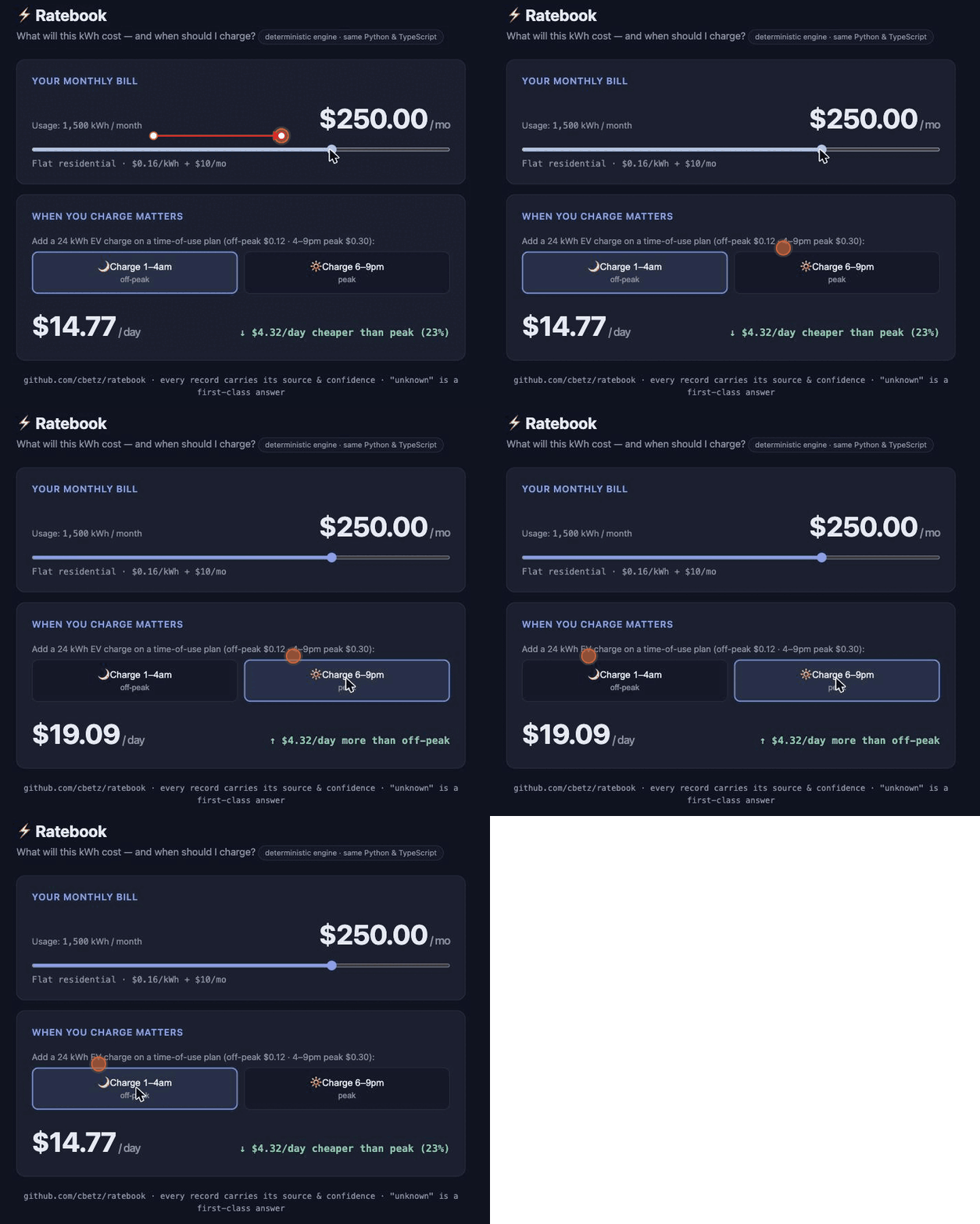
↑ The real engine running in the browser. Try it yourself: demo/demo.html.
Status: pre-release. What works today: a deterministic rate engine (Python + a TypeScript port held to it byte-for-byte), cross-validated against NREL's PySAM and shown to reproduce a real bill's total once its components are supplied; an LLM pipeline that extracts tariff structure from utility PDFs; an MCP server; and a Home Assistant integration. What's still in progress: broad utility coverage, freshness automation, and a reproducible public accuracy scorecard. See
docs/ROADMAP.md.
Quickstart
The engine has no I/O and no required data download — price a tariff in a few lines:
git clone https://github.com/cbetz/ratebook && cd ratebook
uv sync
uv run python quickstart.py   # or paste the snippet below into `uv run python`
from datetime import date
from decimal import Decimal
from ratebook import (
    Tariff, TariffIdentity, Sector, EnergyRateStructure, EnergyPeriod, EnergyTier,
    Schedule, FixedCharge, FixedChargeUnit, Usage, BillingWindow, estimate_bill,
)

# A flat residential tariff: $0.10276/kWh + $11.30/month (PECO Rate R distribution).
no_tou = tuple(tuple(0 for _ in range(24)) for _ in range(12))  # 12 months × 24 hours, one period
tariff = Tariff(
    energy=EnergyRateStructure(periods=(EnergyPeriod(tiers=(EnergyTier(rate=Decimal("0.10276")),)),)),
    schedule=Schedule(weekday=no_tou, weekend=no_tou),
    identity=TariffIdentity(plan_code="R", plan_name="Example flat residential", sector=Sector.RESIDENTIAL),
    fixed_charges=(FixedCharge(Decimal("11.30"), FixedChargeUnit.PER_MONTH),),
)

bill = estimate_bill(tariff, Usage.aggregate(1244), BillingWindow(date(2026, 4, 28), 30))
print(f"ok={bill.ok}  total=${bill.total}")   # ok=True  total=$139.13344  →  1244 kWh × $0.10276 + $11.30
Real tariffs round-trip through JSON via Tariff.from_json(...). To work with corpus data, load
the URDB seed set (uv run ratebook-data urdb) or run the MCP server (uv run ratebook-mcp) and
ask an agent lookup_tariff / estimate_bill / compare_plans / best_charge_window.
Development
Python 3.12+, uv workspace with these packages:
packages/ratebook (rate engine), packages/ratebook-data (data plant),
packages/ratebook-mcp (MCP server), packages/ratebook-ts (the TypeScript engine port —
pnpm + vitest, held to the Python engine via shared JSON test vectors), and
packages/ratebook-homeassistant (a Home Assistant custom integration: electricity-price +
cheapest-charge-window sensors).
uv sync                            # install all workspace packages + dev tools
uv run pytest                      # Python tests
uv run ruff check .                # lint
uv run ratebook-data urdb          # download URDB bulk CSV → data/raw/, load into data/ratebook.duckdb
uv run ratebook-mcp                # run the MCP server (stdio)

pnpm -C packages/ratebook-ts install && pnpm -C packages/ratebook-ts test   # TS engine + vectors
The PySAM cross-validation runs in CI against committed tariff fixtures (uv sync --group validation installs the oracle). The MCP tool tests additionally need the built corpus and run
locally (uv run ratebook-data urdb); they skip otherwise. The two engines must never
diverge: both reproduce packages/ratebook/tests/vectors/v0_bills.json byte-for-byte. Regenerate
it with uv run python packages/ratebook/tests/generate_vectors.py.
See CONTRIBUTING.md — the highest-value contribution is a tariff
correction (report a wrong or stale rate with its source PDF).
License
Code is licensed under Apache-2.0. Published datasets are dedicated to the public domain under CC0-1.0. The seed corpus derives from the U.S. Utility Rate Database (CC0).
Installation
Source-derived launch command. Check the maintainer’s required arguments and credentials before running:
uvx ratebook-mcpSet up in your AI client
Merge this template into ~/Library/Application Support/Claude/claude_desktop_config.json. Keep existing servers. Add any arguments, credentials, and permissions required by the maintainer; this template has not been install-tested.
{
  "mcpServers": {
    "io-github-cbetz-ratebook": {
      "command": "uvx",
      "args": [
        "ratebook-mcp"
      ]
    }
  }
}
Restart Claude Desktop completely for changes to take effect. Confirm the server appears connected in the client’s tool list, then try a read-only example from its documentation.
Claude Desktop setup referencePackage
ratebook-mcppypiCompatible MCP Clients
io.github.cbetz/ratebook works with any MCP-compatible client. Copy the config snippet from the Configuration section above and add it to the file shown for your client, then restart the application.
- Claude Desktop
~/Library/Application Support/Claude/claude_desktop_config.jsonRestart Claude Desktop completely for changes to take effect. - Cursor
~/.cursor/mcp.jsonRestart Cursor for changes to take effect. - VS Code
.vscode/mcp.jsonReload VS Code window for changes to take effect. - Windsurf
~/.codeium/windsurf/mcp_config.jsonRestart Windsurf for changes to take effect. - Claude Code
.mcp.jsonSave at the project root, then start Claude Code in that project and review the MCP server approval prompt. Keep real credentials out of shared files.