io.github.CogitatorTech/omni-nli
An MCP server for natural language inference
Omni-NLI






A multi-interface (REST and MCP) server for natural language inference
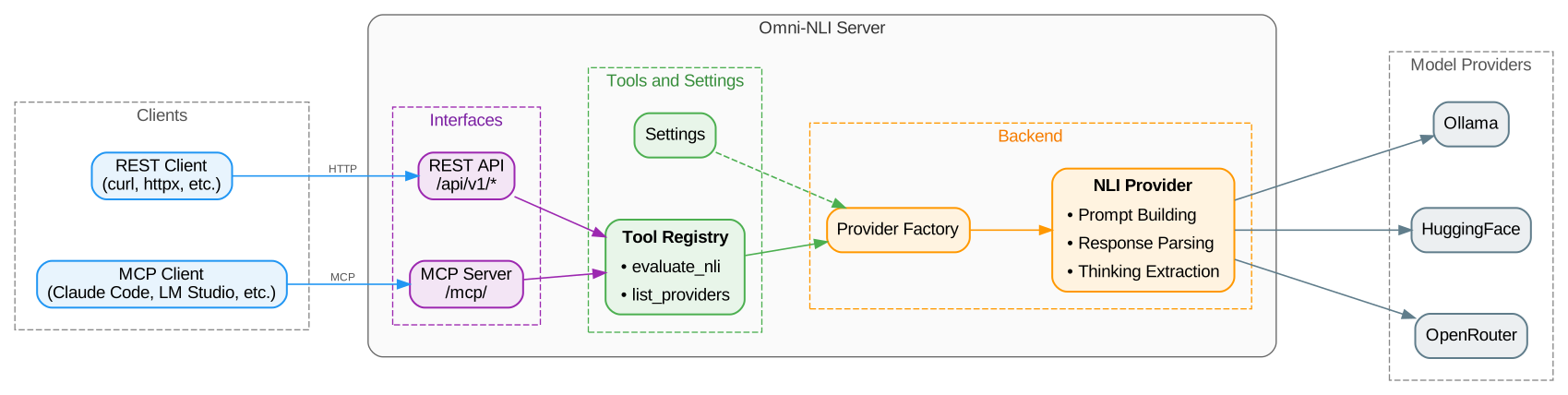
Omni-NLI is a self-hostable server that provides natural language inference (NLI) capabilities via RESTful and the Model Context Protocol (MCP) interfaces. It can be used both as a very scalable standalone stateless microservice (via the REST API) and also as an MCP server for AI agents to implement a verification layer for AI-based applications.
What is NLI?
Given two pieces of text called premise and hypothesis, NLI (AKA textual entailment) is the task of determining the directional relationship between them as it is perceived by a human reader. The relationship is given one of these three labels:
"entailment": the hypothesis is supported by the premise"contradiction": the hypothesis is contradicted by the premise"neutral": the hypothesis is neither supported nor contradicted by the premise
[!IMPORTANT] NLI is not the same as logical entailment. Its goal is to determine if a reasonable human would consider the hypothesis to follow from the premise. This checks for consistency instead of the absolute truth of the hypothesis.
Typical applications of NLI include:
- NLI can be used to check if a given piece of text is consistent with the rest of the text. For example, if a new response from a chatbot or AI assistant contradicts something that was said earlier in the conversation.
- It can be used to check if a summarization contradicts the original text in some way.
- It can be used to check if the documents in the ranked list of results entail the query.
- It can be used to check if a piece of text is supported by some facts. Note that this is not the same as using logic.
[!IMPORTANT] The quality of the results depends a lot on the model (the LLM) that is used. A good strategy is to first fine-tune the model using a dataset of premise-hypothesis-label triples that are relevant to your application domain.
Main Features of Omni-NLI
- Helps mitigate LLM hallucinations by verifying if the generated content is supported by facts
- Supports models provided by different backends, including Ollama, HuggingFace (public and private/gated models), and OpenRouter
- Supports REST API (for traditional applications) and MCP (for AI agents) interfaces
- Fully configurable and very scalable, with built-in caching
- Provides confidence scores and (optional) reasoning traces for explainability
See ROADMAP.md for the list of implemented and planned features.
[!IMPORTANT] Omni-NLI is in early development, so bugs and breaking changes are expected. Please use the issues page to report bugs or request features.
Quickstart
1. Installation
pip install omni-nli[huggingface]
2. Start the Server
omni-nli
3. Evaluate NLI (with REST API)
curl -X POST \
  -H "Content-Type: application/json" \
  -d '{
    "premise": "A football player kicks a ball into the goal.",
    "hypothesis": "The football player is asleep on the field."
  }' \
  http://127.0.0.1:8000/api/v1/nli/evaluate
Example response:
{
    "label": "contradiction",
    "confidence": 0.99,
    "model": "microsoft/Phi-3.5-mini-instruct",
    "backend": "huggingface"
}
4. Evaluate NLI (with MCP Interface)

Documentation
Check out the Omni-NLI Documentation for more information, including configuration options, API reference, and examples.
Contributing
Contributions are always welcome! Please see CONTRIBUTING.md for details on how to get started.
License
Omni-NLI is licensed under the MIT License (see LICENSE).
Acknowledgements
- The logo is from SVG Repo with some modifications.
Installation
Source-derived launch command. Check the maintainer’s required arguments and credentials before running:
uvx omni-nliSet up in your AI client
Merge this template into ~/Library/Application Support/Claude/claude_desktop_config.json. Keep existing servers. Add any arguments, credentials, and permissions required by the maintainer; this template has not been install-tested.
{
  "mcpServers": {
    "io-github-cogitatortech-omni-nli": {
      "command": "uvx",
      "args": [
        "omni-nli"
      ]
    }
  }
}
Restart Claude Desktop completely for changes to take effect. Confirm the server appears connected in the client’s tool list, then try a read-only example from its documentation.
Claude Desktop setup referencePackage
Compatible MCP Clients
io.github.CogitatorTech/omni-nli works with any MCP-compatible client. Copy the config snippet from the Configuration section above and add it to the file shown for your client, then restart the application.
- Claude Desktop
~/Library/Application Support/Claude/claude_desktop_config.jsonRestart Claude Desktop completely for changes to take effect. - Cursor
~/.cursor/mcp.jsonRestart Cursor for changes to take effect. - VS Code
.vscode/mcp.jsonReload VS Code window for changes to take effect. - Windsurf
~/.codeium/windsurf/mcp_config.jsonRestart Windsurf for changes to take effect. - Claude Code
.mcp.jsonSave at the project root, then start Claude Code in that project and review the MCP server approval prompt. Keep real credentials out of shared files.