io.github.doublegate/cyberchef-mcp
CyberChef's 504 data-transformation operations as MCP tools: encryption, encoding, forensics.
CyberChef MCP Server
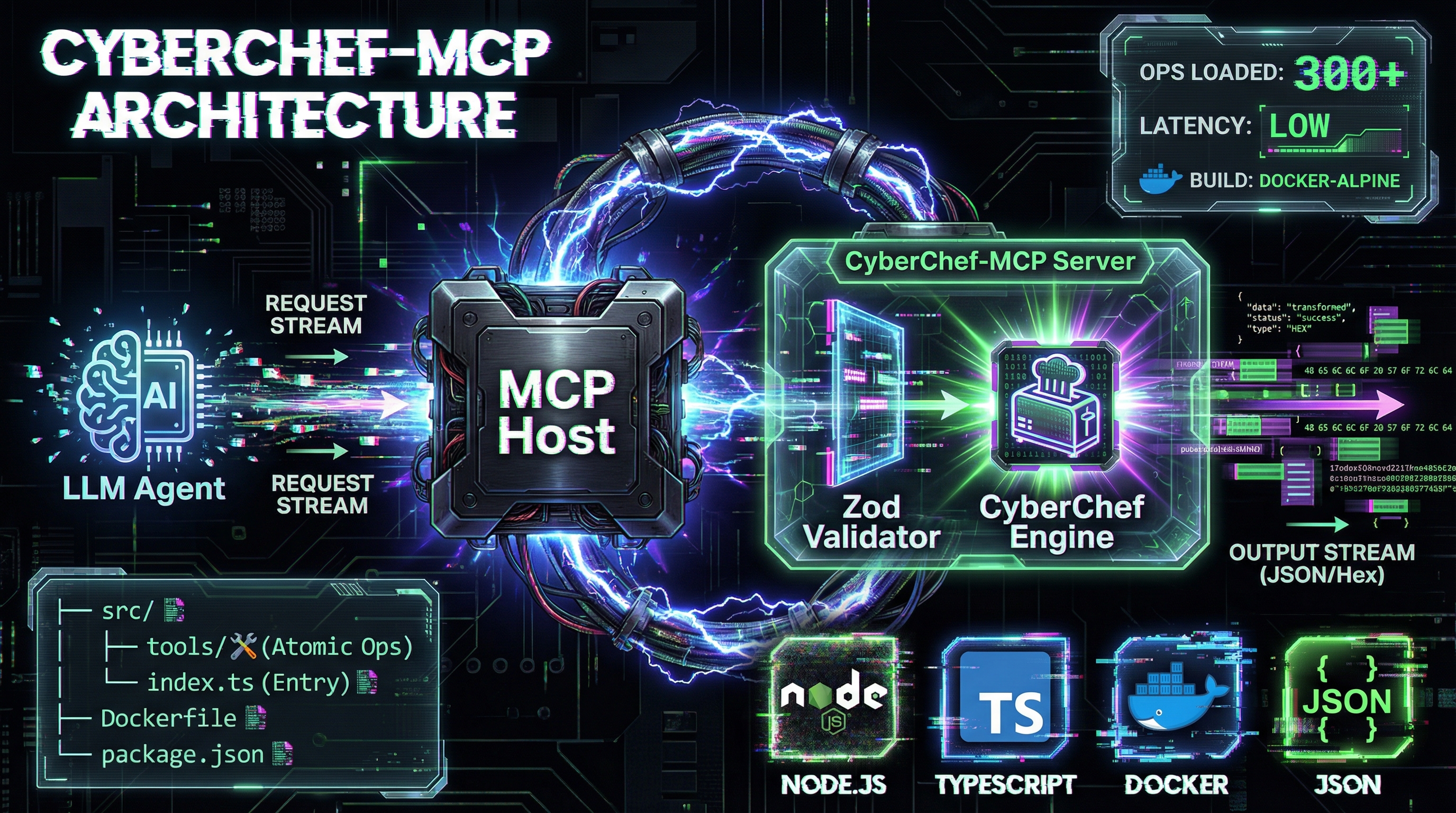
This project provides a Model Context Protocol (MCP) server interface for CyberChef, the "Cyber Swiss Army Knife" created by GCHQ.
By running this server, you enable AI assistants (like Claude, Cursor AI, and others) to natively utilize CyberChef's extensive library of 504 data manipulation operations—including encryption, encoding, compression, and forensic analysis—as executable tools.
Latest Release: v4.2.0 | Release Notes | Tutorial | Examples | Breaking Changes | Security Policy
Upstream base: GCHQ CyberChef v11.4.0 | Licence: GPL-3.0-or-later (from v2.0.0; v1.9.x and earlier remain Apache-2.0)







Project Context
CyberChef is a simple, intuitive web app for carrying out all manner of "cyber" operations within a web browser. It was originally conceived and built by GCHQ.
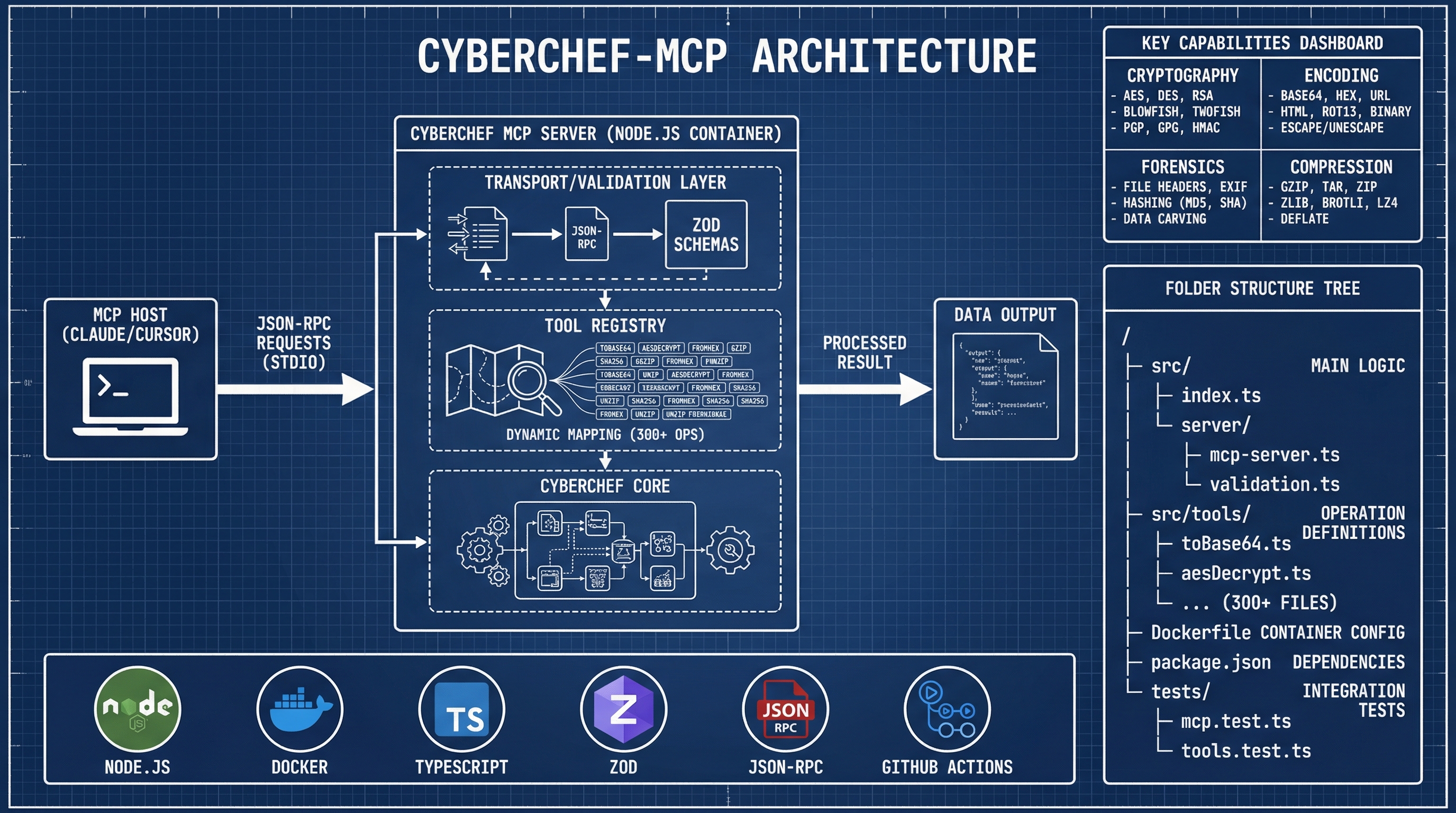
This fork wraps the core CyberChef Node.js API into an MCP server, bridging the gap between natural language AI intent and deterministic data processing.
Fork Relationship
This project maintains a selective sync relationship with the upstream GCHQ/CyberChef repository:
- Synced from upstream:
src/core/**(minus three generated paths) and six upstream-owned files insrc/node/. Mirrored verbatim — never hand-edit them; fork changes live as re-applied patches. - Web UI Components: Removed (88 files, ~19,260 lines) — not needed for an MCP server
- MCP-Specific Code: this fork's own (
src/node/mcp-server.mjs,src/node/lib/**,tests/mcp/, workflows) - Sync is one-way: pull only. As of v2.0.0 the combined work is GPL-3.0-or-later, so MCP-layer changes cannot be contributed back to an Apache-2.0 upstream.
Exact scope, the patch model, and what to do when a sync conflicts: Upstream Sync Guide.
See Upstream Sync Guide for details on the synchronization process.
Features
MCP Tools
The server exposes CyberChef operations as MCP tools:
- Runs on ARM, and 30% smaller (v2.8.0): images are published for
linux/arm64as well aslinux/amd64— Apple Silicon, Graviton, Raspberry Pi 4/5 — and the image is down from 643 MB to 453 MB. AlsoCYBERCHEF_OFFLINE=truefor air-gapped hosts: 502 of the 504 operations never touched a network anyway, so this is a fail-closed switch for the two that do, checked against the recipe rather than the tool name. See the edge deployment guide for architectures, sizing and air-gapped install, and the release notes for how the size reduction was done and verified. - Observable (v2.7.0): a dependency-free Prometheus endpoint at
/metrics(20 metric families, off by default — unlike the health probes it reports which tools are used, how often and how large the inputs are, which is a reconnaissance surface), OpenTelemetry spans following the MCP semantic conventions, andtrace_id/span_idon every log line. It adds one package: the OTel API, not the SDK — measured at 1 package / 2.6 MB / +9 ms against the SDK's 71 packages / 50 MB / +100 ms, which would have handed back more than half of v2.6.0's startup work on every stdio launch. You supply the SDK, so every OTLP backend works rather than a chosen few. Ships a Grafana dashboard, alert rules and a runnable Prometheus stack — all executed against a live server rather than reviewed. Tool arguments are never recorded: the conventions mark them Opt-In, and for this server the arguments are the sensitive material. - OAuth 2.1 authentication on HTTP (v2.5.0): the server acts as an OAuth 2.1 Resource Server — RFC 9728 Protected Resource Metadata, JWKS-based bearer validation, and RFC 8707 audience binding, which is the check that stops a token minted for another service being replayed here. Scope-based RBAC with three scopes (
cyberchef:read,cyberchef:write,cyberchef:network), where the scope a tool needs is derived from its annotations rather than a table that goes stale. Audit logging for who called what. Off unlessCYBERCHEF_AUTH_ISSUERis set, and deliberately not applied to stdio — the MCP specification says stdio SHOULD NOT use OAuth, because a bearer token protects nothing when the client already owns the process. - Multi-tenancy (v2.5.0): the operation cache, recipe store, concurrency pool and audit trail are isolated per tenant, with the tenant read from a claim on an already-verified token (
CYBERCHEF_TENANT_CLAIM) — never from a header the caller controls. Without it, any caller on a shared HTTP deployment could list, modify and delete any other caller's saved recipes, andclear()destroyed every tenant's at once. Off unless configured, and configuring it withoutCYBERCHEF_AUTH_ISSUERis a startup error rather than a silent downgrade. - Starts in ~185 ms (v2.6.0): it used to take ~1.3 seconds, of which ~1.15 s was importing all 504 operation implementations before answering anything — paid on every launch, on stdio, which is how every editor starts the server. The 504-operation barrel is now loaded only by the three tools that need it (
cyberchef_search, batch search, and saved-recipe execution).tools/listis built from metadata, and an ordinary operation call loads just the one operation it runs — verified:cyberchef_bakecompletes without the barrel being loaded at all. A background warm-up was tried, measured, and removed: module loading blocks the event loop, so it just moved the cost in front of the first request. - Deployable as a service (v2.6.0): a Helm chart and Compose file with liveness/readiness/startup probes and a drain that loses no requests during a rolling update. Liveness deliberately stays healthy while draining — a liveness failure there gets the pod killed mid-drain. The chart refuses to render configurations the server would reject at startup, so they fail at
helm templaterather than as a crashloop. - Bounded calls to the authorization server (v2.6.0): JWKS discovery had no timeout (Node's
fetchhas none by default) and cached failures not at all, so an issuer outage turned every request into two outbound ones that could hang until the OS gave up. Now a 5 s deadline and a circuit breaker: 20 verifications against a down issuer went from 40 outbound attempts to 10. - Nineteen analysis tools that are not operations (v2.4.0, expanded through v3.11.0): the original four are
cyberchef_xor_key_length(repeating-key XOR length by index of coincidence),cyberchef_cyclic_pattern(De Bruijn patterns and overflow offsets, byte-compatible with pwntools'cyclic),cyberchef_hash_identify(hash format with the hashcat mode and John format name) andcyberchef_rsa_attack(Fermat, shared factors, Wiener and unpadded small-e). Twelve more arrived in v3.3.0 (classical ciphers, crib dragging, entropy scanning, hash cracking and statistics, JWT weaknesses, plaintext scoring, multi-key RSA, substitution and Vigenère breaking, timestamp identification, corpus diffing), thencyberchef_ecdsa_recoverin v3.4.0 (private-key recovery from a reused ECDSA nonce) andcyberchef_cert_chainin v3.8.0 (orders an X.509 bundle, verifies every link cryptographically, and reports the chain's validity window as the intersection of its members', both ends).cyberchef_pqc_identifyarrived in v3.11.0: it names the NIST post-quantum parameter set behind a key, signature or ciphertext — ML-KEM (FIPS 203), ML-DSA (FIPS 204) or SLH-DSA (FIPS 205) — from the OID when there is DER to read, and from byte length when there is not, in which case it reports every candidate and says so rather than picking one. See Analysis Tools. An operation is a purerun(input, args)over one input and cannot express an analysis;cyberchef_bakecannot either, because a recipe is a pipeline, not a loop. Since v4.1.0 they are reached throughcyberchef_analyse({tool, arguments})on the defaultindexsurface, and remain listed outright oncuratedandall— nineteen of them had been 68% of the index, listed only becausecyberchef_describe_operationrefused them and pointed attools/list, which made the listing their sole schema path. There is deliberately no plugin loader —node:vmis not a security boundary, and that was measured rather than assumed (ADR 0002). - Protocol revision 2026-07-28 (v2.3.0): served on both stdio and HTTP alongside the 2025 era, from one set of handlers. Existing clients are unaffected — a v1-SDK client still negotiates 2025-11-25 against the same registrations. On HTTP the two eras are routed per request by the SDK's own classifier, so 2025 traffic keeps the sessionful wiring while modern traffic is served per request.
- Three transports (v2.3.0): stdio, Streamable HTTP, and a socket binding over a Unix domain socket or loopback TCP (
CYBERCHEF_TRANSPORT=socket), one pinned server instance per connection. It carries no authentication, so a non-loopback bind is refused unless explicitly allowed and the Unix socket is created0600. There is deliberately no WebSocket transport — MCP does not define one. - Every image operation works (v2.3.0): 17 of them returned Node's shared buffer pool instead of the image — unreadable output, and the surplus was whatever the process had recently allocated.
Add Text To Imagehad never worked in this fork at all, since v1.7.1. Both are fixed as fork patches. - Images and audio come back as images and audio (v2.2.0):
Generate QR Code,Render Imageand the image set return an MCPimagecontent block;Play Mediareturns anaudioblock. Before v2.2.0 the html-to-text conversion deleted the payload and these operations returned an empty string — they had never worked over MCP. Other binary stays byte-lossless latin1 text, or base64 withCYBERCHEF_BINARY_OUTPUT=base64. - Tool annotations on every tool (v2.2.0):
readOnlyHint,destructiveHint,idempotentHint,openWorldHintand a readabletitle, so a client can skip the approval prompt for a pure operation. The exceptions were measured, not guessed — onlyHTTP requestandDNS over HTTPSreach the network, and non-idempotence was determined by running each candidate twice and comparing. - Prompts and resources (v2.2.0): five workflow prompts (
analyse-unknown-data,extract-iocs,deobfuscate-script,identify-hash,decode-chain) for when you do not yet know which of 504 operations you need, and saved recipes exposed as readable resources atrecipe://<id>. cyberchef_bake: The "Omni-tool". Executes a full CyberChef recipe (a chain of operations) on an input. Ideal for complex, multi-step transformations (e.g., "Decode Base64, then Gunzip, then prettify JSON").- All 504 operations, without paying for 504 schemas (v2.1.0):
tools/listis an index by default — 23 tools and 15,620 bytes, rather than 545 tools and 426,706 bytes. Every operation stays reachable:cyberchef_categories->cyberchef_list_operations->cyberchef_describe_operationwalks down to any of them,cyberchef_searchfinds one by keyword, andcyberchef_bakeruns any of them by name. The 19 analysis tools are reachable the same way, throughcyberchef_describe_operationandcyberchef_analyse— they were listed on every surface until v4.1.0, where nineteen of them were 68% of the index, becausedescribe_operationused to refuse them and point attools/list, making the listing their only schema path.CYBERCHEF_TOOL_SURFACE=curated(120 tools, 109,548 bytes) or=all(all 545, 426,706 bytes) if you would rather pre-load; both still list every analysis tool outright. See the User Guide.cyberchef_to_base64/cyberchef_from_base64cyberchef_aes_decryptcyberchef_sha2cyberchef_yara_rules- ...and hundreds more.
cyberchef_search: A utility tool to help the AI discover available operations and their descriptions.- Recipe Management (v1.6.0): 10 tools for saving, organizing, and reusing multi-operation workflows
cyberchef_recipe_create/cyberchef_recipe_get/cyberchef_recipe_listcyberchef_recipe_update/cyberchef_recipe_delete/cyberchef_recipe_executecyberchef_recipe_export/cyberchef_recipe_importcyberchef_recipe_validate/cyberchef_recipe_test
- Advanced Features (v1.7.0): 5 new tools for enterprise-grade capabilities
cyberchef_batch- Execute multiple operations in parallel or sequential modecyberchef_telemetry_export- Privacy-first usage analytics (opt-in)cyberchef_cache_stats/cyberchef_cache_clear- Cache inspection and managementcyberchef_quota_info- Resource quota and usage tracking
- Migration tooling — REMOVED in v4.0.0.
cyberchef_migration_preview,cyberchef_deprecation_statsand thecyberchef-migratebinary existed to help callers reach v2.0.0, nine minors earlier. They were advertised on every surface and cost 995 bytes of everytools/list, while the only warning still emitted wasDEP007— a withdrawn code whose own text read "No action required". Your v1-format recipes need no migration: positional arguments, bare string operations and named-object arguments all bake identically today.- The
cyberchef_prefix is permanent. DEP001, DEP007 and DEP008 announced its removal in v1.8.0 and were withdrawn in v2.0.0: removing it saves 2.6% of thetools/listpayload while colliding 19 tool names in MCP's flat namespace and breaking every existing integration. Keep usingcyberchef_to_base64,cyberchef_bakeandcyberchef_search. See v2.0.0 Breaking Changes.
- The
- Worker Thread Pool (v1.9.0): CPU-intensive operations offloaded to worker threads
cyberchef_worker_stats- Monitor worker pool utilization, active/completed tasks, and pool configuration- Enable with
CYBERCHEF_ENABLE_WORKERS=trueenvironment variable - Configurable pool size, idle timeout, and minimum input size for worker routing
Technical Highlights
- Dockerized: Runs as a self-contained Docker container on a Chainguard Wolfi Node.js base (v26.8.1 at time of writing), pinned by digest and bumped weekly by Dependabot. Measured against the published v3.1.0 image: 453 MB on disk, 141 MB as the gzipped release tarball, running as UID 65532 (
nonroot). The base is rebuilt daily and carries no package manager (apk,wgetandcurlare all absent) -- but it does include a BusyBox shell andnpm, so treat a container compromise as having a shell available. This line previously claimed "no shell" and "726 MB on disk"; both were wrong, and the correction is recorded in the v3.1.0 baseline. - Dual-Registry Publishing: Images published to both Docker Hub and GitHub Container Registry (GHCR) for maximum accessibility and Docker Scout health score optimization.
- Supply Chain Attestations: SBOM and provenance attestations attached to Docker Hub images for enhanced security transparency and compliance (SLSA Build Level 3).
- Dual Transport (v1.9.0; per-session HTTP since v2.0.0): Stdio (default) or Streamable HTTP via
CYBERCHEF_TRANSPORT=http. Every HTTP client gets its own session and its own MCP server instance, with CORS, DNS-rebinding protection and a session cap. See the HTTP Transport Guide. - MCP Streaming with Progress (v1.9.0): Operations send
notifications/progressvia the MCP SDK progress token mechanism for real-time status updates during long-running tasks. - Worker Thread Pool (v1.9.0): Piscina-based worker threads offload CPU-intensive operations (AES, Blowfish, bcrypt, scrypt, PBKDF2, etc.) to prevent event loop blocking. Configurable pool size and routing thresholds.
- Schema Validation: All inputs are validated against schemas derived from CyberChef's internal type system using
zod. - Modern Node.js: Requires Node.js
>=26 <27since v4.0.0, and the published image runs Node 26 -- floor and runtime are now the same version rather than two majors apart. - Recipe Management (v1.6.0): Save and reuse multi-operation workflows with full CRUD operations, import/export in multiple formats (JSON/YAML/URL/CyberChef), recipe composition with nesting support, and curated library of 25+ production-ready recipes across 5 categories. See Recipe Management Guide for details.
- Advanced Features (v1.7.0): Enterprise-grade capabilities with batch processing (parallel/sequential execution of up to 100 operations), privacy-first telemetry collection (disabled by default, no input/output data captured), sliding window rate limiting for resource protection, enhanced caching with inspection tools, and resource quota tracking (concurrent operations, data sizes). All features are configurable via environment variables with secure defaults. See Release Notes for details.
- Enhanced Observability (v1.5.0): Structured JSON logging with Pino for production monitoring, comprehensive error handling with actionable recovery suggestions, automatic retry logic with exponential backoff, request correlation with UUID tracking, circuit breaker pattern for cascading failure prevention, and streaming infrastructure for progressive results on large operations. See Release Notes for details.
- Performance Optimized (v1.4.0): LRU cache for operation results (100MB default), automatic streaming for large inputs (10MB+ threshold), configurable resource limits (100MB max input, 30s timeout), memory monitoring, and comprehensive benchmark suite. See Performance Tuning Guide for configuration options.
- Upstream Sync Automation (v1.3.0; rebuilt in v2.0.0): Weekly monitoring of upstream releases, an atomic whole-tree mirror, fork changes carried as patches that fail the sync if they stop applying, comprehensive validation (1,246 MCP + 241 Node-API + 2,289 operation tests), and an emergency rollback. See the Upstream Sync Guide.
- Security Hardened (v1.4.5+): Chainguard Wolfi base image with zero-CVE baseline, non-root execution (UID 65532), automated Trivy vulnerability scanning with build-fail thresholds, dual SBOM strategy (Docker Scout attestations + CycloneDX), read-only filesystem support, SLSA Build Level 3 provenance, and 7-day SLA for critical CVE patches. Fixed 11 of 12 code scanning vulnerabilities including critical cryptographic randomness weakness and 7 ReDoS vulnerabilities. See Security Policy and Security Fixes Report for details.
- Production Ready: Comprehensive CI/CD with CodeQL v4, automated testing, and dual-registry container publishing (Docker Hub + GHCR) with complete supply chain attestations.
Quick Start
Prerequisites
- Node.js
>=26 <27for the npm install, or Docker for the container.
Installation Options
Option 1: npm (Recommended)
npx cyberchef-mcp
No clone, no build, no Docker daemon. For an MCP client, point it at the same command:
{
  "mcpServers": {
    "cyberchef": { "command": "npx", "args": ["-y", "cyberchef-mcp"] }
  }
}
Installing it permanently works too — npm install -g cyberchef-mcp, then run cyberchef-mcp.
That is the only binary the package ships; cyberchef-migrate was removed in v4.0.0.
Option 2: Pull from Docker Hub
# Docker Hub provides health scores and supply chain attestations
docker pull parobek/cyberchef-mcp:latest
docker tag parobek/cyberchef-mcp:latest cyberchef-mcp
docker run -i --rm cyberchef-mcp
Option 2b: Pull from GitHub Container Registry (Alternative)
docker pull ghcr.io/doublegate/cyberchef-mcp_v4:latest
docker tag ghcr.io/doublegate/cyberchef-mcp_v4:latest cyberchef-mcp
docker run -i --rm cyberchef-mcp
Option 3: Download Pre-built Image (Offline Installation)
For environments without direct GHCR access, download the pre-built Docker image tarball from the latest release:
-
Download the tarball (141 MB compressed; measured against the published v3.1.0 asset, not estimated):
# Download from GitHub Releases wget https://github.com/doublegate/CyberChef-MCP/releases/download/v4.2.0/cyberchef-mcp-v4.2.0-docker-image.tar.gz -
Load the image into Docker:
docker load < cyberchef-mcp-v4.2.0-docker-image.tar.gz -
Tag for easier usage:
docker tag parobek/cyberchef-mcp:latest cyberchef-mcp -
Run the server:
docker run -i --rm cyberchef-mcp
Option 4: Build from Source
-
Clone the Repository:
git clone https://github.com/doublegate/CyberChef-MCP.git cd CyberChef-MCP -
Build the Docker Image:
docker build -f Dockerfile.mcp -t cyberchef-mcp . -
Run the Server (Interactive Mode): This command starts the server and listens on stdin. This is what your MCP client will run.
docker run -i --rm cyberchef-mcp -
Optional: Run with Enhanced Security (Read-Only Filesystem): For maximum security in production deployments:
docker run -i --rm --read-only --tmpfs /tmp:rw,noexec,nosuid,size=100m cyberchef-mcp
Client Configuration
Cursor AI
- Go to Settings > Features > MCP.
- Add a new server:
- Name:
CyberChef - Type:
command - Command:
docker - Args:
run -i --rm cyberchef-mcp
- Name:
Claude Code (CLI)
Add to your configuration file (typically ~/.config/claude/config.json):
{
  "mcpServers": {
    "cyberchef": {
      "command": "docker",
      "args": ["run", "-i", "--rm", "cyberchef-mcp"]
    }
  }
}
Claude Desktop
Add to your Claude Desktop configuration file:
- macOS:
~/Library/Application Support/Claude/claude_desktop_config.json - Windows:
%APPDATA%/Claude/claude_desktop_config.json
{
  "mcpServers": {
    "cyberchef": {
      "command": "docker",
      "args": ["run", "-i", "--rm", "cyberchef-mcp"]
    }
  }
}
After adding the configuration, restart Claude Desktop. The CyberChef tools will appear in the available tools panel.
Performance & Configuration
Version 1.4.0 introduces comprehensive performance optimizations and configurable resource limits. All features can be tuned via environment variables for your deployment needs.
Performance Features
LRU Cache for Operation Results
- Automatically caches operation results to eliminate redundant computation
- Configurable cache size (100MB default) and item count (1000 default)
- Cache keys based on operation + input + arguments (SHA256 hash)
Automatic Streaming for Large Inputs
- Inputs exceeding 10MB automatically use chunked processing
- Supports encoding, compression, and hashing operations
- Memory-efficient handling of 100MB+ files
- Transparent fallback for non-streaming operations
Resource Limits
- Maximum input size validation (100MB default)
- Operation timeout enforcement (30 seconds default)
- Prevents out-of-memory crashes and runaway operations
Memory Monitoring
- Periodic memory usage logging to stderr
- Heap and RSS tracking for troubleshooting
Configuration Options
Every setting can be given either in a cyberchef.config.json file or as an environment variable,
with environment variables taking precedence over the file. Nothing is required: with no file,
the server behaves exactly as it always has.
{
  "server":   { "maxInputSize": 10485760, "operationTimeout": 30000 },
  "security": { "offline": true },
  "tools":    { "surface": "curated" }
}
A malformed file, an unknown section or an unknown setting stops the server with a message naming the mistake, rather than starting on defaults nobody chose. All 61 settings, their sections and their environment-variable equivalents are in the configuration guide.
The same settings as environment variables:
# Logging (v1.5.0+)
LOG_LEVEL=info                           # Logging level: debug, info, warn, error, fatal

# Retry Logic (v1.5.0+)
CYBERCHEF_MAX_RETRIES=3                  # Maximum retry attempts for transient failures
CYBERCHEF_INITIAL_BACKOFF=1000           # Initial backoff delay in milliseconds
CYBERCHEF_MAX_BACKOFF=10000              # Maximum backoff delay in milliseconds
CYBERCHEF_BACKOFF_MULTIPLIER=2           # Backoff multiplier for exponential backoff

# Streaming (v1.5.0+)
CYBERCHEF_STREAM_CHUNK_SIZE=1048576      # Chunk size for streaming (1MB)
CYBERCHEF_STREAM_PROGRESS_INTERVAL=10485760  # Progress reporting interval (10MB)

# Recipe Management (v1.6.0+)
CYBERCHEF_RECIPE_STORAGE=./recipes.json  # Storage file path
CYBERCHEF_RECIPE_MAX_COUNT=10000         # Maximum number of recipes
CYBERCHEF_RECIPE_MAX_OPERATIONS=100      # Max operations per recipe
CYBERCHEF_RECIPE_MAX_DEPTH=5             # Max nesting depth

# Batch Processing (v1.7.0+)
CYBERCHEF_BATCH_MAX_SIZE=100             # Maximum operations per batch
CYBERCHEF_BATCH_ENABLED=true             # Enable/disable batch processing

# Telemetry & Analytics (v1.7.0+)
CYBERCHEF_TELEMETRY_ENABLED=false        # Privacy-first: disabled by default

# Rate Limiting (v1.7.0+)
CYBERCHEF_RATE_LIMIT_ENABLED=false       # Disabled by default
CYBERCHEF_RATE_LIMIT_REQUESTS=100        # Max requests per window
CYBERCHEF_RATE_LIMIT_WINDOW=60000        # Time window in milliseconds

# Cache Management (v1.7.0+)
CYBERCHEF_CACHE_ENABLED=true             # Enable/disable caching

# Resource Quotas (v1.7.0+)
CYBERCHEF_MAX_CONCURRENT_OPS=10          # Maximum concurrent operations

# (Removed in v4.0.0) V2_COMPATIBILITY_MODE and CYBERCHEF_SUPPRESS_DEPRECATIONS went with the
# deprecation system they configured. Do not set them: the `compatibility` section is now an
# unknown section, and `cyberchef.config.json` fails CLOSED on one -- the server refuses to start
# with "unknown section \"compatibility\"". The env vars are simply ignored.

# Transport (v1.9.0+; per-session HTTP since v2.0.0)
CYBERCHEF_TRANSPORT=stdio                # Transport type: stdio or http
CYBERCHEF_HTTP_PORT=3000                 # HTTP transport port
CYBERCHEF_HTTP_HOST=127.0.0.1            # HTTP bind address (use 0.0.0.0 in a container)
CYBERCHEF_ALLOWED_HOSTS=                 # Comma-separated Host allowlist. DNS-rebinding protection
                                         # is ON by default (loopback names). Set this when binding
                                         # a non-loopback address; `*` disables the check.
CYBERCHEF_ALLOWED_ORIGINS=               # Comma-separated Origin allowlist; enables CORS. Required
                                         # by browser MCP clients (e.g. MCP Inspector's web UI).
CYBERCHEF_SESSION_TIMEOUT=1800000        # Idle HTTP session reap threshold (30 min)
CYBERCHEF_HTTP_MAX_BODY=4194304          # Maximum accepted HTTP request body (4 MiB)
CYBERCHEF_HTTP_PATH=/mcp                 # MCP endpoint path; any other path returns 404
CYBERCHEF_MAX_SESSIONS=100               # Cap on concurrent HTTP sessions; initialize 503s beyond it

# Worker Thread Pool (v1.9.0+)
CYBERCHEF_WORKER_MIN_THREADS=1           # Minimum worker threads
CYBERCHEF_WORKER_MAX_THREADS=4           # Maximum worker threads
CYBERCHEF_WORKER_IDLE_TIMEOUT=30000      # Worker idle timeout in milliseconds
CYBERCHEF_WORKER_MIN_INPUT_SIZE=1024     # Minimum input size for worker routing (bytes)

# Performance (v1.4.0+)
CYBERCHEF_MAX_INPUT_SIZE=104857600       # Maximum input size (100MB)
CYBERCHEF_OPERATION_TIMEOUT=30000        # Operation timeout in milliseconds (30s)
CYBERCHEF_STREAMING_THRESHOLD=10485760   # Streaming threshold (10MB)
CYBERCHEF_ENABLE_STREAMING=true          # Enable streaming for large operations
CYBERCHEF_ENABLE_WORKERS=false           # Enable worker thread pool (disabled by default)
CYBERCHEF_CACHE_MAX_SIZE=104857600       # Cache maximum size (100MB)
CYBERCHEF_CACHE_MAX_ITEMS=1000           # Cache maximum items
Example Configurations
High-Throughput Server (Large Files)
docker run -i --rm --memory=4g \
  -e CYBERCHEF_MAX_INPUT_SIZE=524288000 \
  -e CYBERCHEF_STREAMING_THRESHOLD=52428800 \
  -e CYBERCHEF_CACHE_MAX_SIZE=524288000 \
  -e CYBERCHEF_OPERATION_TIMEOUT=120000 \
  ghcr.io/doublegate/cyberchef-mcp_v4:latest
Low-Memory Environment
docker run -i --rm --memory=512m \
  -e CYBERCHEF_MAX_INPUT_SIZE=10485760 \
  -e CYBERCHEF_STREAMING_THRESHOLD=5242880 \
  -e CYBERCHEF_CACHE_MAX_SIZE=10485760 \
  -e CYBERCHEF_CACHE_MAX_ITEMS=100 \
  ghcr.io/doublegate/cyberchef-mcp_v4:latest
Claude Desktop with Custom Limits
{
  "mcpServers": {
    "cyberchef": {
      "command": "docker",
      "args": [
        "run", "-i", "--rm",
        "-e", "CYBERCHEF_MAX_INPUT_SIZE=209715200",
        "-e", "CYBERCHEF_CACHE_MAX_SIZE=209715200",
        "ghcr.io/doublegate/cyberchef-mcp_v4:latest"
      ]
    }
  }
}
Debug Logging for Troubleshooting (v1.5.0+)
docker run -i --rm \
  -e LOG_LEVEL=debug \
  -e CYBERCHEF_MAX_RETRIES=5 \
  ghcr.io/doublegate/cyberchef-mcp_v4:latest
Worker Thread Pool for CPU-Intensive Operations (v1.9.0+)
docker run -i --rm \
  -e CYBERCHEF_ENABLE_WORKERS=true \
  -e CYBERCHEF_WORKER_MAX_THREADS=8 \
  -e CYBERCHEF_WORKER_IDLE_TIMEOUT=60000 \
  ghcr.io/doublegate/cyberchef-mcp_v4:latest
HTTP Transport for Browser/Remote Clients (v1.9.0+)
docker run --rm -p 3000:3000 \
  -e CYBERCHEF_TRANSPORT=http \
  -e CYBERCHEF_HTTP_PORT=3000 \
  -e CYBERCHEF_HTTP_HOST=0.0.0.0 \
  -e CYBERCHEF_ALLOWED_HOSTS=localhost:3000,127.0.0.1:3000 \
  ghcr.io/doublegate/cyberchef-mcp_v4:latest
CYBERCHEF_ALLOWED_HOSTS is new in v2.0.0. DNS-rebinding protection is on by default — with
nothing set the server answers only to localhost, 127.0.0.1 and [::1] — so binding a
non-loopback address means naming the hosts you will reach it by, as the example above does.
Loopback is not an exemption: DNS rebinding exists to reach loopback, by making the victim's
browser resolve an attacker-controlled name to 127.0.0.1. The browser then treats the request as
same-origin, so no preflight is sent and CYBERCHEF_ALLOWED_ORIGINS never comes into it. See
the HTTP transport guide for the full
walkthrough.
Multiple simultaneous clients work from v2.0.0. Before it, the HTTP transport was a single
process-wide instance, so the first client to connect succeeded and every one after it was refused
with Invalid Request: Server already initialized (#36).
Each client now gets its own session and its own MCP server instance. See the
HTTP Transport Guide.
For detailed performance tuning guidance, see the Performance Tuning Guide.
Performance Benchmarks
Run the benchmark suite to measure performance on your hardware:
# Install dependencies
npm install

# Generate required configuration
npx grunt configTests

# Run benchmarks
npm run benchmark
The benchmark suite tests 20+ operations across multiple input sizes (1KB, 10KB, 100KB) in categories including:
- Encoding operations (Base64, Hex)
- Hashing operations (MD5, SHA256, SHA512)
- Compression operations (Gzip)
- Cryptographic operations (AES)
- Text operations (Regex)
- Analysis operations (Entropy, Frequency Distribution)
Security
This project implements comprehensive security hardening with continuous improvements:
Latest Enhancements (v1.6.0)
- Recipe Management System: Save, organize, and reuse multi-operation workflows
- CRUD Operations: Create, read, update, delete recipes with versioning
- Import/Export: JSON, YAML, URL, and CyberChef format support
- Recipe Composition: Nest recipes within recipes for complex workflows
- Recipe Library: 25+ curated examples in 5 categories (Cryptography, Encoding, Data Extraction, Forensics, Networking)
- Validation Tools: Pre-execution validation with complexity estimation
- Testing Tools: Test recipes with sample inputs before deployment
- 10 New MCP Tools: Complete recipe lifecycle management
- See Recipe Management Guide for complete usage documentation
Enhanced Observability (v1.5.0)
- Enhanced Error Handling: Comprehensive error reporting for production debugging
- 8 Error Codes: Standardized error classification (INVALID_INPUT, MISSING_ARGUMENT, OPERATION_FAILED, TIMEOUT, OUT_OF_MEMORY, UNSUPPORTED_OPERATION, CACHE_ERROR, STREAMING_ERROR)
- Rich Context: Detailed debugging information (input size, operation name, request ID, timestamp)
- Recovery Suggestions: Actionable recommendations for common issues
- Retryable Classification: Automatic distinction between transient and permanent failures
- Structured Logging with Pino: Production-ready observability
- JSON Logs: Machine-readable logs for monitoring tools (Datadog, Splunk, ELK)
- Request Correlation: UUID-based request tracking across operations
- Performance Metrics: Duration, throughput, cache hits, memory usage
- Configurable Levels: debug, info, warn, error, fatal via LOG_LEVEL environment variable
- Automatic Retry Logic: Resilience for transient failures
- Exponential Backoff: 1s → 2s → 4s with jitter to prevent thundering herd
- Configurable Retries: Default 3 attempts, customizable via CYBERCHEF_MAX_RETRIES
- Smart Detection: Automatically retries timeouts, memory issues, network errors
- Circuit Breaker: Opens after 5 consecutive failures to prevent cascading issues
- MCP Streaming Infrastructure: Progressive results for large operations
- Chunked Processing: Memory-efficient handling of 100MB+ inputs
- Progress Reporting: Updates every 10MB for long-running operations
- 14 Supported Operations: Encoding (Base64, Hex), hashing (MD5, SHA family), text operations
- Configurable Thresholds: Streaming chunk size and progress interval
Security Hardening (v1.4.6)
- Chainguard Wolfi Base Image: minimal, rebuilt daily, zero-CVE baseline
- Zero-CVE Baseline: Daily security updates with 7-day SLA for critical patches
- 70% Smaller Attack Surface: Minimal OS footprint compared to traditional Alpine/Debian images
- Non-Root Execution: Runs as UID 65532 (nonroot user), with no package manager in the image
- SLSA Build Level 3 Provenance: Verifiable supply chain integrity
- Multi-stage Build:
-devvariant for compilation, the slim runtime variant for production
- Read-Only Filesystem Support: Production-ready immutable deployments
- Supports
docker run --read-onlywith tmpfs mount for /tmp - Compliance-ready for PCI-DSS, SOC 2, FedRAMP requirements
- Example:
docker run -i --rm --read-only --tmpfs /tmp:rw,noexec,nosuid,size=100m cyberchef-mcp
- Supports
- Security Scan Fail Thresholds: Automated vulnerability prevention
- Trivy scanner configured with
exit-code: '1'in CI/CD - Builds automatically fail on CRITICAL or HIGH vulnerabilities
- Prevents vulnerable images from reaching production
- Trivy scanner configured with
- Dual SBOM Strategy: Comprehensive supply chain transparency
- Part 1: Docker buildx attestations for automated registry scanning (Docker Scout)
- Part 2: Trivy CycloneDX SBOM for offline compliance auditing
- Both SBOMs attached as release assets for verification
Code Security (v1.4.1+)
- 11 of 12 Code Scanning Vulnerabilities Fixed: Comprehensive security hardening completed
- CRITICAL: Fixed insecure cryptographic randomness in GOST library - replaced
Math.random()withcrypto.randomBytes() - HIGH: Addressed 7 ReDoS (Regular Expression Denial of Service) findings across 6 operations
- Withdrawn — this protection is no longer present. The fix worked by importing a
SafeRegex.mjshelper into the affected operations. Those operations live undersrc/core/operations/, whichupstream-sync.ymlcopies verbatim from upstream, so a later sync removed every import. The module has been removed rather than left as dead code claiming a protection it no longer provided. - See the incident record
for the verification and the general rule it establishes: a hand-edit inside
src/core/**is a fix with an expiry date set by the next sync.
- Withdrawn — this protection is no longer present. The fix worked by importing a
- CRITICAL: Fixed insecure cryptographic randomness in GOST library - replaced
- All 1,933 Tests Passing: Security fixes validated with comprehensive test suite
- See Security Fixes Report for complete details
Supply Chain Security (v1.4.5+)
- Dual-Registry Publishing with Attestations: Enhanced security transparency and compliance
- Docker Hub: Primary distribution with Docker Scout health score monitoring
- GitHub Container Registry (GHCR): Secondary distribution for GitHub ecosystem integration
- Both registries receive identical images with full attestation support
- Docker Scout Attestations: Build integrity and software transparency
- Provenance Attestation (mode=max): Complete build process metadata (builder, materials, recipe) for SLSA Build Level 3 compliance
- SBOM Attestation: Automatic Software Bill of Materials generation in SPDX-JSON format
- Achieves optimal Docker Scout health score (grade A or B) on Docker Hub
- 15 points out of 100 in health score calculation - one of the highest-weighted policy categories
- Dual SBOM Strategy: Comprehensive software transparency
- Docker Attestation SBOM: Attached to image manifest for registry-based validation and
docker sbomcommand - Trivy SBOM Artifact: Standalone CycloneDX file for offline audits and compliance reporting
- Both SBOMs include complete dependency tree with version information
- Docker Attestation SBOM: Attached to image manifest for registry-based validation and
- Trivy Integration: Container and dependency scanning on every build with fail-fast thresholds
- GitHub Security Tab: All findings automatically uploaded as SARIF
- Verification: Use
docker scout quickviewanddocker sbomcommands to inspect attestations locally
Container Security (v1.4.5+)
- Chainguard Wolfi: Zero-CVE baseline, rebuilt daily
- Non-Root Execution: Container runs as UID 65532 (
nonroot) - Read-Only Filesystem: Supports
--read-onlyflag for immutable deployments - Minimal Attack Surface: no package manager (
apk,wgetandcurlare absent) and production dependencies only. A BusyBox shell andnpmARE present -- this line said "no shell" until v3.2.0, when measuring the published image showed otherwise. Size a container compromise accordingly. - Health Checks: Built-in container health monitoring
Cryptographic Hardening (v1.2.5)
- Argon2 OWASP Compliance: Default parameters follow OWASP 2024-2025 recommendations
- Type: Argon2id (hybrid side-channel + GPU resistance)
- Memory: 19 MiB (OWASP minimum)
- Iterations: 2 (OWASP recommended for 19 MiB)
- Secure Random Number Generation: All cryptographic operations use
crypto.randomBytes()orcrypto.getRandomValues() - CVE-2025-64756 Fixed: Updated npm to resolve glob command injection vulnerability
Automated Security Scanning
- CodeQL Analysis: Continuous code scanning for security vulnerabilities
- Weekly Scans: Scheduled scans catch newly discovered vulnerabilities
Secure Deployment
# Recommended: Run with maximum security options
docker run -i --rm \
  --read-only \
  --tmpfs /tmp:rw,noexec,nosuid,size=100m \
  --cap-drop=ALL \
  --security-opt=no-new-privileges \
  cyberchef-mcp

# Note: the image already runs as non-root (UID 65532)
# --read-only requires tmpfs mount for /tmp directory
For detailed information, see:
- Security Policy - Vulnerability reporting and security policies
- Security Audit - Comprehensive security assessment
- Security Fixes Report - Latest vulnerability fixes
- Security Fixes Summary - Quick reference guide
Project Roadmap
The original roadmap scoped 19 releases across 6 phases through August 2027. It was overtaken:
all six phases are complete and the project is at v4.2.0. The table below is kept because it
records what each phase was for; docs/planning/ROADMAP.md is the
live source and has a row per shipped release.
| Phase | Releases | Timeline | Focus | Status |
|---|---|---|---|---|
| Phase 1: Foundation | v1.2.0 - v1.4.6 | Q4 2025 - Q1 2026 | Security hardening, upstream sync, performance | Completed |
| Phase 2: Enhancement | v1.5.0 - v1.7.3 | Q2 2026 | Streaming, recipe management, batch processing | Completed |
| Phase 3: Maturity | v1.8.0 - v2.0.0 | Q3 2026 | API stabilization, upstream catch-up, relicensing, v2.0.0 | v2.0.0 Released |
| Phase 4: Expansion | v2.2.0 - v2.4.0 | Q4 2026 | Multi-modal (v2.2.0 shipped), protocol currency and transports (v2.3.0 shipped), the tool registry and its first four tools (v2.4.0 shipped) | Complete |
| Phase 5: Enterprise | v2.5.0 - v2.7.0 | Q1 2027 | OAuth 2.1, RBAC, audit logging and multi-tenancy (v2.5.0 shipped), horizontal scaling and deployment (v2.6.0 shipped), metrics, tracing and dashboards (v2.7.0 shipped) | Complete |
| Phase 6: Evolution | v2.8.0 - v3.0.0 | Q2-Q3 2027 | Edge deployment, AI-native features, v3.0.0 | Completed — and early: v3.0.0 shipped 2026-09 rather than Q3 2027 |
| Beyond the plan | v3.1.0 - v4.2.0 | 2026-09 | Conformance against the official suite, magic re-ranking, the arm64 benchmark, PQC identification, retiring the v2 migration surface (v4.0.0), the tool-surface work in v4.1.0, and the dispatch consolidation in v4.2.0 | Shipped, none of it in the original six phases |
External project integration — what it actually produced. The planning tree
(External Project Integration, 30 documents) scoped 80-120 new tools
from 8 security projects. Measuring each against the 504 operations already present cut that hard:
four tools shipped in v2.4.0, drawn on xortool, pwntools, RsaCtfTool, hashcat and John — and
nineteen now exist, twelve added in v3.3.0 and one each in v3.4.0, v3.8.0 and v3.11.0. Four of
the eight projects contributed nothing, because the capability was already here — Magic covers
what Ciphey, Ares and katana's core do, and cryptii's encodings have 26 equivalents among the
operations. The cyberchef-recipes preset corpus remains unbuilt. See
THIRD-PARTY-NOTICES.md for what was taken from where.
See the Full Roadmap for what shipped, and v4 planning for what is being watched for. A major version here exists because the protocol forced one, not because the number was next.
Documentation
New here? Start with the Tutorial — a guided first hour, from
install to decoding a real sample. Then examples/ for eight runnable scripts that
CI executes on every change, so they cannot drift from the code.
Detailed documentation is organized in the docs/ directory:
User Guides
- User Guide: Detailed installation and client configuration
- Commands Reference: List of all available MCP tools and operations
- Recipe Management Guide: Complete guide to saving, organizing, and reusing workflows
- Upstream Sync Guide: Guide to selective upstream synchronization workflow
- Docker Hub Setup Guide: Quick start guide for Docker Hub publishing and attestations
- Docker Scout Attestations Guide: Comprehensive guide to supply chain attestations and health scores
Development Guides
- Codecov Integration Guide: Coverage analytics, bundle analysis, and test analytics
Technical Documentation
- Architecture: Technical design of the MCP server
- Technical Implementation: Implementation details
- Performance Tuning Guide: Configuration guide for optimizing performance
Project Management
- Product Roadmap: v1.1.0 → v3.9.0 shipped, with what each release actually found rather than what it planned
- v4 planning: one measured plan and nine thin charters — and the measurement that says v4.0.0 is not scheduled, because the MCP draft specification has accumulated no changes since 2026-07-28
- Tasks: 500+ implementation tasks organized by release
- Development Phases: Sprint breakdowns for each development phase
- Release Plans: Individual release specifications (v1.2.0 - v3.0.0)
- Project Summary: Internal project overview
Strategic Planning
- Upstream Sync Strategy: Automated CyberChef update monitoring
- Security Hardening Plan: Docker DHI, non-root, SBOM generation
- Multi-Modal Strategy: Image/binary/audio handling via MCP
- Plugin Architecture: Custom operations and sandboxed execution
- Enterprise Features: OAuth 2.1, RBAC, audit logging
v2.0.0 Integration Planning
- External Project Integration: Comprehensive planning for v2.0.0+ integrations
- Overview: Integration strategy and architecture (4 phases, 12 sprints, 80-120 new tools)
- Phase Plans: Foundation, JavaScript Native, Algorithm Ports, Advanced
- Sprint Plans: 12 detailed sprint breakdowns with task lists
- Tool Integration Plans: Per-tool integration strategies (Ciphey, cryptii, xortool, RsaCtfTool, John, pwntools, katana, recipes)
- Technical Guides: Tool registration, algorithm porting, testing, dependencies
Reference Documentation
- Security Tool Reference: Technical documentation for 11 security tools and related projects
Installation
Source-derived launch command. Check the maintainer’s required arguments and credentials before running:
docker run -i --rm ghcr.io/doublegate/cyberchef-mcp_v4:4.2.0Set up in your AI client
Merge this template into ~/Library/Application Support/Claude/claude_desktop_config.json. Keep existing servers. Add any arguments, credentials, and permissions required by the maintainer; this template has not been install-tested.
{
  "mcpServers": {
    "io-github-doublegate-cyberchef-mcp": {
      "command": "docker",
      "args": [
        "run",
        "-i",
        "--rm",
        "ghcr.io/doublegate/cyberchef-mcp_v4:4.2.0"
      ]
    }
  }
}
Restart Claude Desktop completely for changes to take effect. Confirm the server appears connected in the client’s tool list, then try a read-only example from its documentation.
Claude Desktop setup referencePackage
ghcr.io/doublegate/cyberchef-mcp_v4:4.2.0dockerCompatible MCP Clients
io.github.doublegate/cyberchef-mcp works with any MCP-compatible client. Copy the config snippet from the Configuration section above and add it to the file shown for your client, then restart the application.
- Claude Desktop
~/Library/Application Support/Claude/claude_desktop_config.jsonRestart Claude Desktop completely for changes to take effect. - Cursor
~/.cursor/mcp.jsonRestart Cursor for changes to take effect. - VS Code
.vscode/mcp.jsonReload VS Code window for changes to take effect. - Windsurf
~/.codeium/windsurf/mcp_config.jsonRestart Windsurf for changes to take effect. - Claude Code
.mcp.jsonSave at the project root, then start Claude Code in that project and review the MCP server approval prompt. Keep real credentials out of shared files.