io.github.ecestnrkl/figjam-mcp
Query FigJam board context, source-cited answers and snapshot changes through five local MCP tools.
figjam-context-mcp
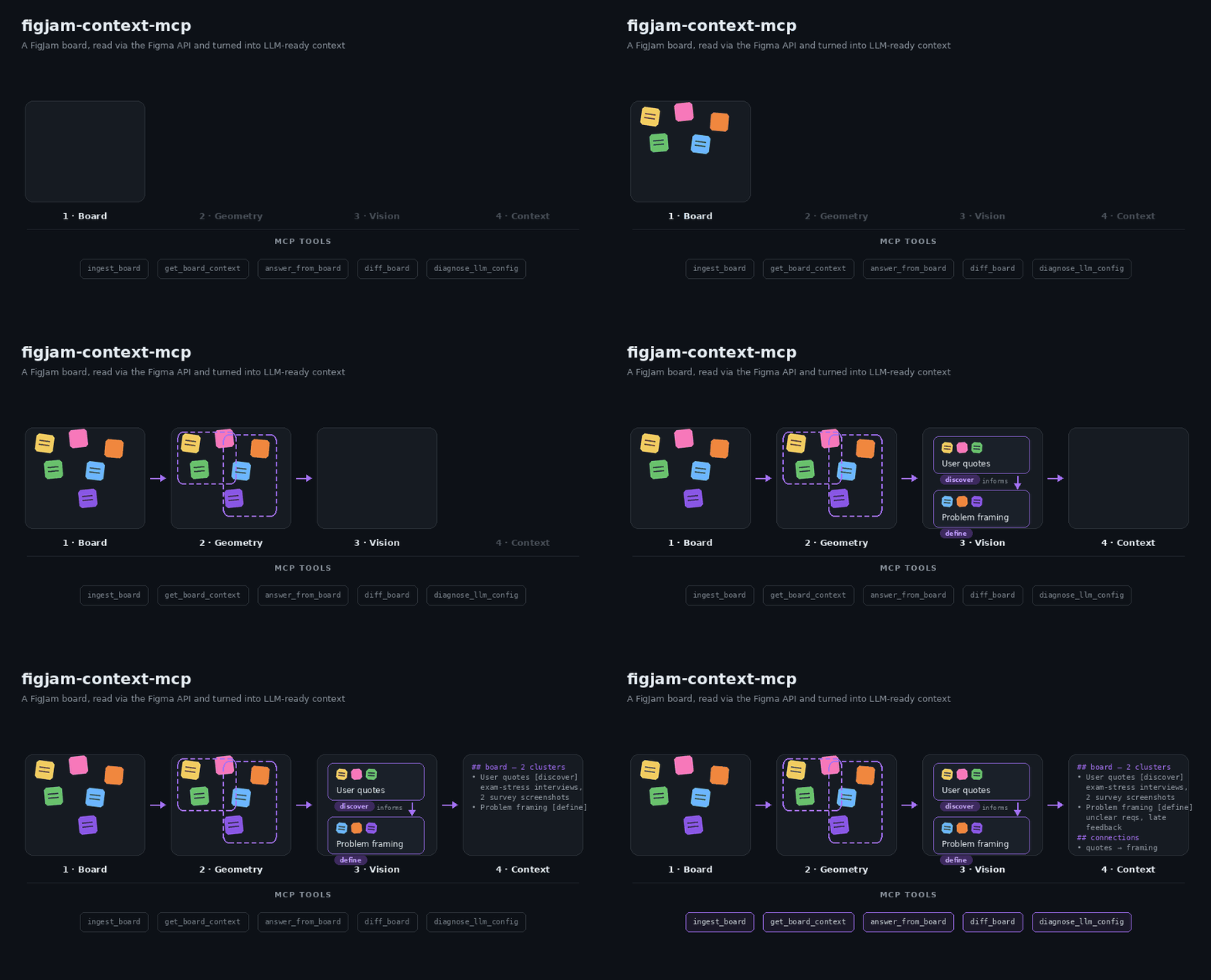
A local MCP server that turns FigJam boards into source-cited context for LLMs. It reads a board through the Figma REST API, groups stickies, tables, images and arrows into clusters, and answers questions with links back to the original nodes.
Why
Workshop boards hold research notes, decisions and open questions, but an LLM cannot read a canvas. Screenshots and PDF exports lose tables, arrow direction and the link to the source. This server keeps the board's structure and cites every answer to the nodes it came from.
Tools
| Tool | What it does | LLM call |
|---|---|---|
ingest_board | Reads a board, clusters it and saves a local snapshot. Re-ingests reuse unchanged clusters. | In balanced (default) and max_quality mode |
get_board_context | Returns paginated, source-linked context, optionally for a topic or exact node IDs. Use it for overviews, summaries and documentation. | No |
answer_from_board | Answers one specific question (a number, status or decision) from the most relevant excerpts, with node-level citations or an insufficient-evidence result. Not meant for whole-board summaries. | Yes |
diff_board | Compares two snapshots: new, removed and changed clusters, nodes, table cells and arrows. | No |
diagnose_llm_config | Tests the configured models with small text and image JSON checks. | Yes |
Quick start
Requires Node.js 22.12 or later.
- Create a Figma personal access token under Settings → Security → Personal
access tokens with the scope
file_content:read. Addfile_metadata:readso re-ingests of an unchanged board skip the download. The token's account needs access to the board. - Optional: create an OpenRouter key at
openrouter.ai/keys. It enables image
interpretation,
answer_from_boardanddiagnose_llm_config. Without it, useingestMode: "max_speed"withget_board_contextanddiff_board. - Add the server to your MCP client:
{
  "mcpServers": {
    "figjam-context": {
      "command": "npx",
      "args": ["-y", "figjam-context-mcp"],
      "env": {
        "FIGMA_ACCESS_TOKEN": "your-figma-token",
        "LLM_BASE_URL": "https://openrouter.ai/api/v1",
        "LLM_API_KEY": "your-openrouter-key"
      }
    }
  }
}
For Claude Code:
claude mcp add figjam-context -e FIGMA_ACCESS_TOKEN=your-figma-token -e LLM_BASE_URL=https://openrouter.ai/api/v1 -e LLM_API_KEY=your-openrouter-key -- npx -y figjam-context-mcp
Then ask your assistant to ingest a board URL, for example "Ingest
https://www.figma.com/board/FILE_KEY/Name and list the open questions."
The boardId of every later call is the file key from that URL.
All settings: configuration. Problems: troubleshooting.
How it works
- Read.
ingest_boarddownloads the board through the Figma REST API. If Figma reports the same version as the last ingest, the download is skipped. - Normalize. Nodes become text, table cells, images and connectors, with their pages and sections.
- Cluster. Nearby nodes are grouped by rotation-aware distance. Arrows between groups become directed relations.
- Interpret. In
balancedmode, clusters with images or little text get a vision-model summary within a 40-second budget; the rest keep their extracted text. Unfinished clusters continue on the next ingest. - Serve. The snapshot is saved to a private local cache.
get_board_contextsearches it (BM25 over original text, table cells and names),answer_from_boardanswers with citations anddiff_boardcompares snapshots.
Models and cost
The default preset student-free uses free OpenRouter models: text goes to
nvidia/nemotron-3-super-120b-a12b:free and then openrouter/free; images go to
openrouter/free, which picks a free model that accepts images and structured
outputs. The free default is best effort: free models change, hit rate limits
and time out.
- OpenRouter allows free models 20 requests per minute and 50 requests per day, or 1,000 per day once you have bought at least 10 credits (limits).
- Figma limits file downloads and image renders by seat and plan: Dev and Full
seats on paid plans get 10–20 requests per minute, View and Collab seats and
files in Starter plans at most 20 per month
(rate limits).
One render request covers up to 18 screenshots (about three clusters), so a
default ingest usually needs at most four;
max_speedneeds none. - For a team, configure your own model:
LLM_BASE_URLtakes any OpenAI-compatible endpoint, andLLM_TEXT_MODELS/LLM_VISION_MODELSset the model lists. - Run
diagnose_llm_configafter every model change. It checks JSON replies and image understanding with synthetic inputs.
Privacy
- The server reads from Figma and never changes a board.
balancedandmax_qualityingests send board text and screenshots to the configured LLM provider.answer_from_boardsends the question and selected excerpts.max_speedwithget_board_contextanddiff_boardsends nothing to an LLM provider.- Snapshots stay in a private per-user cache on your machine. Delete the cache directory to remove them.
- Explicit credentials such as
Passwort: …or API keys are redacted before they reach the cache, tool output or an LLM provider (FIGJAM_MCP_REDACT_CREDENTIALS). This is a safety net, not a guarantee: screenshots are not redacted, so keep credentials off the board. - Keep tokens in the client's environment. A token passed as a tool argument can appear in client logs.
Limitations
- Image interpretation gets 40 seconds per ingest by default; large boards need several ingests to interpret every image cluster.
- A client that cancels an ingest, for example after a 60-second timeout, gets no partial result.
- Free models are best effort. Citations show where an answer comes from, not that its conclusion is right.
- Search is lexical; synonyms without shared words do not match.
- Local stdio only; no hosted or multi-user mode.
Measured results: evaluation.
Development
git clone https://github.com/ecestnrkl/figjam-mcp.git
cd figjam-mcp
npm ci
cp .env.example .env    # add your tokens
npm run check           # typecheck, tests, build, package validation
npm run package:smoke   # install the packed package and exercise all tools
npm run eval:retrieval  # offline retrieval and diff evaluation
npx @modelcontextprotocol/inspector --config inspector.config.json
See CONTRIBUTING.md and the changelog.
License
MIT © 2026 ecestnrkl
Installation
Source-derived launch command. Check the maintainer’s required arguments and credentials before running:
npx -y figjam-context-mcpSet up in your AI client
Merge this template into ~/Library/Application Support/Claude/claude_desktop_config.json. Keep existing servers. Add any arguments, credentials, and permissions required by the maintainer; this template has not been install-tested.
{
  "mcpServers": {
    "io-github-ecestnrkl-figjam-mcp": {
      "command": "npx",
      "args": [
        "-y",
        "figjam-context-mcp"
      ]
    }
  }
}
Restart Claude Desktop completely for changes to take effect. Confirm the server appears connected in the client’s tool list, then try a read-only example from its documentation.
Claude Desktop setup referencePackage
figjam-context-mcpnpmCompatible MCP Clients
io.github.ecestnrkl/figjam-mcp works with any MCP-compatible client. Copy the config snippet from the Configuration section above and add it to the file shown for your client, then restart the application.
- Claude Desktop
~/Library/Application Support/Claude/claude_desktop_config.jsonRestart Claude Desktop completely for changes to take effect. - Cursor
~/.cursor/mcp.jsonRestart Cursor for changes to take effect. - VS Code
.vscode/mcp.jsonReload VS Code window for changes to take effect. - Windsurf
~/.codeium/windsurf/mcp_config.jsonRestart Windsurf for changes to take effect. - Claude Code
.mcp.jsonSave at the project root, then start Claude Code in that project and review the MCP server approval prompt. Keep real credentials out of shared files.