io.github.evidai/polymarket-guard
Polymarket prediction markets — buy/sell positions in USDC. LemonCake pay-per-call billing.
🍋 LemonCake
The billing, budget & identity layer for software for agents. Private Beta · Open core
Monetize any MCP/API in minutes, and let AI agents pay for it safely — each agent gets a spend-capped identity (budget, usage, pause/revoke). Buyers pay by card; no crypto wallet. First 3,000 calls free (lifetime). Then 3% only when your API earns.
-green.svg)






🚀 Get started · 💲 Pricing · 📚 Docs · 🌐 Live
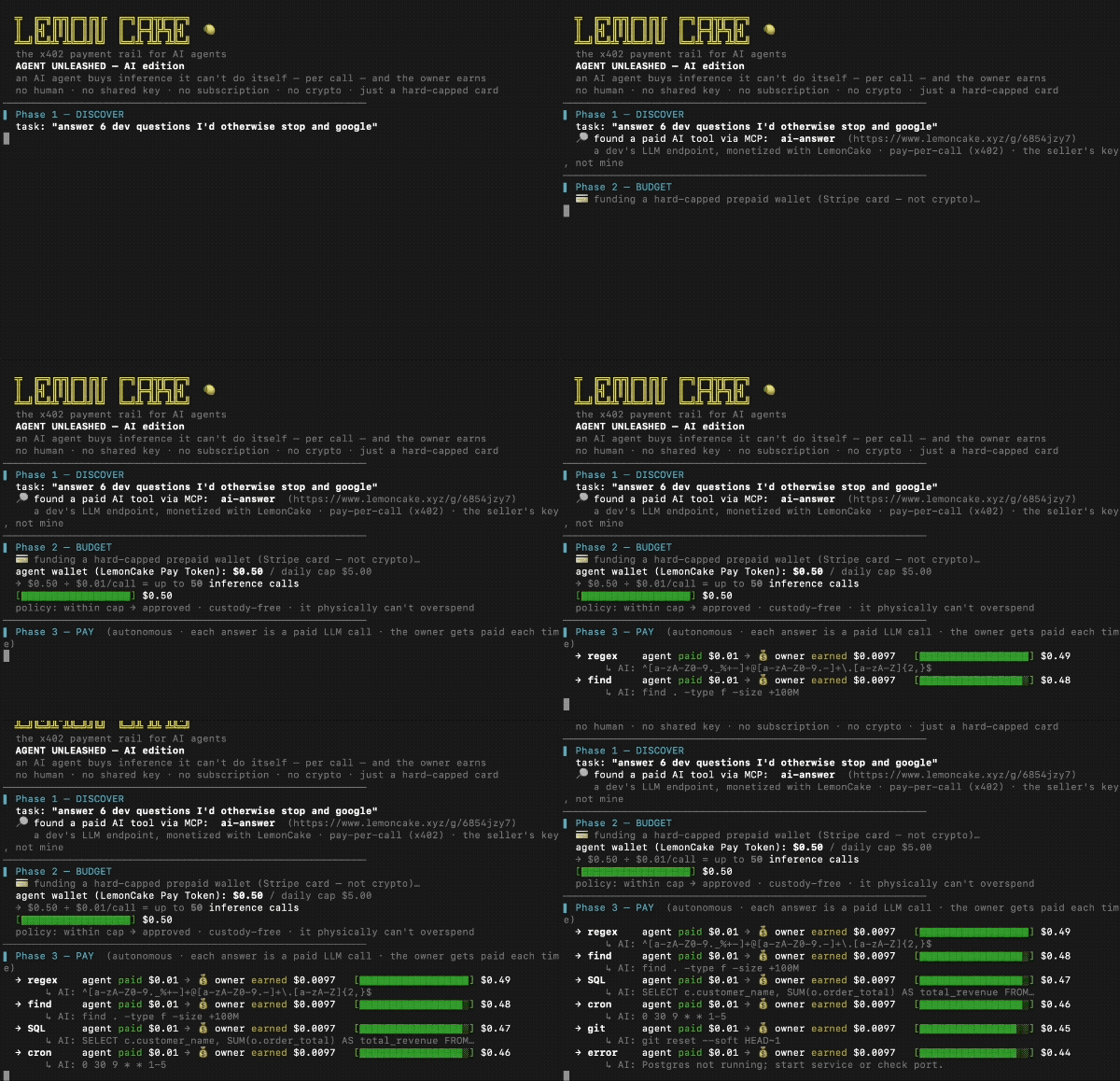
☝️ A real AI agent buys API calls by itself ($0.01 each), stops at its cap, and the API owner earns — no human, no crypto. · demo source
🚀 Get started
Monetizing an MCP/API? Start here — one command:
npx create-lemon-mcp my-paid-mcp     # a paid MCP server, running in sandbox now
# then add a Seller Key in /app and set LEMONCAKE_SELLER_KEY → it charges for real (no code change)
Pick your path:
| I want to… | Do this |
|---|---|
| Monetize my MCP/API (sellers) | npx create-lemon-mcp → add a Seller Key in /app to go live |
| Add billing to a server I already have | @lemon-cake/mcp-sdk — wrap a tool with lc.charge(), or route through the gateway (no code) |
| Let an agent pay for paid APIs (buyers) | npx -y agent-payment-mcp — 8 free demo tools, no signup |
Buyer-side MCP — try in 30 seconds
npx -y agent-payment-mcp
{ "mcpServers": { "lemon": { "command": "npx", "args": ["-y", "agent-payment-mcp"] } } }
Ask your agent to run list_demos / call_demo. To call paid APIs, set LC_PAY_TOKEN (get one at lemoncake.xyz/app).
What is LemonCake?
LemonCake is an x402 payment rail for monetizing MCP servers and HTTP APIs. Sellers register an endpoint and set a price per call. Buyers prepay by card and receive a spend-capped Pay Token. Agents call the gateway with that token, and LemonCake verifies, meters, forwards, and records usage.
sequenceDiagram
    participant A as 🤖 AI Agent
    participant G as 🍋 LemonCake Gateway
    participant API as Your API
    A->>G: POST /g/:id (no token)
    G-->>A: 402 + accepts[] (price, mintUrl)
    A->>G: mint Pay Token (off-session, capped)
    A->>G: Bearer :jwt
    G->>API: forward (upstream key hidden)
    API-->>A: 200 + result
    Note over A,G: budget exhausted → 402 → agent self-funds → continues
Sellers register any HTTP API and set a price per call. Buyers / agents prepay with a card → Pay Token issued automatically → agent calls the API within budget. Budget exhausted → 402 challenge → agent self-funds → continues. No humans.
🧱 Open core
| Layer | Status | Where |
|---|---|---|
Buyer-side MCP (agent-payment-mcp) | ✅ MIT | npm, src |
Seller SDK (@lemon-cake/mcp-sdk) | ✅ MIT | npm, src |
| Starter templates | ✅ MIT | examples/ |
| Docs site | ✅ Public | lemoncake.xyz/docs |
| Gateway + billing engine | 🔒 Hosted | lemoncake.xyz |
| Dashboard (analytics, usage ledger) | 🔒 Hosted | lemoncake.xyz/app |
💳 How payment works
For buyers (human or agent)
- Open a buy link (
lemoncake.xyz/buy/<shortId>) - Pay with a card → Pay Token (JWT) issued automatically
- Pass
Authorization: Bearer <token>to the gateway - Gateway verifies, meters, forwards to the real API
- Budget exhausted → 402 challenge returned with payment instructions
For agents (fully autonomous)
- Issue a Buyer Key (
bk_...) at /app → Pay Tokens pane - Save a card once at /agent/fund
- Agent calls
POST /api/lc/agent/tokens(Bearer bk_) → off-session card charge → JWT - Agent uses JWT to call gateway — hard-capped, no human in the loop
// MCP config for agent with pre-issued Pay Token
{
  "mcpServers": {
    "lemon": {
      "command": "npx",
      "args": ["-y", "agent-payment-mcp"],
      "env": {
        "LC_PAY_TOKEN": "<jwt from Pay Token>"
      }
    }
  }
}
🏗 Publish your API on LemonCake (sellers)
Monetize any HTTP API or MCP server:
- Sign in at lemoncake.xyz/app
- Add API — paste your URL, set price per call (e.g.
$0.01) - Share the buy link, or issue a Seller Key (
sk_live_…) to charge from your own server - You keep 97%. LemonCake takes 3% (Stripe Connect Direct Charge). Never holds funds.
Scaffold a paid MCP in one command — sandbox by default, production with one env var:
npx create-lemon-mcp my-paid-mcp     # demo runs with no key
# then: set LEMONCAKE_SELLER_KEY=sk_live_… → it charges for real (no code change)
Add billing to any tool with the SDK (@lemon-cake/mcp-sdk v1, no crypto):
import { createLemonCakeSDK } from "@lemon-cake/mcp-sdk";

const lc = createLemonCakeSDK();   // reads LEMONCAKE_SELLER_KEY (demo without it)

server.tool("my_premium_tool", "desc", { q: z.string() },
  lc.charge({ price: 0.01 })(async ({ q }) => {
    return { content: [{ type: "text", text: "result" }] };
  }),
);
lc.charge wraps the handler: preflight (reserve) → run → settle (confirm on success, refund on failure). Or route existing traffic through https://lemoncake.xyz/g/<shortId> — no code changes required.
🪪 Agent Identity
Give each AI agent its own spend-capped identity — so a fleet can pay for APIs without a shared card or runaway cost. Built on top of Pay Tokens; no balance pool, custody-free (an agent's "budget" is just the Pay Tokens bound to it).
- Bind a Pay Token to an agent when issuing it (
agentId) → spend is attributed to that agent. - Per-agent rollup — budget, spend, calls, last-used in the dashboard.
- Kill switch —
pause/resume/revokean agent; bound tokens are rejected at the gateway instantly (AGENT_PAUSED/AGENT_REVOKED), even with budget remaining. - Server-authoritative — price is set on the endpoint; agents never carry a card or a seller key.
# manage agents (owner-authenticated)
POST /api/agents            # create  → { agent_id, ... }
POST /api/agents/:id/pause  # kill switch (also /resume, /revoke)
GET  /api/agents            # list + per-agent spend rollup
✨ Features
For agents / buyers
- ✅ x402 native — 402 challenge returns
accepts[]with price + mintUrl - ✅ Hard-capped — per-mint / daily / monthly limits, server-enforced
- ✅ Off-session top-up — agent self-funds via Buyer Key (
bk_...), no prompts - ✅ Demo Mode — 8 free tools, try without any setup
For API providers / sellers
- ✅ 5-min go-live —
npx create-lemon-mcp, orlc.charge()on any tool, or route through the gateway - ✅ Custody-free — Stripe Connect Direct Charge, 97% goes directly to seller
- ✅ Usage ledger — every call recorded, revenue visible in dashboard
- ✅ Buy link — share one URL, buyers self-serve
For agent fleets / operators
- ✅ Per-agent identity — bind Pay Tokens to an agent, attribute spend
- ✅ Per-agent kill switch — pause / resume / revoke, enforced at the gateway
- ✅ Spend rollup — budget / spent / calls per agent
- ✅ No balance pool — custody-free; budget = the agent's bound Pay Tokens
Infrastructure
- 🔧 Stripe Connect Direct Charge (no custody)
- 🔧 x402 gateway with
WWW-Authenticate: Lemoncake-Prepaid - 🔧 EN / 日本語 / Español dashboard
- 🔧 JP FSA: registration not required (confirmed 2026-06)
🏗 Architecture
┌─────────────────────────────────────────────────┐
│  Buyer / Agent                                  │
│   ↳ prepays via card OR Buyer Key (bk_...)      │
│   ↳ receives Pay Token (signed JWT)             │
└──────────────────────┬──────────────────────────┘
                       │  Authorization: Bearer <jwt>
                       ▼
┌─────────────────────────────────────────────────┐
│  LemonCake Gateway  /g/<shortId>                │
│   ↳ verify JWT signature                        │
│   ↳ check budget + calls + rate limit           │
│   ↳ decrement spend, write to ledger            │
└──────────────────────┬──────────────────────────┘
                       │  HTTPS + upstream_auth (hidden)
                       ▼
┌─────────────────────────────────────────────────┐
│  Your API / MCP server (unchanged)              │
└─────────────────────────────────────────────────┘
LemonCake is the middle box. It never holds funds — money flows Stripe → seller via Direct Charge.
🌍 Compliance
Japan FSA Fintech Support Desk (2026-06) confirmed: no registration required. Custody-free design (Stripe Connect Direct Charge, no pooled balance).
| Jurisdiction | Basis |
|---|---|
| 🇯🇵 Japan | FSA — registration not required |
| 🇺🇸 USA | FinCEN 2019 §4.5 — non-custodial software ≠ MSB |
| 🇪🇺 EU | MiCA — non-CASP |
| 🇬🇧 UK | FCA — Tech Service Provider |
| 🇸🇬 Singapore | MAS — DPT non-applicable |
| 🇨🇦 Canada | FINTRAC — non-custodial exemption |
| 🇨🇭 Switzerland | FINMA — non-financial intermediary |
🔌 Package family
| Package | What it does |
|---|---|
agent-payment-mcp | Main entry — x402 gateway + agent payment rail |
@lemon-cake/mcp-sdk | Seller SDK — lc.charge() / lc.protect(), fiat, no crypto |
create-lemon-mcp | Scaffold a paid MCP server — sandbox→prod with one env var |
xstocks-mcp | Buy tokenized US stocks on Solana |
alpaca-guard-mcp | Alpaca paper / live trading with hard daily cap |
tokenized-stock-mcp | Dinari dShares |
🛡 Security
- Server-side hard caps — per-mint / daily / monthly, cannot be exceeded
- Pay Token = signed JWT — HS256, verified on every gateway call
- upstream_auth never exposed — seller's real API key hidden from buyers
- RLS on all DB tables — Supabase row-level security enabled
- Stripe Connect Direct Charge — LemonCake never holds funds
Installation
Source-derived launch command. Check the maintainer’s required arguments and credentials before running:
npx -y polymarket-guard-mcpSet up in your AI client
Merge this template into ~/Library/Application Support/Claude/claude_desktop_config.json. Keep existing servers. Add any arguments, credentials, and permissions required by the maintainer; this template has not been install-tested.
{
  "mcpServers": {
    "io-github-evidai-polymarket-guard": {
      "command": "npx",
      "args": [
        "-y",
        "polymarket-guard-mcp"
      ]
    }
  }
}
Restart Claude Desktop completely for changes to take effect. Confirm the server appears connected in the client’s tool list, then try a read-only example from its documentation.
Claude Desktop setup referencePackage
polymarket-guard-mcpnpmCompatible MCP Clients
io.github.evidai/polymarket-guard works with any MCP-compatible client. Copy the config snippet from the Configuration section above and add it to the file shown for your client, then restart the application.
- Claude Desktop
~/Library/Application Support/Claude/claude_desktop_config.jsonRestart Claude Desktop completely for changes to take effect. - Cursor
~/.cursor/mcp.jsonRestart Cursor for changes to take effect. - VS Code
.vscode/mcp.jsonReload VS Code window for changes to take effect. - Windsurf
~/.codeium/windsurf/mcp_config.jsonRestart Windsurf for changes to take effect. - Claude Code
.mcp.jsonSave at the project root, then start Claude Code in that project and review the MCP server approval prompt. Keep real credentials out of shared files.