io.github.fernandoludvig/rdstation-crm-mcp
Manage RD Station CRM contacts, deals, tasks and notes, with pipeline health reports
rdstation-crm-mcp


An open-source MCP server for RD Station CRM — the leading CRM in Brazil and Latin America. Manage contacts, deals, tasks and notes, and get pipeline health reports, straight from Claude or any MCP-compatible client.
"How's my sales pipeline this month?" → stage-by-stage totals, win rate, and the deals going stale.
Why
RD Station CRM is huge in the LatAm market, but had no open-source MCP server. This project connects it to the MCP ecosystem so AI agents can work your pipeline: qualifying leads, moving deals, scheduling follow-ups, and answering questions about your sales data in natural language.
Quick start
- Get your instance token in RD Station CRM: Profile → Products and integrations → Instance token.
- Add the server to your MCP client.
Claude Desktop (claude_desktop_config.json):
{
  "mcpServers": {
    "rdstation-crm": {
      "command": "npx",
      "args": ["-y", "rdstation-crm-mcp"],
      "env": {
        "RDSTATION_CRM_TOKEN": "your-instance-token"
      }
    }
  }
}
Claude Code:
claude mcp add rdstation-crm -e RDSTATION_CRM_TOKEN=your-instance-token -- npx -y rdstation-crm-mcp
That's it. Ask Claude something like "list my open deals" or "give me a pipeline overview".
Tools
| Tool | Description |
|---|---|
rdcrm_search_contacts | Search contacts by name, email or phone |
rdcrm_get_contact | Contact details, including linked deals |
rdcrm_upsert_contact | Create a contact, or update it if the email already exists |
rdcrm_list_deals | List deals filtered by status, pipeline, stage, owner, dates |
rdcrm_get_deal | Deal details: stage, value, owner, contacts, products |
rdcrm_create_deal | Create a deal — accepts stage by name, resolved automatically |
rdcrm_update_deal | Move stage, change owner, rating, close date, pause/resume |
rdcrm_close_deal | Mark won or lost (lost reasons resolved by name) |
rdcrm_list_tasks | List tasks by deal, assignee, status, type, due date |
rdcrm_create_task | Create a task (call, email, meeting, whatsapp...) on a deal |
rdcrm_add_note | Add a note to a deal's timeline |
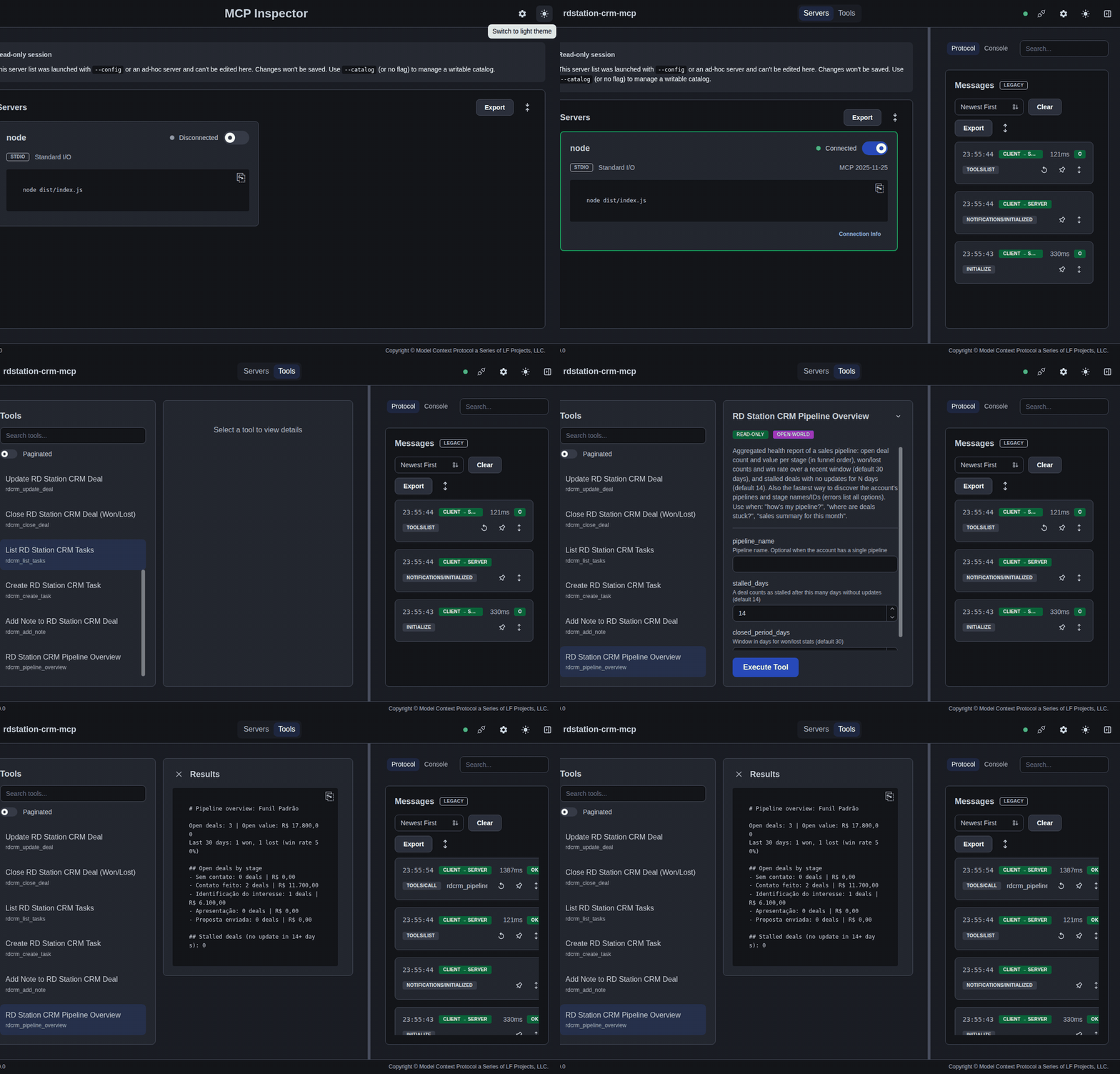
rdcrm_pipeline_overview | Pipeline health report: totals per stage, win rate, stalled deals |
Design notes
These tools are designed for LLMs, not as a 1:1 API wrapper:
- Names instead of IDs. Stages, pipelines, users and lost reasons can be passed by name; the server resolves them against the account and lists the valid options when something doesn't match.
- Compact responses. List tools return one line per record with the fields that matter, plus explicit pagination hints. Large responses are truncated with guidance instead of flooding the context window.
- Actionable errors. A 401 tells you which env var to check; an unknown stage lists every stage in every pipeline.
- Aggregation where it counts.
rdcrm_pipeline_overviewanswers the questions humans actually ask ("where are deals stuck?") with a single tool call.
Remote deployments (Streamable HTTP)
The default (rdstation-crm-mcp) runs over stdio for a single local user, with the token read once from RDSTATION_CRM_TOKEN. For a team-hosted or registry-listed deployment (e.g. Smithery), run the Streamable HTTP variant instead:
npx -y rdstation-crm-mcp-http
This starts an HTTP server (http://127.0.0.1:8080/mcp by default) implementing the MCP Streamable HTTP transport, with proper session lifecycle (initialize → Mcp-Session-Id → DELETE to close).
Because a hosted server can serve more than one user, there's no single implicit token: each session sends its own Authorization: Bearer <token> header on initialize. A RDSTATION_CRM_TOKEN env var still works as a fallback default for a single-tenant self-hosted setup where every caller shares one CRM account.
Env vars:
| Var | Default | Purpose |
|---|---|---|
PORT | 8080 | Port to listen on |
HOST | 127.0.0.1 | Bind address — use 0.0.0.0 for containers/cloud |
ALLOWED_HOSTS | (unset) | Comma-separated Host header allow-list (DNS-rebinding guard); recommended when binding to 0.0.0.0 without a reverse proxy in front |
RDSTATION_CRM_TOKEN | (unset) | Default token used when a session sends no Authorization header |
curl http://127.0.0.1:8080/health
# {"status":"ok","server":"rdstation-crm-mcp","sessions":0}
Development
git clone https://github.com/fernandoludvig/rdstation-crm-mcp.git
cd rdstation-crm-mcp
npm install
npm test              # unit tests (API mocked with msw)
npm run typecheck
npm run build
RDSTATION_CRM_TOKEN=xxx npx @modelcontextprotocol/inspector node dist/index.js
The HTTP layer (src/client/) is isolated from the tools, with retry and exponential backoff for 429/5xx built in.
Roadmap
- Organizations and products tools
- RD Station CRM API v2 support (OAuth) behind the same tool surface
- Streamable HTTP transport for remote deployments
- Publish to MCP registries (Glama, PulseMCP, Smithery)
Contributions welcome — open an issue first for anything non-trivial.
License
MIT © Fernando Ludvig
Not affiliated with or endorsed by RD Station. Uses the public RD Station CRM API v1.
Installation
Source-derived launch command. Check the maintainer’s required arguments and credentials before running:
npx -y rdstation-crm-mcpSet up in your AI client
Merge this template into ~/Library/Application Support/Claude/claude_desktop_config.json. Keep existing servers. Add any arguments, credentials, and permissions required by the maintainer; this template has not been install-tested.
{
  "mcpServers": {
    "io-github-fernandoludvig-rdstation-crm-mcp": {
      "command": "npx",
      "args": [
        "-y",
        "rdstation-crm-mcp"
      ]
    }
  }
}
Restart Claude Desktop completely for changes to take effect. Confirm the server appears connected in the client’s tool list, then try a read-only example from its documentation.
Claude Desktop setup referencePackage
rdstation-crm-mcpnpmCompatible MCP Clients
io.github.fernandoludvig/rdstation-crm-mcp works with any MCP-compatible client. Copy the config snippet from the Configuration section above and add it to the file shown for your client, then restart the application.
- Claude Desktop
~/Library/Application Support/Claude/claude_desktop_config.jsonRestart Claude Desktop completely for changes to take effect. - Cursor
~/.cursor/mcp.jsonRestart Cursor for changes to take effect. - VS Code
.vscode/mcp.jsonReload VS Code window for changes to take effect. - Windsurf
~/.codeium/windsurf/mcp_config.jsonRestart Windsurf for changes to take effect. - Claude Code
.mcp.jsonSave at the project root, then start Claude Code in that project and review the MCP server approval prompt. Keep real credentials out of shared files.