io.github.frsorrentino/chrome-bridge
Borrow a tab from your own logged-in Chrome, hand it back; 2FA and CAPTCHA stay yours. 66 tools.
Chrome Bridge
By frsorrentino · npm
chrome-bridge-mcp· not affiliated with other projects named "chrome-bridge".




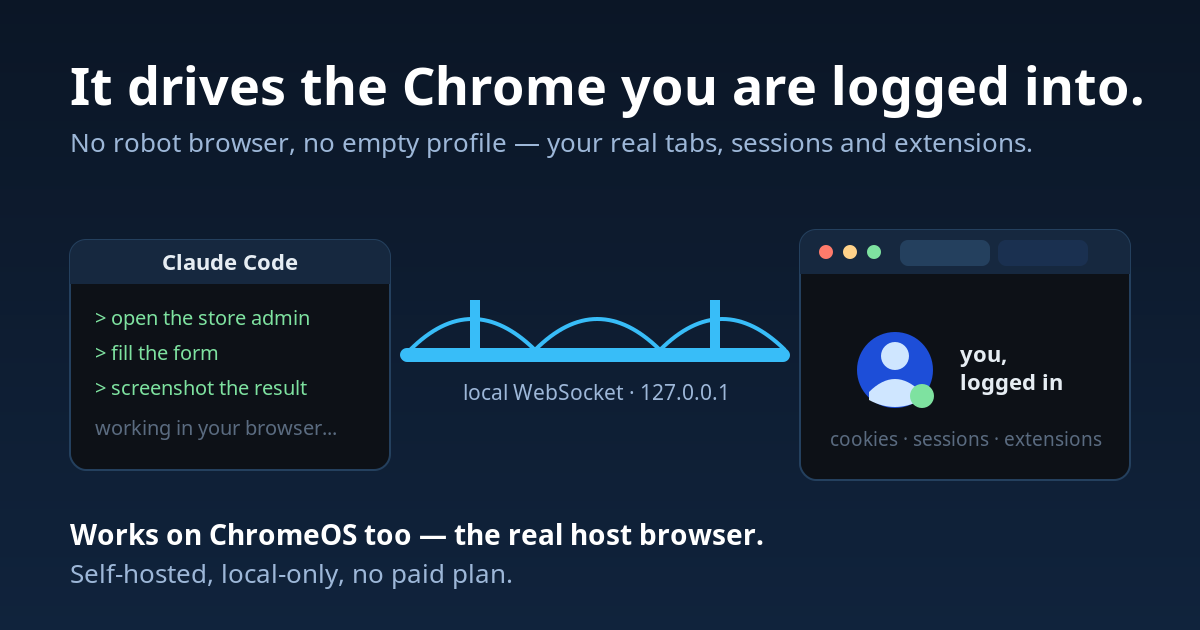
Claude Code borrows a tab from the Chrome you are already using — signed in,
with your extensions and your cookies — works in it, and hands it back. What
only a person can do (a login, a 2FA code, a CAPTCHA, a choice) comes back to
you through handoff: a banner in the page, you act, the agent continues.
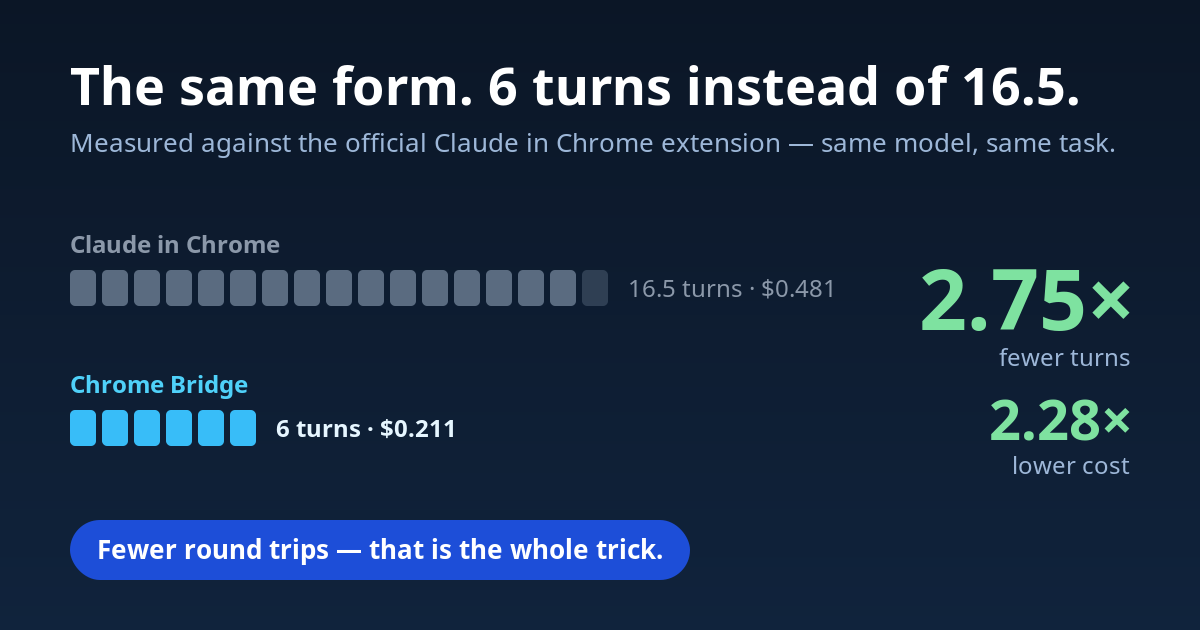
Measured against the official browser extension (paired runs, 29/09/2026, n=5 per task, same model): filling a form, 4.7× fewer turns and 2.8× lower cost; finding one row in a 1,500-row table, 2.3× fewer turns and 3.4× lower cost; debugging a broken page, 9.3× fewer turns and 4.3× lower cost. 15 correct answers out of 15, against 12 (bench/RESULTS.md). ~3× the toolset and no paid plan. 60 web-development tools (navigation, DOM inspection, visual regression, audits, network mocking) over a local WebSocket bridge, plus a headless instance for CI. Self-hosted, local-only. Works on ChromeOS.
Quickstart
Requires Node.js 18+ and Chrome 135+.
git clone git@github.com:frsorrentino/chrome-bridge.git
cd chrome-bridge && ./install.sh
- Open
chrome://extensions, enable Developer mode, click Load unpacked, select theextension/folder. - Restart Claude Code.
Then ask for something like "open localhost:3000, run an accessibility audit
and find the Sign Up button": Claude Code calls navigate,
audit and find_text. Because navigate already returns
element refs, click(ref="n1") follows with no discovery turn in between.
On ChromeOS/Crostini install from the Chrome Web Store instead: an unpacked extension is dropped on every reboot, because the container isn't mounted when Chrome starts.
On Windows
install.shdoes not run from PowerShell or cmd. Use the plugin path below (claude plugin marketplace add frsorrentino/chrome-bridge, thenclaude plugin install chrome-bridge@chrome-bridge) with the extension from the Web Store, or runinstall.shfrom Git Bash. The plugin's error log hooks run in Git Bash, as Claude Code runs every hook, and need Python 3.8+ aspython3,pythonorpy(the Microsoft Storepython3alias is skipped); without Python they stay silent and the tools work the same. For launch mode seeCHROME_BRIDGE_BROWSERbelow: Google Chrome cannot load the extension there, Microsoft Edge can.
install.sh registers the MCP server with --scope user. To do it by hand:
claude mcp add --scope user chrome-bridge node /path/to/server/index.js.
For execute_js, enable Allow user scripts in chrome://extensions →
Chrome Bridge → Details (on Chrome 135-137, enable Developer Mode instead).
As a plugin, without a clone: inside a Claude Code session,
/plugin install chrome-bridge --marketplace frsorrentino/chrome-bridge
(one command, Claude Code 2.1.275+; on older versions /plugin marketplace add frsorrentino/chrome-bridge then /plugin install chrome-bridge@chrome-bridge).
From a shell, claude plugin install has no --marketplace option: run
claude plugin marketplace add frsorrentino/chrome-bridge, then
claude plugin install chrome-bridge@chrome-bridge. Either way the plugin
registers the MCP server from npm (all capabilities) together with the recipes
skill; clients that read Agent Plugins 1.0 get the
same from plugin.json + mcp.json. The extension still comes from the Web
Store or extension/. Pick one path: the plugin and install.sh would
register the same server twice, and so would a plugin added from the
Anthropic directory on claude.ai (it reaches
Claude Code as chrome-bridge@synced) next to a marketplace install. In
claude.ai chat the plugin loads only the recipes skill: the tools need Claude
Code, or Cowork running on your computer, where the local MCP server can start.
Your browser, your login
No blank profile, no debugging port, no cloud browser. The extension runs in your Chrome, so every site you are signed into is already open to the agent: webmail, the hosting panel, a client's back office, a staging site behind basic auth. Tabs the agent opens are marked as its own and closed when the session ends; your tabs stay yours.
When a page asks for something only you can give, the agent does not guess and
never types credentials. handoff shows a banner in the page with what it
needs — "complete the login with your 2FA, then press Done", "click the button
you mean" — waits for you, and continues from where you left it, redirects
included. It can also ask a question in the banner and read your typed reply,
or let you pick one or more elements on the page.
Why Chrome Bridge?
| Chrome Bridge | Claude in Chrome | Chrome DevTools MCP | Playwright MCP | |
|---|---|---|---|---|
| ChromeOS / Crostini | Yes (real host) | No | Container only | Container only |
| Tools | 60 (43 core) | 22 | 29 default (56 with flags) | 24 core (71 total) |
| Requires paid plan | No | Yes (Pro+) | No | No |
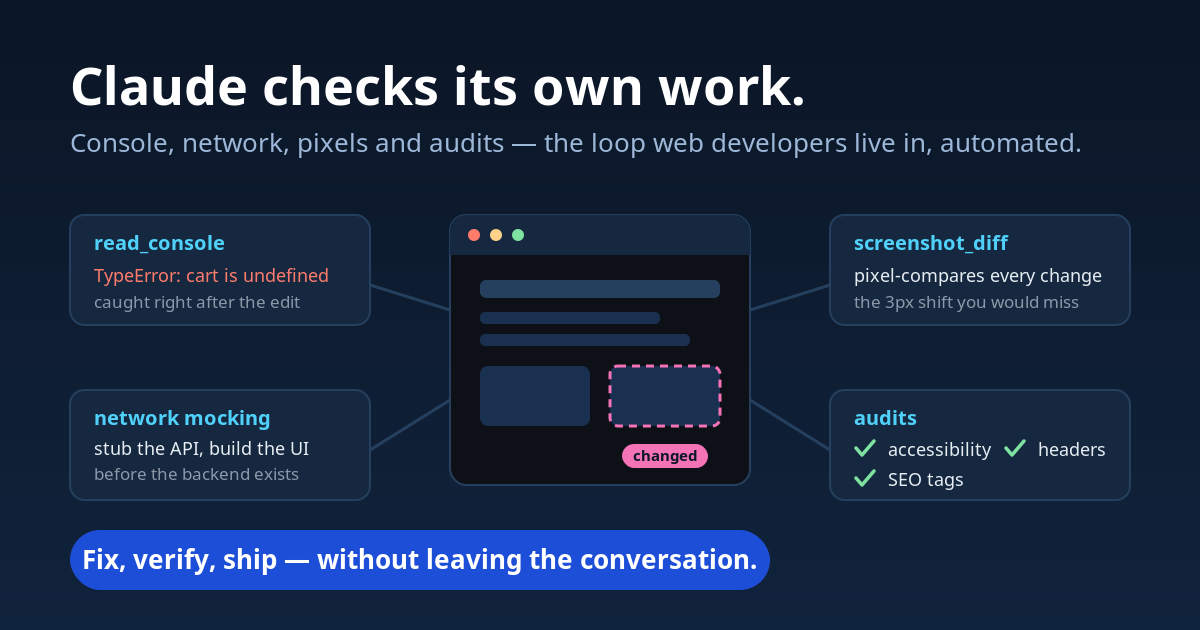
| Network mocking | Yes (stub/headers) | No | No | Yes |
| Visual regression | Yes (screenshot_diff) | No | No | No |
| Audits (a11y/SEO/sec) | Yes (one call, report on disk) | No | Lighthouse | No |
| Headless / CI | Yes | No | Yes | Yes |
| GIF / video | No | Yes | Partial | No |
| Breakpoints / heap | No | No | Yes | No |
Codex for Chrome (OpenAI, May 2026) sits in the Claude in Chrome column: an
official extension with the debugger permission, macOS and Windows only,
the ChatGPT app required. Claude in Chrome documents Linux desktop since
September 2026; ChromeOS and WSL stay out. Competitor figures measured on
2026-09-01 and 2026-09-11 (docs/analisi-2026-09-11-concorrenti.md).
It wins on round trips — short element refs instead of the
screenshot-and-click loop, fill_form filling N fields in one call — and, on
big pages, on payload: table filtering is done server-side. On the form, per single turn it actually costs
slightly more.
The full benchmark — method, every raw run including the unfavourable ones, and what the harness can't measure — is in docs/EFFICIENCY.md.
Using it
The skill in skills/chrome-bridge/SKILL.md
is what makes the tools discoverable: recipes with the phrase that triggers
each one ("verify the email arrives", "test the checkout with a test card",
"which plugin slows the page", "what fires before consent"), the tool sequence,
and the zero-token CLI commands the model would otherwise never see.
install.sh copies it to ~/.claude/skills/chrome-bridge; do the same by
hand for other clients.
Beyond the MCP tools, two lanes keep work away from the model entirely.
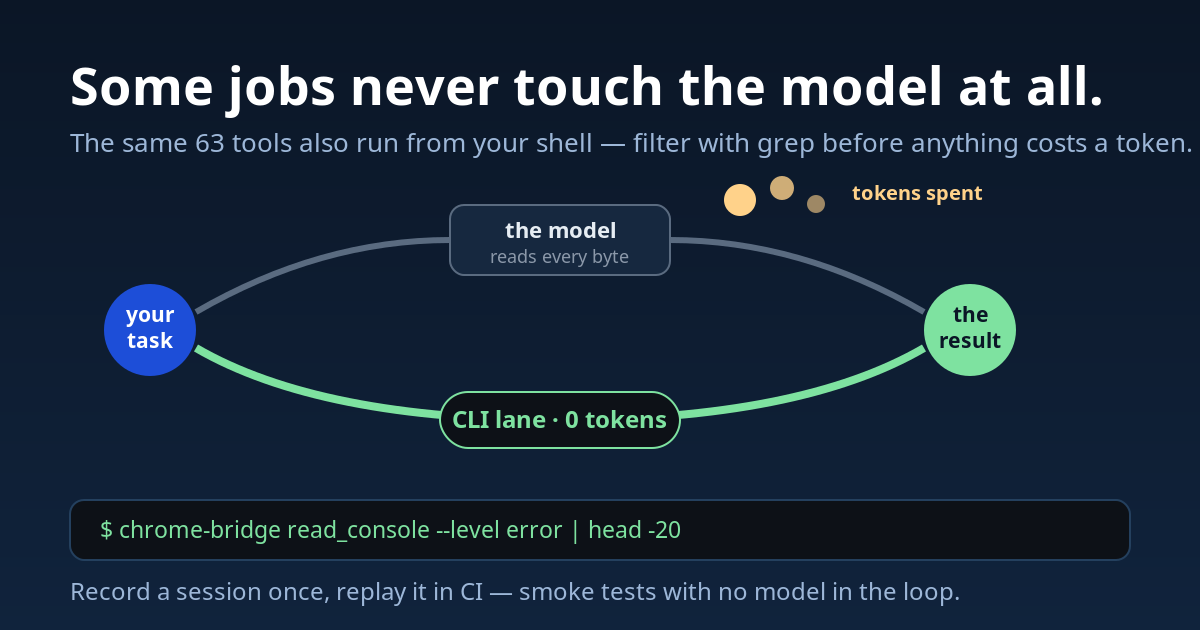
CLI — batch operations, piped through grep or jq before anything reaches
the context:
chrome-bridge navigate --url https://example.com
chrome-bridge read_console --level error | head -20
chrome-bridge assert --selector "#success" --text "Done"
chrome-bridge replay --file ./recordings/login.jsonl
Launch mode — a dedicated Chromium instance with an ephemeral profile, for isolated sessions or CI:
node server/index.js --launch --headless
It looks for Chromium, Microsoft Edge, Brave and last Google Chrome in their
standard paths on Linux, macOS and Windows; CHROME_BRIDGE_BROWSER picks
another binary. Google Chrome 137+ ignores --load-extension, so the
extension never connects in it: use Chromium, Edge, Brave or Chrome for
Testing.
Pair it with session_record + replay for smoke tests with no model in the
loop. In launch mode execute_js falls back to new Function when the
user-script toggle isn't available.
Tools
60 in total. core (43 tools, every tool used in 101 real sessions) loads by
default; the other 17 sit in six optional caps that the agent switches on
mid-session with get_status({enable: ["visual"]}), with no restart
(--caps still sets them at startup).
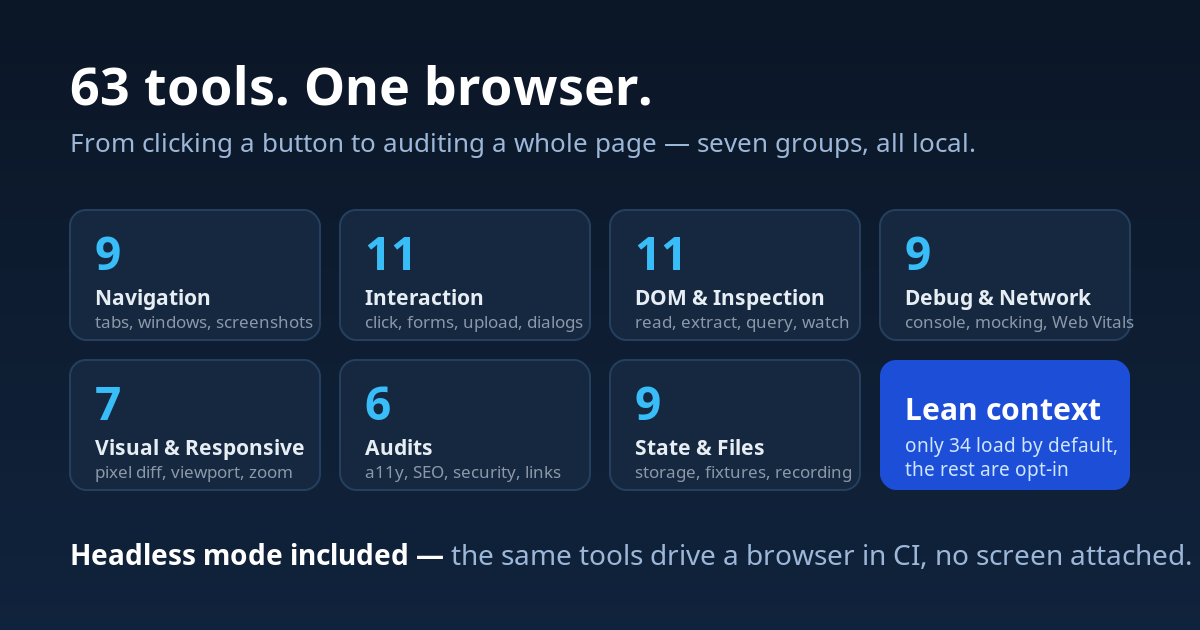
| Group | N | What's in it |
|---|---|---|
| Core & Navigation | 13 | tabs, windows, navigate, screenshot, tile_windows |
| Interaction | 11 | click, fill_form, upload_file, dialogs, clipboard |
| DOM & Inspection | 11 | read_page, extract, query_dom, get_css_styles, watch_dom |
| Debugging & Network | 8 | execute_js, console, network log, mocking, track_events |
| Visual & Responsive | 5 | screenshot_diff, viewport and zoom, media emulation |
| Audits | 2 | audit (a11y, keyboard, SEO, security, links, vitals, css, resources, cache in one call), cookie_audit |
| State, Storage & Files | 9 | storage, fixtures, MHTML, recording, assert |
Every tool, with the notes that matter: docs/TOOLS.md.
How it works
Claude Code  <--stdio-->  MCP Server  <--WebSocket :8765-->  Chrome Extension
                          (server/)                          (extension/, MV3)
The Node.js server handles the protocol and tool logic; the MV3 extension
executes commands through Chrome APIs. User scripts (execute_js) run via
chrome.userScripts.execute().
Configuration and security
Environment variables, each with a matching CLI flag:
| Variable | Default | Notes |
|---|---|---|
CHROME_BRIDGE_PORT | 8765 | |
CHROME_BRIDGE_HOST / --host | 127.0.0.1 | 0.0.0.0 only where the browser lives outside the container (ChromeOS/Crostini port-forward) — and only with a token |
CHROME_BRIDGE_TOKEN | unset | Required on both ext_init and relay_init. Strongly recommended whenever the bind isn't loopback |
CHROME_BRIDGE_CAPS / --caps | core | core, audits, visual, network, storage, dom, files, all. Optional caps can also be switched on at runtime with get_status({enable}) |
CHROME_BRIDGE_NO_JS / --no-js | unset | No arbitrary JavaScript in the page: execute_js and modify_dom leave the schema, wait_for(condition=function) and javascript:/data: URLs are refused. get_status reports js_evaluation |
CHROME_BRIDGE_READ_ROOT / --read-root | unset | Where upload_file may read from. Unset: any file except keys and credentials (~/.ssh, ~/.aws, ~/.gnupg, .env*, id_*, *.pem, *.key, …), symlinks resolved first. Set: only files under this directory, whatever their name — the way to upload a certificate key on purpose |
CHROME_BRIDGE_BROWSER | unset | Launch mode only: the browser binary, e.g. C:\Program Files (x86)\Microsoft\Edge\Application\msedge.exe. Unset: the first of Chromium, Edge, Brave, Google Chrome found in the standard paths (on Linux Chromium, then Google Chrome). Google Chrome 137+ cannot load the extension |
CHROME_BRIDGE_OBSERVE | unset | off stops the local error log below. The plugin sets hook: its hooks keep the log and the server stays out of it |
CHROME_BRIDGE_WRITE_ROOT / --write-root | unset | Every path the model chooses (save_to, output_path, exports) must be under this directory, checked before the browser does any work; the server's own state under ~/.config/chrome-bridge stays writable. The CLI is your shell and is not restricted |
The bridge binds loopback, accepts extension connections only from a
chrome-extension:// origin, and — when a token is set — requires it on both
handshakes. Without one, any local process could act as a relay and reach
execute_js inside your authenticated browser session. Secondary MCP instances
connect via loopback and are acknowledged with relay_init_ok, so a foreign
process holding the port fails fast instead of timing out per command.
What is not protected: page content reaches the model unfiltered, so a
hostile page's text is untrusted input. get_storage, session_fixture, HAR
exports and screenshots are not redacted and may carry cookies, tokens or
personal data. Don't point the automation at pages holding secrets you wouldn't
paste into a chat.
Threat model
chrome-bridge gives an AI agent your real, logged-in browser. Scanners that
rate MCP servers by capability flag it, correctly, for code execution
(execute_js), requests that carry your cookies (http_request) and reading
private page data (get_storage, get_tabs). Those are the product, not bugs.
What matters is who can reach them and what a hostile page can make the agent
do with them.
- Who can connect: see above — loopback bind,
chrome-extension://origin check,CHROME_BRIDGE_TOKENon both handshakes. - The real risk is prompt injection. A page can ask the agent to run JavaScript, send a request with your cookies, submit a form or upload a file. Treat every page you automate as untrusted input, and review what the agent proposes on sites that hold money or credentials.
- Reduce the surface:
--caps core(the default) exposes the smallest set;--no-jsremoves arbitrary JavaScript;--write-rootfences every path the model writes;upload_filerefuses keys and credentials, and--read-rootfences it to one directory. For sessions that matter, automate in a separate Chrome profile. --no-jsis not a sandbox:inject_cssstays, and CSS attribute selectors withurl()can leak attribute values to a remote host.- What leaves your machine is what the browser sends on the agent's behalf. chrome-bridge itself has no telemetry; the error log below stays local unless you approve an issue.
Local error log
When one of its own tools fails, chrome-bridge adds a line to a local file,
${XDG_STATE_HOME:-~/.local/state}/claude-observe/chrome-bridge.jsonl (mode
0600, in a 0700 folder), in the claude-observe
format (the plugin's copy is in observe/). With the plugin, a PostToolUseFailure hook writes it; with the npm
server alone, the server does. The same error seen again is one line with a
count.
- Kept: the tool name, the error text after scrubbing (your home folder
becomes
~; emails, URL queries, secrets and typed values are removed), the names of the parameters and the length of text values, the chrome-bridge version, the OS, the name of the working folder and of the Claude Code config folder. With the plugin, also the Claude Code and model versions, the session id and the names of the last three tools called. - Never kept: parameter values — no URLs, selectors, typed text or page content.
- Nothing leaves your computer unless you say yes. With the plugin, once
a few errors have piled up (or one has waited a few days, or one is marked
as a defect), a line at the end of a turn tells you so, and Claude may offer,
at a natural moment, to send them as one GitHub issue: it shows you the
anonymized text first, then asks with buttons (from your GitHub, or not now)
and sends only what you chose.
/chrome-bridge:observe senddoes the same on demand;list,markandaddread and triage the log. The server alone never sends or offers anything. - Security observations (a read or write outside the perimeter, a secret
exposed, unwanted code execution, data leaving the computer) never enter a
public issue:
/chrome-bridge:observe send --securityprepares a private vulnerability report for the maintainers, see SECURITY.md. - Turn it off:
{"enabled": false}in~/.config/claude-observe/config.json(every plugin that uses claude-observe), orCHROME_BRIDGE_OBSERVE=offfor the server. Keep the log but stop the offers:{"propose": false}.
Troubleshooting
| Symptom | Cause / fix |
|---|---|
Chrome extension not connected | Extension disabled, or its port differs from the server's. The error names the actual host/port; check them in the popup (⚙). |
| Port 8765 already in use | Expected: a second MCP session becomes a relay and shares the one bridge. Set CHROME_BRIDGE_PORT for a separate one. |
Port N is held by a process that is not chrome-bridge | Something else owns the port. Free it or change CHROME_BRIDGE_PORT. |
execute_js fails | Enable Allow user scripts in chrome://extensions → Chrome Bridge → Details (Chrome 138+; on 135-137 enable Developer Mode). |
read_console returns note=Instrumentation not loaded | The page was opened before the extension, "Capture console & metrics" is off, or the page isn't injectable (chrome://). Reload it. |
Screenshot times out, or image readback failed | A minimized or fully covered window stops producing frames; captures fail after 10 s. Bring the window forward. |
wait_for/scroll return page_hidden: true, pages stop updating | Same cause: Chrome does not render a hidden page and slows its timers (after a few minutes, to one wake-up per minute). get_page_info reports visibility. Bring the window on screen, or create_tab with new_window and bounds. |
screenshot presets says NOT APPLIED | Presets resize the window; they do not emulate a phone (no device pixel ratio, UA or touch). The window manager enforces a minimum width, and no window exceeds the screen (e.g. at most a 1536×686 viewport on a 1536×864 ChromeOS screen). For phone emulation or larger viewports use a headless browser. |
type_text returns mismatch: true | The field rejected the value. Events from an extension have isTrusted: false, and some widgets (date pickers, search boxes with tokenizers) discard them. Try mode: 'keys', then the site's own controls (the calendar buttons), or handoff. |
[media removed: request limit] instead of a screenshot | Written by the MCP client, not by the bridge: too many images in one request. Use save_to, or element_screenshot with region and a small scale. |
| Commands work, then stop | The MV3 service worker restarted and in-memory state (network log, diff baselines, HTTP auth) was reset. Re-run the monitoring call. |
| Extension dropped on every ChromeOS reboot | Install from the Web Store instead of Load unpacked. |
| Tool missing from the list | It's in an opt-in group. Check get_status → caps_available, then set CHROME_BRIDGE_CAPS=all. |
Documentation
- docs/TOOLS.md — all 60 tools, by group
- docs/CAPABILITIES.md — what the bridge gets past and what it does not, one dated state per wall
- docs/EFFICIENCY.md — the benchmark and the design behind it
- docs/PERFORMANCE.md — latency per tool on the real path,
npm run bench:latency - bench/RESULTS.md — raw runs and inclusion rule
- CHANGELOG.md
Tests
npm test (Chrome-free, ~22s) · npm run test:e2e (needs Chrome and a
connected extension; with a bridge already on 8765:
CHROME_BRIDGE_PORT=8799 node test/test-devtools.js --launch, which opens
its own Chromium with extension/) · npm run measure (schema cost) ·
npm run bench:latency (milliseconds per tool, launches its own Chromium,
writes docs/PERFORMANCE.md).
License
MIT
Installation
Source-derived launch command. Check the maintainer’s required arguments and credentials before running:
npx -y chrome-bridge-mcpSet up in your AI client
Merge this template into ~/Library/Application Support/Claude/claude_desktop_config.json. Keep existing servers. Add any arguments, credentials, and permissions required by the maintainer; this template has not been install-tested.
{
  "mcpServers": {
    "io-github-frsorrentino-chrome-bridge": {
      "command": "npx",
      "args": [
        "-y",
        "chrome-bridge-mcp"
      ]
    }
  }
}
Restart Claude Desktop completely for changes to take effect. Confirm the server appears connected in the client’s tool list, then try a read-only example from its documentation.
Claude Desktop setup referencePackage
Compatible MCP Clients
io.github.frsorrentino/chrome-bridge works with any MCP-compatible client. Copy the config snippet from the Configuration section above and add it to the file shown for your client, then restart the application.
- Claude Desktop
~/Library/Application Support/Claude/claude_desktop_config.jsonRestart Claude Desktop completely for changes to take effect. - Cursor
~/.cursor/mcp.jsonRestart Cursor for changes to take effect. - VS Code
.vscode/mcp.jsonReload VS Code window for changes to take effect. - Windsurf
~/.codeium/windsurf/mcp_config.jsonRestart Windsurf for changes to take effect. - Claude Code
.mcp.jsonSave at the project root, then start Claude Code in that project and review the MCP server approval prompt. Keep real credentials out of shared files.