skillkit
Toolbox for AI agent skills: scaffold, lint, pack, install, and serve SKILL.md skills
skillkit






The toolbox for AI agent skills. Scaffold, lint, pack, and install SKILL.md skills — and serve your whole skill library to Claude Code, Cursor, and any MCP client with a built-in Model Context Protocol server.
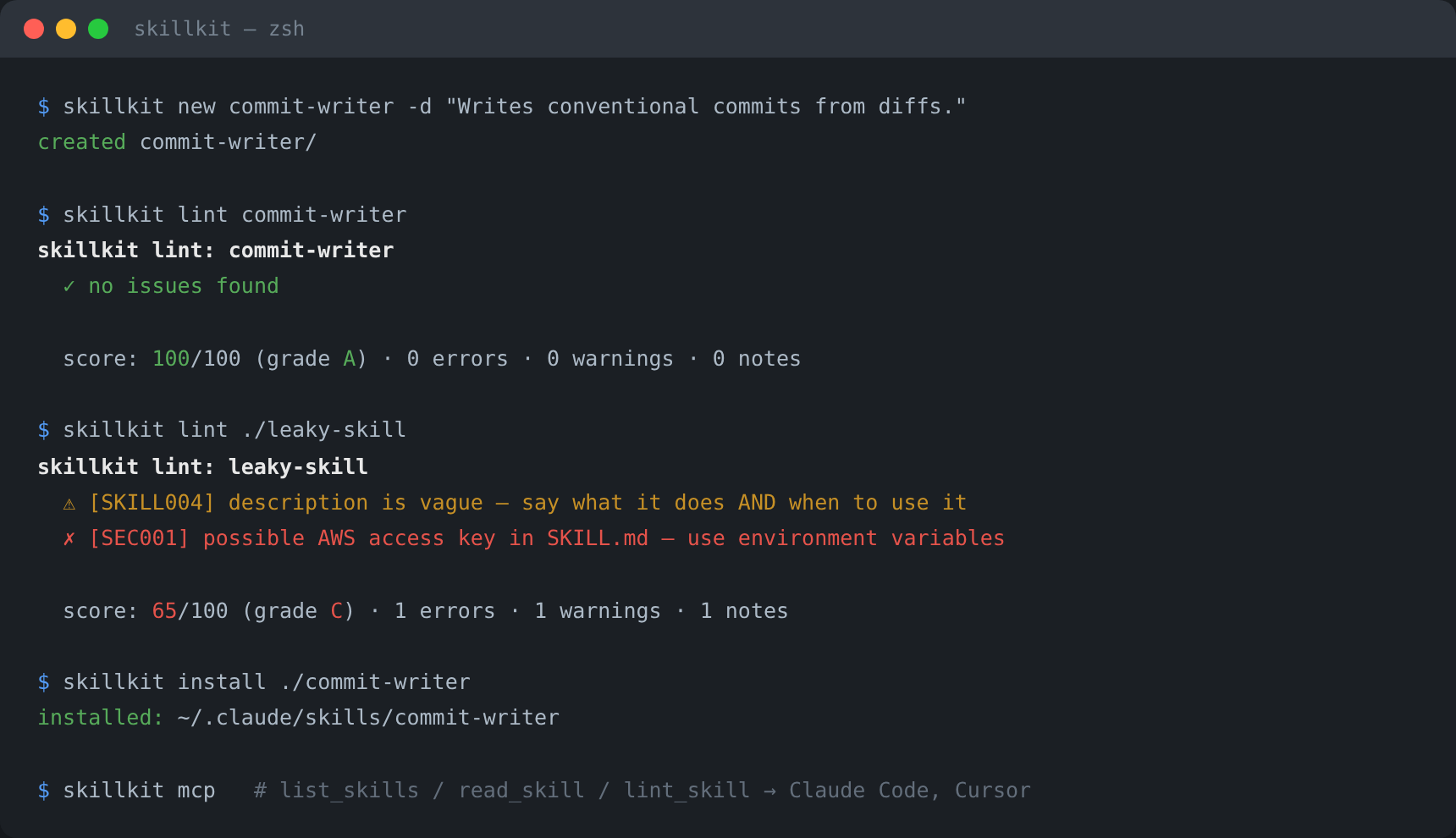
Community audits found that the overwhelming majority of published SKILL.md files carry at least one "skill smell" — and a large share leak secrets. skillkit catches those before you ship.
Deep docs: Usage guide — lint rules reference, MCP patterns, CI usage · Architecture · Contributing · Changelog · Security
Features
new— scaffold a spec-compliant skill folder in one commandlint— validate against the Agent Skills spec plus security smells: leaked API keys, vague descriptions, oversized bodies, folder typos, and more (scored 0–100 with a grade)pack— zip a skill for upload to skill-capable platformsinstall— install from a folder or any git URL into~/.claude/skills(or your own directory)list/remove— manage your installed skill librarymcp— a zero-dependency MCP server (stdio, JSON-RPC 2.0) that exposeslist_skills,read_skill, andlint_skilltools to any client- Zero dependencies — pure Python standard library
- 76 tests, CI on Python 3.10 → 3.12
Quick start
# run without installing (uvx — pulls from PyPI on demand)
uvx --from skillkit-cli skillkit lint ./skills

# or install (installs the `skillkit` command)
pipx install skillkit-cli

# ...or from source
git clone https://github.com/furkan708/skillkit.git
cd skillkit && pip install .

# 1. create a skill
skillkit new commit-writer -d "Writes conventional commit messages from staged diffs. Use when the user asks to commit changes."

# 2. lint it (spec + security + quality)
skillkit lint commit-writer
# ✓ no issues found
# score: 100/100 (grade A) · 0 errors · 0 warnings · 0 notes

# 3. pack it for upload
skillkit pack commit-writer        # → commit-writer.zip

# 4. install it for Claude Code
skillkit install ./commit-writer   # → ~/.claude/skills/commit-writer
Serve your skills over MCP
Add skillkit to any MCP client config — Claude Code, Cursor, Windsurf, and every other MCP-compatible agent:
{
  "mcpServers": {
    "skillkit": { "command": "skillkit", "args": ["mcp"] }
  }
}
Your agent can now discover and read every installed skill on demand:
| Tool | What it does |
|---|---|
list_skills | Discover installed skills with names + descriptions |
read_skill | Load the full SKILL.md instructions of one skill |
lint_skill | Validate a skill and get its quality score |
What lint catches
| Rule | Severity | Check |
|---|---|---|
| SEC001 | error | Leaked secrets: GitHub/AWS/OpenAI/Slack tokens, private keys, hardcoded credentials |
| SKILL001 | error | Invalid name: charset, length ≤ 64, reserved words (anthropic, claude) |
| SKILL002 | error | name does not match the folder name |
| SKILL003 | error | description longer than 1,024 characters |
| SKILL009 | error | metadata is not a string→string map |
| SKILL004 | warn | Vague description (won't trigger — describe what and when) |
| SKILL005 | warn | Body over ~500 lines (move detail into references/) |
| SKILL007 | warn | Folder typos: script/, reference/, docs/… |
| SKILL006 | · info | Very thin body — add steps and examples |
| SKILL008 | · info | Unknown frontmatter fields |
Every run ends with a 0–100 score and a letter grade, so you know when a skill is ready to publish.
CLI reference
skillkit new <name> -d <description> [--dir DIR]   scaffold a skill
skillkit lint <path> [--json] [--strict]           validate a skill
skillkit pack <path> [-o FILE.zip]                 zip for upload
skillkit install <path|git-url> [--agent claude|project] [--dir DIR]
skillkit list [--agent ...] [--dir DIR] [--json]   show installed skills
skillkit remove <name> [--dir DIR]                 uninstall a skill
skillkit mcp [--dir DIR]                           serve skills over MCP
Built on the open Agent Skills specification — the same format supported by 40+ platforms including Claude, OpenAI Codex, and GitHub Copilot.
Tests
pip install pytest
pytest -v
Project Structure
skillkit/
├── skillkit/
│   ├── frontmatter.py   # minimal YAML frontmatter parser
│   ├── model.py         # skill loading (Agent Skills spec)
│   ├── linter.py        # rules, security smells, 0-100 score
│   ├── scaffold.py      # new + pack
│   ├── installer.py     # install / list / remove (folder or git)
│   ├── mcp_server.py    # zero-dependency MCP stdio server
│   └── cli.py           # command-line interface
└── tests/
Roadmap
-
skillkit search— search community skill registries - More install targets (Codex, Copilot CLI paths as they standardize)
-
skillkit doctor— prompt-injection heuristics (planned, not implemented yet)
License
MIT — see the LICENSE file for details.
Installation
Source-derived launch command. Check the maintainer’s required arguments and credentials before running:
uvx skillkit-cliSet up in your AI client
Merge this template into ~/Library/Application Support/Claude/claude_desktop_config.json. Keep existing servers. Add any arguments, credentials, and permissions required by the maintainer; this template has not been install-tested.
{
  "mcpServers": {
    "io-github-furkan708-skillkit": {
      "command": "uvx",
      "args": [
        "skillkit-cli"
      ]
    }
  }
}
Restart Claude Desktop completely for changes to take effect. Confirm the server appears connected in the client’s tool list, then try a read-only example from its documentation.
Claude Desktop setup referencePackage
skillkit-clipypiCompatible MCP Clients
skillkit works with any MCP-compatible client. Copy the config snippet from the Configuration section above and add it to the file shown for your client, then restart the application.
- Claude Desktop
~/Library/Application Support/Claude/claude_desktop_config.jsonRestart Claude Desktop completely for changes to take effect. - Cursor
~/.cursor/mcp.jsonRestart Cursor for changes to take effect. - VS Code
.vscode/mcp.jsonReload VS Code window for changes to take effect. - Windsurf
~/.codeium/windsurf/mcp_config.jsonRestart Windsurf for changes to take effect. - Claude Code
.mcp.jsonSave at the project root, then start Claude Code in that project and review the MCP server approval prompt. Keep real credentials out of shared files.