Hicortex — AI Fleet Memory
Shared fleet memory for AI agents: nightly self-correction, recall every prompt (supported agents).
Hicortex — AI Fleet Memory

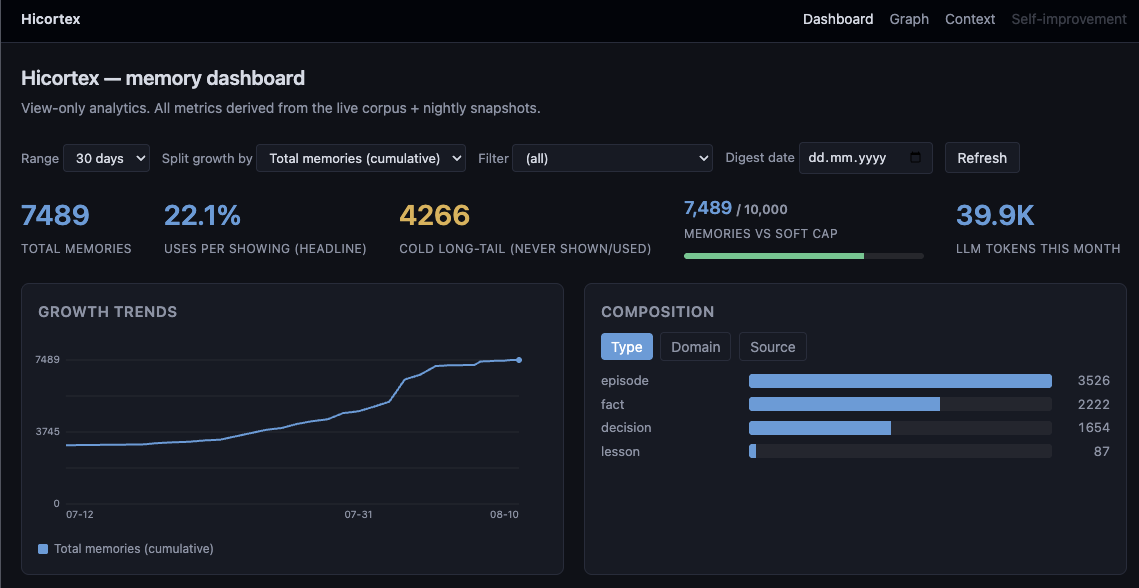




Shared memory for AI agents — it corrects itself overnight, and what one agent learns, the whole fleet knows. One memory across every agent, every project, every machine — they stop assuming and start knowing.
- One brain, every harness — Claude Code, Hermes, OpenClaw, Pi, OpenCode, and any MCP-compatible agent share the same memory.
- Pushed, not pulled — in every supported coding agent, a compact recall index is injected on every prompt, so the decisions, corrections, and context an agent needs are already in front of it. No re-explaining, no copy-paste, nothing to maintain. Zero LLM calls per turn — no API cost or rate-limit hit from recall.
- Consolidates overnight — each night it reads the day's sessions, distills what matters, and turns it into Learnings, links, and a knowledge graph.
- Local-first — raw sessions never leave the machine; only distilled memory is stored.
Install
npx @gamaze/hicortex init
Claude Desktop: one "yes" during init.
Auto-detects your environment, configures one LLM (Ollama, the Claude CLI, or an API key), installs a local daemon (launchd on macOS, systemd on Linux), and registers MCP tools with Claude Code.
For multi-machine setups, point thin clients at a shared server — no local DB or LLM on the clients:
npx @gamaze/hicortex init --server https://your-server.example.com
init auto-detects the other harnesses and installs their clients: a Pi extension (~/.pi/agent/extensions/hicortex.ts — pushed recall, identity + lessons, the ten tools; or copy pi-extension/hicortex/index.ts there manually), an OpenCode plugin (~/.config/opencode/plugins/hicortex.ts — the same trio; or copy opencode-plugin/hicortex/index.ts there manually), the Hermes plugin, and the OpenClaw plugin. pi-mcp-adapter remains a generic MCP escape hatch for any harness (verified against the SSE endpoint) — Pi no longer needs it. See the install docs.
How it works
CAPTURE (nightly)        CONSOLIDATE (nightly)             RECALL (every prompt)
sessions → denoise       score · reflect · link            a compact index of
→ POST /distill          decay · dedup · supersede         relevant memories is
                         (one model, all phases)           pushed into the prompt
                                                           → full text lazy-loaded
Memories strengthen when agents use them, fade when they don't, and link to related ones automatically. Retrieval is hybrid BM25 + vector search — zero-LLM at query time.
The first nightly run captures the last 7 days of sessions by default (not your entire history) — run hicortex nightly --recapture-window <days> once to import more.
Features
- Per-prompt recall push — relevant memory lands in context every turn; the agent fetches full content with
hicortex_getonly when it needs it. - Memory analytics at
/dashboard— growth, recall adoption, and a nightly digest of what was learned. - Knowledge graph at
/viz— memories clustered by domain, connected by relationship edges. - Domains & tags — multi-tag classification with a configurable vocabulary; your categories drift with your data.
- Learnings from reflection — nightly reflection extracts general, reusable Learnings, not just Experience logs.
- Self-correcting store — every night, stale facts are rewritten in place with dated provenance; near-duplicates resolve into one (verbatim copies kept free, merges recoverable); superseded decisions are demoted, never re-surfaced. No zombie memory.
- Unprompted by design — coding agents get recall injected via hooks; instruction-capable clients (Claude Desktop, Cursor-class) get standing instructions, so memory is used without being asked. Plain MCP clients keep full search.
- Self-calibrating — recall, decay and merge boundaries report their own statistics; tuning is measured, never guessed.
- Standing context layer — hand-edited "who you are / how to work" Markdown, injected every session, never decayed.
MCP
Nine MCP tools — hicortex_search, hicortex_get, hicortex_recent, hicortex_ingest, hicortex_lessons, hicortex_index, hicortex_graph, hicortex_update, hicortex_delete — plus a /learn skill to save explicit learnings. Full reference →
Stack
TypeScript · Node.js 20+ · SQLite + sqlite-vec + FTS5 (semantic + full-text in one DB) · ONNX embeddings (bge-small-en, CPU) · MCP over HTTP/SSE · one configurable LLM (Ollama, Claude CLI, or any OpenAI-compatible endpoint).
Development
git clone https://github.com/gamaze-labs/hicortex.git
cd hicortex
AGENTS.md at the repository root defines the machine-checkable verification contract. "Done" means the full command chain exits with code 0. The contract mirrors what CI runs. Contributors — human or agent — run it before claiming work complete.
Contributions welcome — see CONTRIBUTING.md.
Links
- Website: hicortex.gamaze.com
- Docs: hicortex.gamaze.com/docs
- Changelog: CHANGELOG.md
- npm: @gamaze/hicortex
- Issues: gamaze-labs/hicortex/issues
- Security: SECURITY.md
License
Personal and noncommercial use is free under the PolyForm Noncommercial License 1.0.0. Commercial use requires a per-seat license — see hicortex.gamaze.com.
Installation
Source-derived launch command. Check the maintainer’s required arguments and credentials before running:
npx -y @gamaze/hicortexSet up in your AI client
Merge this template into ~/Library/Application Support/Claude/claude_desktop_config.json. Keep existing servers. Add any arguments, credentials, and permissions required by the maintainer; this template has not been install-tested.
{
  "mcpServers": {
    "io-github-gamaze-labs-hicortex": {
      "command": "npx",
      "args": [
        "-y",
        "@gamaze/hicortex"
      ]
    }
  }
}
Restart Claude Desktop completely for changes to take effect. Confirm the server appears connected in the client’s tool list, then try a read-only example from its documentation.
Claude Desktop setup referencePackage
@gamaze/hicortexnpmCompatible MCP Clients
Hicortex — AI Fleet Memory works with any MCP-compatible client. Copy the config snippet from the Configuration section above and add it to the file shown for your client, then restart the application.
- Claude Desktop
~/Library/Application Support/Claude/claude_desktop_config.jsonRestart Claude Desktop completely for changes to take effect. - Cursor
~/.cursor/mcp.jsonRestart Cursor for changes to take effect. - VS Code
.vscode/mcp.jsonReload VS Code window for changes to take effect. - Windsurf
~/.codeium/windsurf/mcp_config.jsonRestart Windsurf for changes to take effect. - Claude Code
.mcp.jsonSave at the project root, then start Claude Code in that project and review the MCP server approval prompt. Keep real credentials out of shared files.