io.github.haiiibin/data-profiler-mcp
Profiles CSV/Parquet/Excel/JSON files: schema, stats, quality flags and dtype tips for LLM agents.
data-profiler-mcp








An MCP server that lets an LLM understand any tabular data file: point it at a CSV, Parquet, Excel or JSON file and get schema, distributions, data-quality flags and dtype suggestions back as structured JSON.
Stop pasting df.head() and df.info() into chat. Ask your assistant "profile sales.csv" and it reads the file itself, then tells you what is in it, what is wrong with it, and how to load it more efficiently.
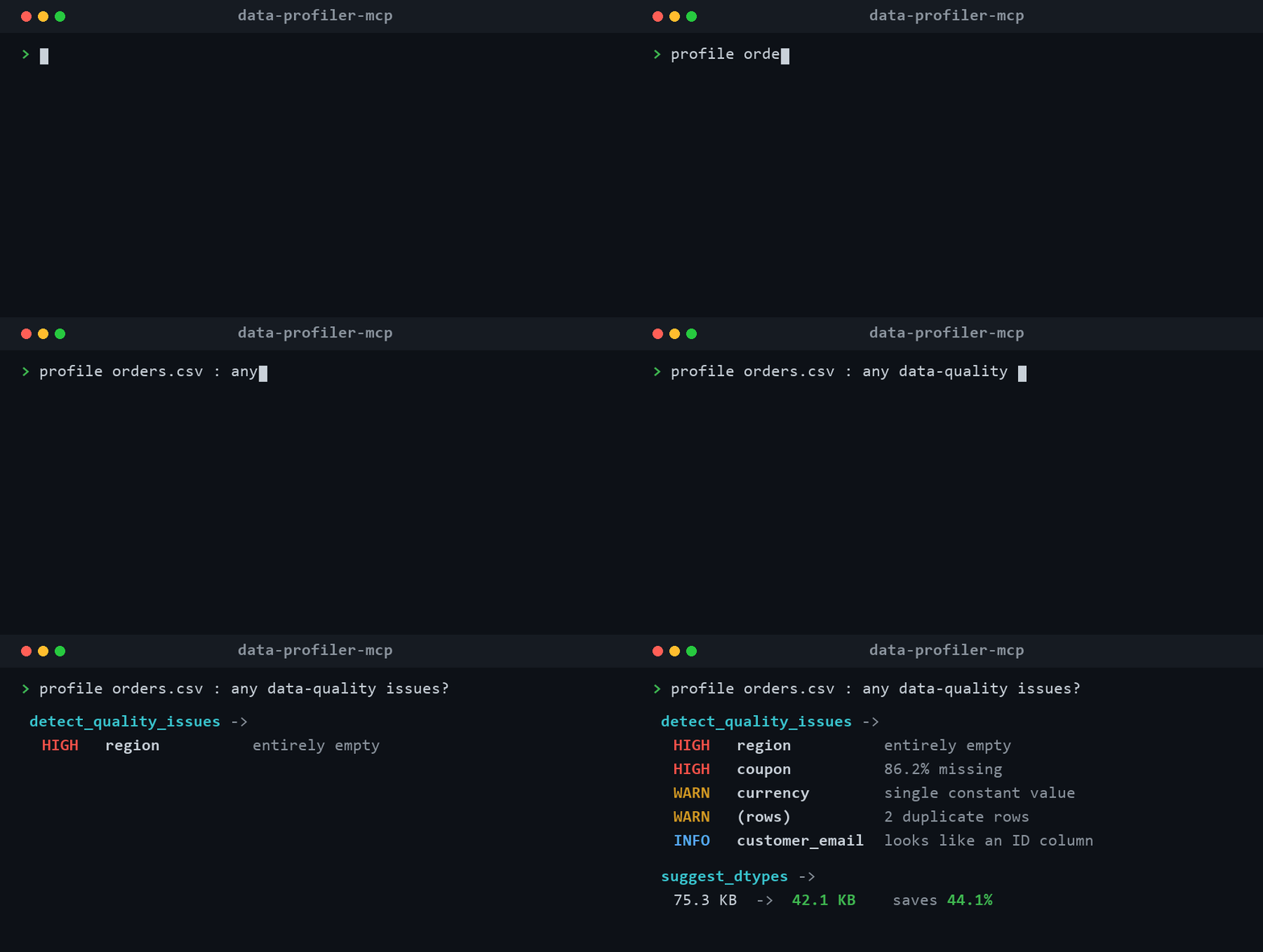
Works with Claude Desktop, Claude Code, Cursor, or any MCP-compatible client.
Features
Seven focused tools, all returning clean JSON:
| Tool | What it does |
|---|---|
profile_dataset | One-call overview: shape, memory, missing-value summary, duplicate rows, a per-column summary, and plain-language quality flags. |
preview_data | The first / last / a random sample of n rows as real records. |
column_stats | Deep dive on one column: full percentiles, skew/kurtosis, outliers (IQR), a histogram, or top values + string lengths for text. |
detect_quality_issues | A data-quality audit: duplicates, high-missing and constant columns, numbers stored as text, mixed-type columns, whitespace padding, likely IDs, grouped by severity. |
suggest_dtypes | Memory-saving / type-fixing recommendations (text to numeric, low-cardinality to category, integer/float downcasting) with estimated savings. |
compare_datasets | Diff two files: added/removed columns, dtype changes, row-count delta, and per-column null-rate and mean side by side. |
correlation_matrix | Correlations between numeric columns (Pearson / Spearman / Kendall): pairs ranked by strength, multicollinearity flags at |r| >= 0.9, and target-vs-rest ranking via column. |
Supported formats: CSV, TSV, Parquet, Excel (.xlsx/.xls), JSON and JSON Lines. Large files are read up to a row cap and clearly flagged as sampled.
No dataset at hand? examples/sample.csv is a small sales export with deliberate quality issues (missing regions, a duplicate row, a constant column, whitespace padding) -- ask your assistant to "profile examples/sample.csv" and see what it flags.
Install
No install needed to try it: open the Glama server page and use Try in Browser to call the tools against a sandbox (the repo ships examples/sample.csv at /app/examples/sample.csv to profile).
Requires Python 3.10+.
Works with MCP Python SDK 1.x and 2.x (mcp>=1.2.0,<3): the 2.0 rename of FastMCP to MCPServer is handled by an import shim, and CI runs the test suite on both majors.
# with uv (recommended)
uv tool install data-profiler-mcp

# or with pip
pip install data-profiler-mcp
Or run it straight from source without installing:
git clone https://github.com/haiiibin/data-profiler-mcp
cd data-profiler-mcp
uv run data-profiler-mcp
Configure your client
Claude Desktop
Edit claude_desktop_config.json
(macOS: ~/Library/Application Support/Claude/, Windows: %APPDATA%\Claude\) and add:
{
  "mcpServers": {
    "data-profiler": {
      "command": "data-profiler-mcp"
    }
  }
}
Running from source instead of installing? Point it at the checkout:
{
  "mcpServers": {
    "data-profiler": {
      "command": "uv",
      "args": ["--directory", "/absolute/path/to/data-profiler-mcp", "run", "data-profiler-mcp"]
    }
  }
}
Restart Claude Desktop and the tools appear under the plug icon.
Claude Code
claude mcp add data-profiler -- data-profiler-mcp
Usage
Once connected, just talk to your assistant:
- "Profile
~/data/sales_2025.csvand tell me what's in it." - "Are there any data-quality problems in
customers.parquet?" - "Show me 20 random rows from
events.jsonl." - "Give me full stats for the
revenuecolumn, including outliers." - "How can I shrink this DataFrame's memory usage?"
- "What changed between
snapshot_jan.csvandsnapshot_feb.csv?"
Example: profile_dataset
{
  "file": { "name": "sample.csv", "format": "csv", "size_human": "14.2 KB" },
  "shape": { "rows": 201, "columns": 13, "sampled": false },
  "memory_usage_human": "78.4 KB",
  "missing_summary": { "total_missing_cells": 561, "pct_missing": 21.5, "columns_with_missing": 3 },
  "duplicate_rows": { "count": 1, "pct": 0.5 },
  "columns": [
    {
      "name": "price", "dtype": "float64", "inferred_type": "float",
      "non_null": 201, "null": 0, "unique": 51,
      "stats": { "min": 0.0, "max": 100000.0, "mean": 521.3, "median": 24.0 }
    }
  ],
  "quality_flags": [
    "[high] empty_col: Column is entirely empty (all values missing).",
    "[warning] const: Column holds a single constant value; it carries no information.",
    "[warning] numeric_text: Every value parses as a number but the column is stored as text."
  ]
}
Example: detect_quality_issues
{
  "issue_count": 8,
  "severity_counts": { "high": 2, "warning": 4, "info": 2 },
  "issues": [
    { "column": "empty_col", "issue": "all_missing", "severity": "high",
      "detail": "Column is entirely empty (all values missing)." },
    { "column": "numeric_text", "issue": "numeric_stored_as_text", "severity": "warning",
      "detail": "Every value parses as a number but the column is stored as text." }
  ]
}
How it works
The server is built on FastMCP and reads files with pandas (plus pyarrow for Parquet and openpyxl for Excel). Every tool returns a plain, JSON-serializable dict, with NumPy scalars, NaN/inf and timestamps normalized so the output is safe to hand straight back to a model. Nothing is written to disk and no data leaves your machine.
Development
uv venv
uv pip install -e ".[dev]"
uv run pytest
License
MIT. See LICENSE.
Installation
Source-derived launch command. Check the maintainer’s required arguments and credentials before running:
uvx data-profiler-mcpSet up in your AI client
Merge this template into ~/Library/Application Support/Claude/claude_desktop_config.json. Keep existing servers. Add any arguments, credentials, and permissions required by the maintainer; this template has not been install-tested.
{
  "mcpServers": {
    "io-github-haiiibin-data-profiler-mcp": {
      "command": "uvx",
      "args": [
        "data-profiler-mcp"
      ]
    }
  }
}
Restart Claude Desktop completely for changes to take effect. Confirm the server appears connected in the client’s tool list, then try a read-only example from its documentation.
Claude Desktop setup referencePackage
Compatible MCP Clients
io.github.haiiibin/data-profiler-mcp works with any MCP-compatible client. Copy the config snippet from the Configuration section above and add it to the file shown for your client, then restart the application.
- Claude Desktop
~/Library/Application Support/Claude/claude_desktop_config.jsonRestart Claude Desktop completely for changes to take effect. - Cursor
~/.cursor/mcp.jsonRestart Cursor for changes to take effect. - VS Code
.vscode/mcp.jsonReload VS Code window for changes to take effect. - Windsurf
~/.codeium/windsurf/mcp_config.jsonRestart Windsurf for changes to take effect. - Claude Code
.mcp.jsonSave at the project root, then start Claude Code in that project and review the MCP server approval prompt. Keep real credentials out of shared files.