io.github.huseyinstif/klaket-mcp
Let AI agents watch videos: local transcripts, speakers, scenes, chapters and moment search
🎬 Klaket
Turn any video into LLM-ready data.



A klaket is a clapperboard — the tool that syncs sound and image on a film set. Klaket syncs video with LLMs.
LLMs read text. The web became readable with scrapers — but video, the largest store of human knowledge, is still locked away. Klaket unlocks it: give it a video URL or file, get back structured, timestamped, LLM-ready data.
pip install klaket
klaket ingest "https://youtube.com/watch?v=..." --wait
{
  "transcript": [
    { "start": 14.32, "end": 19.80, "speaker": "S1", "text": "So let's deploy this with docker compose..." }
  ],
  "scenes": [
    { "start": 190.0, "end": 342.5, "keyframes": ["scene_004_01.jpg"] }
  ],
  "chapters": [...],
  "summary": "..."
}
Features
- 📝 Transcript — timestamped speech-to-text in ~100 languages (auto-detected) with word-level timestamps; pick the model per job (
"model": "medium") - 🎙️ Podcasts too — pass an audio file/URL (mp3, m4a…) and Klaket skips the visual stages, deriving chapters from speech pauses
- 🗣️ Speaker diarization — who said what (S1/S2/…), local & keyless (sherpa-onnx)
- 💬 Subtitles — ready-to-use
.srt/.vttfiles with speaker labels - 🎞️ Scene detection — content-aware scene boundaries + keyframes per scene
- 🔎 On-screen text (OCR) — reads slides, terminals and captions per scene, local & keyless
- 🧩 One JSON timeline — transcript, scenes, frames and on-screen text aligned on a single timeline
- 🔌 Works offline, no API key required — the core pipeline uses zero LLM calls
- 🧠 Pluggable model layer — optional scene descriptions via local VLMs (Ollama) or any OpenAI-compatible endpoint (
KLAKET_VLM=offby default) - 🤖 MCP server — let coding agents "watch" any video and find moments inside it
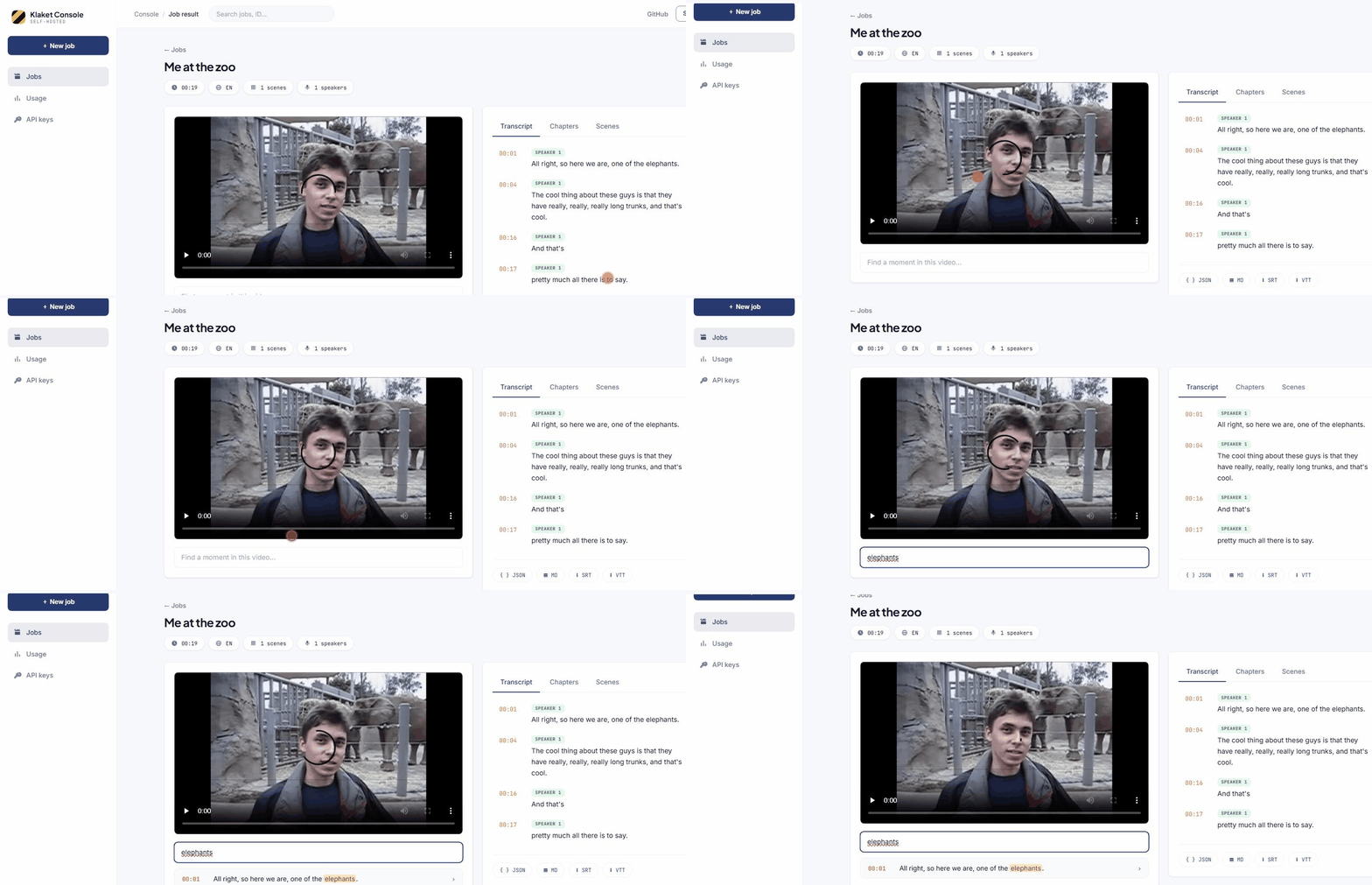
- 🔍 In-video search —
GET /v1/jobs/{id}/search?q=…finds the exact moment - ▶️ Playground — the dashboard plays the video with a click-to-seek, live-highlighted transcript
SDKs
# pip install klaket
from klaket import Klaket
result = Klaket().process("https://youtube.com/watch?v=...", num_speakers=2)
// npm i klaket-sdk
import { Klaket } from "klaket-sdk";
const result = await new Klaket().process("https://youtube.com/watch?v=...");
Give your agent eyes
# Claude Code
claude mcp add klaket -- npx klaket-mcp   # KLAKET_API_URL defaults to localhost:8484
Then: "Watch https://youtube.com/watch?v=… and summarize the commands the presenter runs."
The agent gets klaket_ingest, klaket_job_status and klaket_get_result tools.
Quick start
git clone https://github.com/huseyinstif/klaket.git && cd klaket
docker compose up --build
# API on :8484, dashboard on :5180
curl -X POST localhost:8484/v1/ingest \
  -H "Content-Type: application/json" \
  -d '{"url": "https://youtube.com/watch?v=..."}'
That's it — no API keys, no GPUs required. make help lists developer shortcuts (make up, make test, make e2e).
Architecture
client ──► Go API ──► Redis queue ──► Python worker (ffmpeg · faster-whisper · scenedetect)
                │                          │
            dashboard ◄────────────────────┘   /data/jobs/<id>/result.json
apps/api— Go, job orchestrationapps/worker— Python, media pipelineapps/dashboard— React dashboard
Self-host vs Cloud
Klaket is open source (AGPL-3.0) and fully self-hostable. A hosted, pay-per-minute cloud API with managed GPUs is planned — join the waitlist (coming soon).
Status
🚧 v0.7 — pre-1.0, moving fast. Star the repo to follow along.
License
AGPL-3.0. SDKs and clients will be MIT.
Contact
Built by Hüseyin Tıntaş — X (@1337stif) · LinkedIn
Installation
Source-derived launch command. Check the maintainer’s required arguments and credentials before running:
npx -y klaket-mcpSet up in your AI client
Merge this template into ~/Library/Application Support/Claude/claude_desktop_config.json. Keep existing servers. Add any arguments, credentials, and permissions required by the maintainer; this template has not been install-tested.
{
  "mcpServers": {
    "io-github-huseyinstif-klaket-mcp": {
      "command": "npx",
      "args": [
        "-y",
        "klaket-mcp"
      ]
    }
  }
}
Restart Claude Desktop completely for changes to take effect. Confirm the server appears connected in the client’s tool list, then try a read-only example from its documentation.
Claude Desktop setup referencePackage
klaket-mcpnpmCompatible MCP Clients
io.github.huseyinstif/klaket-mcp works with any MCP-compatible client. Copy the config snippet from the Configuration section above and add it to the file shown for your client, then restart the application.
- Claude Desktop
~/Library/Application Support/Claude/claude_desktop_config.jsonRestart Claude Desktop completely for changes to take effect. - Cursor
~/.cursor/mcp.jsonRestart Cursor for changes to take effect. - VS Code
.vscode/mcp.jsonReload VS Code window for changes to take effect. - Windsurf
~/.codeium/windsurf/mcp_config.jsonRestart Windsurf for changes to take effect. - Claude Code
.mcp.jsonSave at the project root, then start Claude Code in that project and review the MCP server approval prompt. Keep real credentials out of shared files.