io.github.ionasrobert/tacitus-mcp-server
Long-term memory for AI agents: local-first PKM with provenance and hybrid search.
Tacitus
Long-term memory for your AI agents — local-first, with provenance.


Tacitus is an MCP server that turns any folder of Markdown notes into an agent-native knowledge base. It gives AI agents (Claude Code, Claude Desktop, and any MCP client) three things they actually need:
- Memory with provenance — typed, queryable long-term memory. Every fact carries its source and is returned within a token budget; contradictions are surfaced, not silently resolved.
- Retrieval that fits the context window — search returns ranked snippets
(never whole notes) under a token budget;
get_notediscloses progressively (outline → frontmatter → full); the wikilink graph is a queryable API. Hybrid lexical + semantic search, with an optional neural embedder. - Safe write-back — propose a changeset, preview the diff, commit atomically, and revert by version. Read-only scope forbids mutations; every write is audited.
Notes stay as plain .md files in your folder. No cloud, no lock-in.
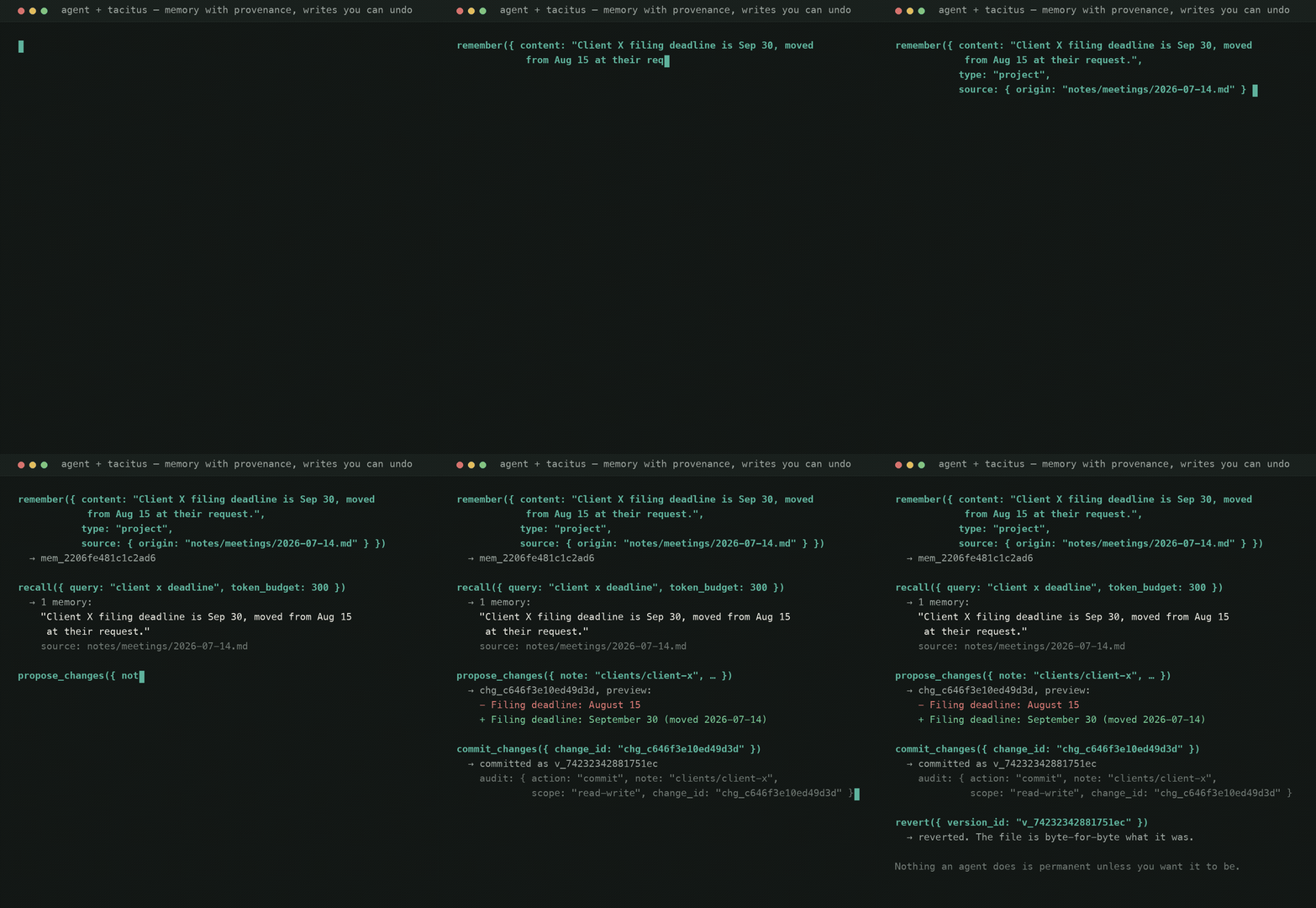
Recorded from a real session — the memory id, changeset id, version id and audit line above are what the binary actually returned (how).
Quick start
npx -y @dashiro/tacitus-mcp-server /path/to/your/vault
Claude Code
claude mcp add tacitus -- npx -y @dashiro/tacitus-mcp-server /path/to/your/vault
Claude Desktop (claude_desktop_config.json)
{
  "mcpServers": {
    "tacitus": {
      "command": "npx",
      "args": ["-y", "@dashiro/tacitus-mcp-server", "/path/to/your/vault"]
    }
  }
}
Native binary (no Node)
Prefer a single, zero-dependency binary? The Rust server ships prebuilt for macOS, Linux, and Windows on every release.
# macOS / Linux — installs `tacitus-mcp` into your Cargo bin dir
curl --proto '=https' --tlsv1.2 -LsSf \
  https://github.com/ionasrobert/tacitus-mcp-server/releases/latest/download/tacitus-mcp-installer.sh | sh
# Windows (PowerShell)
irm https://github.com/ionasrobert/tacitus-mcp-server/releases/latest/download/tacitus-mcp-installer.ps1 | iex
Or grab a .tar.xz / .zip for your platform from the
latest release.
Then point any MCP client at the binary instead of npx:
claude mcp add tacitus -- tacitus-mcp /path/to/your/vault
The native binary is the flagship server (25 tools; the npm server has the
core 16 — see the table below). Both share the same on-disk formats, so a
vault works with either. Set TACITUS_SCOPE=read-only to run the native
server without write permissions.
Tools
| Group | Tools |
|---|---|
| Memory | remember, recall, forget |
| Retrieval | search, get_note, graph_query, list_notes, properties_query* |
| Write-back | propose_changes, commit_changes, revert, rename_note, delete_note, get_version* |
| Convenience | create_note, update_note, link, tag, audit_log |
| Templates | list_templates, create_from_template |
| Tasks | list_tasks, toggle_task |
| Meta | capabilities |
* Native-Rust-server first (the npm server will catch up):
properties_query — Bases-like structured queries over YAML frontmatter
(filters eq|ne|contains|exists|not_exists|gt|lt|gte|lte, sort, select,
token_budget). Templates — Markdown files in .tacitus/templates/ whose
{{var}} placeholders form a schema; substitution happens before YAML
parsing so numeric vars stay typed, {{date}}/{{time}}/{{datetime}}
auto-fill, and creation is versioned + audited like any agent write.
Tasks — every checklist line (- [ ]) as a typed entity (done, due from
due:YYYY-MM-DD or 📅, #tags), queryable and toggleable; toggling takes
the task text as a concurrency guard so a stale caller gets a CONFLICT
instead of flipping the wrong task. rename_note retargets every wikilink
that resolves to the note (alias/heading kept) in one atomic changeset —
a single revert undoes the whole rename; delete_note is versioned too.
Every tool validates input with a schema and returns structured, actionable
errors ({ code, reason, suggestion }) rather than stack traces.
For developers: plugins & integrations
In Tacitus, a plugin is an MCP client — the tool contract above is the public API, with permission scoping, versioning, and audit built in.
- docs/PLUGINS.md — integration guide: connect an agent, write a plugin in Python/TypeScript, embed the Rust engine, plugin patterns
- TypeScript SDK —
@dashiro/tacitus-sdk: every tool as a typed method,{code, reason, suggestion}errors thrown asTacitusToolError:const tacitus = await TacitusClient.spawn({ vault: '/path/to/vault' }); const hits = await tacitus.search({ query: 'client X', token_budget: 500 }); - Sandboxed WASM plugins (experimental) — crate
tacitus-pluginsruns guest wasm under Wasmtime with manifest-declared permissions (tool allowlist- scope), fuel and memory limits, no WASI:
tacitus.callistools/call. The native binary embeds the runtime:tacitus-mcp plugin list|runfor cron agents and scripts. See docs/PLUGINS.md §5
- scope), fuel and memory limits, no WASI:
- docs/MCP_API.md — full reference for all 25 tools (params, returns, error codes)
- Neural search (opt-in):
TACITUS_EMBEDDER=ollamauses a local Ollama daemon for embeddings (TACITUS_OLLAMA_EMBED_MODEL, defaultnomic-embed-text; needs an Ollama with embedding support). Vectors cached in.tacitus/vectors/; falls back to the deterministic hashing embedder when unavailable. - docs/SYNC.md — Sync (beta): E2E-encrypted CRDT sync
between devices (
tacitus-mcp sync init;sync statusshows how much of the relay quota a vault uses) - docs/DATA_FORMAT.md — the on-disk format
(
.tacitus/internals, stable ids, note conventions) - examples/ — three complete plugins (Python read-only analyzer, Node daily-note cron agent, sandboxed WASM guest), tested against the binary
What the sync relay can see
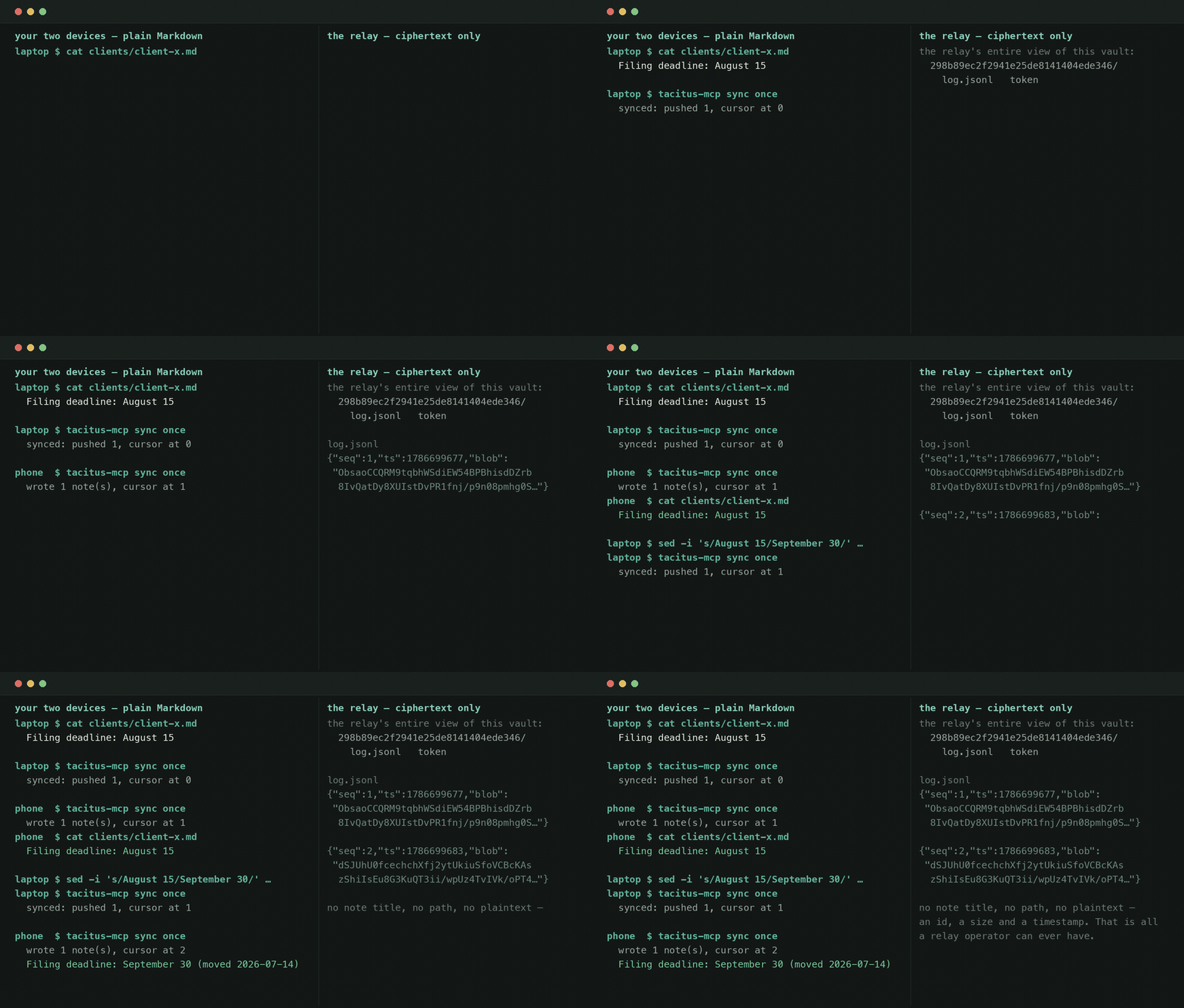
Left: two devices, plain Markdown. Right: everything the relay stores for that
vault. Those blobs were read out of a real log.jsonl after the recording —
no note title, no path, no plaintext. The vault code is the key and never
leaves your devices; lose it and the relay's copy is undecryptable forever.
Semantic search (optional neural embeddings)
search defaults to hybrid mode (lexical + a deterministic, offline
embedder that catches morphological variants). For synonym/paraphrase matching,
opt into a neural embedder:
npm i @huggingface/transformers
TACITUS_EMBEDDER=transformers npx @dashiro/tacitus-mcp-server /path/to/vault
Vectors are cached under .tacitus/vectors/. Falls back to the deterministic
embedder if the optional dependency or model isn't available.
How it stores things
your-vault/
├── notes...             ← your Markdown files (untouched format)
└── .tacitus/
    ├── memory/*.md      ← agent memories (Markdown + YAML frontmatter)
    ├── vectors/*.json   ← cached embeddings
    ├── history/*.json   ← version snapshots (for revert)
    └── audit.log        ← JSONL log of every agent write
Development
Polyglot monorepo. The reference server (shipped on npm) is TypeScript in
packages/mcp-server. A native Rust server in crates/ provides a
single-binary, zero-runtime-deps build (crates/tacitus-core engine +
crates/tacitus-mcp rmcp server) — a superset of the TS server (25 vs 16
tools). Its stable_id matches the TS engine byte-for-byte, so memory ids are
identical across both engines.
# TypeScript server
npm ci
npm test          # vitest
npm run typecheck
npm run lint
npm run build     # tsup → packages/mcp-server/dist
npm run eval      # retrieval quality report

# Rust server (native, single binary)
cargo test
cargo clippy --all-targets -- -D warnings
cargo fmt --check
cargo run -p tacitus-mcp -- /path/to/vault   # runs the MCP server on stdio
cargo build --release                         # → target/release/tacitus-mcp
Cross-platform release binaries are built and published to GitHub Releases by
cargo-dist (dist-workspace.toml +
.github/workflows/release.yml) on every v* tag.
License
MIT — see LICENSE.
Installation
Source-derived launch command. Check the maintainer’s required arguments and credentials before running:
npx -y @dashiro/tacitus-mcp-serverSet up in your AI client
Merge this template into ~/Library/Application Support/Claude/claude_desktop_config.json. Keep existing servers. Add any arguments, credentials, and permissions required by the maintainer; this template has not been install-tested.
{
  "mcpServers": {
    "io-github-ionasrobert-tacitus-mcp-server": {
      "command": "npx",
      "args": [
        "-y",
        "@dashiro/tacitus-mcp-server"
      ]
    }
  }
}
Restart Claude Desktop completely for changes to take effect. Confirm the server appears connected in the client’s tool list, then try a read-only example from its documentation.
Claude Desktop setup referencePackage
@dashiro/tacitus-mcp-servernpmCompatible MCP Clients
io.github.ionasrobert/tacitus-mcp-server works with any MCP-compatible client. Copy the config snippet from the Configuration section above and add it to the file shown for your client, then restart the application.
- Claude Desktop
~/Library/Application Support/Claude/claude_desktop_config.jsonRestart Claude Desktop completely for changes to take effect. - Cursor
~/.cursor/mcp.jsonRestart Cursor for changes to take effect. - VS Code
.vscode/mcp.jsonReload VS Code window for changes to take effect. - Windsurf
~/.codeium/windsurf/mcp_config.jsonRestart Windsurf for changes to take effect. - Claude Code
.mcp.jsonSave at the project root, then start Claude Code in that project and review the MCP server approval prompt. Keep real credentials out of shared files.