io.github.lizhuojunx86/chinese-history-mcp
Traceable Chinese-history MCP: 4 cited tools over 9 classical texts (pre-Qin to Wei-Jin).
chinese-history-mcp







A traceable Chinese-history MCP server. Four Model Context
Protocol tools over 9 classical Chinese
texts (pre-Qin to Wei-Jin — 史记 / 汉书 / 后汉书 / 三国志 / 左传 / 论语 / 孟子 /
吕氏春秋 / 资治通鉴). Every result carries a 【book → chapter → paragraph】
citation, and honestly reports its review_status — the server never claims
per-item human review it doesn't have.
一个可溯源的中国历史故事 MCP server:按事件 / 人物 / 今地名 / 品质四轴查询 先秦-汉魏九部正史子书,每条返回都带原文出处,机器生成/机审内容如实标注。
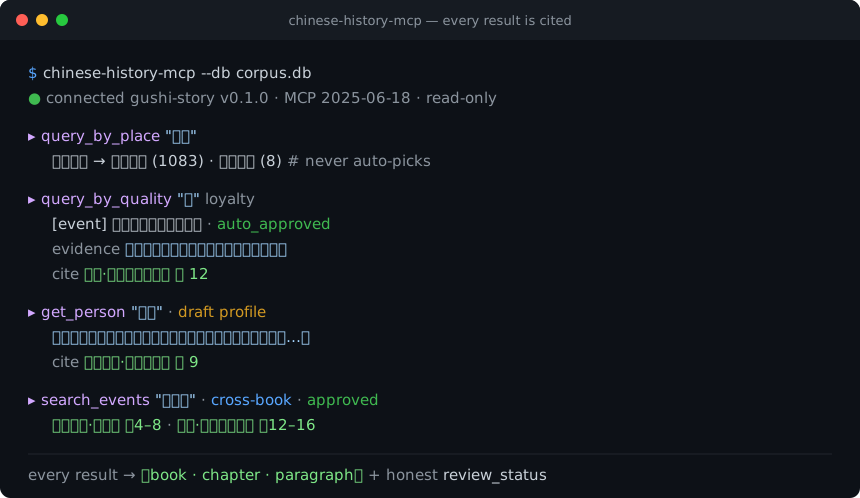
- Zero runtime dependencies — pure Python standard library. No
pip installof a framework, no MCP SDK; the whole server is auditable in a few files. - Read-only — opens the corpus with
mode=ro+PRAGMA query_only; never writes. - Honest by construction — machine-generated punctuation / translation and machine-adjudicated status are labeled in every response (AIGC-compliant).
Why this exists: as of mid-2026 the public MCP ecosystem has no classical Chinese / Chinese-history server. This fills that gap. Income expectation is zero; the goal is a useful public good.
Contents: The four tools · Install & run · The corpus database · Honesty · Data & provenance · Design notes
The four tools
| tool | input | returns |
|---|---|---|
search_events | keyword / book / person / kind / limit | Cross-book fused historical events with per-source provenance (book · chapter · paragraph + role: primary/detailed/brief/comment/corroborating). canonical_summary is an LLM-fused machine narrative. Optional kind filter (事件/场景/评价; unset = all, including appraisal events). time_label may be derived from reviewed time anchors — time_label_source says which (manual vs derived; omitted on pre-0.2 data). |
get_person | name (given name or alias) | Person profile (LLM-synthesized, draft) + others' appraisals (verbatim source quotes, each cited) + attributed qualities + events mentioning them + person-to-person relations (closed 26-type vocabulary — kinship/ruler-minister/mentorship/alliance/enmity; machine-reviewed, only approved/auto_approved exposed, no temporal bounds; empty on pre-0.2 data). |
query_by_place | place (today's place name) / limit | Ancient stories set on the land of a modern place, with citations. Same-name-different-place returns candidates for you to disambiguate — it never silently picks one. Directional/regional generic names are excluded. |
query_by_quality | quality (from a 55-term controlled vocabulary, e.g. 忠 loyalty, 谋略 strategy) / limit / include_draft | Representative events, people, and stories for a quality, each with an original-text evidence_quote and rationale. |
Each tool call returns JSON. Multi-source events, person appraisals, and place/quality edges all carry the exact 【book → chapter → paragraph】 they came from — that is the point of the server.
Install & run
Requires Python 3.9+ (standard library only — nothing else is installed). The server speaks MCP over stdio (newline-delimited JSON-RPC 2.0).
pip install chinese-history-mcp
# then (after downloading corpus.db from Releases — see below):
chinese-history-mcp --db /path/to/corpus.db
Or run without installing, straight from a checkout:
PYTHONPATH=src python3 -m storyextractor.mcp.server --db /path/to/corpus.db
Configure in an MCP client
Claude Desktop (claude_desktop_config.json), Cline, Continue, etc. — add one
stdio server. After pip install chinese-history-mcp:
{
  "mcpServers": {
    "chinese-history": {
      "command": "chinese-history-mcp",
      "args": ["--db", "/path/to/corpus.db"]
    }
  }
}
Alternative: run from a checkout (no install), or with uvx
{
  "mcpServers": {
    "chinese-history": {
      "command": "python3",
      "args": ["-m", "storyextractor.mcp.server", "--db", "/path/to/corpus.db"],
      "env": { "PYTHONPATH": "src" },
      "cwd": "/absolute/path/to/chinese-history-mcp"
    }
  }
}
Or zero-install with uv:
uvx chinese-history-mcp --db /path/to/corpus.db.
Try one handshake by hand
printf '%s\n' \
  '{"jsonrpc":"2.0","id":1,"method":"initialize","params":{"protocolVersion":"2025-06-18","capabilities":{}}}' \
  '{"jsonrpc":"2.0","id":2,"method":"tools/list"}' \
  '{"jsonrpc":"2.0","id":3,"method":"tools/call","params":{"name":"query_by_quality","arguments":{"quality":"忠","limit":2}}}' \
  | chinese-history-mcp --db /path/to/corpus.db
Demo + hallucination comparison
python3 scripts/mcp_demo.py --db /path/to/corpus.db runs a scripted tour of
all four tools (also a minimal MCP-client reference). See
docs/MCP_DEMO.md for a side-by-side of a bare LLM
(fabricated / uncitable) vs. this server (cited) on the same questions.
The corpus database
corpus.db is not in this repository (it is a ~90 MB binary). Download it
from this repo's Releases and point --db at it, or set
STORYEXTRACTOR_DB=/path/to/corpus.db.
The database is read-only at runtime. If you host it on a read-only medium,
make sure the release artifact was produced with
sqlite3 corpus.db "VACUUM INTO 'corpus_release.db'" (single file, no
-wal/-shm sidecars).
Honesty (please read)
This server is designed for provenance, not to launder machine output as scholarship. Downstream clients and LLMs must not present its results as "individually human-reviewed." Every response labels what it is:
- Events
review_status='approved'— mostly machine bulk-approved credible inferences, not per-item human review. - Person profiles
review_status='draft'— LLM-synthesized, not human-vetted. - Quality mappings —
auto_approved= multi-LLM machine consensus,draft= pending review;evidence_quoteis a real substring of the source,rationaleis an LLM's reasoning. - Place mappings — mostly multi-LLM machine consensus (
auto_approved), a few human-approved; confidence is bucketed high/medium/doubtful. - Text — original is public-domain 白文 with machine-generated punctuation/segmentation; vernacular translation is fully machine-generated.
The server also does not eliminate downstream hallucination: it gives you citable retrieval facts; an LLM built on top can still confabulate around them. The citations are anchors for human verification.
Scope is the 9 texts above — "not found" means "not in this corpus," not "did not happen."
Data & provenance
- Original text: public-domain classical Chinese 白文 (unpunctuated base text from public-domain editions), with self-produced, machine-generated punctuation and segmentation (not copied from any modern annotated/collated edition).
- Vernacular translation: machine-generated across the whole corpus.
- Annotations (events / entities / places / qualities): machine-assisted, with human review gating on selected layers; status is reported per record.
License
- Code (this repository): MIT — see LICENSE.
- Corpus data (
corpus.db, distributed via Releases): CC BY 4.0.
The text layer is self-produced (punctuation/segmentation) over public-domain base text, so it is distributed freely; machine-generated attributes are labeled throughout for AIGC compliance.
Design notes
- Pure stdlib hand-written stdio JSON-RPC 2.0 (
initialize/tools/list/tools/call+ping/ notifications). No third-party MCP SDK. - Read-only DB access (
src/storyextractor/mcp/db.py):mode=ro+PRAGMA query_only; the migration-runningdb.connectis never used at serve time. - Tests:
python3 tests/test_mcp_server.py(read-only enforcement, protocol shapes/error codes, honestreview_status, alias token-exact matching + disambiguation, LIKE-wildcard escaping) — builds a temporary fixture DB, so it runs withoutcorpus.db.
Contributing & project meta
- CONTRIBUTING.md — how to run tests/lint and the principles this project holds to.
- CHANGELOG.md — release history.
- SECURITY.md — threat surface (read-only, no network) and how to report issues.
Issues and pull requests are welcome. Please keep the constraints in mind:
zero runtime dependencies, read-only, every result cited, honest review_status.
Installation
Source-derived launch command. Check the maintainer’s required arguments and credentials before running:
uvx chinese-history-mcpSet up in your AI client
Merge this template into ~/Library/Application Support/Claude/claude_desktop_config.json. Keep existing servers. Add any arguments, credentials, and permissions required by the maintainer; this template has not been install-tested.
{
  "mcpServers": {
    "io-github-lizhuojunx86-chinese-history-mcp": {
      "command": "uvx",
      "args": [
        "chinese-history-mcp"
      ]
    }
  }
}
Restart Claude Desktop completely for changes to take effect. Confirm the server appears connected in the client’s tool list, then try a read-only example from its documentation.
Claude Desktop setup referencePackage
Compatible MCP Clients
io.github.lizhuojunx86/chinese-history-mcp works with any MCP-compatible client. Copy the config snippet from the Configuration section above and add it to the file shown for your client, then restart the application.
- Claude Desktop
~/Library/Application Support/Claude/claude_desktop_config.jsonRestart Claude Desktop completely for changes to take effect. - Cursor
~/.cursor/mcp.jsonRestart Cursor for changes to take effect. - VS Code
.vscode/mcp.jsonReload VS Code window for changes to take effect. - Windsurf
~/.codeium/windsurf/mcp_config.jsonRestart Windsurf for changes to take effect. - Claude Code
.mcp.jsonSave at the project root, then start Claude Code in that project and review the MCP server approval prompt. Keep real credentials out of shared files.