io.github.zero-abd/draw2agent
Draw on your website, let your AI agent see it. Visual context for code generation via MCP.
draw2agent ✏️

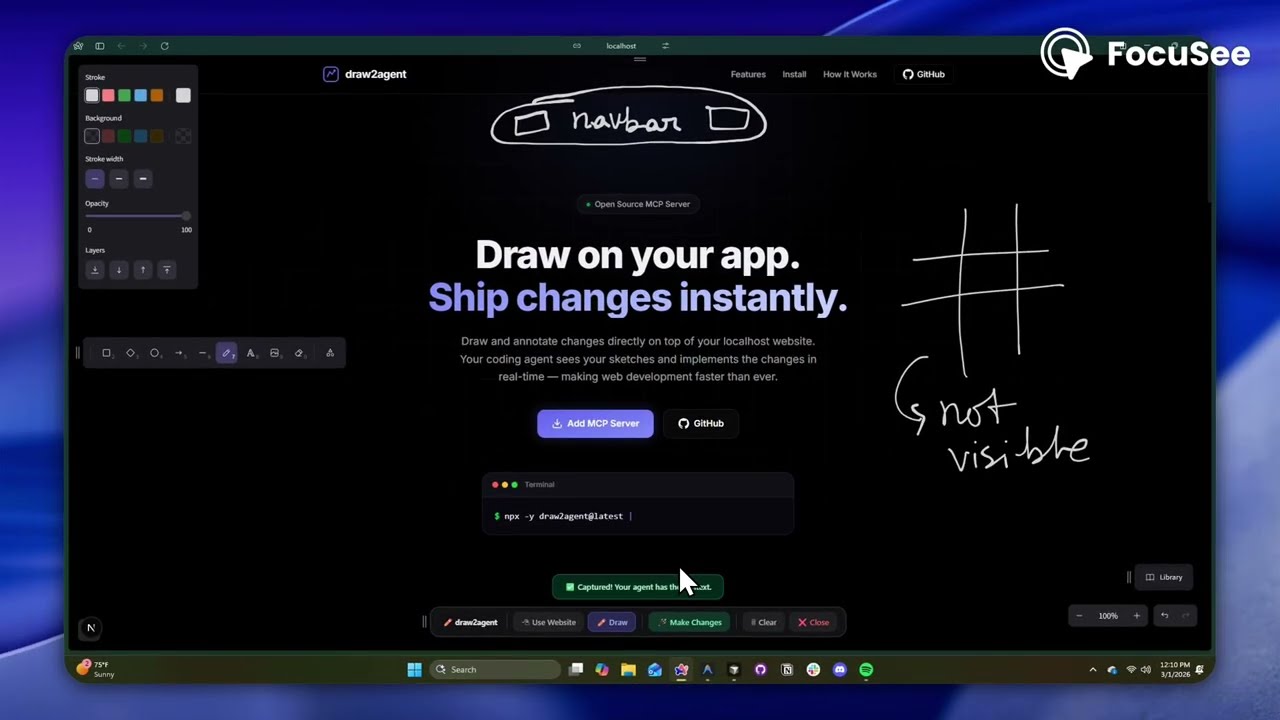
Draw on your website. Your AI agent sees it.
draw2agent is an MCP server that lets you draw annotations directly on top of your local dev page. When you submit, your IDE agent receives a screenshot, structured DOM data, and annotation context to make precise code edits.
👉 Try it out at: draw2agent.vercel.app
Demo
Quick Start
1. Add to your IDE (one-time)
Cursor (~/.cursor/mcp.json):
{
  "mcpServers": {
    "draw2agent": {
      "command": "npx",
      "args": ["-y", "draw2agent"]
    }
  }
}
2. Use it
Tell your agent:
"Use draw2agent to fix the navbar"
- 🌐 Agent opens your browser with drawing tools on your page
- ✏️ Draw circles, arrows, text directly on your website
- 📸 Click Submit
- 🤖 Agent reads the visual context and applies code changes
How It Works
Your Dev Page (proxied)
├── Your original page content
└── Excalidraw overlay (transparent, on top)
    ├── Draw mode: annotate directly on the page
    ├── Select mode: interact with the page normally (Esc)
    └── Submit: screenshot + DOM + annotations → agent
The MCP server exposes two tools:
| Tool | Description |
|---|---|
launch_canvas | Opens your dev page with the drawing overlay |
get_drawing_state | Returns screenshot, DOM nodes, and annotations |
License
MIT
Installation
Source-derived launch command. Check the maintainer’s required arguments and credentials before running:
npx -y draw2agentSet up in your AI client
Merge this template into ~/Library/Application Support/Claude/claude_desktop_config.json. Keep existing servers. Add any arguments, credentials, and permissions required by the maintainer; this template has not been install-tested.
{
  "mcpServers": {
    "io-github-zero-abd-draw2agent": {
      "command": "npx",
      "args": [
        "-y",
        "draw2agent"
      ]
    }
  }
}
Restart Claude Desktop completely for changes to take effect. Confirm the server appears connected in the client’s tool list, then try a read-only example from its documentation.
Claude Desktop setup referencePackage
draw2agentnpmCompatible MCP Clients
io.github.zero-abd/draw2agent works with any MCP-compatible client. Copy the config snippet from the Configuration section above and add it to the file shown for your client, then restart the application.
- Claude Desktop
~/Library/Application Support/Claude/claude_desktop_config.jsonRestart Claude Desktop completely for changes to take effect. - Cursor
~/.cursor/mcp.jsonRestart Cursor for changes to take effect. - VS Code
.vscode/mcp.jsonReload VS Code window for changes to take effect. - Windsurf
~/.codeium/windsurf/mcp_config.jsonRestart Windsurf for changes to take effect. - Claude Code
.mcp.jsonSave at the project root, then start Claude Code in that project and review the MCP server approval prompt. Keep real credentials out of shared files.